

Hello-
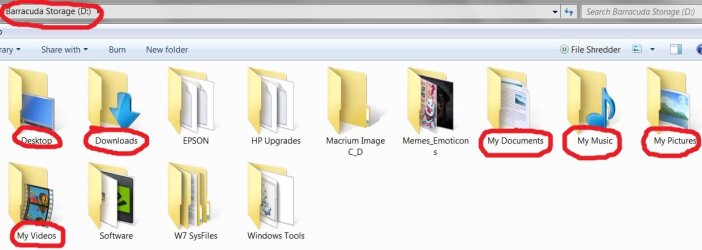
This machine has an SSD for the OS and an HDD for storage, Downloads, My Documents, My Pictures,
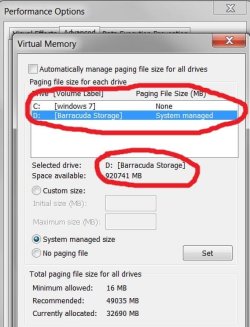
My Videos, etc. Page File is also on Storage HDD.
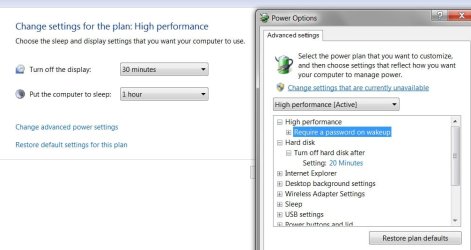
I have the Power Plan set up for High Performance, the SSD set to Sleep in an hour (NO hibernation!),
and the Display shuts down in 30 mins. Screen Saver is set to engage after 15 mins of inactivity.
Also, while the machine is sitting there idling, before the 60 min Sleep time arrives, the HDD will start
and stop randomly on its own.
After waking the machine I go about my business online, and if I want to download something there's
a lag as the HDD turns on and spools up. It just started doing this and we haven't made any changes
to the system that should warrant this behavior.
In Power Options> Advanced Settings, there is a value for turning off hard disk after 'x' amount of minutes.
I'm wondering if this has anything to do with it, and why now?... we haven't touched any of that stuff.
The only other thing I can think of is a Service is arbitrarily starting before the SSD goes to sleep in the
1 hour setting... but how so?... unless it's something in the Page File, or other menu items we moved from
C:\ over to D:\... Perhaps 'Desktop' shouldn't be on D:\, but rather C:\ (?)...
We've included some photos to look at.
Any help is greatly appreciated.
Rgeards-
tim
This machine has an SSD for the OS and an HDD for storage, Downloads, My Documents, My Pictures,
My Videos, etc. Page File is also on Storage HDD.
I have the Power Plan set up for High Performance, the SSD set to Sleep in an hour (NO hibernation!),
and the Display shuts down in 30 mins. Screen Saver is set to engage after 15 mins of inactivity.
Also, while the machine is sitting there idling, before the 60 min Sleep time arrives, the HDD will start
and stop randomly on its own.
After waking the machine I go about my business online, and if I want to download something there's
a lag as the HDD turns on and spools up. It just started doing this and we haven't made any changes
to the system that should warrant this behavior.
In Power Options> Advanced Settings, there is a value for turning off hard disk after 'x' amount of minutes.
I'm wondering if this has anything to do with it, and why now?... we haven't touched any of that stuff.
The only other thing I can think of is a Service is arbitrarily starting before the SSD goes to sleep in the
1 hour setting... but how so?... unless it's something in the Page File, or other menu items we moved from
C:\ over to D:\... Perhaps 'Desktop' shouldn't be on D:\, but rather C:\ (?)...
We've included some photos to look at.
Any help is greatly appreciated.
Rgeards-
tim
Attachments
My Computer
At a glance
Windows 7 Pro SP1 x64Intel Haswell i7-4770 3.4GHzG. SKILLS 32GB Ripjaws X Series DDR3 1600 SDRAMIntegrated HD4600- upgrade coming!
- Computer type
- PC/Desktop
- Computer Manufacturer/Model Number
- HP ENVY 700-515xt CTO, with more cam, headers, and 4.11 gears.
- OS
- Windows 7 Pro SP1 x64
- CPU
- Intel Haswell i7-4770 3.4GHz
- Motherboard
- OEM Kaili2 (MSI MS-7826 v2.0)
- Memory
- G. SKILLS 32GB Ripjaws X Series DDR3 1600 SDRAM
- Graphics Card(s)
- Integrated HD4600- upgrade coming!
- Sound Card
- Integrated...for now.
- Monitor(s) Displays
- Dell ST-2310 Digital
- Screen Resolution
- I like 1920x1080
- Hard Drives
- C\:-Samsung 850PRO SSD-256gb, D:\-SG Barracuda 7200 HDD 1 TB (Storage)
- PSU
- 350w OEM (About to become a display in the aquarium!)
- Case
- ENVY OEM
- Cooling
- FANS
- Keyboard
- Logitech and HP- USB.
- Mouse
- Logitech LS1 (Alltime favorite of mine!) and HP- both USB
- Internet Speed
- 65Mbps Down (min)/4.5Mbps UP- Charter Comm HS cable
- Antivirus
- avast! Internet Security 2015/MBAM
- Browser
- Opera, at present. Love that Chromium horsepower!


