Storage in 2017: Big improvements are on the way

Storage

Back on the base topic of Storage:

Data storage and backup is a very old problem and the answer has not
really changed in the 36 years that I've been directly involved with it.

One of the first commercial data backup routines that I got involved in,
was at a bank, where they had to shut down their Trust Dept, at 3PM,
so they could do their data backup and hope to be finished by 5PM,
when the people wanted to go home. They were using the old DOS
backup program from MS, to back up their entire PC hard drive to
5.25" floppy disks. They had never heard of doing incremental backups or just backing up their data files that may have changed on a particular day.
I helped them to cut down their backup time to about 15 to 20 minutes, by introducing them to Incremental Updates. The floppy disks that they produced went into a fireproof vault, so they were about as safe as was possible at that time.

That was many years ago now, but the premise that your data should be backed up frequently and then placed in a Secure Location has not changed.
Handing my own critical data files over to someone I don't know, in a place I don't know, with what kind of security and redundancy that I don't know, is just ridiculous to me.

I make regular backups, to storage devices that I own, and that I keep close to me, that are not available to anyone else, anywhere else. My most critical data files, I burn to DVD's and store in a secure vault, off premises.

In the past 36 years I've experienced many HD crashes, on my own PC, where everything ON the HD was lost, but because I have good backups, I've never lost even one little bit of data.

A question:
If all your backups are on a 'cloud' somewhere and your HD totally Crashes, how are you going to restore everything including the OS, to a brand new HD? My question is predicated on the assumption that you (anyone) have only one PC.

Personally, I have three computers capable of becoming my Main PC at a moments notice. My data files are copied and regularly updated to all three PC's.

One of my favorite quotes (author unknown):
"The only bad backup, is the one that you decided NOT to make".

Cheers Mates!
TechnoMage :cool:
 

My Computer My Computer

At a glance

Win 7 Pro, SP1, x86, Win-11/Pro/64AMD8GB CrucialVarious
Computer type
PC/Desktop
Computer Manufacturer/Model Number
Various
OS
Win 7 Pro, SP1, x86, Win-11/Pro/64
CPU
AMD
Motherboard
Various
Memory
8GB Crucial
Graphics Card(s)
Various
Sound Card
OnBoard
Monitor(s) Displays
Acer 21.5"
Hard Drives
Crucial SSD, 500 GB
PSU
OEM
Case
SFF Slim Line Case
Cooling
OEM
Keyboard
eMachines
Mouse
Logitech Wireless
Internet Speed
varies
Antivirus
Windows Defender/Super Anti-Spyware
Browser
Firefox
...Handing my own critical data files over to someone I don't know, in a place I don't know, with what kind of security and redundancy that I don't know, is just ridiculous to me...

The way you put it, I totally agree. However, there are reputable cloud backup services that are about as safe as can be. Carbonite, for example, uses secure servers and encryption for which you hold the key to access; even Carbonite cannot access your files without your permission. Their servers have adequate redundancy to protect from data loss should a one or more drives fail. Each server location has backup climate and power systems to keep them chugging along in pretty much any emergency. While not available for basic, personal plans, the more expensive business plans also have geo-redundancy (your data is stored in multiple servers located in different geographical locations). There are several other companies that provide the same protection but none of them are free. Many business totally depend on cloud backups. The electric/irrigation utility I retired from has local backups but also uses an out of State cloud backup system that the company can actually run off should the entire local system go down. They would test it a couple of times of year and it always worked flawlessly, albeit a bit sluggishly.

I use Carbonite myself as an additional layer of protection for any data that has been added or changed since I last updated my offsite backups (although I could recover everything from there if needs be; it would be extremely time consuming, however).

...I make regular backups, to storage devices that I own, and that I keep close to me, that are not available to anyone else, anywhere else. My most critical data files, I burn to DVD's and store in a secure vault, off premises...

I do pretty much the same. I have a set of four backup drives for each data drive I have in my computer (currently, four). Two of each set are kept at home in a drawer away from the computer and the other two are kept in my safe deposit box in the vault at my credit union; the vault is built on solid rock, btw). The onsite and offsite drives get swapped out no less than once a month. I already mentioned I also have a cloud backup.

...A question:
If all your backups are on a 'cloud' somewhere and your HD totally Crashes, how are you going to restore everything including the OS, to a brand new HD? My question is predicated on the assumption that you (anyone) have only one PC...

Assuming your cloud backup was your only backup, you would have to reinstall the OS and programs onto the replacement drive so you can then download your data from the cloud. More expensive backup services will actually send you a replacement drive (for a fee, of course) you can use to recover your OS and programs from, assuming you had the foresight to have imaged them already and stored the image(s) on the original drive.

However, one should never depend on only one backup, even if it is a cloud backup (unless it is one of the better business services). For us common folk, it's more economical to maintain at least a physical onsite backup and an offsite backup. While a less expensive basic cloud backup can be used as an offsite backup, especially since it automatically stays up to date, it does take a long time to download all your data if you have very much of it. If I had to download all my data, it would take weeks. That's why I also have physical drives for my offsite backups and keep the cloud backup to recover data added or changed since the last time the offsite backup was updated. I have yet to need it, though.

One thing that is handy about my cloud backup is I can use it to access data when I'm on the road as long as I have a secure internet connection since the notebooks I carry can hold only a fraction of my data at any one time.

...Personally, I have three computers capable of becoming my Main PC at a moments notice...

I currently have only one desktop PC that is my main PC. In a pinch, if the main PC goes down, I can fire up one of my travel notebooks and use it. If I need data that's not on the notebook, I can always use one of the backup drives in an external dock.

The only backups I have for my notebooks is one external drive with a clone of the notebook on it and another one with recent images (if the drive in the notebook should permanently die, I can always pull the clone drive out of it's case and pop it into the notebook). Other than the clone and system images, I don't worry about backing up data on the notebooks since all the data on them is on the main PC, which is backed up to the teeth, and on Carbonite.
 

My Computer My Computer

At a glance

Win 7 Ultimate 64 bitIntel i7-3930KKingston HyperX Genesis 32GB Kit (8x4GB Modul...MSI R7850 Twin Frozr 2GD5/OC Radeon HD 7850 2...
Computer type
PC/Desktop
Computer Manufacturer/Model Number
Custom Build
OS
Win 7 Ultimate 64 bit
CPU
Intel i7-3930K
Motherboard
ASUS P9X79 WS
Memory
Kingston HyperX Genesis 32GB Kit (8x4GB Modules) 1600MHz DDR
Graphics Card(s)
MSI R7850 Twin Frozr 2GD5/OC Radeon HD 7850 2GB 256-bit GDDR
Sound Card
Asus Xonar Essence STX
Monitor(s) Displays
3x Asus VG248QE 24", Vizio 32" TV
Screen Resolution
1920 x 1080, ?
Hard Drives
Samsung 128GB 840 Pro SSD (1),
Samsung 4TB 850 EVO SSDs (4)
Samsung 4TB 850 EVO SSDs (16) external backup drives used in 2.5" hot swap bays in the computer.
PSU
Corsair HX750w
Case
Antec Two Hundred v2 (modified)
Cooling
Cooler Master GeminII S524 120mm (fan replaced with a 140mm)
Keyboard
Logitech G510s
Mouse
Logitech M525 (two in use)
Internet Speed
=< 32Mbps down, 8Mbps up
Antivirus
AVAST!, MBAM, SAS, Spybot S&D (all but MBAM free) Glary Util
Browser
IE11
Other Info
LSI 9211-8i HBA card (8 SATA III ports), 2.5" & 3.5" Hot Swap Bays, HooToo HT-CR001 PCI-E to USB 3.0 Internal Hub + 6 Slot Card Reader, and LG Model CH12LS28 BD-ROM Optical Drive. Also, ScanSnap S1500 ADF duplexing scanner, Canon 9000F flat bed scanner, Corsair SP2500 2.1 speakers, Samsung CLP 415nw laser color printer, Cyberpower PP2200SW UPS
Many people here are restricted to ADSL2+ with maximum 24Mb/s down, 1Mb/s up. In reality you don't get that due to distance from the node and congestion at the node and exchange. I live in a housing estate that is ~12 years old and all they installed was twisted pair. Digging up the street for cable or fibre is deemed too expensive for many/most areas. Australia's National Broadband Network (NBN) initiative is a bit of an expensive joke for many.

For people on ADSL2+ this makes cloud storage only useful for small amounts of data. Personally I want all my applications (inc Adobe PS etc) installed as standalone on my PCs and large data stored on my HDDs/SSDs. I can also store HDD data in a different location.
 

My Computer My Computer

At a glance

Windows 7x64 Home Premium SP1Intel i7 2600kG.Skill Ripjaws (DDR3-1600) 2x4GBNvidia GeForce GTS 450; Intel HD Graphics 300...
Computer type
PC/Desktop
Computer Manufacturer/Model Number
Own build
OS
Windows 7x64 Home Premium SP1
CPU
Intel i7 2600k
Motherboard
ASUS P8Z68 Deluxe
Memory
G.Skill Ripjaws (DDR3-1600) 2x4GB
Graphics Card(s)
Nvidia GeForce GTS 450; Intel HD Graphics 3000(GT2+)
Monitor(s) Displays
Dell Ultrasharp IPS panel U2311H, Samsung SyncMaster P2350
Screen Resolution
1920x1080
Hard Drives
Samsung 850 Pro SSD 256GB, Samsung SSD 840 120GB, Seagates 1TB Barracuda ST31000528AS x2
PSU
Seasonic M12II 520W
Case
Lian Li Lancool PC-K60
Cooling
Case: 1x120mm, 3x140mm CPU: Hyper 212+
Keyboard
Logitech MK520 (wireless)
Mouse
Logitech MK520
Internet Speed
6-7 Mbps
Antivirus
Norton Security Premium, Malwarebytes on 2 (MSE on 3rd PC)
Browser
FireFox
Other Info
Audio: Logitech Z523 2.1
Many people here are restricted to ADSL2+ with maximum 24Mb/s down, 1Mb/s up. In reality you don't get that due to distance from the node and congestion at the node and exchange. I live in a housing estate that is ~12 years old and all they installed was twisted pair. Digging up the street for cable or fibre is deemed too expensive for many/most areas. Australia's National Broadband Network (NBN) initiative is a bit of an expensive joke for many.

For people on ADSL2+ this makes cloud storage only useful for small amounts of data. Personally I want all my applications (inc Adobe PS etc) installed as standalone on my PCs and large data stored on my HDDs/SSDs. I can also store HDD data in a different location.
This is why I laugh (when I'm not swearing) at the idiots that claim all processing will be done remotely (Cloud Servers) within 5 years.

It will be at least 10 years (if ever) before we get fibre to our house (which is the astronomical distance of ~8 km from the city centre).
 

My Computer My Computer

At a glance

W7 Ultimate SP1, LM19.2 MATE, W10 Home 1703, ...AMD Phenom II x6 1100T, 3.3 GHz12GB DDR3 1333 G-Skill (4GB x 2), G-Skill (2G...NVIDIA GeForce GTX 660
Computer type
PC/Desktop
Computer Manufacturer/Model Number
n/a
OS
W7 Ultimate SP1, LM19.2 MATE, W10 Home 1703, W10 Pro 1703 VM, #All 64 bit
CPU
AMD Phenom II x6 1100T, 3.3 GHz
Motherboard
ASUS M4A88T-M/USB3 (AM3)
Memory
12GB DDR3 1333 G-Skill (4GB x 2), G-Skill (2GB x 2)
Graphics Card(s)
NVIDIA GeForce GTX 660
Sound Card
Realtek?
Monitor(s) Displays
Samsung S23B350
Screen Resolution
1920x1080
Hard Drives
WD Green 2TB (SATA), WD Green 3TB (SATA), WD Blue 4TB (SATA), WD Blue 6TB (SATA)
PSU
Cooler Master
Case
Antec GX300 Tower
Cooling
3x Antec TRICOOL 120mm Fans
Mouse
Wired Optical
Internet Speed
DSL
Antivirus
Avast
Browser
Pale Moon (64 bit)
Other Info
2018-12-27 Upgraded HDDs
2015-12-10 Upgraded case, graphics card, storage
2015-08-15 Upgraded motherboard & RAM
2015-07-15 Upgraded LM17.1 to LM17.2
This is why I laugh (when I'm not swearing) at the idiots that claim all processing will be done remotely (Cloud Servers) within 5 years.

It will be at least 10 years (if ever) before we get fibre to our house (which is the astronomical distance of ~8 km from the city centre).

I feel the same way about the push here in the U.S. to move everything to the cloud. We simply do not have the infrastructure to support that much traffic and, even if we did, not everyone would be able to afford it.
 

My Computer My Computer

At a glance

Win 7 Ultimate 64 bitIntel i7-3930KKingston HyperX Genesis 32GB Kit (8x4GB Modul...MSI R7850 Twin Frozr 2GD5/OC Radeon HD 7850 2...
Computer type
PC/Desktop
Computer Manufacturer/Model Number
Custom Build
OS
Win 7 Ultimate 64 bit
CPU
Intel i7-3930K
Motherboard
ASUS P9X79 WS
Memory
Kingston HyperX Genesis 32GB Kit (8x4GB Modules) 1600MHz DDR
Graphics Card(s)
MSI R7850 Twin Frozr 2GD5/OC Radeon HD 7850 2GB 256-bit GDDR
Sound Card
Asus Xonar Essence STX
Monitor(s) Displays
3x Asus VG248QE 24", Vizio 32" TV
Screen Resolution
1920 x 1080, ?
Hard Drives
Samsung 128GB 840 Pro SSD (1),
Samsung 4TB 850 EVO SSDs (4)
Samsung 4TB 850 EVO SSDs (16) external backup drives used in 2.5" hot swap bays in the computer.
PSU
Corsair HX750w
Case
Antec Two Hundred v2 (modified)
Cooling
Cooler Master GeminII S524 120mm (fan replaced with a 140mm)
Keyboard
Logitech G510s
Mouse
Logitech M525 (two in use)
Internet Speed
=< 32Mbps down, 8Mbps up
Antivirus
AVAST!, MBAM, SAS, Spybot S&D (all but MBAM free) Glary Util
Browser
IE11
Other Info
LSI 9211-8i HBA card (8 SATA III ports), 2.5" & 3.5" Hot Swap Bays, HooToo HT-CR001 PCI-E to USB 3.0 Internal Hub + 6 Slot Card Reader, and LG Model CH12LS28 BD-ROM Optical Drive. Also, ScanSnap S1500 ADF duplexing scanner, Canon 9000F flat bed scanner, Corsair SP2500 2.1 speakers, Samsung CLP 415nw laser color printer, Cyberpower PP2200SW UPS
It will be at least 10 years (if ever) before we get fibre to our house (which is the astronomical distance of ~8 km from the city centre).
You are probably correct. When I say "housing estate" these are houses that typically go from $500k-$1m. Buyers should be asking what is my broadband connectivity before shelling out the $. Clearly the "cloud" is cloudy.
 

My Computer My Computer

At a glance

Windows 7x64 Home Premium SP1Intel i7 2600kG.Skill Ripjaws (DDR3-1600) 2x4GBNvidia GeForce GTS 450; Intel HD Graphics 300...
Computer type
PC/Desktop
Computer Manufacturer/Model Number
Own build
OS
Windows 7x64 Home Premium SP1
CPU
Intel i7 2600k
Motherboard
ASUS P8Z68 Deluxe
Memory
G.Skill Ripjaws (DDR3-1600) 2x4GB
Graphics Card(s)
Nvidia GeForce GTS 450; Intel HD Graphics 3000(GT2+)
Monitor(s) Displays
Dell Ultrasharp IPS panel U2311H, Samsung SyncMaster P2350
Screen Resolution
1920x1080
Hard Drives
Samsung 850 Pro SSD 256GB, Samsung SSD 840 120GB, Seagates 1TB Barracuda ST31000528AS x2
PSU
Seasonic M12II 520W
Case
Lian Li Lancool PC-K60
Cooling
Case: 1x120mm, 3x140mm CPU: Hyper 212+
Keyboard
Logitech MK520 (wireless)
Mouse
Logitech MK520
Internet Speed
6-7 Mbps
Antivirus
Norton Security Premium, Malwarebytes on 2 (MSE on 3rd PC)
Browser
FireFox
Other Info
Audio: Logitech Z523 2.1

My Computer My Computer

At a glance

Win 7 Ultimate 64 bitIntel i7-3930KKingston HyperX Genesis 32GB Kit (8x4GB Modul...MSI R7850 Twin Frozr 2GD5/OC Radeon HD 7850 2...
Computer type
PC/Desktop
Computer Manufacturer/Model Number
Custom Build
OS
Win 7 Ultimate 64 bit
CPU
Intel i7-3930K
Motherboard
ASUS P9X79 WS
Memory
Kingston HyperX Genesis 32GB Kit (8x4GB Modules) 1600MHz DDR
Graphics Card(s)
MSI R7850 Twin Frozr 2GD5/OC Radeon HD 7850 2GB 256-bit GDDR
Sound Card
Asus Xonar Essence STX
Monitor(s) Displays
3x Asus VG248QE 24", Vizio 32" TV
Screen Resolution
1920 x 1080, ?
Hard Drives
Samsung 128GB 840 Pro SSD (1),
Samsung 4TB 850 EVO SSDs (4)
Samsung 4TB 850 EVO SSDs (16) external backup drives used in 2.5" hot swap bays in the computer.
PSU
Corsair HX750w
Case
Antec Two Hundred v2 (modified)
Cooling
Cooler Master GeminII S524 120mm (fan replaced with a 140mm)
Keyboard
Logitech G510s
Mouse
Logitech M525 (two in use)
Internet Speed
=< 32Mbps down, 8Mbps up
Antivirus
AVAST!, MBAM, SAS, Spybot S&D (all but MBAM free) Glary Util
Browser
IE11
Other Info
LSI 9211-8i HBA card (8 SATA III ports), 2.5" & 3.5" Hot Swap Bays, HooToo HT-CR001 PCI-E to USB 3.0 Internal Hub + 6 Slot Card Reader, and LG Model CH12LS28 BD-ROM Optical Drive. Also, ScanSnap S1500 ADF duplexing scanner, Canon 9000F flat bed scanner, Corsair SP2500 2.1 speakers, Samsung CLP 415nw laser color printer, Cyberpower PP2200SW UPS
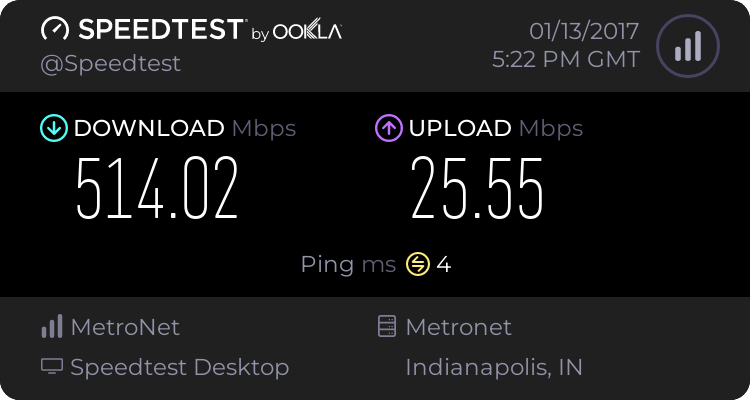
I loathe the idea of the cloud. I prefer to keep my stuff backed up across my machines and also on Blu Ray and DVD discs. I also have wonderful internet faster that any other provider. We have 4 sources of internet. The county has wifi masts dotted about from towers and grain barns to cover everyone not on cable. There are 3 cable supplies. Comcast, AT&T uVerse and Metronet. Metronet is fiber to the home and is by far and away the fastest. Currently pay $100 for a fantastic fiber and phone service.

5964330065.png
 

My Computer My Computer

At a glance

Windows 7 x64 Ultimate and numerous virtual m...AMD FX-8350 Vishera 32nm Technology @ 4.2 GHz...G Skill 32.0GB Dual-Channel DDR3 @ 1204MHz (1...EVGA GeForce GTX 960 4GB Super SC ACX 2.0+ wi...
Computer type
PC/Desktop
Computer Manufacturer/Model Number
Bluethunder II
OS
Windows 7 x64 Ultimate and numerous virtual machines
CPU
AMD FX-8350 Vishera 32nm Technology @ 4.2 GHz default
Motherboard
ASUSTeK COMPUTER INC. SABERTOOTH 990FX R2.0 (Socket 942)
Memory
G Skill 32.0GB Dual-Channel DDR3 @ 1204MHz (11-13-13-31)
Graphics Card(s)
EVGA GeForce GTX 960 4GB Super SC ACX 2.0+ with Back Plate
Sound Card
Creative X-Fi Titanium HD Audiophile PCIe
Monitor(s) Displays
LG L227WTG x 3
Screen Resolution
1680 x 1050 16:10
Hard Drives
238GB Samsung850 PRO SATA Disk Device (SSD)
1863GB Seagate ST2000DM 001-1CH164 (SATA)
1397GB Seagate ST1500DL 003-9VT16L(SATA)
466GB Western Digital WDC WD50 03AZEX-00K1GA0 (SATA) x 2
932GB Seagate ST310005 28AS SATA Disk Device (SATA)
PSU
Enermax Revolution87+ 1000 Watts Gold Certified Power Supply
Case
Rocketfish Full Tower
Cooling
Cooler Master Hyper 212 EVO Push Pull 120mm Fans
Keyboard
Logitech K740
Mouse
Logitech G100S Laser LED + Logitech Gamepad F310
Internet Speed
500 mbs down and 30mbs up
Antivirus
Malwarebytes Pro & Avast and MSE on certain Virtual Machines
Browser
Firefox (Main) Chrome, Internet Explorer (Back Up)
Other Info
Logitech X 230 2.1 Stereo System and 5.1 Yamaha RX V2090
B&W DM6 Monitor Speakers + Center and Surround Speakers
Using Mouse Without Borders (Google it)
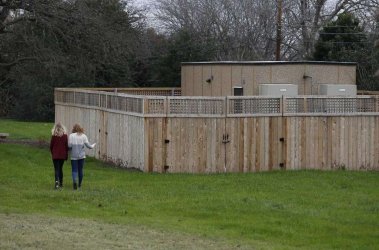
San Antonio is one of the U.S. cities selected to receive Google Fiber Optic internet with up to 1000 Mbps download. In order to accommodate the infrastructure, Google is building about 17 "huts" to house needed equipment. Construction has apparently been placed on hold while city officials review the plans and address concerns from citizens. So much for progress and San Antonio joining the 21st century.

hut.jpg
 

My Computer My Computer

At a glance

Win 7 Pro 64-bitIntel i5 2.4 Ghz8GB DDR3Intel HD 3000
Computer type
Laptop
Computer Manufacturer/Model Number
Sony Vaio VPCEB47GM Laptop
OS
Win 7 Pro 64-bit
CPU
Intel i5 2.4 Ghz
Memory
8GB DDR3
Graphics Card(s)
Intel HD 3000
Sound Card
IDT High Definition
Monitor(s) Displays
15.6 WGXA Anti-Glare LED
Screen Resolution
1280x800
Hard Drives
640Gb 7200rpm
Antivirus
MSE
Browser
Opera (primary) with IE9 backup
San Antonio is one of the U.S. cities selected to receive Google Fiber Optic internet with up to 1000 Mbps download. In order to accommodate the infrastructure, Google is building about 17 "huts" to house needed equipment. Construction has apparently been placed on hold while city officials review the plans and address concerns from citizens. So much for progress and San Antonio joining the 21st century.

View attachment 395316

Don't feel bad. Phoenix is larger than San Antonio and recently was removed from Google's list. Which doesn't really matter for me because I live in a suburb that has only one internet provider and wasn't on Google's list anyway. And I'm paying 2/3 of what Indiantone is paying for 1/10 the speed.
 

My Computer My Computer

At a glance

Win 7 Ultimate 64 bitIntel i7-3930KKingston HyperX Genesis 32GB Kit (8x4GB Modul...MSI R7850 Twin Frozr 2GD5/OC Radeon HD 7850 2...
Computer type
PC/Desktop
Computer Manufacturer/Model Number
Custom Build
OS
Win 7 Ultimate 64 bit
CPU
Intel i7-3930K
Motherboard
ASUS P9X79 WS
Memory
Kingston HyperX Genesis 32GB Kit (8x4GB Modules) 1600MHz DDR
Graphics Card(s)
MSI R7850 Twin Frozr 2GD5/OC Radeon HD 7850 2GB 256-bit GDDR
Sound Card
Asus Xonar Essence STX
Monitor(s) Displays
3x Asus VG248QE 24", Vizio 32" TV
Screen Resolution
1920 x 1080, ?
Hard Drives
Samsung 128GB 840 Pro SSD (1),
Samsung 4TB 850 EVO SSDs (4)
Samsung 4TB 850 EVO SSDs (16) external backup drives used in 2.5" hot swap bays in the computer.
PSU
Corsair HX750w
Case
Antec Two Hundred v2 (modified)
Cooling
Cooler Master GeminII S524 120mm (fan replaced with a 140mm)
Keyboard
Logitech G510s
Mouse
Logitech M525 (two in use)
Internet Speed
=< 32Mbps down, 8Mbps up
Antivirus
AVAST!, MBAM, SAS, Spybot S&D (all but MBAM free) Glary Util
Browser
IE11
Other Info
LSI 9211-8i HBA card (8 SATA III ports), 2.5" & 3.5" Hot Swap Bays, HooToo HT-CR001 PCI-E to USB 3.0 Internal Hub + 6 Slot Card Reader, and LG Model CH12LS28 BD-ROM Optical Drive. Also, ScanSnap S1500 ADF duplexing scanner, Canon 9000F flat bed scanner, Corsair SP2500 2.1 speakers, Samsung CLP 415nw laser color printer, Cyberpower PP2200SW UPS
Don't feel bad. Phoenix is larger than San Antonio and recently was removed from Google's list. Which doesn't really matter for me because I live in a suburb that has only one internet provider and wasn't on Google's list anyway. And I'm paying 2/3 of what Indiantone is paying for 1/10 the speed.

I sympathize. I live outside San Antonio's city limits and have only one ISP to choose from. On January 3 subscribers received notice that our rates are going up. We will have a 2GB data cap. After exceeding the 2 GB limit, speeds will be throttled from 6Mbps to 3Mbps and we will have to buy additional 500MB blocks of data usage. The ISP is quoting $10 for each 500MB block in addition to the usual monthly fee. And is subject to change without notice. :banghead:
 

My Computer My Computer

At a glance

Win 7 Pro 64-bitIntel i5 2.4 Ghz8GB DDR3Intel HD 3000
Computer type
Laptop
Computer Manufacturer/Model Number
Sony Vaio VPCEB47GM Laptop
OS
Win 7 Pro 64-bit
CPU
Intel i5 2.4 Ghz
Memory
8GB DDR3
Graphics Card(s)
Intel HD 3000
Sound Card
IDT High Definition
Monitor(s) Displays
15.6 WGXA Anti-Glare LED
Screen Resolution
1280x800
Hard Drives
640Gb 7200rpm
Antivirus
MSE
Browser
Opera (primary) with IE9 backup
I sympathize. I live outside San Antonio's city limits and have only one ISP to choose from. On January 3 subscribers received notice that our rates are going up. We will have a 2GB data cap. After exceeding the 2 GB limit, speeds will be throttled from 6Mbps to 3Mbps and we will have to buy additional 500MB blocks of data usage. The ISP is quoting $10 for each 500MB block in addition to the usual monthly fee. And is subject to change without notice. :banghead:
Now that is pathetic.
 

My Computer My Computer

At a glance

Windows 7x64 Home Premium SP1Intel i7 2600kG.Skill Ripjaws (DDR3-1600) 2x4GBNvidia GeForce GTS 450; Intel HD Graphics 300...
Computer type
PC/Desktop
Computer Manufacturer/Model Number
Own build
OS
Windows 7x64 Home Premium SP1
CPU
Intel i7 2600k
Motherboard
ASUS P8Z68 Deluxe
Memory
G.Skill Ripjaws (DDR3-1600) 2x4GB
Graphics Card(s)
Nvidia GeForce GTS 450; Intel HD Graphics 3000(GT2+)
Monitor(s) Displays
Dell Ultrasharp IPS panel U2311H, Samsung SyncMaster P2350
Screen Resolution
1920x1080
Hard Drives
Samsung 850 Pro SSD 256GB, Samsung SSD 840 120GB, Seagates 1TB Barracuda ST31000528AS x2
PSU
Seasonic M12II 520W
Case
Lian Li Lancool PC-K60
Cooling
Case: 1x120mm, 3x140mm CPU: Hyper 212+
Keyboard
Logitech MK520 (wireless)
Mouse
Logitech MK520
Internet Speed
6-7 Mbps
Antivirus
Norton Security Premium, Malwarebytes on 2 (MSE on 3rd PC)
Browser
FireFox
Other Info
Audio: Logitech Z523 2.1

My Computer My Computer

At a glance

W7 Ultimate SP1, LM19.2 MATE, W10 Home 1703, ...AMD Phenom II x6 1100T, 3.3 GHz12GB DDR3 1333 G-Skill (4GB x 2), G-Skill (2G...NVIDIA GeForce GTX 660
Computer type
PC/Desktop
Computer Manufacturer/Model Number
n/a
OS
W7 Ultimate SP1, LM19.2 MATE, W10 Home 1703, W10 Pro 1703 VM, #All 64 bit
CPU
AMD Phenom II x6 1100T, 3.3 GHz
Motherboard
ASUS M4A88T-M/USB3 (AM3)
Memory
12GB DDR3 1333 G-Skill (4GB x 2), G-Skill (2GB x 2)
Graphics Card(s)
NVIDIA GeForce GTX 660
Sound Card
Realtek?
Monitor(s) Displays
Samsung S23B350
Screen Resolution
1920x1080
Hard Drives
WD Green 2TB (SATA), WD Green 3TB (SATA), WD Blue 4TB (SATA), WD Blue 6TB (SATA)
PSU
Cooler Master
Case
Antec GX300 Tower
Cooling
3x Antec TRICOOL 120mm Fans
Mouse
Wired Optical
Internet Speed
DSL
Antivirus
Avast
Browser
Pale Moon (64 bit)
Other Info
2018-12-27 Upgraded HDDs
2015-12-10 Upgraded case, graphics card, storage
2015-08-15 Upgraded motherboard & RAM
2015-07-15 Upgraded LM17.1 to LM17.2
PDF Generation and Handling

I use Paper Port it does a great job for me.
 

My Computer My Computer

At a glance

win 7 X64 Ultimate SP1I3770KG Skill F3-14900CL9-4GBXL x 4NVIDIA GeForce GTX670 + Intel 4000
Computer Manufacturer/Model Number
BGC (Bob's Garage Crew)
OS
win 7 X64 Ultimate SP1
CPU
I3770K
Motherboard
Asus P8Z77-V Deluxe
Memory
G Skill F3-14900CL9-4GBXL x 4
Graphics Card(s)
NVIDIA GeForce GTX670 + Intel 4000
Sound Card
Realtek HD 5.1 (MOB)
Monitor(s) Displays
Asus VW224T (1)
Screen Resolution
1920 x 1080
Hard Drives
SATA Corsair Force GT 2.5" 180GB (System) Sata 3
OCZ Vertex3 120GB
OCZ Vertex 2 120GB 2.5" SATA II
ST31000524AS 1000.2GB
WD15EARS (External)
PSU
CoolerMaster 1000 Watt
Case
CoolerMaster HAF X
Cooling
CPU -- CoolerMaster 520N
Keyboard
MS Wireless 3000 V2
Mouse
MS Wireless 3000 V2
Internet Speed
Cable
Antivirus
Norton Internet Security
Browser
IE9
Other Info
AMI Bios 1805
OC'd 3%
I'm eager to move storage to the cloud.
I was reluctant when I had 20 Mbps down and 11 Mbps up.
Now I have 115 Mbps down and 11 Mbps up.

Since the cloud (for me) is more up than down, 11 Mbps just doesn't cut it.

But ATT now has 1000 Mbps up and down in my area. Gotta give them a call real soon.
 

My Computer My Computer

At a glance

Windows 10 x64i7-7700K16 GB 2400 MHzGTX 1060
Computer type
PC/Desktop
Computer Manufacturer/Model Number
Dell
OS
Windows 10 x64
CPU
i7-7700K
Memory
16 GB 2400 MHz
Graphics Card(s)
GTX 1060
Sound Card
Integrated, plus external Presonus Audiobox USB
Monitor(s) Displays
2x AOC 27"
Screen Resolution
1920x1080
Hard Drives
512 GB M.2 SSD
2 TB 7200 RPM disk
Internet Speed
110 Mbps
Browser
Firefox
I'm getting only 59-60 Mbps down and 6-7 Mbps up and I'm able to utilize a cloud backup (Carbonite.com) without any trouble. The initial upload took a couple of weeks (my IPS didn't like that) but the daily traffic isn't a problem at all. I'm averaging around 1GB of up and down traffic a day. I still prefer to keep all my data at home as well along with physical backups but a cloud backup is also handy since it updates far more frequently than I do and I can access it when on the road.
 

My Computer My Computer

At a glance

Win 7 Ultimate 64 bitIntel i7-3930KKingston HyperX Genesis 32GB Kit (8x4GB Modul...MSI R7850 Twin Frozr 2GD5/OC Radeon HD 7850 2...
Computer type
PC/Desktop
Computer Manufacturer/Model Number
Custom Build
OS
Win 7 Ultimate 64 bit
CPU
Intel i7-3930K
Motherboard
ASUS P9X79 WS
Memory
Kingston HyperX Genesis 32GB Kit (8x4GB Modules) 1600MHz DDR
Graphics Card(s)
MSI R7850 Twin Frozr 2GD5/OC Radeon HD 7850 2GB 256-bit GDDR
Sound Card
Asus Xonar Essence STX
Monitor(s) Displays
3x Asus VG248QE 24", Vizio 32" TV
Screen Resolution
1920 x 1080, ?
Hard Drives
Samsung 128GB 840 Pro SSD (1),
Samsung 4TB 850 EVO SSDs (4)
Samsung 4TB 850 EVO SSDs (16) external backup drives used in 2.5" hot swap bays in the computer.
PSU
Corsair HX750w
Case
Antec Two Hundred v2 (modified)
Cooling
Cooler Master GeminII S524 120mm (fan replaced with a 140mm)
Keyboard
Logitech G510s
Mouse
Logitech M525 (two in use)
Internet Speed
=< 32Mbps down, 8Mbps up
Antivirus
AVAST!, MBAM, SAS, Spybot S&D (all but MBAM free) Glary Util
Browser
IE11
Other Info
LSI 9211-8i HBA card (8 SATA III ports), 2.5" & 3.5" Hot Swap Bays, HooToo HT-CR001 PCI-E to USB 3.0 Internal Hub + 6 Slot Card Reader, and LG Model CH12LS28 BD-ROM Optical Drive. Also, ScanSnap S1500 ADF duplexing scanner, Canon 9000F flat bed scanner, Corsair SP2500 2.1 speakers, Samsung CLP 415nw laser color printer, Cyberpower PP2200SW UPS
Back
Top