Strange Account That Only Appears When I Change Parental Settings

theclap

New member
Local time
6:14 PM
Messages
4
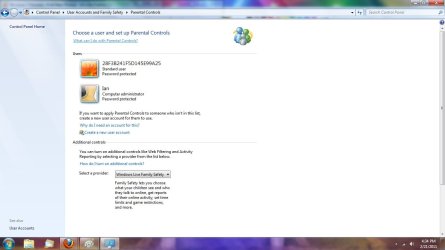
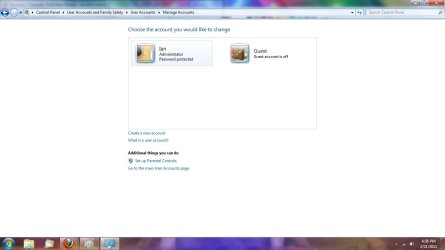
Hi guys. First off, first post officially :D. I have been trolling this website since I started working with windows 7 the large community is very helpful! Anyways, I have an account that I cannot edit or delete. My computer is not hooked up to anything else that could put it there. I suspect it to be a virus, but this has happened to me a few times and I don't really put this computer into the danger zone, i.e. file sharing, porn, etc. I went into my C:\drive and saw a random folder, locked, with random letters and numbers specifically 2b3f75e219864ad2238a349c. Naturally, I went into my control panel > user accounts > parental controls and saw the same numbers as a password protected standard user. The only difference is now the letters are capitalized. Next, I went in to delete it of course because it looks frightning and dangerous. But when I got there, it wasn't there. Would anyone be able to help me understand what this is? It doesn't really seem like it's supposed to be there and seems threatening. Thanks! pictures attached of the folder/location, parental controls window, and manage accounts window.
 

Attachments

  • Cdrive.jpg
    Cdrive.jpg
    70.8 KB · Views: 58
  • parentalcontrols.jpg
    parentalcontrols.jpg
    63.5 KB · Views: 68
  • manageaccounts.jpg
    manageaccounts.jpg
    40.5 KB · Views: 37

My Computer My Computer

At a glance

Windows Home Premium x64
OS
Windows Home Premium x64
That folder looks like the leftovers of a Windows Update which possibly failed for whatever reason. Could have been another type of installation too, I suppose. As a guess, I'd say that maybe this particular update made a temporary user account to simplify permissions granting during the install.

What's in the folder with the same name? :)
 

My Computer My Computer

At a glance

Main - Windows 7 Pro SP1 64-Bit; 2nd - Window...Main - Core i7 2600K; 2nd - Core i7 920Main - 16GB Corsair Vengeance; 2nd - 12GB Cor...Main - XFX Radeon 6870 1GB; 2nd - XFX Radeon ...
Computer Manufacturer/Model Number
Self
OS
Main - Windows 7 Pro SP1 64-Bit; 2nd - Windows Server 2008 R2
CPU
Main - Core i7 2600K; 2nd - Core i7 920
Motherboard
Main - Asus P8Z68-V Pro/Gen3; 2nd - Gigabyte GA-EX58-UDR3
Memory
Main - 16GB Corsair Vengeance; 2nd - 12GB Corsair Vengeance
Graphics Card(s)
Main - XFX Radeon 6870 1GB; 2nd - XFX Radeon 4870 1GB
Sound Card
Both: Onboard Realtek Azalia
Monitor(s) Displays
Main - Hann 25" + I-INC 25" + Acer 23"; 2nd - Upgrading Soon
Screen Resolution
Main - 1920x1080 (All Three Monitors); 2nd - Upgrading Soon
Hard Drives
Main - (1) Crucial M4 128GB (Boot)
Main - (1) Seagate 2TB 64MB Cache (Data)
Main - (1) Seagate 2TB 64MB Cache (Data Backup)
2nd - (1) Intel X25-M SSD 80GB (Boot)
2nd - (3) Seagate 1TB 32MB Cache (Data Backup)
2nd - (1) Seagate 320GB (Because)
PSU
Main - OCZ 600W Modular; 2nd - OCZ 600W
Case
Main - Thermaltake Element G; 2nd - NZXT something or other
Cooling
Main - Corsair H80; 2nd - Prolimatech Megahalems
Keyboard
Main - Razer Reclusa; 2nd - Old MS Keyboard
Mouse
Main - Logitech MX Revolution; 2nd - Old MS Mouse
Internet Speed
20Mbps Time-Warner Cable
a file install.exe, sounds like that makes sense then. I've brought this up to a couple professionals and I couldn't get a single straight answer. I'm just baffled as how I can only see it underneath parental controls, my main concern here is that is this threatening or not?
 

My Computer My Computer

At a glance

Windows Home Premium x64
OS
Windows Home Premium x64
I doubt it's threatening, but with the tendency of the nitwits who foist malware on us to look for new and creative ways to sneak something in on us it is wise to be cautious.

Have you right-clicked the install.exe file and gone to Properties>>Details? That might tell you exactly what it is right there.

Here's an example of what you're looking for. It shows the Name, Version, and Date it showed up on your computer, etc:
 

Attachments

  • Sample of Details.JPG
    Sample of Details.JPG
    31.1 KB · Views: 5

My Computer My Computer

At a glance

Main - Windows 7 Pro SP1 64-Bit; 2nd - Window...Main - Core i7 2600K; 2nd - Core i7 920Main - 16GB Corsair Vengeance; 2nd - 12GB Cor...Main - XFX Radeon 6870 1GB; 2nd - XFX Radeon ...
Computer Manufacturer/Model Number
Self
OS
Main - Windows 7 Pro SP1 64-Bit; 2nd - Windows Server 2008 R2
CPU
Main - Core i7 2600K; 2nd - Core i7 920
Motherboard
Main - Asus P8Z68-V Pro/Gen3; 2nd - Gigabyte GA-EX58-UDR3
Memory
Main - 16GB Corsair Vengeance; 2nd - 12GB Corsair Vengeance
Graphics Card(s)
Main - XFX Radeon 6870 1GB; 2nd - XFX Radeon 4870 1GB
Sound Card
Both: Onboard Realtek Azalia
Monitor(s) Displays
Main - Hann 25" + I-INC 25" + Acer 23"; 2nd - Upgrading Soon
Screen Resolution
Main - 1920x1080 (All Three Monitors); 2nd - Upgrading Soon
Hard Drives
Main - (1) Crucial M4 128GB (Boot)
Main - (1) Seagate 2TB 64MB Cache (Data)
Main - (1) Seagate 2TB 64MB Cache (Data Backup)
2nd - (1) Intel X25-M SSD 80GB (Boot)
2nd - (3) Seagate 1TB 32MB Cache (Data Backup)
2nd - (1) Seagate 320GB (Because)
PSU
Main - OCZ 600W Modular; 2nd - OCZ 600W
Case
Main - Thermaltake Element G; 2nd - NZXT something or other
Cooling
Main - Corsair H80; 2nd - Prolimatech Megahalems
Keyboard
Main - Razer Reclusa; 2nd - Old MS Keyboard
Mouse
Main - Logitech MX Revolution; 2nd - Old MS Mouse
Internet Speed
20Mbps Time-Warner Cable
yes, it was basically blank no info what so ever. I'm going to run a full scan and see if something comes up. I have had the same problem before and coincidentally at the same time i was infected with a zombie virus. The user name was not identically similar, but it was the same idea with a bunch of random letters and numbers. thanks for the help. Hopefully this is not malware of any kind as that is my biggest fear, I have the habit of not backing my things up on this computer :rolleyes:
 

My Computer My Computer

At a glance

Windows Home Premium x64
OS
Windows Home Premium x64
What antivirus program are you running? Most people (myself included) take the Schwarzenegger approach - keep your main gun firing at all times and lob grenades when necessary. :D

What this means in practice is to have one - and only one - antivirus program which is always running, but use a couple supplemental run-as-needed programs to double-check things. I run Microsoft Security Essentials full-time and follow it up with occasional scans with Malwarebytes. If I think there might be a problem or am feeling extra paranoid I'll throw in an online scan or two like TrendMicro's HouseCall or BitDefender. :)
 

My Computer My Computer

At a glance

Main - Windows 7 Pro SP1 64-Bit; 2nd - Window...Main - Core i7 2600K; 2nd - Core i7 920Main - 16GB Corsair Vengeance; 2nd - 12GB Cor...Main - XFX Radeon 6870 1GB; 2nd - XFX Radeon ...
Computer Manufacturer/Model Number
Self
OS
Main - Windows 7 Pro SP1 64-Bit; 2nd - Windows Server 2008 R2
CPU
Main - Core i7 2600K; 2nd - Core i7 920
Motherboard
Main - Asus P8Z68-V Pro/Gen3; 2nd - Gigabyte GA-EX58-UDR3
Memory
Main - 16GB Corsair Vengeance; 2nd - 12GB Corsair Vengeance
Graphics Card(s)
Main - XFX Radeon 6870 1GB; 2nd - XFX Radeon 4870 1GB
Sound Card
Both: Onboard Realtek Azalia
Monitor(s) Displays
Main - Hann 25" + I-INC 25" + Acer 23"; 2nd - Upgrading Soon
Screen Resolution
Main - 1920x1080 (All Three Monitors); 2nd - Upgrading Soon
Hard Drives
Main - (1) Crucial M4 128GB (Boot)
Main - (1) Seagate 2TB 64MB Cache (Data)
Main - (1) Seagate 2TB 64MB Cache (Data Backup)
2nd - (1) Intel X25-M SSD 80GB (Boot)
2nd - (3) Seagate 1TB 32MB Cache (Data Backup)
2nd - (1) Seagate 320GB (Because)
PSU
Main - OCZ 600W Modular; 2nd - OCZ 600W
Case
Main - Thermaltake Element G; 2nd - NZXT something or other
Cooling
Main - Corsair H80; 2nd - Prolimatech Megahalems
Keyboard
Main - Razer Reclusa; 2nd - Old MS Keyboard
Mouse
Main - Logitech MX Revolution; 2nd - Old MS Mouse
Internet Speed
20Mbps Time-Warner Cable
I have norton and security essentials which i dont run at the same time. I found the source. It's from an add on for visual studio. specifically the xna game studio and phone developer software. It even put a whole install folder for visual studio along with it! I tried exiting out of the install prematurely at a few points and sure enough it made a few of these folders and a new account i can only see through parental controls. Thanks guys for the trouble shoot, problem almost completely solved! now to find out the actual culprit of the original folder.

It seems to me that my problem correlates with the window that comes up when you exit an install and windows pops up a window asking if this program was installed properly or it asks if you would like to reinstall using reccomended settings. If I exit that window, the folders and account appear. If I press it was installed properly, they disappear. Though, I can still see the account but it's not to my concern anymore.
 

My Computer My Computer

At a glance

Windows Home Premium x64
OS
Windows Home Premium x64
...It seems to me that my problem correlates with the window that comes up when you exit an install and windows pops up a window asking if this program was installed properly or it asks if you would like to reinstall using recommended settings. If I exit that window, the folders and account appear. If I press it was installed properly, they disappear...
I've had this same thing pop up a number of times but was never quite sure why it happened or what caused it. I think you've put your finger on it. :D
 

My Computer My Computer

At a glance

Main - Windows 7 Pro SP1 64-Bit; 2nd - Window...Main - Core i7 2600K; 2nd - Core i7 920Main - 16GB Corsair Vengeance; 2nd - 12GB Cor...Main - XFX Radeon 6870 1GB; 2nd - XFX Radeon ...
Computer Manufacturer/Model Number
Self
OS
Main - Windows 7 Pro SP1 64-Bit; 2nd - Windows Server 2008 R2
CPU
Main - Core i7 2600K; 2nd - Core i7 920
Motherboard
Main - Asus P8Z68-V Pro/Gen3; 2nd - Gigabyte GA-EX58-UDR3
Memory
Main - 16GB Corsair Vengeance; 2nd - 12GB Corsair Vengeance
Graphics Card(s)
Main - XFX Radeon 6870 1GB; 2nd - XFX Radeon 4870 1GB
Sound Card
Both: Onboard Realtek Azalia
Monitor(s) Displays
Main - Hann 25" + I-INC 25" + Acer 23"; 2nd - Upgrading Soon
Screen Resolution
Main - 1920x1080 (All Three Monitors); 2nd - Upgrading Soon
Hard Drives
Main - (1) Crucial M4 128GB (Boot)
Main - (1) Seagate 2TB 64MB Cache (Data)
Main - (1) Seagate 2TB 64MB Cache (Data Backup)
2nd - (1) Intel X25-M SSD 80GB (Boot)
2nd - (3) Seagate 1TB 32MB Cache (Data Backup)
2nd - (1) Seagate 320GB (Because)
PSU
Main - OCZ 600W Modular; 2nd - OCZ 600W
Case
Main - Thermaltake Element G; 2nd - NZXT something or other
Cooling
Main - Corsair H80; 2nd - Prolimatech Megahalems
Keyboard
Main - Razer Reclusa; 2nd - Old MS Keyboard
Mouse
Main - Logitech MX Revolution; 2nd - Old MS Mouse
Internet Speed
20Mbps Time-Warner Cable
Back
Top