

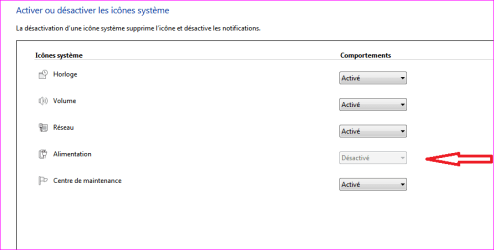
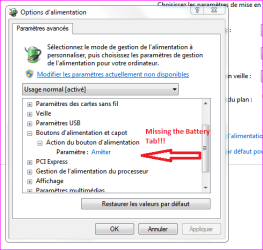
Hi there, since this morning i don't have anymore the icone & power management for my battery. The battery works fine when i unplug and let it for an hour, charging when plugin back.
I looked everywhere and all seems correct. In Device Manager i uninstalled the Battery drivers, then rebooted and all reinstalled correctly.
When i pulled out the battery while wired powered at put it back still not recognized.
I know it is still a fresh battery, but no power management for it!!!!! Just the No icone and No indications at all, about how much is it in use.
My "Acer Bloatwares" Power Management works, keyboard light is working aswell, so not an issue from their apps.
Strange?!? :sarc:
Any Help? Thanks!
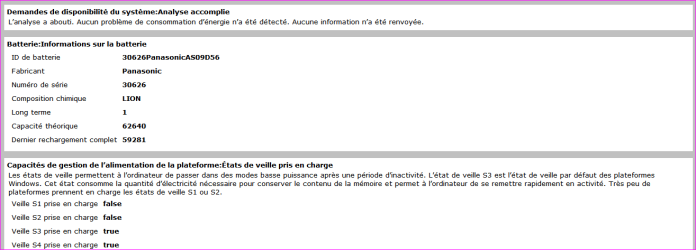
PS: I've run the Cmd "powercfg -energy -output %USERPROFILE%\Desktop\Energy_Report.html", and it tells i've no issues in general when set on "Normal Power Plan" (recommended) & at least it recognize capacity of it ( i've use it a little10 minutes ago before doing the powercfg, so it remain less than what it is).
Almost forgot to say i ran Sfc /Scannow already! I'm on Laptop Acer...
I looked everywhere and all seems correct. In Device Manager i uninstalled the Battery drivers, then rebooted and all reinstalled correctly.
When i pulled out the battery while wired powered at put it back still not recognized.
I know it is still a fresh battery, but no power management for it!!!!! Just the No icone and No indications at all, about how much is it in use.
My "Acer Bloatwares" Power Management works, keyboard light is working aswell, so not an issue from their apps.
Strange?!?
:sarc:Any Help? Thanks!
PS: I've run the Cmd "powercfg -energy -output %USERPROFILE%\Desktop\Energy_Report.html", and it tells i've no issues in general when set on "Normal Power Plan" (recommended) & at least it recognize capacity of it ( i've use it a little10 minutes ago before doing the powercfg, so it remain less than what it is).
Almost forgot to say i ran Sfc /Scannow already! I'm on Laptop Acer...
Attachments
Last edited:
My Computer
At a glance
Windows 7 Professional SP1 - x64 [Non-UEFI Boot]Ivy Bridge Core i5 3570K (Delidded)G.Skill "Ares" DDR3 PC3-12800 - 1600MHz (16Gb)Asus Dual-RX480-O4G
- Computer type
- PC/Desktop
- Computer Manufacturer/Model Number
- Custom Build
- OS
- Windows 7 Professional SP1 - x64 [Non-UEFI Boot]
- CPU
- Ivy Bridge Core i5 3570K (Delidded)
- Motherboard
- Asus P8Z77-V LE PLUS
- Memory
- G.Skill "Ares" DDR3 PC3-12800 - 1600MHz (16Gb)
- Graphics Card(s)
- Asus Dual-RX480-O4G
- Sound Card
- Creative Sound Blaster Z w/5.1 sound system
- Monitor(s) Displays
- Asus IPS 23"
- Screen Resolution
- 16/9
- Hard Drives
- Internal:
500Go Sata 6Gb/s (x2)
500Go Sata 3Gb/s (x2)
SSD 60Go Sata 6Gb/s
- PSU
- In Win C 900W Series 80+ Platinum
- Case
- Thermaltake Chaser A71
- Cooling
- Custom Water Cooling Loop
- Keyboard
- Cooler Master QuickFire XTi
- Mouse
- Razer Imperator 2012 (4G)
- Antivirus
- MSE
- Browser
- IE 11.0.xxx Rtm
- Other Info
- "Raid0" with Intel Smart Response Technology (HDD/SSD)


