You are using an out of date browser. It may not display this or other websites correctly.
You should upgrade or use an
alternative browser.
Solved Strange BIOS screen - hard drive problem
My computer is Lenovo IdeaPad S400.
Recently, I started to see a strange BIOS screen at startup and after this, my computer sometimes started to freeze.
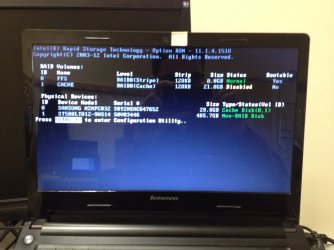
I can't find the root cause of this. Is it a hard drive problem? If it is, should I replace it?
- Computer type
- Laptop
- OS
- Windows 7 Home Premium 64-bit
R.I.P.
Guru
Gold Member
VIP
Did you make any Bios changes, please answer honestly.
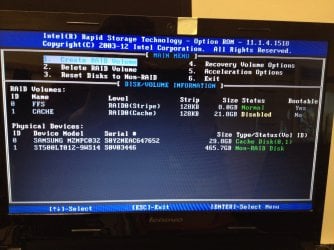
Why is Raid Volume 1 Cache Disabled ?
If you don`t know what you`re doing call Lenovo or take it to a Professional.
- Computer type
- PC/Desktop
- Computer Manufacturer/Model Number
- Skylake Special #666
- OS
- Windows 10 Pro x64
- CPU
- Intel Core i7 6700K
- Motherboard
- Asus Sabertooth Z170 Mark 1
- Memory
- GSkill TridentZ RGB 16GB 3600 16-16-16-36
- Graphics Card(s)
- EVGA GTX 980 Ti SC x2
- Sound Card
- Realtek High Definition
- Monitor(s) Displays
- AOC G2460PG
- Screen Resolution
- 1920 x 1080 144Hz
- Hard Drives
- Samsung 860 Pro 256GB, Seagate Barracuda 4TB x2
- PSU
- EVGA 1000 P2, EVGA White Custom Braided Cables
- Case
- Corsair Vengeance C70 Gunmetal Black
- Cooling
- Corsair H100i v2, Corsair ML120 x2, Thermal Grizzly Kryonaut
- Keyboard
- Logitech G910 Orion Spectrum
- Mouse
- Logitech G700s
- Internet Speed
- Verizon Fios Quantum Gateway 75/75
- Antivirus
- Windows Defender, Malwarebytes Free 3.8.3
- Browser
- Chrome
- Other Info
- Corsair SP120 x4, LG Blu-ray Drive, Durabrand HT-395 100 Watt Dolby Digital Amp, Corsair H2100 Wireless 7.1 Headset
New member
Member
Thread Starter
Did you make any Bios changes, please answer honestly.
No, I didn't. It suddenly happened.
- Computer type
- Laptop
- OS
- Windows 7 Home Premium 64-bit
New member
Member
Thread Starter
Did you make any Bios changes, please answer honestly.
Why is Raid Volume 1 Cache Disabled ?
If you don`t know what you`re doing call Lenovo or take it to a Professional.
I don't know why Raid Volume 1 Cache is set to Disabled. I didn't do anything.

This is what I see when press Ctrl + I:
- Computer type
- Laptop
- OS
- Windows 7 Home Premium 64-bit
New member
Member
Thread Starter
Is it certain that this is caused by hard drive? If it is, I will replace it.
- Computer type
- Laptop
- OS
- Windows 7 Home Premium 64-bit
R.I.P.
Guru
Gold Member
VIP
It could be, as you said it freezes up.
But then maybe it could just use a fresh install.
Is there a Recovery Partition ?
Just use that to reinstall Windows.
Backup Your Data first.
- Computer type
- PC/Desktop
- Computer Manufacturer/Model Number
- Skylake Special #666
- OS
- Windows 10 Pro x64
- CPU
- Intel Core i7 6700K
- Motherboard
- Asus Sabertooth Z170 Mark 1
- Memory
- GSkill TridentZ RGB 16GB 3600 16-16-16-36
- Graphics Card(s)
- EVGA GTX 980 Ti SC x2
- Sound Card
- Realtek High Definition
- Monitor(s) Displays
- AOC G2460PG
- Screen Resolution
- 1920 x 1080 144Hz
- Hard Drives
- Samsung 860 Pro 256GB, Seagate Barracuda 4TB x2
- PSU
- EVGA 1000 P2, EVGA White Custom Braided Cables
- Case
- Corsair Vengeance C70 Gunmetal Black
- Cooling
- Corsair H100i v2, Corsair ML120 x2, Thermal Grizzly Kryonaut
- Keyboard
- Logitech G910 Orion Spectrum
- Mouse
- Logitech G700s
- Internet Speed
- Verizon Fios Quantum Gateway 75/75
- Antivirus
- Windows Defender, Malwarebytes Free 3.8.3
- Browser
- Chrome
- Other Info
- Corsair SP120 x4, LG Blu-ray Drive, Durabrand HT-395 100 Watt Dolby Digital Amp, Corsair H2100 Wireless 7.1 Headset
New member
Member
Thread Starter
It could be, as you said it freezes up.
But then maybe it could just use a fresh install.
Is there a Recovery Partition ?
Just use that to reinstall Windows.
Backup Your Data first.
There is a recovery partition.
I had also created a recovery disc. Can I use that recovery disc on a new hard drive?
- Computer type
- Laptop
- OS
- Windows 7 Home Premium 64-bit
R.I.P.
Guru
Gold Member
VIP
I don`t see why not, that`s what they are for.
But sometimes Windows is funny and will only reinstall to the same drive.
I would just get a solid state drive and do a clean install, get rid of that hybrid drive.
Clean Install Windows 7
Access Denied
Access Denied
- Computer type
- PC/Desktop
- Computer Manufacturer/Model Number
- Skylake Special #666
- OS
- Windows 10 Pro x64
- CPU
- Intel Core i7 6700K
- Motherboard
- Asus Sabertooth Z170 Mark 1
- Memory
- GSkill TridentZ RGB 16GB 3600 16-16-16-36
- Graphics Card(s)
- EVGA GTX 980 Ti SC x2
- Sound Card
- Realtek High Definition
- Monitor(s) Displays
- AOC G2460PG
- Screen Resolution
- 1920 x 1080 144Hz
- Hard Drives
- Samsung 860 Pro 256GB, Seagate Barracuda 4TB x2
- PSU
- EVGA 1000 P2, EVGA White Custom Braided Cables
- Case
- Corsair Vengeance C70 Gunmetal Black
- Cooling
- Corsair H100i v2, Corsair ML120 x2, Thermal Grizzly Kryonaut
- Keyboard
- Logitech G910 Orion Spectrum
- Mouse
- Logitech G700s
- Internet Speed
- Verizon Fios Quantum Gateway 75/75
- Antivirus
- Windows Defender, Malwarebytes Free 3.8.3
- Browser
- Chrome
- Other Info
- Corsair SP120 x4, LG Blu-ray Drive, Durabrand HT-395 100 Watt Dolby Digital Amp, Corsair H2100 Wireless 7.1 Headset

