Strange Bootmgr Issue.

rsvr85

Yeah but no but
Guru
VIP
Local time
10:49 PM
Messages
1,065
Location
C:\Users\Home
Hey guys :)

I've just obseved something very strange.

Today i went ahead and reinstalled Windows 7 on my 320GB HDD (Disk 0). The hard drive is split into 3 partitions - 150GB for the OS, 150GB for personal data & 20GB for Karmic (roughly).

I proceeded as i usually would, booting from USB, deleting the 150GB OS partition, creating a new one and installing. Everything went swimmingly (if not a little slow) until i got to Desktop.
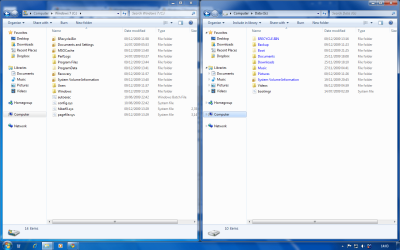
I noticed that my data partition wasn't recognized in Explorer. After consulting with Disk management the partition was if fact there, it just needed a letter assigning to it which i did through diskpart (G).

After browsing through my data partition to setup my Libraries, i noticed that bootmgr and the boot folder was on it. I deleted the bootmgr and boot folder and rebooted expecting to see "bootmgr is missing". I wasn't disappointed, i restarted, booted into W7 setup and repaired the installation thinking it would setup the bootmgr on the OS partition. Whilst repair setup ran and detected the Windows installations, it came up that D: had Windows installed on it when in fact it's installed on C: (D is my DVD drive). i thought this must be a glitch and carried on with the repair anyway. It repaired the install but put the bootmgr and boot folder back onto my data partition.

It's hope it's not life threatening and i eagerly await your suggestions before i carry on with any further setup. I'm curious to know why it's done this and how to rectify it.
I've done nothing different to what i'd usually do.

Here's a shot of Disk Management as it stands & both drives for clarification.

123.png

2.png

Thanks in advance for your time :)
 
Last edited:

My Computer

Computer Manufacturer/Model Number
HP Touchsmart IQ771.uk
OS
Windows 7 Ultimate x64
CPU
AMD Turion(tm) 64 X2 Mobile Technology TL-56
Motherboard
ASUS Pheonix
Memory
3GB Nanya PC2-6400 DDR2-SDRAM SO-DIM (400MHz)
Graphics Card(s)
NVIDIA GeForce Go 7600 256MB GDDR3 SDRAM
Sound Card
High Definition Intergrated NVIDIA MCP51
Monitor(s) Displays
46" Sony Bravia HDTV
Screen Resolution
1600x1200
Hard Drives
1.5TB Samsug
320GB Seagate ST3320820AS - SATA 3Gb/s 8MB
500GB Maxtor Basics STM305003EHD301-RK
Internet Speed
↓6.32 Mb/s ↑0.35 Mb/s ↔26ms
Other Info
BIOS - American Megatrends Inc. 5.07
Ethernet Port - NVIDIA nForce 10/100/1000 Mbps
DVD Drive - TSSTcorp DVDR/RW TS-T632L
Stu, I might be completely wrong and don't have my Win7 computer to check, but isn't the actual boot manager file in C:\Windows\boot or something like that?

Can you go slower? It will be embarrassing for me.... :)
 

My Computer

Computer Manufacturer/Model Number
Wally, Innc.
OS
Windows 7 x64 finally!
CPU
AMD Athlon II X2 240
Motherboard
Biostar TA790GX XE
Memory
OCZ Platinum 4GB DDR2 1066 (will not work past 800MHz)
Graphics Card(s)
MSI R4670-MD1G Radeon HD 4670 1GB 128-bit GDDR3
Sound Card
ATI High Definition Audio Device Realtek ALC888
Monitor(s) Displays
HP w19e
Screen Resolution
1440x900
Hard Drives
Western Digital Caviar Green WD5000AADS 500GB SATA
Western Digital Caviar Blue WD5000AAKS 500GB SATA
PSU
Athena Power Micro ATX 400W
Case
HEC 6T 6T10BB Black MicroATX Mini Tower
Cooling
stock
Keyboard
wired, many keys
Mouse
HP wireless, 2 buttons, 1 wheel
Internet Speed
DSL 2Mb (recently getting 1.65M!)
The data partition somehow got marked Active which confused the Win7 installer.

Download and burn to CD the best partition manager for Win7, free Partition Wizard.

Back up your files and a Win7 backup image so you can start over if necessary.

Boot into PW, right click on Data drive and Modify>Set Inactive.

Now right click on Windows 7 drive and Modify>Set active. Apply both operations,.

Now boot into Win7 DVD Repair console and run Startup Repair repeatedly until Win7 boots, as it needs to first attempt repair and then rewrite the MBR to Win7.
 
Last edited:
Stu, I might be completely wrong and don't have my Win7 computer to check, but isn't the actual boot manager file in C:\Windows\boot or something like that?

Can you go slower? It will be embarrassing for me.... :)

Hi Walter, yes there is a bootmgr file in C:\Windows\Boot\PCAT, but the one i'm concerned about (boot folder & bootmgr) should be in C:\Windows which has been set on my data partition (G)

The data partition somehow got marked Active which confused the Win7 installer.

Download and burn to CD the best partition manager for Win7, free Partition Wizard.

Boot into PW, right click on Data drive and Modify>Set Inactive.

Now right click on Windows 7 drive and Modify>Set active. Apply both operations,.

Now boot into Win7 DVD Repair console and run Startup Repair repeatedly until Win7 boots, as it needs to first attempt repair and then rewrite the MBR to Win7.

Hi Greg, i had a feeling i'd see you here :p

Unfortunately ( I should have mentioned this before, my bad!) burning a DVD to boot from is out of the question. My DVD drive is on the blink and only reads, it refuses to burn. :(

Is there a USB alternative i can use? My PC does support booting from USB drives/sticks.

Is this something to be worried about or is it a matter than can be dealt with casually?

Thanks for all your suggestions guys :D
 
Last edited:

My Computer

Computer Manufacturer/Model Number
HP Touchsmart IQ771.uk
OS
Windows 7 Ultimate x64
CPU
AMD Turion(tm) 64 X2 Mobile Technology TL-56
Motherboard
ASUS Pheonix
Memory
3GB Nanya PC2-6400 DDR2-SDRAM SO-DIM (400MHz)
Graphics Card(s)
NVIDIA GeForce Go 7600 256MB GDDR3 SDRAM
Sound Card
High Definition Intergrated NVIDIA MCP51
Monitor(s) Displays
46" Sony Bravia HDTV
Screen Resolution
1600x1200
Hard Drives
1.5TB Samsug
320GB Seagate ST3320820AS - SATA 3Gb/s 8MB
500GB Maxtor Basics STM305003EHD301-RK
Internet Speed
↓6.32 Mb/s ↑0.35 Mb/s ↔26ms
Other Info
BIOS - American Megatrends Inc. 5.07
Ethernet Port - NVIDIA nForce 10/100/1000 Mbps
DVD Drive - TSSTcorp DVDR/RW TS-T632L
Partition Wizard only needs a CD. Can you burn a CD?

Back up your files and a Windows 7 backup image so you can start over if necessary

If no CD, run free Partition Wizard from your desktop to see if it will Modify>Set inactive Data Partition, then Modify>Set Active Windows 7.

If not use the booted Win7 flash installer Repair console Command Line to run Diskpart commands:

Boot Win7 installer>Repair console>Recovery tools, open a Command Line, type:

DISKPART
LIST DISK
SELECT DISK 0
LIST PARTITION
SELECT PARTITION # (for Windows 7 partition)
ACTIVE
EXIT


now mark Data partition inactive so it doesn't need to be formatted:

DISKPART
LIST DISK
SELECT DISK 0
LIST PARTITION
SELECT PARTITION # (for Data Drive partition)
INACTIVE
EXIT

Now boot into Win7 DVD Repair console and run Startup Repair repeatedly as it will attempt to repair and then rewrite the MBR to Win7 partition.
 
Last edited:
Thanks Greg :)

Can the diskpart commands be run in Windows or do i have to boot into the recovery console?
If within Windows, can i set the data partition (G) as inactive, delete boot & bootmgr from (G) and then boot into startup repair?? Would that work?

Eitherway, i'm sure using your method will solve this. ;)

I'll report back tomorrow, it's late now. Thanks again :D
 

My Computer

Computer Manufacturer/Model Number
HP Touchsmart IQ771.uk
OS
Windows 7 Ultimate x64
CPU
AMD Turion(tm) 64 X2 Mobile Technology TL-56
Motherboard
ASUS Pheonix
Memory
3GB Nanya PC2-6400 DDR2-SDRAM SO-DIM (400MHz)
Graphics Card(s)
NVIDIA GeForce Go 7600 256MB GDDR3 SDRAM
Sound Card
High Definition Intergrated NVIDIA MCP51
Monitor(s) Displays
46" Sony Bravia HDTV
Screen Resolution
1600x1200
Hard Drives
1.5TB Samsug
320GB Seagate ST3320820AS - SATA 3Gb/s 8MB
500GB Maxtor Basics STM305003EHD301-RK
Internet Speed
↓6.32 Mb/s ↑0.35 Mb/s ↔26ms
Other Info
BIOS - American Megatrends Inc. 5.07
Ethernet Port - NVIDIA nForce 10/100/1000 Mbps
DVD Drive - TSSTcorp DVDR/RW TS-T632L
Thanks Greg :)

Can the diskpart commands be run in Windows or do i have to boot into the recovery console?
If within Windows, can i set the data partition (G) as inactive, delete boot & bootmgr from (G) and then boot into startup repair?? Would that work?

Eitherway, i'm sure using your method will solve this. ;)

I'll report back tomorrow, it's late now. Thanks again :D

Yes marking Data partition inactive should disable bootmgr but you can delete those files,

then mark Win7 active and run Startup Repair 3 times to recover to it the MBR.

Use Win7 flashstick to boot into Command line and run Diskpart as given above.

Back up your files and a Windows 7 backup image so you can start over if necessary
 
Last edited:
All done!

Thanks a lot Greg :D
 

My Computer

Computer Manufacturer/Model Number
HP Touchsmart IQ771.uk
OS
Windows 7 Ultimate x64
CPU
AMD Turion(tm) 64 X2 Mobile Technology TL-56
Motherboard
ASUS Pheonix
Memory
3GB Nanya PC2-6400 DDR2-SDRAM SO-DIM (400MHz)
Graphics Card(s)
NVIDIA GeForce Go 7600 256MB GDDR3 SDRAM
Sound Card
High Definition Intergrated NVIDIA MCP51
Monitor(s) Displays
46" Sony Bravia HDTV
Screen Resolution
1600x1200
Hard Drives
1.5TB Samsug
320GB Seagate ST3320820AS - SATA 3Gb/s 8MB
500GB Maxtor Basics STM305003EHD301-RK
Internet Speed
↓6.32 Mb/s ↑0.35 Mb/s ↔26ms
Other Info
BIOS - American Megatrends Inc. 5.07
Ethernet Port - NVIDIA nForce 10/100/1000 Mbps
DVD Drive - TSSTcorp DVDR/RW TS-T632L
Back
Top