Solved strange bootup after installing components in new PC case

p5200

New member
Member
VIP
Local time
7:29 AM
Messages
255
I rebuilt by installing all hardware in a new Coolermaster haf 930 full size tower. Everything seemed fine on bootup but, I noticed the drivers, were installing I think, for the ssd and dvd/cd. it booted back up and restarted just fine all day yesterday. When I got up this morning, I turned it on and it got to the welcome screen with small spinning circle next to it but, stayed there a lot longer than usual. Next, it went to a plain blue screen and stayed there for 10-15 seconds then all icons popped on the monitor as usual and everything worked fine after that till I shut down or restart then it's the same thing all over again. All help will be greatly appreciated Thanks! :)
 

My Computer My Computer

Computer type
PC/Desktop
Computer Manufacturer/Model Number
custom build
OS
windows 7 Professional 64-bit
CPU
intel i5 4670k
Motherboard
ASUS Z87-A
Memory
G.SKILL 1866mhz. 16GB. (4 x 4GB) 240-Pin DDR3 SDRAM DDR3
Graphics Card(s)
HIS RADEON 4850 PCIE 2.0 ver.
Sound Card
onboard
Monitor(s) Displays
HP w2408h HDMI
Screen Resolution
1024 x 768
Hard Drives
SamSung 840 ssd 120 GB
PSU
Corsair HX 1050 Gold
Case
ALUMINUS FULL ATX
Cooling
Cooler Master Hyper 212 EVO
Keyboard
Logitech 520
Mouse
Logitech 310
Internet Speed
10 mbs
Antivirus
Avast full version
Browser
Firefox
Re-check all your connections. It sounds like something that was previously connected is not now.

Also: are you using the same power supply as before? Or is it a new supply that came with the case?
If a new supply, what are the specs on both (old and new).
 

My Computer My Computer

Computer type
PC/Desktop
Computer Manufacturer/Model Number
Home Built - Jan 2013
OS
Windows 7 64 Bit Home Premium SP1
CPU
i7-3820
Motherboard
Asus P9X79-PRO - Bios 4608
Memory
GSkill F3-14900CL9Q - 16GB
Graphics Card(s)
EVGA GeForce GTX660 - Driver 352.86
Sound Card
On board Realtek ALC898
Monitor(s) Displays
Acer S271HL
Screen Resolution
1920 x 1080
Hard Drives
#1- Samsung 840 Pro Series
#2- Western Digital WD1002FAEX Sata3 Black
#3- Western Digital WD1002FAEX Sata3 Black
PSU
Corsair CMPSU-850TX-V2 - 850 watt (by Seasonic)
Case
Corsair Obsidian 550D
Cooling
Standard 3 120mm case fans, Cooler Master Hyper 212 EVO
Keyboard
MS KC-0405
Mouse
Intellimouse 5-button
Internet Speed
56 Mbits/Sec (on a good day)
Antivirus
Avast & Malwarebytes
Browser
Firefox
Other Info
Asus DVD - DRW-24B1ST 24X
So we all understand correctly.
Did you move hardware from a old computer to the new tower.

The operating system and all drivers ect was already on the ssd.

Just a clean hardware swap??

Is your concern that your boot time is slower than it use to be?
Could you let us know from a Cold Boot to the Desktop time in seconds.
You don't need to use any special programs just watch a clock.
 

My Computer My Computer

Computer type
PC/Desktop
Computer Manufacturer/Model Number
Home made Desktop
OS
Windows 10 Pro. 64/ version 1709 Windows 7 Pro/64
CPU
Intel i7-6800K @ 4.3
Motherboard
ASUS X-99 Deluxe II
Memory
Corsair Platinum 16 gig @2400
Graphics Card(s)
EVGA GTX 1070 OC
Monitor(s) Displays
Asus 27" LED LCD/VE278Q
Screen Resolution
1920-1080 or 1280-720 HDMI
Hard Drives
INTEL SSD 730-240 Gb Sata 3.0/
PSU
EVGA Platium 1200W
Case
Phanteks Luxe Tempered Glass 8 fans/ one radiator
Cooling
XSPC/ Water Cooled CPU
Keyboard
Das 4 Professional
Mouse
Logitech M705/MX Anywhere 2-S
Internet Speed
100 mbits
Antivirus
Microsoft Security Essentials/ Malwarebytes Premium 3.0/ SAS
Browser
I.E. 11 default/Firefox/ ISP Time Warner Cable/Spectrum
Other Info
LG BluRay Burner/
Sound system-KLipsch-THX/
Icy Dock ssd Hot Swap bays.
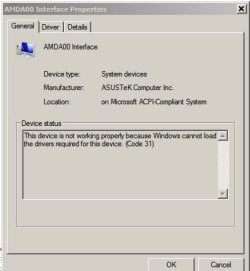
I used all the same hardware just put it in a new tower. I checked device manager and found this unknown device so I uninstalled it and since that, it has booted up normally twice in 23-24 seconds. :)
 

Attachments

  • Capture.JPG
    Capture.JPG
    24.6 KB · Views: 9

My Computer My Computer

Computer type
PC/Desktop
Computer Manufacturer/Model Number
custom build
OS
windows 7 Professional 64-bit
CPU
intel i5 4670k
Motherboard
ASUS Z87-A
Memory
G.SKILL 1866mhz. 16GB. (4 x 4GB) 240-Pin DDR3 SDRAM DDR3
Graphics Card(s)
HIS RADEON 4850 PCIE 2.0 ver.
Sound Card
onboard
Monitor(s) Displays
HP w2408h HDMI
Screen Resolution
1024 x 768
Hard Drives
SamSung 840 ssd 120 GB
PSU
Corsair HX 1050 Gold
Case
ALUMINUS FULL ATX
Cooling
Cooler Master Hyper 212 EVO
Keyboard
Logitech 520
Mouse
Logitech 310
Internet Speed
10 mbs
Antivirus
Avast full version
Browser
Firefox
Post a screenshot of your Device Manager window, with the category the problem device is in expanded.

I suspect you have a new device connected from the case (Firewire, USB-3.0, etc), changed from the previous case, that will now need a driver.
 

My Computer My Computer

Computer type
PC/Desktop
Computer Manufacturer/Model Number
Home Built - Jan 2013
OS
Windows 7 64 Bit Home Premium SP1
CPU
i7-3820
Motherboard
Asus P9X79-PRO - Bios 4608
Memory
GSkill F3-14900CL9Q - 16GB
Graphics Card(s)
EVGA GeForce GTX660 - Driver 352.86
Sound Card
On board Realtek ALC898
Monitor(s) Displays
Acer S271HL
Screen Resolution
1920 x 1080
Hard Drives
#1- Samsung 840 Pro Series
#2- Western Digital WD1002FAEX Sata3 Black
#3- Western Digital WD1002FAEX Sata3 Black
PSU
Corsair CMPSU-850TX-V2 - 850 watt (by Seasonic)
Case
Corsair Obsidian 550D
Cooling
Standard 3 120mm case fans, Cooler Master Hyper 212 EVO
Keyboard
MS KC-0405
Mouse
Intellimouse 5-button
Internet Speed
56 Mbits/Sec (on a good day)
Antivirus
Avast & Malwarebytes
Browser
Firefox
Other Info
Asus DVD - DRW-24B1ST 24X
Your right, the front usb on this tower are 3.0 the other tower just had the usb 2.0 I guess I'd better make sure the front panel usb 3.0 sockets are still working. If not, I will try to post a picture of device manager expanded Thanks! :)
 

My Computer My Computer

Computer type
PC/Desktop
Computer Manufacturer/Model Number
custom build
OS
windows 7 Professional 64-bit
CPU
intel i5 4670k
Motherboard
ASUS Z87-A
Memory
G.SKILL 1866mhz. 16GB. (4 x 4GB) 240-Pin DDR3 SDRAM DDR3
Graphics Card(s)
HIS RADEON 4850 PCIE 2.0 ver.
Sound Card
onboard
Monitor(s) Displays
HP w2408h HDMI
Screen Resolution
1024 x 768
Hard Drives
SamSung 840 ssd 120 GB
PSU
Corsair HX 1050 Gold
Case
ALUMINUS FULL ATX
Cooling
Cooler Master Hyper 212 EVO
Keyboard
Logitech 520
Mouse
Logitech 310
Internet Speed
10 mbs
Antivirus
Avast full version
Browser
Firefox
Front panel usb 3.0 still working with nothing in device manager showing up unusual now and still reboots fine so maybe, I'm good to go now. :)
 

My Computer My Computer

Computer type
PC/Desktop
Computer Manufacturer/Model Number
custom build
OS
windows 7 Professional 64-bit
CPU
intel i5 4670k
Motherboard
ASUS Z87-A
Memory
G.SKILL 1866mhz. 16GB. (4 x 4GB) 240-Pin DDR3 SDRAM DDR3
Graphics Card(s)
HIS RADEON 4850 PCIE 2.0 ver.
Sound Card
onboard
Monitor(s) Displays
HP w2408h HDMI
Screen Resolution
1024 x 768
Hard Drives
SamSung 840 ssd 120 GB
PSU
Corsair HX 1050 Gold
Case
ALUMINUS FULL ATX
Cooling
Cooler Master Hyper 212 EVO
Keyboard
Logitech 520
Mouse
Logitech 310
Internet Speed
10 mbs
Antivirus
Avast full version
Browser
Firefox
The last thing to check is that the USB controller on your motherboard is USB 2 or 3. If it is USB2 then obviously your case ports will only run at USB2 speed, not USB3. If the controller is USB3 then you may need to install a USB3 driver to get USB3 speeds.
 

My Computer My Computer

Computer type
PC/Desktop
Computer Manufacturer/Model Number
Home Built - Jan 2013
OS
Windows 7 64 Bit Home Premium SP1
CPU
i7-3820
Motherboard
Asus P9X79-PRO - Bios 4608
Memory
GSkill F3-14900CL9Q - 16GB
Graphics Card(s)
EVGA GeForce GTX660 - Driver 352.86
Sound Card
On board Realtek ALC898
Monitor(s) Displays
Acer S271HL
Screen Resolution
1920 x 1080
Hard Drives
#1- Samsung 840 Pro Series
#2- Western Digital WD1002FAEX Sata3 Black
#3- Western Digital WD1002FAEX Sata3 Black
PSU
Corsair CMPSU-850TX-V2 - 850 watt (by Seasonic)
Case
Corsair Obsidian 550D
Cooling
Standard 3 120mm case fans, Cooler Master Hyper 212 EVO
Keyboard
MS KC-0405
Mouse
Intellimouse 5-button
Internet Speed
56 Mbits/Sec (on a good day)
Antivirus
Avast & Malwarebytes
Browser
Firefox
Other Info
Asus DVD - DRW-24B1ST 24X
You boot times are very good.
I do agree with TVeblen many time one has to add the usb 3.0 drivers to the system.
 

My Computer My Computer

Computer type
PC/Desktop
Computer Manufacturer/Model Number
Home made Desktop
OS
Windows 10 Pro. 64/ version 1709 Windows 7 Pro/64
CPU
Intel i7-6800K @ 4.3
Motherboard
ASUS X-99 Deluxe II
Memory
Corsair Platinum 16 gig @2400
Graphics Card(s)
EVGA GTX 1070 OC
Monitor(s) Displays
Asus 27" LED LCD/VE278Q
Screen Resolution
1920-1080 or 1280-720 HDMI
Hard Drives
INTEL SSD 730-240 Gb Sata 3.0/
PSU
EVGA Platium 1200W
Case
Phanteks Luxe Tempered Glass 8 fans/ one radiator
Cooling
XSPC/ Water Cooled CPU
Keyboard
Das 4 Professional
Mouse
Logitech M705/MX Anywhere 2-S
Internet Speed
100 mbits
Antivirus
Microsoft Security Essentials/ Malwarebytes Premium 3.0/ SAS
Browser
I.E. 11 default/Firefox/ ISP Time Warner Cable/Spectrum
Other Info
LG BluRay Burner/
Sound system-KLipsch-THX/
Icy Dock ssd Hot Swap bays.
Back
Top