Hi all,
Im a newbie to the site, but not to computing. I recently built a computer, nothing new there, no issues. But a while ago I was looking for a VPN so that I could watch TV from back home. I decided to get a small prog to back up the vpn to stop internet explorer or any other services from accessing the internet if the VPN dropped off.
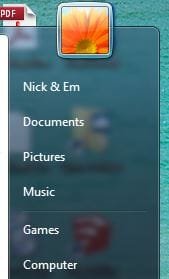
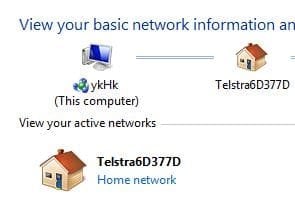
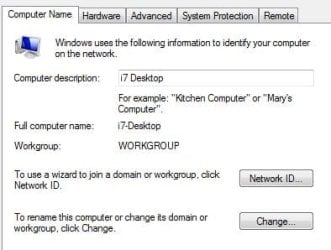
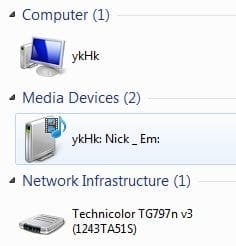
Now my issue is this. My computer name, when I go into the control panel looks like this: (1st pic) ykHk - Yeh that's not my name, it was automatically changed. When I go to change my pc name: (2) It says i7-Desktop, which is what it originally said. Yet, when I look in windows explorer: (3) It should be either i7-Desktop or Nick & Em. I have never inputted the weird name ykHk! Picture (4) shows that the SSID is 'Network Profile' when actually it is shown here in (5) to be something different Telstra6D377D etc. :huh:
Its a real pain as a lot of online services i.e. online storage stuff detects the 'Computer Name' as ykHk and I can no longer connect to other networked computers/drives etc or vice versa. I used to be able to network print and all sorts.
All of this started when I was looking for a decent VPN back up program. I have uninstalled said programs in order to sort this but these settings / issues never reset themselves. (Ps I now use VPN Check Pro - which is no problems).
Does anyone have any ideas other than - rename the computer, rename the network etc as both of these things, when I go to do them say exactly what I want them to say. Just that the computer seems to secretly think that it is something else! :shock:
Any handy, friendly advice would be great, kind regards to all in advance, Hockayak
Im a newbie to the site, but not to computing. I recently built a computer, nothing new there, no issues. But a while ago I was looking for a VPN so that I could watch TV from back home. I decided to get a small prog to back up the vpn to stop internet explorer or any other services from accessing the internet if the VPN dropped off.
Now my issue is this. My computer name, when I go into the control panel looks like this: (1st pic) ykHk - Yeh that's not my name, it was automatically changed. When I go to change my pc name: (2) It says i7-Desktop, which is what it originally said. Yet, when I look in windows explorer: (3) It should be either i7-Desktop or Nick & Em. I have never inputted the weird name ykHk! Picture (4) shows that the SSID is 'Network Profile' when actually it is shown here in (5) to be something different Telstra6D377D etc. :huh:
Its a real pain as a lot of online services i.e. online storage stuff detects the 'Computer Name' as ykHk and I can no longer connect to other networked computers/drives etc or vice versa. I used to be able to network print and all sorts.
All of this started when I was looking for a decent VPN back up program. I have uninstalled said programs in order to sort this but these settings / issues never reset themselves. (Ps I now use VPN Check Pro - which is no problems).
Does anyone have any ideas other than - rename the computer, rename the network etc as both of these things, when I go to do them say exactly what I want them to say. Just that the computer seems to secretly think that it is something else! :shock:
Any handy, friendly advice would be great, kind regards to all in advance, Hockayak
Attachments


My Computer
- Computer type
- PC/Desktop
- Computer Manufacturer/Model Number
- Custom Build
- OS
- Windows 7 Ultimate x64
- Memory
- 16Gb
- Graphics Card(s)
- GTX 660Ti
- Hard Drives
- Misc
- Antivirus
- Norton 360
- Browser
- Explorer / Firefox