Strange Connection Problem

johnwillyums

New member
Guru
Gold Member
VIP
Local time
5:23 AM
Messages
4,286
Location
Colne, Lancashire, UK
Hi folks.

I wasn't sure where to post this but I think it must be a software problem.
I'm running a self build system that I've had for a few weeks now.
A week or so ago I had a lengthy session in Chrome Browser using Google Wave. I then closed Chrome and opened Firefox to do something else but it soon became apparent that I was no longer on the web. I couldn't view any pages, couldn't access email etc.
I tried Chrome again and that was the same.
I shut down, disconnected everything, turned off my router and so on and when I plugged it all back in I was back online. Problem solved I thought.
However, since then this has happened about four times. Always under similar circumstances. After a session in Chrome browser in Google Wave and other sites.
The second time (and subsequently) I have simply rebooted and the problem is solved.
Last night I was playing with Wave in Chrome most of the evening and then came out and opened FF.
Same again, no connection. Went back to Chrome, no connection. Opened Opera, no connection.
However I happened to be downloading a torrent file using uTorrent so I checked that and the torrent was still coming down rapidly. Therefore I must have still had a connection to the net.
Checked all my browsers again and nothing, no connection apparently.
Did a reboot and problem solved.

This is mystifying me. It seems to be some kind of software/connection problem but it's affecting browsers and not uTorrent?
I'd appreciate any ideas on this, thanks, John:)
 

My Computer

Computer Manufacturer/Model Number
The Monolith. 3.1
OS
Windows 7 Home Premium 64 bit
CPU
i7 [email protected]
Motherboard
Gigabyte Z77-D3H
Memory
2x4GB Corsair Vegeance DDR3
Graphics Card(s)
XFX GTX 260 Black Edition
Sound Card
none-through large stereo hi fi
Monitor(s) Displays
Croosover 27MDP LED IPS Dell 2408 WFP
Screen Resolution
2560x1440 1920x1200
Hard Drives
1x Samsung 840Pro 128GB SSD
1x Samsung Spinpoint F1 1TB
PSU
Corsair AX 850 Watt
Case
Cooler Master ACTS 840
Cooling
Be Quiet! Dark Rock Pro
Keyboard
Enermax Aurora
Mouse
Logitech Ballmouse
Internet Speed
20MBPS
Hi folks.

I wasn't sure where to post this but I think it must be a software problem.
I'm running a self build system that I've had for a few weeks now.
A week or so ago I had a lengthy session in Chrome Browser using Google Wave. I then closed Chrome and opened Firefox to do something else but it soon became apparent that I was no longer on the web. I couldn't view any pages, couldn't access email etc.
I tried Chrome again and that was the same.
I shut down, disconnected everything, turned off my router and so on and when I plugged it all back in I was back online. Problem solved I thought.
However, since then this has happened about four times. Always under similar circumstances. After a session in Chrome browser in Google Wave and other sites.
The second time (and subsequently) I have simply rebooted and the problem is solved.
Last night I was playing with Wave in Chrome most of the evening and then came out and opened FF.
Same again, no connection. Went back to Chrome, no connection. Opened Opera, no connection.
However I happened to be downloading a torrent file using uTorrent so I checked that and the torrent was still coming down rapidly. Therefore I must have still had a connection to the net.
Checked all my browsers again and nothing, no connection apparently.
Did a reboot and problem solved.

This is mystifying me. It seems to be some kind of software/connection problem but it's affecting browsers and not uTorrent?
I'd appreciate any ideas on this, thanks, John:)

Hi John

Wondered what was happening to you in wave. I assume homegroup and IPv6. right? Ipv6 can casue that and it wouldnt nec affect torrent (different ports and protocols). It could also be an dns/dhcp issue. next time that happens before you reboot etc, try ipconfig /flushdns and ipconfig /renew. If that works its a dns problem easy to fix. If that doesn't help see if there is any notations in event viewer>windows log>applications tab. it would say app hang, app crash or sime such. If logged note the "event ID" and "source" you can google them. If you want I can also (have abt 200 of them memorized) give you a hand. Let me know


Kenn J++
 

My Computer

Computer Manufacturer/Model Number
HP Pavillion dv-7 1005 Tx
OS
Win 8 Release candidate 8400
CPU
[email protected]
Memory
4 gigs
Graphics Card(s)
Nvidia 9600M
Sound Card
HD built-in
Monitor(s) Displays
17" Wxga
Screen Resolution
1440x900
Cooling
none
Internet Speed
45Mb down 5Mb up
Much obliged Kenn. Next time it happens I'll try what you suggest I'll try the ipconfig commands and see what I get.
Figured it had to be something like that. Trouble is it doesn't happen all the time.
Well, actually I'm glad it doesn't happen all the time:)

Thanks, John

PS your cat is looking a lot more relaxed today:D
 

My Computer

Computer Manufacturer/Model Number
The Monolith. 3.1
OS
Windows 7 Home Premium 64 bit
CPU
i7 [email protected]
Motherboard
Gigabyte Z77-D3H
Memory
2x4GB Corsair Vegeance DDR3
Graphics Card(s)
XFX GTX 260 Black Edition
Sound Card
none-through large stereo hi fi
Monitor(s) Displays
Croosover 27MDP LED IPS Dell 2408 WFP
Screen Resolution
2560x1440 1920x1200
Hard Drives
1x Samsung 840Pro 128GB SSD
1x Samsung Spinpoint F1 1TB
PSU
Corsair AX 850 Watt
Case
Cooler Master ACTS 840
Cooling
Be Quiet! Dark Rock Pro
Keyboard
Enermax Aurora
Mouse
Logitech Ballmouse
Internet Speed
20MBPS
ROUTER

Its you router. The new browser is triggering a port forward.
Log in to your router and check the config settings. Use the Release DHCP and then enable it again.
 

My Computer

Computer Manufacturer/Model Number
Custom Build
OS
Windows 7 7600 1 X64
CPU
AMD PHENOM II X 550 PROCESSOR 3.1 ghz
Motherboard
ASUS M4A78-TE
Memory
Corsair 4 gig ddr 3
Graphics Card(s)
ati radeon 3300
Sound Card
ati hd
Monitor(s) Displays
syncmaster 2033sw
Screen Resolution
1600X900 60 hz refresh
Hard Drives
twin_seagates SATA's 1 TB & 500 Gig, hitachi_slimline 160 gig
PSU
antec_550 watt
Case
cooler master GLite
Cooling
stock_heat sink
Internet Speed
20mbs up/ 1.5mbs down
Other Info
favorite child "stewie"
favorite dog "brian"
Hi Adrian. Long time no see.
I've been into the router config and everything looks ok in there. I couldn't actually find a Release DHCP control. It's fairly simple though and it looks ok in and out.
I think I'll have to wait 'til it happens again and try Ken's ipconfig method to narrow down the possibilities.
Thanks to you both for your input, J:D
 

My Computer

Computer Manufacturer/Model Number
The Monolith. 3.1
OS
Windows 7 Home Premium 64 bit
CPU
i7 [email protected]
Motherboard
Gigabyte Z77-D3H
Memory
2x4GB Corsair Vegeance DDR3
Graphics Card(s)
XFX GTX 260 Black Edition
Sound Card
none-through large stereo hi fi
Monitor(s) Displays
Croosover 27MDP LED IPS Dell 2408 WFP
Screen Resolution
2560x1440 1920x1200
Hard Drives
1x Samsung 840Pro 128GB SSD
1x Samsung Spinpoint F1 1TB
PSU
Corsair AX 850 Watt
Case
Cooler Master ACTS 840
Cooling
Be Quiet! Dark Rock Pro
Keyboard
Enermax Aurora
Mouse
Logitech Ballmouse
Internet Speed
20MBPS
D**n. It just happened again but I couldn't remember what I was supposed to enter after ipconfig so I just rebooted instead. I've written out the commands now so next time.
Did have a look in event viewer though but nothing recent showing in there. I hate little problems like this:rolleyes:
 

My Computer

Computer Manufacturer/Model Number
The Monolith. 3.1
OS
Windows 7 Home Premium 64 bit
CPU
i7 [email protected]
Motherboard
Gigabyte Z77-D3H
Memory
2x4GB Corsair Vegeance DDR3
Graphics Card(s)
XFX GTX 260 Black Edition
Sound Card
none-through large stereo hi fi
Monitor(s) Displays
Croosover 27MDP LED IPS Dell 2408 WFP
Screen Resolution
2560x1440 1920x1200
Hard Drives
1x Samsung 840Pro 128GB SSD
1x Samsung Spinpoint F1 1TB
PSU
Corsair AX 850 Watt
Case
Cooler Master ACTS 840
Cooling
Be Quiet! Dark Rock Pro
Keyboard
Enermax Aurora
Mouse
Logitech Ballmouse
Internet Speed
20MBPS
Hello Ken (or anybody). It just happened again.

I was watching live tv in Media Center but had left Chrome open.
I closed Media Center and brought up Chrome and I appeared to be off line. Same in FF.

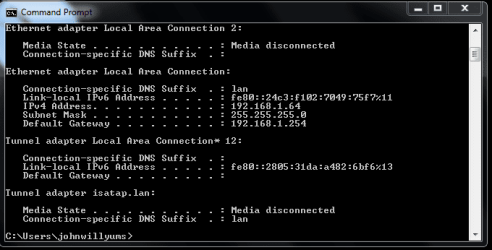
So I opened a command prompt window put in ipconfig/flush/dns and then ipconfig/renew and I got this result.(see pic)

However this had not re established my browser connection so presumably it is not a DNS problem.

I have looked in Event Viewer and I find an error about 9 hours ago (4130 Windows Backup).

Earlier this evening I had two warnings (1014 DNS Client Event). Also over the last few days they are all the same error (7031 Service Control Manager)

Any ideas on this would be most welcome. A reboot works fine but it shouldn't be happening.

I'm just waiting on the delivery of a new HDD on which I intend to do a fresh install of W7 and use as my c/drive.
Do you think that will cure the problem anyway? If so then I needn't really worry.

Thanks, John:)
 

Attachments

  • ipsconfig1.PNG
    ipsconfig1.PNG
    10.2 KB · Views: 21

My Computer

Computer Manufacturer/Model Number
The Monolith. 3.1
OS
Windows 7 Home Premium 64 bit
CPU
i7 [email protected]
Motherboard
Gigabyte Z77-D3H
Memory
2x4GB Corsair Vegeance DDR3
Graphics Card(s)
XFX GTX 260 Black Edition
Sound Card
none-through large stereo hi fi
Monitor(s) Displays
Croosover 27MDP LED IPS Dell 2408 WFP
Screen Resolution
2560x1440 1920x1200
Hard Drives
1x Samsung 840Pro 128GB SSD
1x Samsung Spinpoint F1 1TB
PSU
Corsair AX 850 Watt
Case
Cooler Master ACTS 840
Cooling
Be Quiet! Dark Rock Pro
Keyboard
Enermax Aurora
Mouse
Logitech Ballmouse
Internet Speed
20MBPS
Thanks for the help guys. I'll get back to you if a clean install on a brand new drive doesn't sort this problem out.
It seems to be getting more frequent. J:confused:
 

My Computer

Computer Manufacturer/Model Number
The Monolith. 3.1
OS
Windows 7 Home Premium 64 bit
CPU
i7 [email protected]
Motherboard
Gigabyte Z77-D3H
Memory
2x4GB Corsair Vegeance DDR3
Graphics Card(s)
XFX GTX 260 Black Edition
Sound Card
none-through large stereo hi fi
Monitor(s) Displays
Croosover 27MDP LED IPS Dell 2408 WFP
Screen Resolution
2560x1440 1920x1200
Hard Drives
1x Samsung 840Pro 128GB SSD
1x Samsung Spinpoint F1 1TB
PSU
Corsair AX 850 Watt
Case
Cooler Master ACTS 840
Cooling
Be Quiet! Dark Rock Pro
Keyboard
Enermax Aurora
Mouse
Logitech Ballmouse
Internet Speed
20MBPS
Back
Top