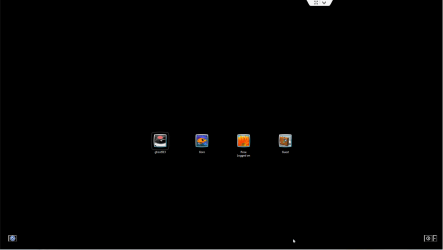
Strange Console-like Welcome Screen

Bigpoppa00

New member
Local time
2:26 AM
Messages
7
I am trying to help this elderly couple that I've always done Computer work for and they have something I have never seen before.
They have an ACER all in one PC with Windows 7 Home Edition. The problem is that when they start up the computer it comes to the Logon screen, but it's not the normal Blue screen that Windows 7 comes up with. Instead its completely black, and only shows the 4 usernames. It won't let them type their password either. I logged in with Teamviewer (which is how I help them since now I live in a different state) and I am able to type the password without any issues. I should mention that the box where you enter the password says "password" but its green, which is what makes it look like a console. I have never seen this before. I've Googled for it but nothing comes up. I've attached 2 screen shots. Any help is appreciated.
 

Attachments
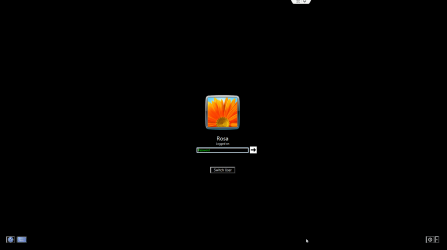
  • Logon2.png
    Logon2.png
    13 KB · Views: 8
  • Logon1.png
    Logon1.png
    7.8 KB · Views: 7
Last edited:

My Computer

Computer type
PC/Desktop
OS
Windows 7 Ultimate x64
I am trying to help this elderly couple that I've always done Computer work for and they have something I have never seen before.
They have an ACER all in one PC with Windows 7 Home Edition. The problem is that when they start up the computer it comes to the Logon screen, but it's not the normal Blue screen that Windows 7 comes up with. Instead its completely black, and only shows the 4 usernames. It won't let them type their password either. I logged in with Teamviewer (which is how I help them since now I live in a different state) and I am able to type the password without any issues. I should mention that the box where you enter the password says "password" but its green, which is what makes it look like a console. I have never seen this before. I've Googled for it but nothing comes up. I've attached 2 screen shots. Any help is appreciated.


Anyone ever seen this? Really need help with this.
 

My Computer

Computer type
PC/Desktop
OS
Windows 7 Ultimate x64
Did they press the Virtual Keyboard input icon by any chance?
 

My Computer

Computer type
PC/Desktop
Computer Manufacturer/Model Number
Golden Mk. I.4
OS
Windows 10 Pro x64 ; Xubuntu x64
CPU
Intel i7 860 @ 2.80 GHz O/C'ed to 4.0GHz
Motherboard
Gigabyte P55A-UD3R Rev.1. Award BIOS F13
Memory
16GB Corsair Vengance DDR3 @ 661 MHz Dual Channel (9-9-9-24)
Graphics Card(s)
EVGA NVidia GTX 560 1024MB
Sound Card
Realtek Integrated
Monitor(s) Displays
Dual Samsung SyncMaster 2494HS
Screen Resolution
1920*1080 and 1920*1080
Hard Drives
1*Samsung 840 EVO 120GB SSD;
1*OCZ Vertex 2 60GB SSD;
2*Samsung F3 SpinPoint 1TB in RAID0;
1*Samsung F1 SpinPoint 1TB;
2*Western Digital 1TB External USB 3.0
1*Western Digital 500GB External USB 3.0
1*Seagate 500GB External USB 2.0
PSU
Thermaltake ToughPower QFan 750W
Case
Thermaltake Element S VK60001W2Z
Cooling
Corsair H60 Water Cooling, 2*230mm and 2*80mm case fans
Keyboard
Logitech G110
Mouse
Logitech MX518
I don't know. But wouldn't that input get canceled out when the computer is turned off/restarted? I've restarted it and even had them turn it off completely and still comes back to that.
 

My Computer

Computer type
PC/Desktop
OS
Windows 7 Ultimate x64
Log in, then check which items are starting in StartUp - perhaps its something there, although I doubt it.
 

My Computer

Computer type
PC/Desktop
Computer Manufacturer/Model Number
Golden Mk. I.4
OS
Windows 10 Pro x64 ; Xubuntu x64
CPU
Intel i7 860 @ 2.80 GHz O/C'ed to 4.0GHz
Motherboard
Gigabyte P55A-UD3R Rev.1. Award BIOS F13
Memory
16GB Corsair Vengance DDR3 @ 661 MHz Dual Channel (9-9-9-24)
Graphics Card(s)
EVGA NVidia GTX 560 1024MB
Sound Card
Realtek Integrated
Monitor(s) Displays
Dual Samsung SyncMaster 2494HS
Screen Resolution
1920*1080 and 1920*1080
Hard Drives
1*Samsung 840 EVO 120GB SSD;
1*OCZ Vertex 2 60GB SSD;
2*Samsung F3 SpinPoint 1TB in RAID0;
1*Samsung F1 SpinPoint 1TB;
2*Western Digital 1TB External USB 3.0
1*Western Digital 500GB External USB 3.0
1*Seagate 500GB External USB 2.0
PSU
Thermaltake ToughPower QFan 750W
Case
Thermaltake Element S VK60001W2Z
Cooling
Corsair H60 Water Cooling, 2*230mm and 2*80mm case fans
Keyboard
Logitech G110
Mouse
Logitech MX518
I did that. I even removed anything that's not related to actually booting up. Still goes to that screen. But if you notice on the screenshots, that all happens before the user even logs in. So whatever it is, has to be something deep within windows.
 

My Computer

Computer type
PC/Desktop
OS
Windows 7 Ultimate x64
Have you checked the BIOS? Is there anything in there?
 

My Computer

Computer type
PC/Desktop
Computer Manufacturer/Model Number
Golden Mk. I.4
OS
Windows 10 Pro x64 ; Xubuntu x64
CPU
Intel i7 860 @ 2.80 GHz O/C'ed to 4.0GHz
Motherboard
Gigabyte P55A-UD3R Rev.1. Award BIOS F13
Memory
16GB Corsair Vengance DDR3 @ 661 MHz Dual Channel (9-9-9-24)
Graphics Card(s)
EVGA NVidia GTX 560 1024MB
Sound Card
Realtek Integrated
Monitor(s) Displays
Dual Samsung SyncMaster 2494HS
Screen Resolution
1920*1080 and 1920*1080
Hard Drives
1*Samsung 840 EVO 120GB SSD;
1*OCZ Vertex 2 60GB SSD;
2*Samsung F3 SpinPoint 1TB in RAID0;
1*Samsung F1 SpinPoint 1TB;
2*Western Digital 1TB External USB 3.0
1*Western Digital 500GB External USB 3.0
1*Seagate 500GB External USB 2.0
PSU
Thermaltake ToughPower QFan 750W
Case
Thermaltake Element S VK60001W2Z
Cooling
Corsair H60 Water Cooling, 2*230mm and 2*80mm case fans
Keyboard
Logitech G110
Mouse
Logitech MX518
I have not, and I cannot. As I stated in the OP I am can only work on the computer remotely as she's located in south Florida and I now live in Georgia. I know she didn't go in there as she's in her 70s and I've watched her turned the computer before. To her, it's very fascinating. And no one else but her and her husband use the computer even though there are about 4 users. I've just never seen anything like it. I've Googled the symptoms and nothing remotely close comes up. It's like a first ever.
 

My Computer

Computer type
PC/Desktop
OS
Windows 7 Ultimate x64
Have you checked for malware? I doubt its the issue, but its worth crossing out.
 

My Computer

Computer type
PC/Desktop
Computer Manufacturer/Model Number
Golden Mk. I.4
OS
Windows 10 Pro x64 ; Xubuntu x64
CPU
Intel i7 860 @ 2.80 GHz O/C'ed to 4.0GHz
Motherboard
Gigabyte P55A-UD3R Rev.1. Award BIOS F13
Memory
16GB Corsair Vengance DDR3 @ 661 MHz Dual Channel (9-9-9-24)
Graphics Card(s)
EVGA NVidia GTX 560 1024MB
Sound Card
Realtek Integrated
Monitor(s) Displays
Dual Samsung SyncMaster 2494HS
Screen Resolution
1920*1080 and 1920*1080
Hard Drives
1*Samsung 840 EVO 120GB SSD;
1*OCZ Vertex 2 60GB SSD;
2*Samsung F3 SpinPoint 1TB in RAID0;
1*Samsung F1 SpinPoint 1TB;
2*Western Digital 1TB External USB 3.0
1*Western Digital 500GB External USB 3.0
1*Seagate 500GB External USB 2.0
PSU
Thermaltake ToughPower QFan 750W
Case
Thermaltake Element S VK60001W2Z
Cooling
Corsair H60 Water Cooling, 2*230mm and 2*80mm case fans
Keyboard
Logitech G110
Mouse
Logitech MX518
Yep. The first say I saw it. Ran Malwarebytes, CCleaner, cleanup 4.52, SUPERAntiSpyware, Avast, advanced system care. All just picked up the regular stuff. Nothing major. Still no dice.
 

My Computer

Computer type
PC/Desktop
OS
Windows 7 Ultimate x64
A friend of mine just suggested something which kinda works but it kinda doesn't. Under the windows themes at the bottom there's choices for High contrast. That kinda make it happen on my computer, but at the same time every menu or word or writing comes up with the green letters. In her case it's not doing that. He's given me something to think about though. And I do remember changing her theme before and that didn't get rid of the problem.
 

My Computer

Computer type
PC/Desktop
OS
Windows 7 Ultimate x64
Perhaps she has customised the theme.....
 

My Computer

Computer type
PC/Desktop
Computer Manufacturer/Model Number
Golden Mk. I.4
OS
Windows 10 Pro x64 ; Xubuntu x64
CPU
Intel i7 860 @ 2.80 GHz O/C'ed to 4.0GHz
Motherboard
Gigabyte P55A-UD3R Rev.1. Award BIOS F13
Memory
16GB Corsair Vengance DDR3 @ 661 MHz Dual Channel (9-9-9-24)
Graphics Card(s)
EVGA NVidia GTX 560 1024MB
Sound Card
Realtek Integrated
Monitor(s) Displays
Dual Samsung SyncMaster 2494HS
Screen Resolution
1920*1080 and 1920*1080
Hard Drives
1*Samsung 840 EVO 120GB SSD;
1*OCZ Vertex 2 60GB SSD;
2*Samsung F3 SpinPoint 1TB in RAID0;
1*Samsung F1 SpinPoint 1TB;
2*Western Digital 1TB External USB 3.0
1*Western Digital 500GB External USB 3.0
1*Seagate 500GB External USB 2.0
PSU
Thermaltake ToughPower QFan 750W
Case
Thermaltake Element S VK60001W2Z
Cooling
Corsair H60 Water Cooling, 2*230mm and 2*80mm case fans
Keyboard
Logitech G110
Mouse
Logitech MX518
Back
Top