Solved Strange Developments After Booting Up....

Busterbrown

New member
Member
Local time
8:25 AM
Messages
51
Oftentimes after booting up, I get these strange developments;

a) I cannot execute any AV, utility or diagnostic programs;
b) Shockwave Flash often crashes;
b) A small blue "cyclone" whirls over the small network-connect icon, lower-right-hand corner;
c) Facebook or YouTube videos can't play;
d) Shutdown time takes too long;
e) During shutdown, Explorer still runs in the background, system requests "Forced Shutdown?"

I don't know what all these symptoms point to--any ideas?:confused:
 

My Computer

Computer type
PC/Desktop
OS
Windows 7 Pro 64-bit
I also managed to get this Win 7 system diagnostics report on my latest boot-up:

Log Name: Microsoft-Windows-Diagnostics-Performance/Operational
Source: Microsoft-Windows-Diagnostics-Performance
Date: 10/15/2016 3:24:08 PM
Event ID: 100
Task Category: Boot Performance Monitoring
Level: Critical
Keywords: Event Log
User: LOCAL SERVICE
Computer: [Edited]
Description:
Windows has started up:
Boot Duration : 168780ms
IsDegradation : false
Incident Time (UTC) : ‎2016‎-‎10‎-‎15T19:21:00.671600300Z
Event Xml:
<Event xmlns="http://schemas.microsoft.com/win/2004/08/events/event">
<System>
<Provider Name="Microsoft-Windows-Diagnostics-Performance" Guid="{CFC18EC0-96B1-4EBA-961B-622CAEE05B0A}" />
<EventID>100</EventID>
<Version>2</Version>
<Level>1</Level>
<Task>4002</Task>
<Opcode>34</Opcode>
<Keywords>0x8000000000010000</Keywords>
<TimeCreated SystemTime="2016-10-15T19:24:08.048228600Z" />
<EventRecordID>11720</EventRecordID>
<Correlation ActivityID="{00000000-C9C4-0000-6730-77431927D201}" />
<Execution ProcessID="1676" ThreadID="4836" />
<Channel>Microsoft-Windows-Diagnostics-Performance/Operational</Channel>
<Computer>[Edited]</Computer>
<Security UserID="[Edited]" />
</System>
<EventData>
<Data Name="BootTsVersion">2</Data>
<Data Name="BootStartTime">2016-10-15T19:21:00.671600300Z</Data>
<Data Name="BootEndTime">2016-10-15T19:24:02.355903000Z</Data>
<Data Name="SystemBootInstance">5426</Data>
<Data Name="UserBootInstance">907</Data>
<Data Name="BootTime">168780</Data>
<Data Name="MainPathBootTime">53952</Data>
<Data Name="BootKernelInitTime">29</Data>
<Data Name="BootDriverInitTime">9327</Data>
<Data Name="BootDevicesInitTime">10132</Data>
<Data Name="BootPrefetchInitTime">0</Data>
<Data Name="BootPrefetchBytes">0</Data>
<Data Name="BootAutoChkTime">0</Data>
<Data Name="BootSmssInitTime">12645</Data>
<Data Name="BootCriticalServicesInitTime">1148</Data>
<Data Name="BootUserProfileProcessingTime">1297</Data>
<Data Name="BootMachineProfileProcessingTime">532</Data>
<Data Name="BootExplorerInitTime">17701</Data>
<Data Name="BootNumStartupApps">17</Data>
<Data Name="BootPostBootTime">114828</Data>
<Data Name="BootIsRebootAfterInstall">false</Data>
<Data Name="BootRootCauseStepImprovementBits">128</Data>
<Data Name="BootRootCauseGradualImprovementBits">192</Data>
<Data Name="BootRootCauseStepDegradationBits">0</Data>
<Data Name="BootRootCauseGradualDegradationBits">0</Data>
<Data Name="BootIsDegradation">false</Data>
<Data Name="BootIsStepDegradation">false</Data>
<Data Name="BootIsGradualDegradation">false</Data>
<Data Name="BootImprovementDelta">0</Data>
<Data Name="BootDegradationDelta">0</Data>
<Data Name="BootIsRootCauseIdentified">true</Data>
<Data Name="OSLoaderDuration">2721</Data>
<Data Name="BootPNPInitStartTimeMS">29</Data>
<Data Name="BootPNPInitDuration">10162</Data>
<Data Name="OtherKernelInitDuration">662</Data>
<Data Name="SystemPNPInitStartTimeMS">10778</Data>
<Data Name="SystemPNPInitDuration">9297</Data>
<Data Name="SessionInitStartTimeMS">20123</Data>
<Data Name="Session0InitDuration">1408</Data>
<Data Name="Session1InitDuration">480</Data>
<Data Name="SessionInitOtherDuration">10757</Data>
<Data Name="WinLogonStartTimeMS">32768</Data>
<Data Name="OtherLogonInitActivityDuration">1651</Data>
<Data Name="UserLogonWaitDuration">12905</Data>
</EventData>
</Event>
 

My Computer

Computer type
PC/Desktop
OS
Windows 7 Pro 64-bit
Hello Buster,
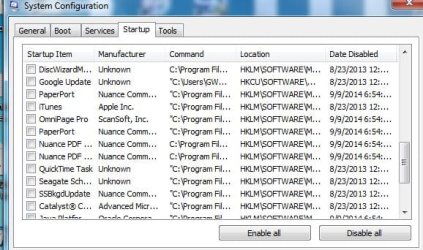
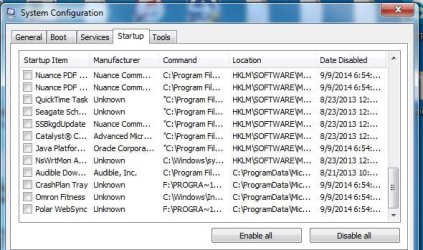
can you post a screenshot of your startup items,
control panel >> admin tools >> system config >> startup.

Roy
 

My Computer

Computer type
PC/Desktop
Computer Manufacturer/Model Number
medionl/Aspire 6930G/acer x55a
OS
W7 home premium 32bit/W7HP 64bit/w10 tp insider ring
CPU
E5300 dual core
Motherboard
medion MS7366
Memory
3gb
Graphics Card(s)
Nvidia Geforce 7100 Nforce 630i
Monitor(s) Displays
avixc
Internet Speed
n (isp resticted to 72)
Antivirus
mse/pands
Browser
palemoon
Other Info
Belkin Fd7050 n USB using Railink RT2870 drivers, more upto date
Screen Capture shots of Start-up items (4 screens), Attached.
 

Attachments

  • Capture.JPG_1.JPG
    Capture.JPG_1.JPG
    45.9 KB · Views: 46
  • Capture_2.JPG
    Capture_2.JPG
    56.3 KB · Views: 46
  • Capture3.JPG
    Capture3.JPG
    58.6 KB · Views: 46
  • Capture4.JPG
    Capture4.JPG
    57.4 KB · Views: 46

My Computer

Computer type
PC/Desktop
OS
Windows 7 Pro 64-bit
Hi Buster,
I would uncheck anything you do not use on start-up.
Remember you also need to go to
Control Panel >> admin tools >> services >> highlight the entry Right Click >> properties >> change startup to manual

If it were mine id uncheck
Apple/ITunes/Java Skype Acronis Malwarebytes(if Free) LastPass Omnipage Polar Fitbit
CrashPlan(you already back up to Acronis)
No idea what BRS is


Roy
 

My Computer

Computer type
PC/Desktop
Computer Manufacturer/Model Number
medionl/Aspire 6930G/acer x55a
OS
W7 home premium 32bit/W7HP 64bit/w10 tp insider ring
CPU
E5300 dual core
Motherboard
medion MS7366
Memory
3gb
Graphics Card(s)
Nvidia Geforce 7100 Nforce 630i
Monitor(s) Displays
avixc
Internet Speed
n (isp resticted to 72)
Antivirus
mse/pands
Browser
palemoon
Other Info
Belkin Fd7050 n USB using Railink RT2870 drivers, more upto date
I will uncheck those Startup choices--but that Systems Diagnostics Report listed itself as CRITICAL...

Looks to me like all the strange developments post-Start-up point to more ominous symptoms.
 

My Computer

Computer type
PC/Desktop
OS
Windows 7 Pro 64-bit
Hi Buster,
If its still slow loading/shutting down after unchecking, then there could be an underlying problem, especially if you take into account your Space problem thread.

I take it you've done a full scan with MalwareBytes and your AV.
Mind trying ESET on line scan, please dissable your other AV.
Online Malware Detection | ESET
Wouldn't hurt to run these 2 as well
AdwCleaner Download
Junkware Removal Tool Download

post the results

Roy
 

My Computer

Computer type
PC/Desktop
Computer Manufacturer/Model Number
medionl/Aspire 6930G/acer x55a
OS
W7 home premium 32bit/W7HP 64bit/w10 tp insider ring
CPU
E5300 dual core
Motherboard
medion MS7366
Memory
3gb
Graphics Card(s)
Nvidia Geforce 7100 Nforce 630i
Monitor(s) Displays
avixc
Internet Speed
n (isp resticted to 72)
Antivirus
mse/pands
Browser
palemoon
Other Info
Belkin Fd7050 n USB using Railink RT2870 drivers, more upto date
System File Checker

Have you tried running sfc?

Open the Command Prompt (Use the "Run as administrator" option in the context menu).

Type:
sfc /scannow

Tutorial

SFC /SCANNOW Command - System File Checker
 

My Computer

Computer type
PC/Desktop
Computer Manufacturer/Model Number
n/a
OS
W7 Ultimate SP1, LM19.2 MATE, W10 Home 1703, W10 Pro 1703 VM, #All 64 bit
CPU
AMD Phenom II x6 1100T, 3.3 GHz
Motherboard
ASUS M4A88T-M/USB3 (AM3)
Memory
12GB DDR3 1333 G-Skill (4GB x 2), G-Skill (2GB x 2)
Graphics Card(s)
NVIDIA GeForce GTX 660
Sound Card
Realtek?
Monitor(s) Displays
Samsung S23B350
Screen Resolution
1920x1080
Hard Drives
WD Green 2TB (SATA), WD Green 3TB (SATA), WD Blue 4TB (SATA), WD Blue 6TB (SATA)
PSU
Cooler Master
Case
Antec GX300 Tower
Cooling
3x Antec TRICOOL 120mm Fans
Mouse
Wired Optical
Internet Speed
DSL
Antivirus
Avast
Browser
Pale Moon (64 bit)
Other Info
2018-12-27 Upgraded HDDs
2015-12-10 Upgraded case, graphics card, storage
2015-08-15 Upgraded motherboard & RAM
2015-07-15 Upgraded LM17.1 to LM17.2
Hi Buster,
If its still slow loading/shutting down after unchecking, then there could be an underlying problem, especially if you take into account your Space problem thread.

I take it you've done a full scan with MalwareBytes and your AV.
Mind trying ESET on line scan, please dissable your other AV.
Online Malware Detection | ESET
Wouldn't hurt to run these 2 as well
AdwCleaner Download
Junkware Removal Tool Download

post the results

Roy

Will try these, Thanks.
 

My Computer

Computer type
PC/Desktop
OS
Windows 7 Pro 64-bit
Hi Buster,
If its still slow loading/shutting down after unchecking, then there could be an underlying problem, especially if you take into account your Space problem thread.

I take it you've done a full scan with MalwareBytes and your AV.
Mind trying ESET on line scan, please dissable your other AV.
Online Malware Detection | ESET
Wouldn't hurt to run these 2 as well
AdwCleaner Download
Junkware Removal Tool Download

post the results

Roy

Which other AV/ Do you mean my Avast program or MBAM?
 

My Computer

Computer type
PC/Desktop
OS
Windows 7 Pro 64-bit
Hi Buster,
Just Avast.

Roy
 

My Computer

Computer type
PC/Desktop
Computer Manufacturer/Model Number
medionl/Aspire 6930G/acer x55a
OS
W7 home premium 32bit/W7HP 64bit/w10 tp insider ring
CPU
E5300 dual core
Motherboard
medion MS7366
Memory
3gb
Graphics Card(s)
Nvidia Geforce 7100 Nforce 630i
Monitor(s) Displays
avixc
Internet Speed
n (isp resticted to 72)
Antivirus
mse/pands
Browser
palemoon
Other Info
Belkin Fd7050 n USB using Railink RT2870 drivers, more upto date
Hi Buster,
If its still slow loading/shutting down after unchecking, then there could be an underlying problem, especially if you take into account your Space problem thread.

I take it you've done a full scan with MalwareBytes and your AV.
Mind trying ESET on line scan, please dissable your other AV.
Online Malware Detection | ESET
Wouldn't hurt to run these 2 as well
AdwCleaner Download
Junkware Removal Tool Download

post the results

Roy

I did run ESET. It found 2 infected files, ran for almost 1 1/2 hours, then stalled out. It didn't list the name or location of the infected files while it scanned, before it stalled.

I ran AdwCleaner and it found a few PUPs, which I removed.

The space problem may be related to System Restore settings, since I removed my old System Restores, and the space on Drive C went back up to 223 GB (though it keeps diminishing by 2 GB each day, so I have to change the SR settings).
 
Last edited:

My Computer

Computer type
PC/Desktop
OS
Windows 7 Pro 64-bit
My suggestion is to download the most recent version of "tweaking.com_windows_repair_aio_setup.exe" and run the program as directed - it really solves most of ordinary Win 7 problems, and even some that are rarely seen. Highly recommended.
 

My Computer

Computer type
PC/Desktop
Computer Manufacturer/Model Number
Dell
OS
Windows 7 Ultimate 64 bit
CPU
i7 Intel
Memory
8 GB
Graphics Card(s)
nVidia GeForce
Hard Drives
Seagate; WesternDigital
Antivirus
Panda
Browser
Firefox
I have upgraded to Windows 7 Professional.

Thanks for all the helpful posts.
 

My Computer

Computer type
PC/Desktop
OS
Windows 7 Pro 64-bit
Back
Top