Strange Disk Activity

Wow my post was a little late and didn't really add anything. This forum moves faster than most others. :P

Isn't there a way to remove indexing of certain areas?
And -- just curious -- why is it a problem? I know it uses power and can be noisy, but overall it's a necessity if you want to be using search. Of course you could use a different search, such as Copernic or whatever, but I much prefer using integrated search.
 

My Computer

Computer Manufacturer/Model Number
Dell DM061 (E520)
OS
Win 7 (7100 x64); OS X 10.5.6
CPU
Intel Pentium D 915 - 2.8Ghz x 2
Motherboard
Dell 0WG864
Memory
4GB DDR2 PC2-6400
Graphics Card(s)
nVidia XFX GeForce 9600GT
Monitor(s) Displays
Acer P223W; Acer X223W
Screen Resolution
3360x1050
Hard Drives
Seagate 150GB; Western Digital 150GB; Western Digital 500GB; WD MyBook World Edition 1TB (NAS)
PSU
OCZ StealthXstream 400W
Case
Dell E520 (lol)
Keyboard
Dell Multimedia Keyboard
Mouse
Dell
Internet Speed
128KB/s :(
Wow my post was a little late and didn't really add anything. This forum moves faster than most others. :P

Isn't there a way to remove indexing of certain areas?
And -- just curious -- why is it a problem? I know it uses power and can be noisy, but overall it's a necessity if you want to be using search. Of course you could use a different search, such as Copernic or whatever, but I much prefer using integrated search.

I'm not suggesting its a problem, was just curious what all the disk activity was when sys. is idle.

Yes, you can remove or add directories to the indexer. It can be found in the control panel, but I can't find exactly where it is right now cause I always typed index in the control panel search box. lol
 

My Computer

Computer Manufacturer/Model Number
POS
OS
OS3.5
CPU
celery
Motherboard
Good Question ...Unknown
Memory
memory never forgets
Graphics Card(s)
OB
Sound Card
OB
Monitor(s) Displays
HUGE
Screen Resolution
168000000x105000000
Hard Drives
full
PSU
OEM 65watt
Case
N/A
Cooling
OB
Keyboard
OB
Mouse
mouse
Internet Speed
1 Trillion MBps
Other Info
Still An Awesome Forum!
Its in Indexing Options in the Control Panel.
 

My Computer

Computer Manufacturer/Model Number
Self Build 64bit
OS
Vista Ult64, Win7600
CPU
Intel Core 2 Quad Q6600 @ 2400 MHz 64bit OS
Motherboard
Asus P5E3 Deluxe WiFi @p 64 bit OS
Memory
4096 MB DDR3-SDRAM
Graphics Card(s)
ATI Radeon HD 3870 Series x2 Crossfired
Sound Card
Realtek on board
Monitor(s) Displays
Samsung SyncMaster - 23 inches
Screen Resolution
1680x1050 pixels at 60 Hz in True Colors
Hard Drives
Hitachi (250 GB)/Samsung 750 GB. /Barracuda 160 GB.
My Book 1 TB external..
PSU
Cooler Master 1000w
Case
Cooler Master Cosmos 1000.
Cooling
Fans and fresh air,
Keyboard
Wireless
Mouse
Wireless
Internet Speed
Never fast enough
Other Info
I use a Magnum.
Ah right.

Change the view to Large/Small icons and there's an entry for 'Indexing Options.'
 

My Computer

Computer Manufacturer/Model Number
Dell DM061 (E520)
OS
Win 7 (7100 x64); OS X 10.5.6
CPU
Intel Pentium D 915 - 2.8Ghz x 2
Motherboard
Dell 0WG864
Memory
4GB DDR2 PC2-6400
Graphics Card(s)
nVidia XFX GeForce 9600GT
Monitor(s) Displays
Acer P223W; Acer X223W
Screen Resolution
3360x1050
Hard Drives
Seagate 150GB; Western Digital 150GB; Western Digital 500GB; WD MyBook World Edition 1TB (NAS)
PSU
OCZ StealthXstream 400W
Case
Dell E520 (lol)
Keyboard
Dell Multimedia Keyboard
Mouse
Dell
Internet Speed
128KB/s :(
After spending the better part of the day trying to get the indexer to stop indexing "internet explorer history" I gave up on it. Uninstalled it and wow, nice improvement with speed. Everything is opening much faster, and overall is more responsive.
Every time I would clear the check box for ie history, the very next time I ran MS's delete browser history it would appear, same with ccleaner. Went into Local Computer Policy and set policies to not index certain paths, but to no avail. After telling it to Not scan C:\* D:\* M:\* it grayed out those drives index options ui, yet the ie history stayed active. Unreal how you can create a policy to not index all the drives on the pc yet it would still index certain items contained on them.

Stuck the address bar in the taskbar and at least it still offers up suggestions as you type.

Thanks jfar for pointing out the uninstall method, for sure the correct & best way.
 

My Computer

Computer Manufacturer/Model Number
POS
OS
OS3.5
CPU
celery
Motherboard
Good Question ...Unknown
Memory
memory never forgets
Graphics Card(s)
OB
Sound Card
OB
Monitor(s) Displays
HUGE
Screen Resolution
168000000x105000000
Hard Drives
full
PSU
OEM 65watt
Case
N/A
Cooling
OB
Keyboard
OB
Mouse
mouse
Internet Speed
1 Trillion MBps
Other Info
Still An Awesome Forum!
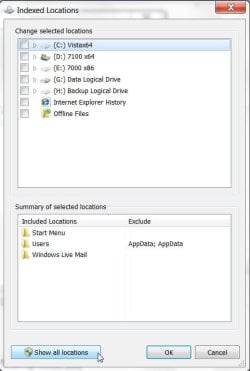
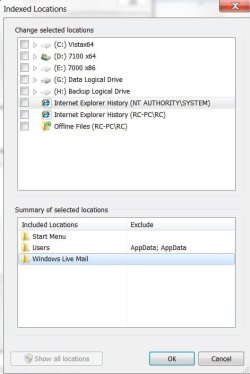
If you select the Show All locations - you find there are two entries for IE indexing - previously only one was visible :

INDEXER-1-2009-05-26_230147.jpg

INDEXER2009-05-26_225547.jpg

Could that be it?
 

My Computers

System One System Two

  • Computer type
    PC/Desktop
    OS
    7 X64
    CPU
    i5 8400
    Motherboard
    gigabyte b365m ds3h
    Memory
    2x8gb 3200mhz
    Hard Drives
    various
    PSU
    pure power 11 400w cm
    Case
    Coolermaster
    Cooling
    cryorig m9i
  • Computer type
    PC/Desktop
    OS
    7x64
    CPU
    g5400
    Motherboard
    ga b365m ds3h
    Memory
    8gb ddr4 2400
    PSU
    xfx pro 450w
If you select the Show All locations - you find there are two entries for IE indexing - previously only one was visible :

View attachment 12134

View attachment 12133

Could that be it?

Hello SIW2,

Were you able to stop ie history from indexing and keep it that way after deleting the cache?

Do recall selecting that a couple of times though never saw 2 entries for ie history. The entry that did show for IE history was from my user profile dir.. I gave up on trying to stop ie history from being indexed and uninstalled. Glad I did, it really did make a noticeable difference in performance, including web browsing.
 

My Computer

Computer Manufacturer/Model Number
POS
OS
OS3.5
CPU
celery
Motherboard
Good Question ...Unknown
Memory
memory never forgets
Graphics Card(s)
OB
Sound Card
OB
Monitor(s) Displays
HUGE
Screen Resolution
168000000x105000000
Hard Drives
full
PSU
OEM 65watt
Case
N/A
Cooling
OB
Keyboard
OB
Mouse
mouse
Internet Speed
1 Trillion MBps
Other Info
Still An Awesome Forum!
OH, and BTW,

...It would appear that the index/search service was the cause of the disk activity I originally posted about as it was quiet as a mouse last night. First time since running Win7.
 

My Computer

Computer Manufacturer/Model Number
POS
OS
OS3.5
CPU
celery
Motherboard
Good Question ...Unknown
Memory
memory never forgets
Graphics Card(s)
OB
Sound Card
OB
Monitor(s) Displays
HUGE
Screen Resolution
168000000x105000000
Hard Drives
full
PSU
OEM 65watt
Case
N/A
Cooling
OB
Keyboard
OB
Mouse
mouse
Internet Speed
1 Trillion MBps
Other Info
Still An Awesome Forum!
I don't use IE , so hard to say.

Do notice the disk activity tho. I have very little indexed.
 

My Computers

System One System Two

  • Computer type
    PC/Desktop
    OS
    7 X64
    CPU
    i5 8400
    Motherboard
    gigabyte b365m ds3h
    Memory
    2x8gb 3200mhz
    Hard Drives
    various
    PSU
    pure power 11 400w cm
    Case
    Coolermaster
    Cooling
    cryorig m9i
  • Computer type
    PC/Desktop
    OS
    7x64
    CPU
    g5400
    Motherboard
    ga b365m ds3h
    Memory
    8gb ddr4 2400
    PSU
    xfx pro 450w
Ahh, well, after i turned my Indexing off, i found my computer to be snappier, and load things a bit more quicker, and less accessing of the HDD, i seldom use it, so all it was doing was consuming my ram :|

Enzo.
 

My Computer

Computer Manufacturer/Model Number
Custom Build
OS
W7 RTM Ultimate x64
CPU
Intel Q8400 @ 2.66GHZ
Motherboard
Gigabyte GA-EG45M-UD2H
Memory
4GB DDR2-800
Graphics Card(s)
Gainward GTS 450 GLH 1GB Edition
Sound Card
Integrated 8 Channel
Monitor(s) Displays
AOC 23.6 Inch Widescreen LCD
Screen Resolution
1920x1080
Hard Drives
Seagate 500GB Internal
Western Digital 1TB Internal

Hitachi 1TB External
PSU
Apevia Java Power 500W
Case
Cooler Master HAF 922 Black
Cooling
Stock Intel CPU Fan
Keyboard
HP SK-2960 Multimedia Keyboard
Mouse
Logitech M350 Wireless Gaming Mouse
Internet Speed
1.5MB
Back
Top