Strange Dissapearing DVD

DoubleR

New member
Local time
7:23 PM
Messages
24
Recently I found that my DVD drive is missing in action when I bring up "computer" and it is no longer listed in the device list. I used the DVD several weeks back, and it also reports in BIOS and works when booting to my XP partition. So it seems to be a problem in my Win 7 build 7100 (64) install that has recently cropped up. I have tried to add devices and it is not recognized. My next thought it to reinstall the chip set drivers for my board to see if it will pop up again. I have an X38 board (Asus P5E3 deluxe WiFi...)

A quick search did not show much in the forum so advise is requested.

Also, the system would not correctly perform a System Restore and get error "An unspecified error occurred during system restore 0x800700005" I suspect this is may be related. edit - Seems this is not so uncommon and I can likely do a system resore using the install disk or booting into safe mode.
 
Last edited:

My Computer

Computer Manufacturer/Model Number
Home Built
OS
XP, Win_7 64 7100
CPU
Intel Q6600
Motherboard
ASUS P5E3 Deluxe X38 chipset
Memory
1033 4x1 GB
Graphics Card(s)
ATI 4850x2
Sound Card
SoundMax Intergrated
Monitor(s) Displays
SyncMaster 2493HM, SyncMaster 204t
Screen Resolution
1920x1200. 1600x120,
Hard Drives
VelociRaprtor Raid 0 300 GB array, Raid 1 750 GB array
PSU
PC P&C Silencer 750W Quad
Case
Cosmos
Cooling
Zallman 110 mm and more fans
Keyboard
Tarantula Razor
Mouse
LogitecMx518
Internet Speed
9.5 down .750 up
does the drive show if you stick a disc in it?

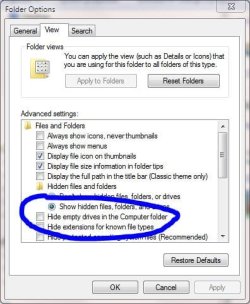
it may be a new feature in the new explorer - it doesn't display empty drives/partitions by default. you need to untick the 'hide' box.

to get the folder options window, press your Alt key while in explorer, to get the menu bar showing, then tools >> folder options >> view

this may or may not help!

*edit* oops, forgot to add snipshot - here we go:
 

Attachments

  • show.JPG
    show.JPG
    43.8 KB · Views: 9

My Computer

Computer Manufacturer/Model Number
mickey megabyte 1234
OS
ultimate 64 sp1
CPU
i5 2500K [email protected]
Motherboard
MSI P67A-GD53
Memory
8 gigs GSkill Ripjaws 1600
Graphics Card(s)
amd hd6950
Sound Card
creative x-fi gamer
Monitor(s) Displays
samsung 24"
Screen Resolution
1920x1080
Hard Drives
ocz vertex 2e 60 gig, samsung f3 1tb, buffalo 2tb ext
PSU
antec 550
Case
antec three hundred
Cooling
i'm a cooling fan
Keyboard
saitek eclipse ii
Mouse
logitech g3
Internet Speed
about 4 Mbps
Other Info
i love win7
does the drive show if you stick a disc in it?

No - The DVD blinks a few times and does nothing if I insert a disk.

And thanks for the tip. I took the check off to see if it helped and it did not. Although I seem to remember noticing this in the past that drive would not show up unless a disk was in it and now I know why.
 

My Computer

Computer Manufacturer/Model Number
Home Built
OS
XP, Win_7 64 7100
CPU
Intel Q6600
Motherboard
ASUS P5E3 Deluxe X38 chipset
Memory
1033 4x1 GB
Graphics Card(s)
ATI 4850x2
Sound Card
SoundMax Intergrated
Monitor(s) Displays
SyncMaster 2493HM, SyncMaster 204t
Screen Resolution
1920x1200. 1600x120,
Hard Drives
VelociRaprtor Raid 0 300 GB array, Raid 1 750 GB array
PSU
PC P&C Silencer 750W Quad
Case
Cosmos
Cooling
Zallman 110 mm and more fans
Keyboard
Tarantula Razor
Mouse
LogitecMx518
Internet Speed
9.5 down .750 up
Installing multiple pieces of software that address the ODDs directly can have this effect.

A common fix is to clear the registry of UpperFilters and LowerFilters setttings. Just delete the keys.
 
Installing multiple pieces of software that address the ODDs directly can have this effect.

A common fix is to clear the registry of UpperFilters and LowerFilters setttings. Just delete the keys.

It sure would help others if you give more info or point to a how-to then just say delete the keys
 

My Computer

OS
win 7 64 , Vista
CPU
Amd 64 X2 5600
Motherboard
Msi K9n MS-7250
Memory
4G Corsair PC2-6400
Graphics Card(s)
MSI Gefores 8800 GT
Monitor(s) Displays
Acer P221w
Screen Resolution
1680 x 1080
It sure would help others if you give more info or point to a how-to then just say delete the keys
If you mean that you do not know how to edit registry settings, just say so.

Better yet, start your own thread and ask how.

Do you need detailed instructions on how to start your own thread? If so, start your own thread and ask how.
 
Installing multiple pieces of software that address the ODDs directly can have this effect.

A common fix is to clear the registry of UpperFilters and LowerFilters setttings. Just delete the keys.

Thanks, I suspect this is it. Perhaps it occurred when I reinstalled a new version of IMGBurn the other day. I have some experience changing the registry. So I will do some searching around to find what keys you are referring to and are affected by this.
 

My Computer

Computer Manufacturer/Model Number
Home Built
OS
XP, Win_7 64 7100
CPU
Intel Q6600
Motherboard
ASUS P5E3 Deluxe X38 chipset
Memory
1033 4x1 GB
Graphics Card(s)
ATI 4850x2
Sound Card
SoundMax Intergrated
Monitor(s) Displays
SyncMaster 2493HM, SyncMaster 204t
Screen Resolution
1920x1200. 1600x120,
Hard Drives
VelociRaprtor Raid 0 300 GB array, Raid 1 750 GB array
PSU
PC P&C Silencer 750W Quad
Case
Cosmos
Cooling
Zallman 110 mm and more fans
Keyboard
Tarantula Razor
Mouse
LogitecMx518
Internet Speed
9.5 down .750 up
Delete the CD Keys

The reference Antman is talking about is this:
Vista
When I try to upgrade an earlier version of Windows to Windows Vista, I receive an error message: "Windows could not update the computer's boot configuration"
WARNING:Caution There can be many instances of the registry subkey that is mentioned in step 3. You must make sure that you are in the appropriate registry subkey before modifying the UpperFilters and the LowerFilters values. To verify that you are in the appropriate registry subkey, make sure that the Default data value is DVD/CD-ROM and the Class data value is CDROM.
Quote:
Step 1: Start Registry Editor
Click Start, type regedit in the quick search, and then click the regedit icon in the search results.
Registry Editor starts.
Step 2: Delete the UpperFilters registry entry
1. In Registry Editor, expand My Computer, and then expand HKEY_LOCAL_MACHINE.
2. Expand SYSTEM
3. Search for the key {4D36E965-E325-11CE-BFC1-08002BE10318} by unchecking the Values and Data options in Look At in the find dialog.
4. In the right pane (topic area), click UpperFilters.
Note An UpperFilters.bak registry entry may also appear. To delete the UpperFilters registry entry, you must click UpperFilters and not UpperFilters.bak.
5. On the Edit menu, click Delete.
6. When you receive the following message, click Yes to confirm the deletion of the UpperFilters registry entry:
Are you sure you want to delete this value?
The UpperFilters registry entry is removed from the {4D36E965-E325-11CE-BFC1-08002BE10318} registry subkey.
7. Repeat steps 3 - 6 until you have removed all of the UpperFilters entries from the registry (There can be multiple if you have multiple ControlSet keys present.
Note Do not exit Registry Editor. You must have this program for the next step.
Step 3: Delete the LowerFilters registry entry
1. In Registry Editor, expand My Computer, and then expand HKEY_LOCAL_MACHINE.
2. Expand SYSTEM.
3. Search for the key {4D36E965-E325-11CE-BFC1-08002BE10318} by unchecking the Values and Data options in Look At in the find dialog.
4. In the right pane (topic area), click LowerFilters.
Note An LowerFilters.bak registry entry may also appear. To delete the LowerFilters registry entry, you must click LowerFilters and not LowerFilters.bak.
5. On the Edit menu, click Delete.
6. When you receive the following message, click Yes to confirm the deletion of the LowerFilters registry entry:
Are you sure you want to delete this value?
The LowerFilters registry entry is removed from the {4D36E965-E325-11CE-BFC1-08002BE10318} registry subkey.
7. Repeat steps 3 - 6 until you have removed all of the UpperFilters entries from the registry (There can be multiple if you have multiple ControlSet keys present.
8. Exit Registry Editor.
It also goes back to Pre-Whistler Days, the problem is basically caused by 3rd party DVD Burners being installed that do not agree with MS way. ea one overwrites a specific file.
Roxio - Nero and Divx cause this if installed wrong.
 
Last edited:
Thank you, Snuffy. My post was there to bait someone to provide the detail I was lacking. Unsolicited smartass comments notwithstanding.
 

My Computer

Computer Manufacturer/Model Number
Home Built
OS
XP, Win_7 64 7100
CPU
Intel Q6600
Motherboard
ASUS P5E3 Deluxe X38 chipset
Memory
1033 4x1 GB
Graphics Card(s)
ATI 4850x2
Sound Card
SoundMax Intergrated
Monitor(s) Displays
SyncMaster 2493HM, SyncMaster 204t
Screen Resolution
1920x1200. 1600x120,
Hard Drives
VelociRaprtor Raid 0 300 GB array, Raid 1 750 GB array
PSU
PC P&C Silencer 750W Quad
Case
Cosmos
Cooling
Zallman 110 mm and more fans
Keyboard
Tarantula Razor
Mouse
LogitecMx518
Internet Speed
9.5 down .750 up
Well, let's not overlook the basics. Are the data and power cables properly seated? Is the device properly configured in BIOS?

Another trick that works for reasons of PFM - via Device Manager, UNINSTALL the drive and boot. Allow Windows to discover and install the drive.
 
I went back through Snuffy's info and found all control sets for this key. No other UpperFilters and LowerFilters values were found to remove. Itunes is complaining that the registry was changed and needs to be reinstalled. I do not think that will fix the problem though.


I will try disconnect, boot, connect boot next
 

My Computer

Computer Manufacturer/Model Number
Home Built
OS
XP, Win_7 64 7100
CPU
Intel Q6600
Motherboard
ASUS P5E3 Deluxe X38 chipset
Memory
1033 4x1 GB
Graphics Card(s)
ATI 4850x2
Sound Card
SoundMax Intergrated
Monitor(s) Displays
SyncMaster 2493HM, SyncMaster 204t
Screen Resolution
1920x1200. 1600x120,
Hard Drives
VelociRaprtor Raid 0 300 GB array, Raid 1 750 GB array
PSU
PC P&C Silencer 750W Quad
Case
Cosmos
Cooling
Zallman 110 mm and more fans
Keyboard
Tarantula Razor
Mouse
LogitecMx518
Internet Speed
9.5 down .750 up
What burner programs do you have installed.?
I'm not familiar with what iTunes might do.. but apparently iTunes could also be affecting.

I will try disconnect, boot, connect boot next
can you explain to me what that means.
 
This forum and the folks that help out are great. The problem is resolved. I realized that the Jmicron storage controller was missing too. I installed the latest win 7 WHQL driver from Jmicron. The DVD is back.

Now I know that I said the DVD had been working, I have installed software from the DVD for example. But I do not think I ever installed the drivers for the Jmicron controller. I quess windows 7 had a driver installed that was working up to this point.

Anyway Cheers


I will try disconnect, boot, connect boot next
can you explain to me what that means.

I could not remove the DVD from the device list because it was not listed. So I unplugged the IDE cable, Restarted, and then shutdown and restarted after I made sure all of the cables were snug. I was thinking that maybe it would recognize the DVD drive again. That did not fix it. Watching the reboot is when it dawned on me that I that the JMicron controller was not listed in the device list either and it is the IDE controller for this motherboard.
 

My Computer

Computer Manufacturer/Model Number
Home Built
OS
XP, Win_7 64 7100
CPU
Intel Q6600
Motherboard
ASUS P5E3 Deluxe X38 chipset
Memory
1033 4x1 GB
Graphics Card(s)
ATI 4850x2
Sound Card
SoundMax Intergrated
Monitor(s) Displays
SyncMaster 2493HM, SyncMaster 204t
Screen Resolution
1920x1200. 1600x120,
Hard Drives
VelociRaprtor Raid 0 300 GB array, Raid 1 750 GB array
PSU
PC P&C Silencer 750W Quad
Case
Cosmos
Cooling
Zallman 110 mm and more fans
Keyboard
Tarantula Razor
Mouse
LogitecMx518
Internet Speed
9.5 down .750 up
It sure would help others if you give more info or point to a how-to then just say delete the keys
If you mean that you do not know how to edit registry settings, just say so.

Better yet, start your own thread and ask how.

Do you need detailed instructions on how to start your own thread? If so, start your own thread and ask how.

I do know how to edit registry but i am not the one needing the help.

There are some that do come here for help that do not know how , so only give part of some help that cane screw there system up is no help at all
 

My Computer

OS
win 7 64 , Vista
CPU
Amd 64 X2 5600
Motherboard
Msi K9n MS-7250
Memory
4G Corsair PC2-6400
Graphics Card(s)
MSI Gefores 8800 GT
Monitor(s) Displays
Acer P221w
Screen Resolution
1680 x 1080
Back
Top