Bushmaster03
New member
- Local time
- 3:52 PM
- Messages
- 11
Greetings all,
I recently upgraded my system with an i7 3930k, a G1 Assassin 2 motherboard, and corsair quad channel memory (system specs below). After conducting a secure erase of my SSD and HDD using Diskpart, I attempted to install Windows 7 on the SSD. The installation goes smoothly until the system restarts and resumes with, "please wait while windows checks your computer's performance."
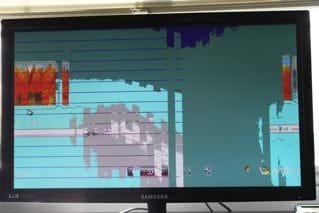
From that point on (until the system is restarted) the display is distorted, oddly colored, and the mouse pointer leaves a trail of colors and square shapes. I can tell that the setup is at the username and password screen, but because of the distorted colors and shapes, it is difficult to decipher. If I restart the system at this point, it resumes with the username entry step of the setup and the screen is completely normal.
The first time this happened, I though it was strange but continued on with updating Windows 7 and setting up my PC. However, after the WEI (experience index test) failed several times, and the system crashed with several BSODs (mainly 1a and 4e) I decided something must be wrong.
I have been attempting to isolate the problem, initially thinking it must be the memory, but since the processor, motherboard, and memory are new I am having a difficult time. Has anyone heard of or experienced this issue? I have replicated the problem four times on different hard drives (SSD and HDD) and have even swapped video cards. Nothing seems to work.
System specs:
CPU: i7 3930k
CPU Cooler: NH-D14
MB: G1 Assassin2
Memory: Corsair Vengeance LP 16gb quad channel 1600mhz
SSD: OCZ Vertex III 120gb
HDD: WD Caviar Black 1TB
Video: 2x MSI GTX 580 Lightning SLI
PSU: Corsair AX1200
Thanks in advance for the support,
Jim
I recently upgraded my system with an i7 3930k, a G1 Assassin 2 motherboard, and corsair quad channel memory (system specs below). After conducting a secure erase of my SSD and HDD using Diskpart, I attempted to install Windows 7 on the SSD. The installation goes smoothly until the system restarts and resumes with, "please wait while windows checks your computer's performance."
From that point on (until the system is restarted) the display is distorted, oddly colored, and the mouse pointer leaves a trail of colors and square shapes. I can tell that the setup is at the username and password screen, but because of the distorted colors and shapes, it is difficult to decipher. If I restart the system at this point, it resumes with the username entry step of the setup and the screen is completely normal.
The first time this happened, I though it was strange but continued on with updating Windows 7 and setting up my PC. However, after the WEI (experience index test) failed several times, and the system crashed with several BSODs (mainly 1a and 4e) I decided something must be wrong.
I have been attempting to isolate the problem, initially thinking it must be the memory, but since the processor, motherboard, and memory are new I am having a difficult time. Has anyone heard of or experienced this issue? I have replicated the problem four times on different hard drives (SSD and HDD) and have even swapped video cards. Nothing seems to work.
System specs:
CPU: i7 3930k
CPU Cooler: NH-D14
MB: G1 Assassin2
Memory: Corsair Vengeance LP 16gb quad channel 1600mhz
SSD: OCZ Vertex III 120gb
HDD: WD Caviar Black 1TB
Video: 2x MSI GTX 580 Lightning SLI
PSU: Corsair AX1200
Thanks in advance for the support,
Jim
My Computer
- OS
- Windows 7 Home Premium x64
- CPU
- i7 3930k
- Motherboard
- Gigabyte G1 Assassin2
- Memory
- Corsair Vengeance LP 16gb (4x4gb) DDR3 1600mhz
- Graphics Card(s)
- GTX 580 lightning SLI
- Hard Drives
- OCZ Vertex III 120gb
WD Caviar Black 1TB
- PSU
- Corsair AX1200
- Case
- Silverstone FT02
- Cooling
- NH-D14