Strange .doc icons and context menu issue. Please help!

jer85

New member
Local time
7:03 PM
Messages
1
I've just installed Windows 7, and right afterwards Office 2003. I've noticed, that while .rtf documents had the normal Word icons, the .doc documents were still associated with Wordpad. Manually, using the "Open with" menu I've re-associated .doc files by default with Word. When I double click on them Word opens them, however the icons of the .doc files are different from those of the .rtf files. (Now their appearance refer to Word, but they are not the "original" Word icons. It looks like as if I associated an alien extension with Word, for example .jpg or .pdf. It seems as if Word wouldn't really like to recognize .doc files as its own.)
Moreover, when on the desktop I do a right-click and select "New" I can create every file types of the installed Office applications (.xml, .ppt, .mdb) except a .doc file, there is no possibility to create any Word documents that way at all.

So according to the mentioned problems I think Word has some problems with managing its own file extension. I repaired and also re-installed Office, but that didn't help.
Until now I used the RC version of Windows 7 but I didn't have this problem.

If you could help me solving this issue I'd be very grateful!
 

My Computer My Computer

OS
Windows 7
Windows 7 does not recognize DOC files!

I have Windows 7 and both MS Word 2000, Office/Word 2003, and Word 2007. I also have Adobe Acrobat Reader 9. Windows 7 does not allow a file association for anything other than Wordpad (useless). I know how to force an association - it does not work. If I open the program, I can go looking for the document, but if I double-click on the DOC or PDF icon, nothing happens (except in the case of the DOC icon, it offers Wordpad). This is extremely frustrating! You would think that the makers of Windows 7 would have built-in functionality for 2 of the most prolific word processors (Word & Reader). Very strange. I have hired a computer geek to work on it - so far he is stumped too! :mad:
 

My Computer My Computer

Computer Manufacturer/Model Number
HP p6210f
OS
Windows 7 Home Edition
CPU
AMD
Motherboard
Quad-Core
Memory
6 GB
Graphics Card(s)
Raedon 1 GB
Sound Card
Soundblaster
Monitor(s) Displays
Hanspree 25"
Hard Drives
640 GB
PSU
Unknown
Case
HP Tower
Cooling
Fan
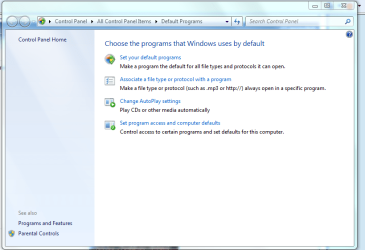
Hi, have you tried to associate a file to a particular program. Default Programs.


file.PNG
 

My Computer My Computer

Computer Manufacturer/Model Number
Self Build 64bit
OS
Vista Ult64, Win7600
CPU
Intel Core 2 Quad Q6600 @ 2400 MHz 64bit OS
Motherboard
Asus P5E3 Deluxe WiFi @p 64 bit OS
Memory
4096 MB DDR3-SDRAM
Graphics Card(s)
ATI Radeon HD 3870 Series x2 Crossfired
Sound Card
Realtek on board
Monitor(s) Displays
Samsung SyncMaster - 23 inches
Screen Resolution
1680x1050 pixels at 60 Hz in True Colors
Hard Drives
Hitachi (250 GB)/Samsung 750 GB. /Barracuda 160 GB.
My Book 1 TB external..
PSU
Cooler Master 1000w
Case
Cooler Master Cosmos 1000.
Cooling
Fans and fresh air,
Keyboard
Wireless
Mouse
Wireless
Internet Speed
Never fast enough
Other Info
I use a Magnum.
You might want to download this great app.

It's called FileTypesMan 1.56.

However word documents are totally different than standard icons They get the association from the CL]windows\installer folder.
 

My Computer My Computer

Computer Manufacturer/Model Number
Cheap $399.00 E-Machine
OS
Windows 7 Pro & Vista Home Premium
CPU
Athlon 64 3800+ (Orleans) 2.40GHz
Motherboard
Winfast
Memory
2GB DDR2 RAM DIMM
Graphics Card(s)
NVIDIA GeForce 8500 GT 512 MB memory HDMI out
Sound Card
creative X-Fi Exteme 7..1 channel
Monitor(s) Displays
Acer V223W 22" widescreen DVI
Screen Resolution
1680x1050
Hard Drives
WDC WD5 500GB
WDC WD25 250GB
PSU
OCZ 550 watt
Case
Gateway
Cooling
2 fans
Keyboard
Dell
Mouse
Sony Vaio
Internet Speed
18MB/s down - .72MB /s up
Back
Top