
strange icon/shortcut in my usb flash

amoretam

New member
Power User
Local time
4:25 PM
Messages
362
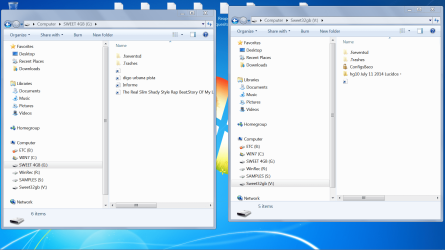
Hi, as you can see in the pic, I get these icons sometimes when I copy files to my usb drives.

When I click on them, for example if it's an audio file, the file opens in VLC, .. but the file is a shorcut to another location...! usually to system32 folder...

I dont really understand what is happening...

Anyone , ?..

thanks
 

Attachments
  • strange shorcut iconos.png
    strange shorcut iconos.png
    147.6 KB · Views: 11

My Computer My Computer

At a glance

Windows 7 x64bit Home PremiumIntel Core i5-2500K Quad-Core Processor 3.3 G...8GB G.Skill DDR3 PC3-12800 1600MHz - F3-12800...Sandy Bridge
Computer type
PC/Desktop
Computer Manufacturer/Model Number
Custom Build
OS
Windows 7 x64bit Home Premium
CPU
Intel Core i5-2500K Quad-Core Processor 3.3 GHz 6 MB Cache
Motherboard
Intel Desktop Board Media Series LGA 1155 DDR 1333 Micro-ATX
Memory
8GB G.Skill DDR3 PC3-12800 1600MHz - F3-12800CL9D-8GBRL
Graphics Card(s)
Sandy Bridge
Sound Card
M-Audio Fast Track PRO - Avid digidesign 003 rack factory
Monitor(s) Displays
Acer X233H LCD monitor
Screen Resolution
1920x1080
Hard Drives
OS Drive: Silicon Power 256GB SSD 3D NAND A55 SLC Cache Performance Boost SATA III
PSU
Cooler Master eXtreme Power Plus 500w Power Supply
Other Info
This Computer was built from scratch
Looks like you copied the SHORTCUT and not the actual file to the USB drive. Like you might have shortcuts on your desktop to the actual files, and you forgot those are just shortcuts. So you 'copy the file' from the DT to the USB drive, but you are only copying the shortcut itself. You have to go to the actual file itself and copy that to paste to your stick.

EDIT: Because those 'funny icons' on the stick are shortcut icons. :) Once you paste the actual files, you will have the appropriate icon for the file. And BTW if you moved one of those files on your computer, the shortcut on the stick would no longer work. And of course if you plug the stick into a different computer the shortcuts won't work.
 

My Computer My Computer

At a glance

Win 7 Ultimate 64-bit
OS
Win 7 Ultimate 64-bit
Looks like you copied the SHORTCUT and not the actual file to the USB drive. Like you might have shortcuts on your desktop to the actual files, and you forgot those are just shortcuts. So you 'copy the file' from the DT to the USB drive, but you are only copying the shortcut itself. You have to go to the actual file itself and copy that to paste to your stick.

EDIT: Because those 'funny icons' on the stick are shortcut icons. :) Once you paste the actual files, you will have the appropriate icon for the file. And BTW if you moved one of those files on your computer, the shortcut on the stick would no longer work. And of course if you plug the stick into a different computer the shortcuts won't work.

This is it.
 

My Computer My Computer

At a glance

Windows 7 Home Premium x64Intel Core I7 4790 @ 3.6ghz (4.0ghz turbo boo...8gb DDR3 Corsair Vengeance (2x4)iGPU intel HD graphics 4600
Computer type
PC/Desktop
Computer Manufacturer/Model Number
Custom Built Desktop
OS
Windows 7 Home Premium x64
CPU
Intel Core I7 4790 @ 3.6ghz (4.0ghz turbo boost), stock
Motherboard
Asus z97m-plus, stock BIOS
Memory
8gb DDR3 Corsair Vengeance (2x4)
Graphics Card(s)
iGPU intel HD graphics 4600
Sound Card
Integrated Asus Crystal Sound
Screen Resolution
1920x1080
Hard Drives
WD Caviar Green 1tb,
Kingston v300 120gb
PSU
Cooler Master B600 - 600W
Case
Aerocool qs-200 White Lite
Cooling
Stock case cooler and stock CPU cooler
Antivirus
None
Browser
Chrome/IE
Looks like you copied the SHORTCUT and not the actual file to the USB drive. Like you might have shortcuts on your desktop to the actual files, and you forgot those are just shortcuts. So you 'copy the file' from the DT to the USB drive, but you are only copying the shortcut itself. You have to go to the actual file itself and copy that to paste to your stick.

EDIT: Because those 'funny icons' on the stick are shortcut icons. :) Once you paste the actual files, you will have the appropriate icon for the file. And BTW if you moved one of those files on your computer, the shortcut on the stick would no longer work. And of course if you plug the stick into a different computer the shortcuts won't work.

This is it.
I dont really think this is the problem. It happens now and then. For example a friend of mine wanted to give an audio file from his computer to my USB flash, when I connected my usb flash to my computer the funny shorcut icon was there... it happens with my other usb flash too, ..

A Virus???? maybe?
 

My Computer My Computer

At a glance

Windows 7 x64bit Home PremiumIntel Core i5-2500K Quad-Core Processor 3.3 G...8GB G.Skill DDR3 PC3-12800 1600MHz - F3-12800...Sandy Bridge
Computer type
PC/Desktop
Computer Manufacturer/Model Number
Custom Build
OS
Windows 7 x64bit Home Premium
CPU
Intel Core i5-2500K Quad-Core Processor 3.3 GHz 6 MB Cache
Motherboard
Intel Desktop Board Media Series LGA 1155 DDR 1333 Micro-ATX
Memory
8GB G.Skill DDR3 PC3-12800 1600MHz - F3-12800CL9D-8GBRL
Graphics Card(s)
Sandy Bridge
Sound Card
M-Audio Fast Track PRO - Avid digidesign 003 rack factory
Monitor(s) Displays
Acer X233H LCD monitor
Screen Resolution
1920x1080
Hard Drives
OS Drive: Silicon Power 256GB SSD 3D NAND A55 SLC Cache Performance Boost SATA III
PSU
Cooler Master eXtreme Power Plus 500w Power Supply
Other Info
This Computer was built from scratch
Please don't take things easy. It could be the Shortcut virus that can steal and relay your personal information to a distant master server.

Download, install and run USBFix on your PC and infected USB drives to cleanse and get rid of it.

UsbFix - Official Website ( Read the tutorial and other links in the webpage too.)
 

My Computer My Computer

At a glance

Windows 7 Home Premium 32 bit
OS
Windows 7 Home Premium 32 bit
Please don't take things easy. It could be the Shortcut virus that can steal and relay your personal information to a distant master server.

Download, install and run USBFix on your PC and infected USB drives to cleanse and get rid of it.

UsbFix - Official Website ( Read the tutorial and other links in the webpage too.)

thank you , this did it, ... it found it as a virus shorcut or something and delete it, ...

thanks
 

My Computer My Computer

At a glance

Windows 7 x64bit Home PremiumIntel Core i5-2500K Quad-Core Processor 3.3 G...8GB G.Skill DDR3 PC3-12800 1600MHz - F3-12800...Sandy Bridge
Computer type
PC/Desktop
Computer Manufacturer/Model Number
Custom Build
OS
Windows 7 x64bit Home Premium
CPU
Intel Core i5-2500K Quad-Core Processor 3.3 GHz 6 MB Cache
Motherboard
Intel Desktop Board Media Series LGA 1155 DDR 1333 Micro-ATX
Memory
8GB G.Skill DDR3 PC3-12800 1600MHz - F3-12800CL9D-8GBRL
Graphics Card(s)
Sandy Bridge
Sound Card
M-Audio Fast Track PRO - Avid digidesign 003 rack factory
Monitor(s) Displays
Acer X233H LCD monitor
Screen Resolution
1920x1080
Hard Drives
OS Drive: Silicon Power 256GB SSD 3D NAND A55 SLC Cache Performance Boost SATA III
PSU
Cooler Master eXtreme Power Plus 500w Power Supply
Other Info
This Computer was built from scratch
Glad it helped.:)

Periodically run Malwarebytes Anti-Malware (Free) to check your PC and other drives. https://www.malwarebytes.org/

You may mark this thread as solved. It will help others.
 

My Computer My Computer

At a glance

Windows 7 Home Premium 32 bit
OS
Windows 7 Home Premium 32 bit

My Computer My Computer

At a glance

Windows 7 Ultimate
Computer type
Laptop
Computer Manufacturer/Model Number
HP
OS
Windows 7 Ultimate
Back
Top