Strange Install Problem

@gregrocker:
I installed another windows 7 on a different partition and all went well.I also managed to make a win 7 repair disk.
I cant find how to make an XP repair disk...do you know ?
 

My Computer

OS
Windows home premium 64 bit
CPU
AMD Athlon II Dual Core 2.3Ghz
Memory
2048 MB DDR SD RAM
Graphics Card(s)
AMD M88OG with ATI Mobility Radeon HD 4250
Hard Drives
500 Gb
Why did you install another Win7? Did you boot the installer this time to install it?

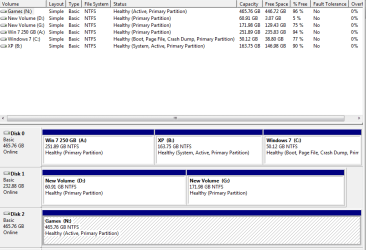
Please post back a screenshot of Disk Management - Post a Screen Capture Image and tell us which ones you want to keep so we can tell you how to delete the other one. Where do you want the space to go for the deleted OS?
 
Im ok with how my PC is setup. I installed another win 7 to use as my C: drive ( my main drive ) for E-Mails and surfing etc etc.I will use the first instalation of Win 7 just for games and the XP partition is just for older programes.I installed Win 7 the normal way ( using my Win 7 install disk )
Can you explain how to make a recovery/repair disk for XP please ?
 

My Computer

OS
Windows home premium 64 bit
CPU
AMD Athlon II Dual Core 2.3Ghz
Memory
2048 MB DDR SD RAM
Graphics Card(s)
AMD M88OG with ATI Mobility Radeon HD 4250
Hard Drives
500 Gb
We should still see the Disk Management screenshot as half the time they are incorrect and sometimes wildly so. I wouldn't have asked if it wasn't absolutely needed.

XP Repair console is on its CD. You'll see it when you boot the disk. XP Repair Install

You must have a second license for a second Win7. And they should each boot as C when you are in them.
 
I have decided to give up on XP.
Everything was going just fine then on the weekend I tried to load XP and got an error message about System32\hal.dll.I googled it and it is the XP boot loader,I am not going to mess about with the boot loader because I could end up where I was at the start of this thread.
If running XP and Win 7 in a dual boot is that much hassel I will stick with just Win 7.Maybe one day I can buy another PC just for XP and my older games.
 

My Computer

OS
Windows home premium 64 bit
CPU
AMD Athlon II Dual Core 2.3Ghz
Memory
2048 MB DDR SD RAM
Graphics Card(s)
AMD M88OG with ATI Mobility Radeon HD 4250
Hard Drives
500 Gb
The startup message I got was:
<windows root>\System32\hal.dll is missing or corrupt etc etc.
I googled it and it is a problem with the XP boot loader.Like I said, if XP is that much of a problem then I wont have it,also I dont know how to take a screen shot and post it on this forum.
 

My Computer

OS
Windows home premium 64 bit
CPU
AMD Athlon II Dual Core 2.3Ghz
Memory
2048 MB DDR SD RAM
Graphics Card(s)
AMD M88OG with ATI Mobility Radeon HD 4250
Hard Drives
500 Gb
Ok, here is the screen shot.
The main thing is that I have 4 OS ( 3 win 7 ) and 1 XP.The other partitions do not have any operating systems on them,they are just for games,pictures,music etc etc.
 

Attachments

  • Capture.PNG
    Capture.PNG
    16 KB · Views: 0

My Computer

OS
Windows home premium 64 bit
CPU
AMD Athlon II Dual Core 2.3Ghz
Memory
2048 MB DDR SD RAM
Graphics Card(s)
AMD M88OG with ATI Mobility Radeon HD 4250
Hard Drives
500 Gb
Why do you need 3 Win7's? That is excessive. Better to have one perfect install.

XP is booting all OS's. If you ever want to remove it it will require Marking Win7 Partition Active to run Startup Repair - Run 3 Separate Times with all other drives unplugged. When Win7 partition starts and holds the System flag, you can delete XP partition and recover the space using Disk Mgmt Partition or Volume - Extend , or How to extend partition easily with Partition Wizard - video help. Then install EasyBCD to 7 to add the other OS's.

Games N: partition should not be marked Active as only the System partition should be marked Active: Partition - Mark as Inactive - Windows 7 Forums
 
Last edited:
The reason I have 3 windows 7s is because I use the large one for games only (N) I use the 250GB one (A) for downloading patches music etc etc and for using utilities like Gimp for photo editing.I use the smallest partition 50GB (C) for E-Mails and surfing only.
I know how to wipe XP and make (A) bigger ( enlarge partition ) but I would like to keep XP if I can ( for older games ) any way of doing this ?
 

My Computer

OS
Windows home premium 64 bit
CPU
AMD Athlon II Dual Core 2.3Ghz
Memory
2048 MB DDR SD RAM
Graphics Card(s)
AMD M88OG with ATI Mobility Radeon HD 4250
Hard Drives
500 Gb
If you want XP since it is booting all OS's anyway right now then I would go ahead and try to repair it. If it succeeds it will grab the boot for itself as XP does when installed/repaired last. But this is OK since you want to reassert the Win7 bootloader anyway to move the System flag to Win7 to have your main Win7 OS booting the system and not XP. We can help you do this as we have for thousands of others successfully.

First, put your XP disk in the drive and boot it. Follow these steps to attempt to repair XP boot: How to Fix MBR in Windows XP and Vista

If this doesn't boot XP, then boot into disk again to run an XP Repair Install.

Once XP starts, I'd save a backup image so you have a working copy of XP backed up which you can reapply anywhere in the future: Macrium - Image your system

Now to reaasert the Win7 boot while moving the System flag to Win7 from XP so that Win7 is booting your system.

Follow these steps:

From XP or if necessary the Win7 disk Mark your main Win7 Partition Active, then power down to unplug all other drives, boot into Win7 disk to run Startup Repair - Run 3 Separate Times until Win7 starts and holds the System flag.

Now install EasyBCD (click Download - no Name or Email required) to add the other OS's.


Thanks,I will try that,but note that I will be away for this week so can not get back to you till next week.Ok.
Thanks
 

My Computer

OS
Windows home premium 64 bit
CPU
AMD Athlon II Dual Core 2.3Ghz
Memory
2048 MB DDR SD RAM
Graphics Card(s)
AMD M88OG with ATI Mobility Radeon HD 4250
Hard Drives
500 Gb
Back
Top