Strange ITUNES Issue that just popped up.

Windows7inMiami

New member
Member
VIP
Local time
10:46 AM
Messages
120
Ever since I upgraded to 7 my ITUNES has been extremely iffy and acting weird. After my third delete and install no matter what I do the Itunes does not automatically recognize my extremely huge music collection, so I have to drag and drop it all and when I do, anything I add to Itunes music does't "ADD", I have to my self physically drag and drop the music into the "My Music" folder and I cannot figure out why?

Help?

Thanks Guys!


****QUICK UPDATE****** It just decided not to recognise an of my music so I am deleting ITUNES completely, maybe some install help? Maybe something that is left on my computer is an issue? I just want Itunes to work properly and IDK how to do that. As you read this I am itunes less.....
 

My Computer My Computer

At a glance

Windows 7ATI
Computer Manufacturer/Model Number
Gateway NV52
OS
Windows 7
Graphics Card(s)
ATI
Fill out your system specs so that we can trouble shoot more effectively.
Thanks.
 

My Computer My Computer

At a glance

Windows 7 7600 1 X64AMD PHENOM II X 550 PROCESSOR 3.1 ghzCorsair 4 gig ddr 3ati radeon 3300
Computer Manufacturer/Model Number
Custom Build
OS
Windows 7 7600 1 X64
CPU
AMD PHENOM II X 550 PROCESSOR 3.1 ghz
Motherboard
ASUS M4A78-TE
Memory
Corsair 4 gig ddr 3
Graphics Card(s)
ati radeon 3300
Sound Card
ati hd
Monitor(s) Displays
syncmaster 2033sw
Screen Resolution
1600X900 60 hz refresh
Hard Drives
twin_seagates SATA's 1 TB & 500 Gig, hitachi_slimline 160 gig
PSU
antec_550 watt
Case
cooler master GLite
Cooling
stock_heat sink
Internet Speed
20mbs up/ 1.5mbs down
Other Info
favorite child "stewie"
favorite dog "brian"
Sorry, it is a Gateway NV52. I just clean installed Win7
 

My Computer My Computer

At a glance

Windows 7ATI
Computer Manufacturer/Model Number
Gateway NV52
OS
Windows 7
Graphics Card(s)
ATI
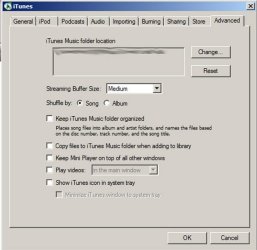
I use an older version of iTunes and it has a checkbox to let iTunes take control. I don't want iTunes to have any control, but you do and so you may have to place checks in these checkboxes under preferences/advanced:
 

Attachments

  • Untitled-1.jpg
    Untitled-1.jpg
    39.4 KB · Views: 24

My Computer My Computer

At a glance

Windows 7 Home Premium SP1, 64-bitIntel Skylake i5-6600K, not overclocked8 GB HyperX DDR4-2666 (2 x 4 GB)none; graphics are integrated on CPU
Computer type
PC/Desktop
Computer Manufacturer/Model Number
Ignatz Special; 4 speed manual gearbox; factory air conditioning; one of one
OS
Windows 7 Home Premium SP1, 64-bit
CPU
Intel Skylake i5-6600K, not overclocked
Motherboard
AsRock Z170M Extreme 4, micro ATX
Memory
8 GB HyperX DDR4-2666 (2 x 4 GB)
Graphics Card(s)
none; graphics are integrated on CPU
Sound Card
onboard: Realtek ALC1150; external: USB Behringer UF0-202
Monitor(s) Displays
Dell S2340M 23 inch IPS
Screen Resolution
1600 x 900
Hard Drives
System: Crucial MX100 series SSD, 128 GB;
Data: Samsung Spinpoint 103SJ, 1 TB;
Backup: WD Caviar Green WD30EZRX-00D8PB0, 3 TB
PSU
Rosewill SilentNight 500 watt fanless, semi-modular
Case
Antec Solo II
Cooling
Noctua NH-U12S; Noctua F12 intake, Noctua S12A exhaust
Keyboard
Microsoft 200 6JH-00001 USB
Mouse
Dell or Microsoft optical wired; USB
Antivirus
Microsoft Security Essentials and Malwarebytes Premium
Browser
Pale Moon
Other Info
All fans PWM; speeds at idle: CPU circa 500 rpm; intake circa 600 rpm; exhaust circa 600 rpm; CPU temps 27 idle and 47 C load in a warm room (27 C/81 F) when running Intel Extreme Tuning Utility stress test.
I just say no to iTunes.:p

If you have an iPod, there are several other programs that will work with them now besides iTunes. Mediamonkey, Winamp, and I think foobar2000 all will work with iPods, and the J. River Media app might as well.
 

My Computer My Computer

At a glance

Win 7 Ultimate 64-bit SP1 (desktop)Intel Core 2 Duo E84002x 2GB OCZ DDR II SDRAM PC2-6400NVIDIA GeForce 9400GT
Computer type
PC/Desktop
Computer Manufacturer/Model Number
Gigabyte Technology Co., Ltd.
OS
Win 7 Ultimate 64-bit SP1 (desktop)
CPU
Intel Core 2 Duo E8400
Motherboard
Gigabyte GA-EP35-DS3R
Memory
2x 2GB OCZ DDR II SDRAM PC2-6400
Graphics Card(s)
NVIDIA GeForce 9400GT
Monitor(s) Displays
HP 2009m(primary), Acer P191W
Screen Resolution
1600x900, 1440x900
Hard Drives
Internal:WD Caviar Black 640GB 32MB cache 7200RPM
External:Samsung Story Station 1TB HDD desktop drive
500GB Toshiba portable drive
PSU
Antec Earthwatts EA500D
Case
Antec Sonata III
Cooling
4 fans
Keyboard
Logitech Wave
Mouse
Logitech M-SBF90
Internet Speed
Slow due to home Wireless-G router
Antivirus
MSE, Hitman Pro, Malwarebytes
Browser
Chrome and Palemoon
Other Info
Laptop....Acer 5750Z-4835
15.6" HD Widescreen CineCrystal™ LED-backlit LCD Display: (1366x768 resolution, 16:9 aspect ratio)
Intel® Pentium® Processor B940 (2.0GHz, 2MB L3 cache)
Windows® 7 Home Premium,500GB Hard Drive,4GB DDR3 RAM, Intel® HD Graphics,8X DVD-Super Multi Double-Layer Drive
Multi-in-1 Digital Media Card Reader,802.11b/g/n Wi-Fi
Chrome and Palemoon, MSE, Hitman Pro
any new help would be great, this is a new issue and IDK how to get around it.
 

My Computer My Computer

At a glance

Windows 7ATI
Computer Manufacturer/Model Number
Gateway NV52
OS
Windows 7
Graphics Card(s)
ATI
I think I may be confused.

In your itunes, if you go to options/ Add / new Folder/ my Music it should work.

Is it not adding anything?
 

My Computer My Computer

At a glance

Windows 7 Home Premium 64bitIntel Core i7 2700k8GB Mushkin Redline Ridgebacks @1866EVGA GTX570 SC
Computer Manufacturer/Model Number
Custom (Self Build)
OS
Windows 7 Home Premium 64bit
CPU
Intel Core i7 2700k
Motherboard
eVGA P67 SLI
Memory
8GB Mushkin Redline Ridgebacks @1866
Graphics Card(s)
EVGA GTX570 SC
Sound Card
XiFi Titanium HD
Monitor(s) Displays
LG W2453V
Screen Resolution
1920x1080
Hard Drives
Intel 320 80GB -- Intel X25-V 40GB --WD Black 1TB x2 -- WD Blue 640GB
PSU
Seasonic x750
Case
Corsair 600T SE White
Cooling
eVGA Superclocked CPU Cooler
Keyboard
Saitek Cyborg
Antivirus
Kaspersky
Browser
IE
Other Info
LG BD/DVD
Miami, since you re-installed itunes it may have not completely added your existing libraries and play lists. You may have to create new playlists and libraries by using the Itunes/Files/Add Library folder and so on.
Here is a screenshot showing you how to add music folders and playlists, maybe it will help.

Regards,
Adrian
 

Attachments

  • library.jpg
    library.jpg
    196.4 KB · Views: 85

My Computer My Computer

At a glance

Windows 7 7600 1 X64AMD PHENOM II X 550 PROCESSOR 3.1 ghzCorsair 4 gig ddr 3ati radeon 3300
Computer Manufacturer/Model Number
Custom Build
OS
Windows 7 7600 1 X64
CPU
AMD PHENOM II X 550 PROCESSOR 3.1 ghz
Motherboard
ASUS M4A78-TE
Memory
Corsair 4 gig ddr 3
Graphics Card(s)
ati radeon 3300
Sound Card
ati hd
Monitor(s) Displays
syncmaster 2033sw
Screen Resolution
1600X900 60 hz refresh
Hard Drives
twin_seagates SATA's 1 TB & 500 Gig, hitachi_slimline 160 gig
PSU
antec_550 watt
Case
cooler master GLite
Cooling
stock_heat sink
Internet Speed
20mbs up/ 1.5mbs down
Other Info
favorite child "stewie"
favorite dog "brian"
Well everything is now doubled. IDk how to get rid of that as I deleted half of them already. Such a stupid issue. IDK what to do now.
 

My Computer My Computer

At a glance

Windows 7ATI
Computer Manufacturer/Model Number
Gateway NV52
OS
Windows 7
Graphics Card(s)
ATI
OK i got it to work, thanks to ignatzatsonic.

I just had to find the setting, wait ages as all the music was copied and then delete the original, and then wait another age while my IPOD was re synced.
 

My Computer My Computer

At a glance

Windows 7ATI
Computer Manufacturer/Model Number
Gateway NV52
OS
Windows 7
Graphics Card(s)
ATI
Back
Top