I have a problem with the appearance of the glass effect of the taskbar and windows title.
They both look like aero peek windows with the "shadow stripes". You can see what I mean in the attached pictures. The picture to the left is how it looks on my computer.
After much troubleshooting with my Windows 7 computers I have found the source of the problem but now how to solve it.
Here is how I reproduce the problem:
Personalize -> Window Color
Move the Color intensity slider and the shadow strips appear. Even if I click cancel the damage is done..
Can anyone tell me how to get the appearance back to normal? I know this is a tiny visual problem but it is driving me mad
Thanks in advance!
/ Nicko
Attachments
bad.png
6.1 KB
· Views: 37
ok.png
4 KB
· Views: 29
My Computer
At a glance
Windows 7 Home Premium x64ATI Radeon HD 5700 Series
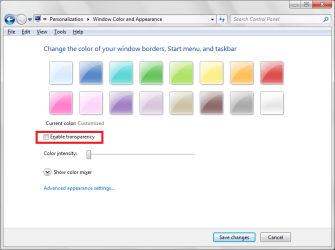
Go to Personalize>> Window Color>> Untick the box that says "Enable Transparency". Then adjust the color intensity slider to the color intensity you like. But after this, the glass effect will be gone
Attachments
geghwr.png
30.2 KB
· Views: 6
My Computer
At a glance
Windows 7 Ultimate 32 Bit, Windows Developer ...Intel Pentium Dual CPU E2180@2GHzNVIDIA GeForce 7200 GS
Computer Manufacturer/Model Number
Custom Built
OS
Windows 7 Ultimate 32 Bit, Windows Developer Preview, Linux Mint 9 Gnome 32 Bit