strange problem burning DVDs

mumbles

New member
Local time
10:00 AM
Messages
9
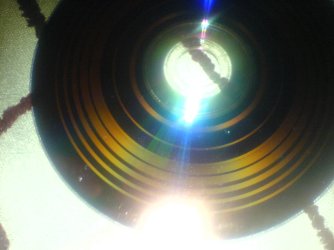
running win7 x64 I have a sony optiarc ad-7240s sata dvdrw. It is seeming impossible to successfuly burn any DVDs on my setup. I successfuly burnt a dvd iso using imgburn few months back when I had XP installed. In win7 Using the inbuilt burning no matter I burn an iso image or data dvd with master format I get a dvd with visible concentric circles discontinous writing!! last time I also got a 0x80004005 error. to my surprise the dvds read fine but some files work and others no error just drive seeks on forever. I never have installed any 3rd party burner so no chance of conflicts. I tried free iso burner it showed error:aborting message and ruined my dvd. I checked many forums and found even many 3rd party burners are having failures. Please advice a fix or a failsafe 3rd party burner.
 

My Computer

OS
win 7 x64
It sounds like you're having driver issues. You should check the dvd burner manufacturer's website for the latest Windows 7 drivers. That may fix your problem.
 

My Computer

Computer Manufacturer/Model Number
Apple Macbook Pro (April 2009)
OS
W7 Ult. x64 | OS X
CPU
Intel Mobile Core 2 Duo 2.93Ghz [T9800 Penryn]
Motherboard
NVIDIA nForce 730i Rev. B1 [Mac-F2268EC8 (U2E1)]
Memory
4096MB Samsung DDR3 Dual Channel [PC3-8500F 1066Mhz]
Graphics Card(s)
NVIDIA GeForce 9600M GT 512MB [G96M Rev. C1]
Sound Card
SB X-Fi Surround 5.1 USB | Onboard Realtek (Disabled)
Monitor(s) Displays
Acer x223wbd 22" | Apple Anti-Glare 17" (Disabled)
Screen Resolution
{Current} 1440x900 {Acer} 1680x1050 {Apple} 1920x1200
Hard Drives
{Internal}
Seagate Momentus 320GB 2.5" 7200RPM [ST9320421AS]

{Externals}
LaCie 320GB USB 2.0 HDD [301284UR]
LaCie 750GB USB 2.0 FW400 eSATA HDD [301314U]
LaCie 1TB USB 2.0 HDD [301304UR]
PSU
Magsafe
Case
Aluminum/Unibody (MBP52)
Cooling
2 x 6000 RPM Fans
Keyboard
Logitech G-15v2 [PN 920-000379]
Mouse
Logitech G-9 [PN 910-000338]
Internet Speed
12Mbps/2.5Mbps w/ 24Mbps Speed Boost [Comcast]
Other Info
Logitech X-540 Speakers [PN 970223-0122]
Sennheiser PC-151 Headset
windows shows I have the latest ones. I cant find them on manufacturer site. if anyone knows please direct me to the location.
 

My Computer

OS
win 7 x64

My Computer

Computer Manufacturer/Model Number
HP M9077c
OS
Windows 7 Home Premium 64bit
CPU
Intel(R)Core(TM)2 quad [email protected] 2.39GHz
Motherboard
ASUSeK
Memory
6GB DDR2 6400
Graphics Card(s)
GeForce 8500/512MB
Sound Card
Realtek High Def Audio
Monitor(s) Displays
HP w2408 LCD 24" widescreen
Screen Resolution
1920x1200
Cooling
6 pack of Bud
Keyboard
MS wireless Inteli
Mouse
MS wireless Inteli

My Computer

Computer type
PC/Desktop
Computer Manufacturer/Model Number
Home built
OS
Windows 7 Ult, Windows 8.1 Pro,
CPU
Q9650-4.275GHz, E8600 4.5GHz, E6750-3.8GHz
Motherboard
Evga 780i FTW
Memory
G.Skill PC2 9600 1200Mhz 5 5 5 15 2T
Graphics Card(s)
GTX480
Sound Card
Asus Xonar D2
Monitor(s) Displays
HannsG
Screen Resolution
1680X1050
Hard Drives
GSkill Phoenix Pro 120GB SSD
PSU
ThermalTake Toughpower 1000Watt modular
Case
ThermalTake XaserV
Cooling
Xigmatek S1283
Keyboard
Logitech G15
Mouse
Logitech G9
Internet Speed
T1
checked various things in windows related to dvd all appear fine. the driver details list cdrom.sys dated 21-06-2006, let me kno if thats normal for DVD drives. I also updated firmware from 1.01 to 1.04 still no avail.
ok I just used active iso burner to test burn 3gb image on a half filled dvd-r. all appeared normal until 91% when it gave a burn error and ejected the dvd. again I got rings written on the empty portion of disk when the laser supposed to be off!!! I dont have a clue of whats wrong.
 

My Computer

OS
win 7 x64
Somebody else had troubles with this drive several months ago. I can't remember how it was solved.

One way that has worked before with some problem drives is to delete the optical driver. Power down computer. Un-plug power & data cable from the optical drive.
Then power up the computer into windows with NO optical drive present. Then power
OFF computer again. Re-connect the power & data cables. Be connected to the internet, Power ON the computer again & let it search for the optical drive & install the drivers.
 

My Computer

Computer type
PC/Desktop
Computer Manufacturer/Model Number
Built them myself, Science Experiments !
OS
Win7 Enterprise, Win7 x86 (Ult 7600), Win7 x64 Ult 7600, TechNet RTM on AMD x64 (2.8Ghz)
CPU
AMD fx8350 4ghz, AMD-32 2400mhz, AMD-64 3200mhz, AMDx64 2.8G
Motherboard
SIS 755, ECS-K8M890M-M (Ult 7600), GigaByte & others
Memory
2gb, 4gb on the Ult 7600, 4gb on Technet RTM, 32gb on FX8350
Graphics Card(s)
Draw my own Graphics, several nVidia cards
Sound Card
on motherboard
Monitor(s) Displays
19" flat scr, 28" I-Inc widescr,22" Emprex Widescr, 23" Acer
Screen Resolution
1280 x 1024, 1440 x 900, 1920 x 1080
Hard Drives
6 pata Ide HD's & 2 Sata HD's
added 80gb external on Ult 7600 computer,
numerous extra 1tb, 2TB, 3Tb SATA HD's
A collection of ext HD Docks w/ HDs
PSU
430w, 550w, 600w, 700, 800, etc
Case
All Generic Full Towers
Cooling
Open Air & a few fans, some w/ colored LEDs
Keyboard
Compaq & Dell recycled from GoodWill
Mouse
Made in China Optical Wired Mouse
Internet Speed
Fast Cable InterNet
Antivirus
AVG Free on 24 different Desktops, NO Problems!
Browser
IE 8 is preferred, but use FireFox sometimes
Other Info
Linksys Routers, switches, & Hubs
Too Many USB Flash Drives to count, Biggest is 64GB !
Eight computers in my home network.
Sixteen computers at my business network.
Linked via TeamViewer !
Lots of old used spare computer parts everywhere!
after updating firmware windows reinstalled the drive as a new hardware also to make sure I followed above suggestion but still no difference.
tried another dvd with active iso burner at 4x on 16x dvd to be safe, it gave up with error a minute or two after start. the dvd just got a 3mm thick ring written at the inner most zone but windows showing 3.3gb used, all files of image are showing except they dont copy.
another try with another disc this time on imgburn I set 8x speed. everything went normal took 11min to burn, on verifying showed 'I/O Error' 'No seek complete'. I took out the dvd to have a look and guess what - again 7-8 rings!!
 

Attachments

  • DSC00003.JPG
    DSC00003.JPG
    169.6 KB · Views: 8
Last edited:

My Computer

OS
win 7 x64

try using a rewritable so your not just creating loads of coasters and try using CDburnerXP which i use on all my systems and it works flawlessly :geek:

let us know if that works for you ?
 

My Computer

Computer Manufacturer/Model Number
built my own
OS
win7 ultimate / virtual box
CPU
Intel Core i7 3770K,1155, Ivy Bridge
Motherboard
MSI Z77A-G43
Memory
GSkill Ripjaws Z Series 1600 CL 9.0 16GB
Graphics Card(s)
KFA2 GeForce GTX 670 EX OC 2048MB GDDR5 PCI-E gfx card
Sound Card
onboard Nvidia HDMI audio
Monitor(s) Displays
ASUS VK222H 22" widescreen LCD monitor
Screen Resolution
1680x1050
Hard Drives
Kingston 128gb SSD
OCZ Vertex 90gb SSD
500GB WDCaviar 16mb 5000KS
320GB WDCaviar 16mb 3200AAKS sata 2
1TB Samsung 16mb HD103SJ sata 2
PSU
Corsair HX 750W ATX2.2 Modular
Cooling
Antec 25 Kuhler H2O 620
Keyboard
logitech
Mouse
logitech MX518
Internet Speed
7mb adsl
This could be a buffer under-run error which is creating gaps. I dont know if this holds true now but for many drives, there used to be shift points from one speed to another, say 4x to 6x and then 6x to 8x. But the burner is supposed to handle these on the fly.

Have you tried changing the media brand? If that doesnt help, I would strongly suspect a bad drive.
 

My Computer

Computer Manufacturer/Model Number
Too many to describe...
OS
Windows 7 x64 pro/ Windows 7 x86 Pro/ XP SP3 x86
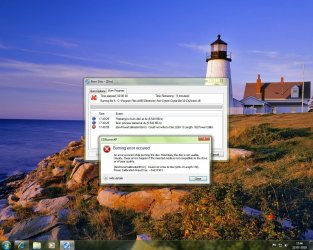
so I just brought a moserbaer 4x rewritable dvd. first tried burning files thru explorer but shows compatibility error - disc speed too fast or slow for drive.??
installed imgburn - again error
removed imgburn, installed cdburnerxp - same speed error...
 

Attachments

  • error.jpg
    error.jpg
    204.3 KB · Views: 10

My Computer

OS
win 7 x64
hey guys,
RMAd my drive and got a brand new 7260s today. Started with a test burn of my rewritable dvd which completed successfully and the data worked fine.
Problem is solved however there is a small glitch,
Even after burning 2gb of data explorer is showing the dvdrw disc empty. properties inside the dvd root folder showing size 174bytes, size on disk 4kb even on erased disc. I am little hesitant to move on to burning dvdr discs because of this.

Is this normal behavior with rewritables?
 

My Computer

OS
win 7 x64
Back
Top