Strange problem with bootup

andygo

New member
Member
Local time
1:06 AM
Messages
42
Just came to my lappy which I had previously closed down into sleep mode by shutting lid to find it won't boot up.

When I initially opened up the lid, the screen was frozen at the time I had closed the lappy dow..

I rebooted but all I get is a blank (eg no colour or icons) screen apart from the cursor which I can move.

I have tried booting into repair mode and booting from my Win7 dvd. It says Windows is loading files, then I get the windows flag, and then the black screen.

I have also tried booting to safe mode. It gets as far as sys32/drivers/ndis.sys then goes to the black screen, this time without the cursor visible.

So it woulod appear that I have no way to even boot from my install disc.

Any ideas folks, and no, I don't really want to reformat, lol!
 
Last edited:

My Computer

OS
Win 7 32 bit
Hard Drives
128mb Samsung ssd, 1TB WD hard drive

My Computer

Computer type
PC/Desktop
Computer Manufacturer/Model Number
LENOVO K450 @3.0GHZ
OS
64-bit Windows 8.1 Pro
CPU
Core(TM) i5 CPU 4330 Haswell @ 3.20GHz
Motherboard
LENOVO
Memory
12.00 GB
Graphics Card(s)
Intel(R) HD Graphics
Sound Card
Intel HD integtrated
Monitor(s) Displays
HP 25' ISP Monitor
Screen Resolution
1900/1020
Hard Drives
(1) ST1000DM003-1CH162 (2) Generic STORAGE DEVICE USB Device (3) Generic STORAGE DEVICE USB Device
Internet Speed
100mb down/10mb up
Thanks for your quick answer, but it looks from the tutorial that I can only do the repair from within Windows 7. As I cant see anything onscreen, that option is a bit tricky.

By the way, I have edited my original post - see the bit about ndis.sys...
 

My Computer

OS
Win 7 32 bit
Hard Drives
128mb Samsung ssd, 1TB WD hard drive
You need to boot from the Windows disc, and select the repair option.. ;)
 

My Computer

Computer type
PC/Desktop
Computer Manufacturer/Model Number
LENOVO K450 @3.0GHZ
OS
64-bit Windows 8.1 Pro
CPU
Core(TM) i5 CPU 4330 Haswell @ 3.20GHz
Motherboard
LENOVO
Memory
12.00 GB
Graphics Card(s)
Intel(R) HD Graphics
Sound Card
Intel HD integtrated
Monitor(s) Displays
HP 25' ISP Monitor
Screen Resolution
1900/1020
Hard Drives
(1) ST1000DM003-1CH162 (2) Generic STORAGE DEVICE USB Device (3) Generic STORAGE DEVICE USB Device
Internet Speed
100mb down/10mb up
Tews is correct, but make sure that in your Bios that it is set to boot from your cd/dvd drive first. Report back to us please.


Steve
 

My Computer

Computer Manufacturer/Model Number
Over Clockers Ultima Viper 2.80Ghz
OS
Windows 7 Ultimate 64 - OEM Service Pack 1
CPU
Intel Core i7 930 2.80Ghz Bloomfield Socket LGA 1366
Motherboard
Gigabyte GA-X58A-UD3R Intel X58 Socket 1366 DDR3
Memory
Patriot Viper 6GB 3x2GB DDR3 PC3-1200C9 1600Mhz Tri Channel
Graphics Card(s)
Asus ATI Radeon HD 5770 CuCore 1024MB GDDR5 PCI Express
Sound Card
Realtek ALC889 @ Intel 82801JB ICH10 - High Definition Audio
Monitor(s) Displays
Samsung SyncMaster 920N 19"
Screen Resolution
1280*1024
Hard Drives
1 x OCZ Vertex2 Series 120GB 2.5" SATA-II SSD
1 x Seagate Barracuda 7200.12 1TB SATA-II 32MB Cache
1 x Western Digital Caviar Green 2TB SATA-II 64 MB Cache
PSU
Corsair TX 650W ATX SLi
Case
Antec 902 Ultimate Gaming Case Black
Cooling
Prolimatech Megahalems Rev B CPU Cooler Socket 775/1156/1366
Keyboard
Microsoft Comfort Curve Keyboard
Mouse
Microsoft Optical USB
Internet Speed
ADSL24 FTTC 34.2 Mbps Down 7.1Mbps Up
Other Info
OcUK 22x DVDSATA ReWriter Black
Akasa AK-FN058 Apache Black Super Silent 120mm Fan
Printer Epson Stylus Photo R300
Scanner Canon Canoscan 8000F
I tried that earlier.

I boot up with the Win 7 disc and when I am asked to press any key to boot from dvd it reads the dvd, displays a progress bar telling me that Windows is loading files.

I then get a 'starting Windows' screen with the pulsing Win logo.

The dvd stops spinning and the screen remains as above for a couple of mintes or so.

The screen then reverts to a black screen with a moveable cursor. The hdd disk led does not flash.

T

I have left the laptop in that state for an hour with no change.

Its a bit strange as the laptop should at least boot from the dvd drive.
Thinking about it, I did install a Windows update last night.......
 

My Computer

OS
Win 7 32 bit
Hard Drives
128mb Samsung ssd, 1TB WD hard drive
do a system restore to a point before you installed the update and see if that helps...
 

My Computer

Computer type
PC/Desktop
Computer Manufacturer/Model Number
LENOVO K450 @3.0GHZ
OS
64-bit Windows 8.1 Pro
CPU
Core(TM) i5 CPU 4330 Haswell @ 3.20GHz
Motherboard
LENOVO
Memory
12.00 GB
Graphics Card(s)
Intel(R) HD Graphics
Sound Card
Intel HD integtrated
Monitor(s) Displays
HP 25' ISP Monitor
Screen Resolution
1900/1020
Hard Drives
(1) ST1000DM003-1CH162 (2) Generic STORAGE DEVICE USB Device (3) Generic STORAGE DEVICE USB Device
Internet Speed
100mb down/10mb up
Sorry if I have not made myself clear, but my lappy will not boot up into Windows at all....

In fact, even with the install disc, the lappy does not go through the same start routine as my main PC, which I have just tried in case it was damaged. It stops before the blue welcome screen which you get when it asks for input language etc.
 
Last edited:

My Computer

OS
Win 7 32 bit
Hard Drives
128mb Samsung ssd, 1TB WD hard drive
It may be easier to reinstall Windows in that case...
 

My Computer

Computer type
PC/Desktop
Computer Manufacturer/Model Number
LENOVO K450 @3.0GHZ
OS
64-bit Windows 8.1 Pro
CPU
Core(TM) i5 CPU 4330 Haswell @ 3.20GHz
Motherboard
LENOVO
Memory
12.00 GB
Graphics Card(s)
Intel(R) HD Graphics
Sound Card
Intel HD integtrated
Monitor(s) Displays
HP 25' ISP Monitor
Screen Resolution
1900/1020
Hard Drives
(1) ST1000DM003-1CH162 (2) Generic STORAGE DEVICE USB Device (3) Generic STORAGE DEVICE USB Device
Internet Speed
100mb down/10mb up
I don't seem to have that option as I cannot even boot to any workable screen even with my install disc..
 

My Computer

OS
Win 7 32 bit
Hard Drives
128mb Samsung ssd, 1TB WD hard drive
It will boot up in safe mode to windows\system32\drivers\ndis.sys and then freezes for a mo, then says windows is loading files again, and then reverts to the usual black screen, although in this case there is no cursor visible.

Can't understand what the issue is when it cant boot from the install disc though. Must be a way round it!

Can't even format my hdd as things stand
 

My Computer

OS
Win 7 32 bit
Hard Drives
128mb Samsung ssd, 1TB WD hard drive
Just removed the hard drive from my lappy and mounted in a usb caddy. Hooked kit up to my main pc, but its saying I need to format it before I can use it.

I would like to get some data off it before that though.

Any ideas?
 

My Computer

OS
Win 7 32 bit
Hard Drives
128mb Samsung ssd, 1TB WD hard drive
Has it been assigned a drive letter ? If not go to disk management and assign it a letter you should be able to use it then to get what ever files you need.


Steve
 
Last edited:

My Computer

Computer Manufacturer/Model Number
Over Clockers Ultima Viper 2.80Ghz
OS
Windows 7 Ultimate 64 - OEM Service Pack 1
CPU
Intel Core i7 930 2.80Ghz Bloomfield Socket LGA 1366
Motherboard
Gigabyte GA-X58A-UD3R Intel X58 Socket 1366 DDR3
Memory
Patriot Viper 6GB 3x2GB DDR3 PC3-1200C9 1600Mhz Tri Channel
Graphics Card(s)
Asus ATI Radeon HD 5770 CuCore 1024MB GDDR5 PCI Express
Sound Card
Realtek ALC889 @ Intel 82801JB ICH10 - High Definition Audio
Monitor(s) Displays
Samsung SyncMaster 920N 19"
Screen Resolution
1280*1024
Hard Drives
1 x OCZ Vertex2 Series 120GB 2.5" SATA-II SSD
1 x Seagate Barracuda 7200.12 1TB SATA-II 32MB Cache
1 x Western Digital Caviar Green 2TB SATA-II 64 MB Cache
PSU
Corsair TX 650W ATX SLi
Case
Antec 902 Ultimate Gaming Case Black
Cooling
Prolimatech Megahalems Rev B CPU Cooler Socket 775/1156/1366
Keyboard
Microsoft Comfort Curve Keyboard
Mouse
Microsoft Optical USB
Internet Speed
ADSL24 FTTC 34.2 Mbps Down 7.1Mbps Up
Other Info
OcUK 22x DVDSATA ReWriter Black
Akasa AK-FN058 Apache Black Super Silent 120mm Fan
Printer Epson Stylus Photo R300
Scanner Canon Canoscan 8000F
It's been assigned drive letter E.

When I try and access the files, the green progress bar is shown at the top of exploer, followed by a 'cyclic redundancy' error message.


Life is difficult sometimes, lol!
 

My Computer

OS
Win 7 32 bit
Hard Drives
128mb Samsung ssd, 1TB WD hard drive
Man I am so sorry you are having so many troubles :( This is what I found about "Cyclic Redundancy"
There are plenty of technical resources on the Web that discuss cyclic redundancy checks (CRCs). Most times you won't need to worry about this technobabble. That is, until one it day it suddenly appears and you think - what the hell does that mean? In simple terms, a CRC is bit of mathematics used to ensure that your data is OK when being transfered. It's a checking procedure that quickly identifies when data has been damaged. If you get this message, it means that the file being read by your PC or software is corrupted. However, it does not mean all the data is lost forever. When data is transfered, it is usually in small blocks and each block is given a CRC value. If something goes wrong with the data between the time it leaves the source and arrives at its destination, the CRC sent at the source will no longer match the one that is calculated when the data arrives - this is when the cyclic redundancy check error will appear.


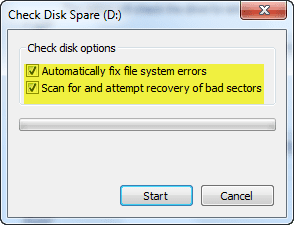
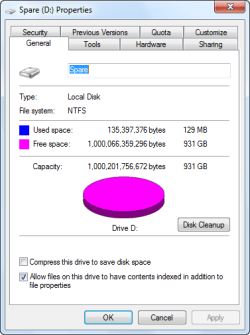
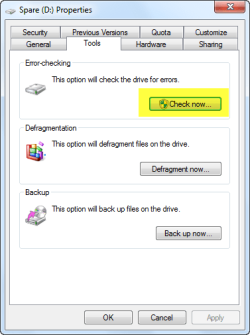
Since you have use of a PC and the drive is connected I would suggest you try doing a a disk check see attached pics if you don't know how do this.


Go to my computer right click on it and open it select the drive you what to check, right click on that drive and then go to Properties and then click on tools and then go to error checking and heck the boxes, it will most probably tell you to reboot and it could take a while for the disk to be checked.


But before doing this I would advise this download from here a program called Recuva

Recuva - Undelete, Unerase, File and Disk Recovery - Free Download

Run this and see if you can pull all the important files first and save them to your pc it may well take some time my friend.


Sorry I can't offer you any more advice.


Steve
 

Attachments

  • disk help 1.png
    disk help 1.png
    12.7 KB · Views: 2
  • disk help 2.png
    disk help 2.png
    13.1 KB · Views: 2
  • disk help 3.png
    disk help 3.png
    7.1 KB · Views: 70

My Computer

Computer Manufacturer/Model Number
Over Clockers Ultima Viper 2.80Ghz
OS
Windows 7 Ultimate 64 - OEM Service Pack 1
CPU
Intel Core i7 930 2.80Ghz Bloomfield Socket LGA 1366
Motherboard
Gigabyte GA-X58A-UD3R Intel X58 Socket 1366 DDR3
Memory
Patriot Viper 6GB 3x2GB DDR3 PC3-1200C9 1600Mhz Tri Channel
Graphics Card(s)
Asus ATI Radeon HD 5770 CuCore 1024MB GDDR5 PCI Express
Sound Card
Realtek ALC889 @ Intel 82801JB ICH10 - High Definition Audio
Monitor(s) Displays
Samsung SyncMaster 920N 19"
Screen Resolution
1280*1024
Hard Drives
1 x OCZ Vertex2 Series 120GB 2.5" SATA-II SSD
1 x Seagate Barracuda 7200.12 1TB SATA-II 32MB Cache
1 x Western Digital Caviar Green 2TB SATA-II 64 MB Cache
PSU
Corsair TX 650W ATX SLi
Case
Antec 902 Ultimate Gaming Case Black
Cooling
Prolimatech Megahalems Rev B CPU Cooler Socket 775/1156/1366
Keyboard
Microsoft Comfort Curve Keyboard
Mouse
Microsoft Optical USB
Internet Speed
ADSL24 FTTC 34.2 Mbps Down 7.1Mbps Up
Other Info
OcUK 22x DVDSATA ReWriter Black
Akasa AK-FN058 Apache Black Super Silent 120mm Fan
Printer Epson Stylus Photo R300
Scanner Canon Canoscan 8000F
Well I gave up and formatted the drive using partition magic with it in the usb caddy on my main pc.
Even though its formatted now, I am still having problems. At least now the laptop will let me get to the point where it asks me if I wnat to repair or install Win 7 from my dvd.

However, using either option the system freezes after I have selected 1/. install win 7 and have chosen my language etc and then says setup is starting. (i just get the spinning cursor) or 2/. if i have gone into repair mode, freezes on the screen that asks if I want to restore from an image or repair the operating system.

Also, if I remove the hdd from the lappy, I cant even access the bios, so gawd knows whats happening there.


Nightmare!!!!!!!!!!!!!!!!!!!!!!!!!!!!!!!
 

My Computer

OS
Win 7 32 bit
Hard Drives
128mb Samsung ssd, 1TB WD hard drive

My Computer

Computer Manufacturer/Model Number
Over Clockers Ultima Viper 2.80Ghz
OS
Windows 7 Ultimate 64 - OEM Service Pack 1
CPU
Intel Core i7 930 2.80Ghz Bloomfield Socket LGA 1366
Motherboard
Gigabyte GA-X58A-UD3R Intel X58 Socket 1366 DDR3
Memory
Patriot Viper 6GB 3x2GB DDR3 PC3-1200C9 1600Mhz Tri Channel
Graphics Card(s)
Asus ATI Radeon HD 5770 CuCore 1024MB GDDR5 PCI Express
Sound Card
Realtek ALC889 @ Intel 82801JB ICH10 - High Definition Audio
Monitor(s) Displays
Samsung SyncMaster 920N 19"
Screen Resolution
1280*1024
Hard Drives
1 x OCZ Vertex2 Series 120GB 2.5" SATA-II SSD
1 x Seagate Barracuda 7200.12 1TB SATA-II 32MB Cache
1 x Western Digital Caviar Green 2TB SATA-II 64 MB Cache
PSU
Corsair TX 650W ATX SLi
Case
Antec 902 Ultimate Gaming Case Black
Cooling
Prolimatech Megahalems Rev B CPU Cooler Socket 775/1156/1366
Keyboard
Microsoft Comfort Curve Keyboard
Mouse
Microsoft Optical USB
Internet Speed
ADSL24 FTTC 34.2 Mbps Down 7.1Mbps Up
Other Info
OcUK 22x DVDSATA ReWriter Black
Akasa AK-FN058 Apache Black Super Silent 120mm Fan
Printer Epson Stylus Photo R300
Scanner Canon Canoscan 8000F
I reckon I need to be able to format the MBR as well. I think the mbr is interfering with the setup process. If I remember correctly, when I first got W7 about christmas there were issues with the mbr tables.

I was using what you recommended actually already - as you say the name is similair. Even when I have formatted, it reports that there is still 78mb of data present....
 

My Computer

OS
Win 7 32 bit
Hard Drives
128mb Samsung ssd, 1TB WD hard drive
A search of the file which was hanging the system from booting in Safe Mode says it is the frequent target of malware infection. So you needed at that point to do a virus boot scan: FREE Bootable AntiVirus Rescue CDs Download List

Your files could also have been copied out using a Rescue Disk included with one of the free bootable AV's above.

You will need to wipe the HD of all infection before reinstall using Partition Wizard CD's Disk tab>Wipe Disk. Apply 3 sets of zeroes which is DOD standard for deepest clean. Then boot the installer again to see if it will install.

If your BIOS is corrupted you may need to reflash it with latest update from Support Downloads webpage for your computer or mobo model. Follow the Read Me carefully or seek help from your Computer tech support if it is under warranty.

Please fill in your System Specs so we can help you better.
 
You need to delete that a well I suspect that is the root of all the problems.


Steve
 

My Computer

Computer Manufacturer/Model Number
Over Clockers Ultima Viper 2.80Ghz
OS
Windows 7 Ultimate 64 - OEM Service Pack 1
CPU
Intel Core i7 930 2.80Ghz Bloomfield Socket LGA 1366
Motherboard
Gigabyte GA-X58A-UD3R Intel X58 Socket 1366 DDR3
Memory
Patriot Viper 6GB 3x2GB DDR3 PC3-1200C9 1600Mhz Tri Channel
Graphics Card(s)
Asus ATI Radeon HD 5770 CuCore 1024MB GDDR5 PCI Express
Sound Card
Realtek ALC889 @ Intel 82801JB ICH10 - High Definition Audio
Monitor(s) Displays
Samsung SyncMaster 920N 19"
Screen Resolution
1280*1024
Hard Drives
1 x OCZ Vertex2 Series 120GB 2.5" SATA-II SSD
1 x Seagate Barracuda 7200.12 1TB SATA-II 32MB Cache
1 x Western Digital Caviar Green 2TB SATA-II 64 MB Cache
PSU
Corsair TX 650W ATX SLi
Case
Antec 902 Ultimate Gaming Case Black
Cooling
Prolimatech Megahalems Rev B CPU Cooler Socket 775/1156/1366
Keyboard
Microsoft Comfort Curve Keyboard
Mouse
Microsoft Optical USB
Internet Speed
ADSL24 FTTC 34.2 Mbps Down 7.1Mbps Up
Other Info
OcUK 22x DVDSATA ReWriter Black
Akasa AK-FN058 Apache Black Super Silent 120mm Fan
Printer Epson Stylus Photo R300
Scanner Canon Canoscan 8000F
Back
Top