Solved Strange problem with browsers via VPN

Wayfarerman

New member
Local time
2:36 AM
Messages
10
Dear all,

I've faced a strange problem in using the various web browsers. I use a Laptop with Windows 7 64 bit and I use ADSL internet connection. When I use my usual internet connection I don't have any problem, but when I use a VPN connection It is just the Google Chrome which is able to connect the internet and my other browsers i.e. Internet Explorer & Firefox could not access the internet. Also Yahoo messenger could not log in. As soon as I disconnect from VPN, the problem would wipe out. I use the Kaspersky Internet Security, But disabling this firewall & antivirus didn't made any changes.

It is worth to say that I don't have any problem with this VPN connection on my PC with Windows XP 32 bit.

Waiting for your comments.
 

My Computer

OS
Windows 7 64 bit Enterprise
What vpn are you using? What provider? Are you using any software for the vpn connection?
 

My Computer

Computer Manufacturer/Model Number
Alienware
OS
Windows 7 Ultimate x64
CPU
I7
Motherboard
GA-X58-USB3
Memory
6 x 1.5V DDR3 DIMM sockets supporting up to 24 GB of system
Graphics Card(s)
GeForce GTX 580
Sound Card
Realtek ALC892 codec 2/4/5.1/7.1-channel
Monitor(s) Displays
NEC Display Solutions E321 Black 32"
Screen Resolution
1366 x 768
Hard Drives
OCZ Colossus LT Series OCZSSD2-1CLSLT1T 3.5" 1TB SATA II MLC Internal Solid State Drive
PSU
XFX Black Edition XPS-850W-BES 850W ATX12V
Case
Antec
Cooling
Zalman
Keyboard
Microsoft
Mouse
Microsoft
Dear seth500,

I just know that the VPN server is in the USA. I do not use any software for connecting to VPN, just the common VPN connection which I've made in Windows.
 

My Computer

OS
Windows 7 64 bit Enterprise
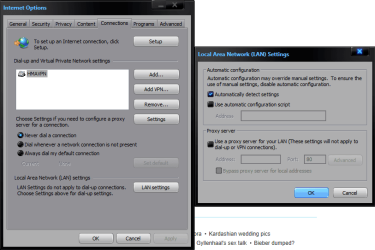
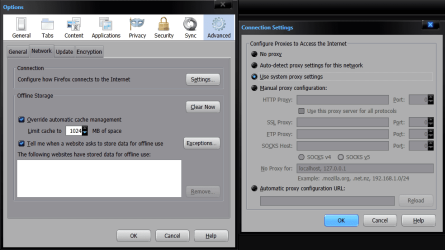
I don't know if this will help or not but here a couple of screen shots of my internet browser setting for Firefox and IE and I use a VPN that uses software to connect but that should make not any difference, the browsers should connect to the internet regardless unless they are not detecting the connection automatically. Open IE and go to connections and make sure the LAN setting are set to automatically detect settings and then open Firefox and go into options and then advanced then network tab then settings and set it to use system proxy settings. And see if that helps the problem. If it doesn't switch it to no proxy and close the browser and reopen it. If all fails you may want to play with the encryption settings on your connection and see if that's the problem. In any case I use encryption and don't have any issue's.

By the way which browser builds are you using?
 

Attachments

  • 8-22-2011 10-09-41 AM.png
    8-22-2011 10-09-41 AM.png
    26.5 KB · Views: 74
  • 8-22-2011 10-07-53 AM.png
    8-22-2011 10-07-53 AM.png
    32.2 KB · Views: 59

My Computer

Computer Manufacturer/Model Number
Alienware
OS
Windows 7 Ultimate x64
CPU
I7
Motherboard
GA-X58-USB3
Memory
6 x 1.5V DDR3 DIMM sockets supporting up to 24 GB of system
Graphics Card(s)
GeForce GTX 580
Sound Card
Realtek ALC892 codec 2/4/5.1/7.1-channel
Monitor(s) Displays
NEC Display Solutions E321 Black 32"
Screen Resolution
1366 x 768
Hard Drives
OCZ Colossus LT Series OCZSSD2-1CLSLT1T 3.5" 1TB SATA II MLC Internal Solid State Drive
PSU
XFX Black Edition XPS-850W-BES 850W ATX12V
Case
Antec
Cooling
Zalman
Keyboard
Microsoft
Mouse
Microsoft
Dear seth500,

Thank you for your nice guidance, but unfortunately the problem was not disappeared.
I'm using the Firefox 6.0 and IE 9.0.8080.16413

I think that the clue must be in this fact that Chrome can connect via VPN but others can not. I've also noticed that the problem is related to the DNS, because I'm able to see the websites with their IP address. Should this co be of some help.
 

My Computer

OS
Windows 7 64 bit Enterprise
Your welcome Wayfarerman

You could try that on your router is switch your DNS Servers to Google dns which would be 8.8.8.8 and 8.8.4.4 or Open dns servers which are 208.67.222.222 and 208.67.220.220.
 

My Computer

Computer Manufacturer/Model Number
Alienware
OS
Windows 7 Ultimate x64
CPU
I7
Motherboard
GA-X58-USB3
Memory
6 x 1.5V DDR3 DIMM sockets supporting up to 24 GB of system
Graphics Card(s)
GeForce GTX 580
Sound Card
Realtek ALC892 codec 2/4/5.1/7.1-channel
Monitor(s) Displays
NEC Display Solutions E321 Black 32"
Screen Resolution
1366 x 768
Hard Drives
OCZ Colossus LT Series OCZSSD2-1CLSLT1T 3.5" 1TB SATA II MLC Internal Solid State Drive
PSU
XFX Black Edition XPS-850W-BES 850W ATX12V
Case
Antec
Cooling
Zalman
Keyboard
Microsoft
Mouse
Microsoft
I changed the DNS settings of my both connections i.e. ADSL and VPN to google DNS 8.8.8.8 and the problem was solved.

Thank you again for your support and information.
 

My Computer

OS
Windows 7 64 bit Enterprise
I changed the DNS settings of my both connections i.e. ADSL and VPN to google DNS 8.8.8.8 and the problem was solved.

Thank you again for your support and information.

I'm glad it worked out for you and your very welcome.
 

My Computer

Computer Manufacturer/Model Number
Alienware
OS
Windows 7 Ultimate x64
CPU
I7
Motherboard
GA-X58-USB3
Memory
6 x 1.5V DDR3 DIMM sockets supporting up to 24 GB of system
Graphics Card(s)
GeForce GTX 580
Sound Card
Realtek ALC892 codec 2/4/5.1/7.1-channel
Monitor(s) Displays
NEC Display Solutions E321 Black 32"
Screen Resolution
1366 x 768
Hard Drives
OCZ Colossus LT Series OCZSSD2-1CLSLT1T 3.5" 1TB SATA II MLC Internal Solid State Drive
PSU
XFX Black Edition XPS-850W-BES 850W ATX12V
Case
Antec
Cooling
Zalman
Keyboard
Microsoft
Mouse
Microsoft
Back
Top