Strange RAM usage on File transfer.

Emilispk

New member
Member
Local time
1:57 AM
Messages
25
Location
Lithuania
My "Windows 7 Ultimate x64" is acting strange.
My normal RAM usage is ~3.12GB
When I connect my "Nexus 7 3G 32GB" tablet to my pc, the RAM stays the same, but when I start to copy files from/to it, my RAM usage jumps to ~96%, about ~8GB. And when it's done copying the files, the RAM usage doesn't change.
I have to restart my pc every time(annoying).
P.S: Doesn't matter if the files are big(GB), or just a small file(few kb).
P.S.S:This doesn't happen in W8 or Linux.
 

My Computer

Computer type
PC/Desktop
Computer Manufacturer/Model Number
Samsung Series 3 NP300V5A
OS
Windows 7 Ultimate x64
CPU
Intel® Core™ i7-2670QM
Memory
8GB DDR3 1333Mhz
Graphics Card(s)
1GB Nvidia 520MX
Monitor(s) Displays
1
Screen Resolution
1366x768
Hard Drives
750GB HDD
Plus other external HDD's
PSU
(laptop)
Internet Speed
~300Mbit
Antivirus
Eset 5.2.9.1
Browser
Chrome v.26
Other Info
(laptop)
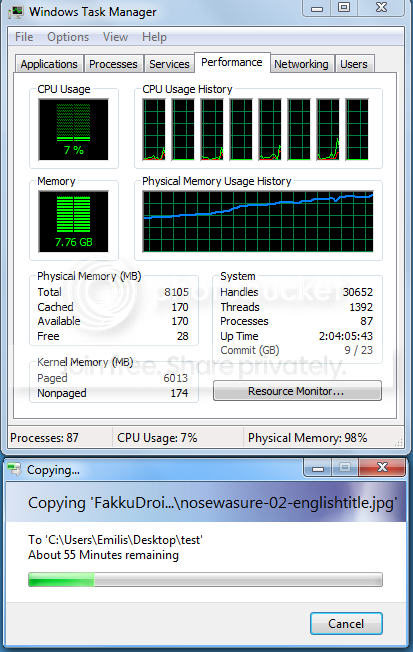
Post a screenshot of Task Manager - Performance tab, when the memory usage is high.
 

My Computer

Computer type
PC/Desktop
Computer Manufacturer/Model Number
HP
OS
Windows 7 Pro 64 bit
CPU
Xeon W3520
Memory
8 GB
Graphics Card(s)
Nvidia Geforce 210
1.
pic_zps775c9c76.png

(dont mind the 55 min's time, it only takes like ~5 min to do it)
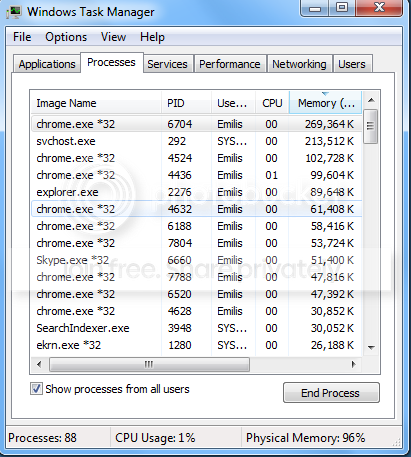
2.
2_zpsd17238b7.png
 

My Computer

Computer type
PC/Desktop
Computer Manufacturer/Model Number
Samsung Series 3 NP300V5A
OS
Windows 7 Ultimate x64
CPU
Intel® Core™ i7-2670QM
Memory
8GB DDR3 1333Mhz
Graphics Card(s)
1GB Nvidia 520MX
Monitor(s) Displays
1
Screen Resolution
1366x768
Hard Drives
750GB HDD
Plus other external HDD's
PSU
(laptop)
Internet Speed
~300Mbit
Antivirus
Eset 5.2.9.1
Browser
Chrome v.26
Other Info
(laptop)
The problem is clearly the Kernel memory - paged. The value of 6013 is many times a reasonable value. Very doubtful that a process would be responsible for this. Most likely it is a driver problem or malware.
 

My Computer

Computer type
PC/Desktop
Computer Manufacturer/Model Number
HP
OS
Windows 7 Pro 64 bit
CPU
Xeon W3520
Memory
8 GB
Graphics Card(s)
Nvidia Geforce 210
My computer is clean(trust me), what should I do about the kernel memory?
 

My Computer

Computer type
PC/Desktop
Computer Manufacturer/Model Number
Samsung Series 3 NP300V5A
OS
Windows 7 Ultimate x64
CPU
Intel® Core™ i7-2670QM
Memory
8GB DDR3 1333Mhz
Graphics Card(s)
1GB Nvidia 520MX
Monitor(s) Displays
1
Screen Resolution
1366x768
Hard Drives
750GB HDD
Plus other external HDD's
PSU
(laptop)
Internet Speed
~300Mbit
Antivirus
Eset 5.2.9.1
Browser
Chrome v.26
Other Info
(laptop)
Sorry, can't help you with that.
As for it being malware: A standard anti-malware scan is unlikely to find such a problem.
 

My Computer

Computer type
PC/Desktop
Computer Manufacturer/Model Number
HP
OS
Windows 7 Pro 64 bit
CPU
Xeon W3520
Memory
8 GB
Graphics Card(s)
Nvidia Geforce 210
How about having 9 chrome pages open at the same time you are doing your transfer.
 

My Computer

Computer type
PC/Desktop
Computer Manufacturer/Model Number
Home made Desktop
OS
Windows 10 Pro. 64/ version 1709 Windows 7 Pro/64
CPU
Intel i7-6800K @ 4.3
Motherboard
ASUS X-99 Deluxe II
Memory
Corsair Platinum 16 gig @2400
Graphics Card(s)
EVGA GTX 1070 OC
Monitor(s) Displays
Asus 27" LED LCD/VE278Q
Screen Resolution
1920-1080 or 1280-720 HDMI
Hard Drives
INTEL SSD 730-240 Gb Sata 3.0/
PSU
EVGA Platium 1200W
Case
Phanteks Luxe Tempered Glass 8 fans/ one radiator
Cooling
XSPC/ Water Cooled CPU
Keyboard
Das 4 Professional
Mouse
Logitech M705/MX Anywhere 2-S
Internet Speed
100 mbits
Antivirus
Microsoft Security Essentials/ Malwarebytes Premium 3.0/ SAS
Browser
I.E. 11 default/Firefox/ ISP Time Warner Cable/Spectrum
Other Info
LG BluRay Burner/
Sound system-KLipsch-THX/
Icy Dock ssd Hot Swap bays.
that is why his ram is normally at 3 GB. Usually RAM sue does not go above 2 GB when not doing anything.

Anyway, that appears to be a driver issue. If it happens only when you are moving stuff to your tablet, you need to find drivers for it, otherwise update your chipset drivers.
 

My Computer

Computer type
PC/Desktop
Computer Manufacturer/Model Number
custom built
OS
Win 7 Pro 64-bit 7601
CPU
AMD Phenom 9650 QuadCore, revision DR-B3
Motherboard
ASUS M4A78
Memory
5 GB yes I run 2x 2GB and 1x 1GB, different brand, spank me.
Graphics Card(s)
NVIDIA GeForce 9800 GT 512 Mb, unknown manufacturer.
Sound Card
Crappy Realtek Integrated Audio
Monitor(s) Displays
Fujitsu Siemens P19-3P
Screen Resolution
1280 x 1024 x 32 bits @ 60 Hz Oh yeah, 4:3 rocks!
Hard Drives
(1) MAXTOR S TM3320613AS SATA Disk Device (2) STM35004 18AS SATA Disk Device (3) TOSHIBA USB 2.5"-HDD
PSU
whatever, around 450w
Case
Scavenged from old company PC, 10+ years old
Cooling
CPU fan, GPU fan, case fan, nothing fancy
Keyboard
Microsoft, PS/2, white.
Mouse
Optical, logitec.
Internet Speed
effective max speeds: 70-ish kB/s down 30-ish kB/s up
Antivirus
Avira, free edition.
Browser
Firefox with FXChrome to make it look like Google Chrome :P
Other Info
Was discarded by previous owner due to "horrible performance".
Was running Win Xp from a IDE drive. Yeah. Was a pain.
SATA II drive and Win7 and it zips away! Yay!
How about having 9 chrome pages open at the same time you are doing your transfer.
I use Chrome alot,I didn't have any issues with it so far, because I have 8GB of RAM, and my CPU is good :)
The problems is: If I use W7 stock drivers I can move files and stuff, but when I install other drivers(XDA..etc), I can only access the USB debugging mode, and the file transfer is gone :/
 

My Computer

Computer type
PC/Desktop
Computer Manufacturer/Model Number
Samsung Series 3 NP300V5A
OS
Windows 7 Ultimate x64
CPU
Intel® Core™ i7-2670QM
Memory
8GB DDR3 1333Mhz
Graphics Card(s)
1GB Nvidia 520MX
Monitor(s) Displays
1
Screen Resolution
1366x768
Hard Drives
750GB HDD
Plus other external HDD's
PSU
(laptop)
Internet Speed
~300Mbit
Antivirus
Eset 5.2.9.1
Browser
Chrome v.26
Other Info
(laptop)
I mean drivers from here.

USB debugging should be disabled from the device (in the developer options I think) before connecting it.

Anyway, it appears that the device in question does connect only as MFT (media file transfer) that on my android devices sucks as both speed and resource use, although it does free the RAM it used once finished. (I usually switch them to MSC mode, that unmounts the "external SD" from the device and turns it in a USB flash drive for the PC, possible only if you have an "external SD", a mini-sd plugged in the mini-sd slot of the device)

I suggest to make a shared folder on your laptop's drive and access it from a filemanager on the Nexus, then transfer data inside the folder from it. This article. ES file manager is what I use on my devices as well.

It should perform on par, or slightly worse, as long as both devices are connected to the same wifi router/hotspot.
 

My Computer

Computer type
PC/Desktop
Computer Manufacturer/Model Number
custom built
OS
Win 7 Pro 64-bit 7601
CPU
AMD Phenom 9650 QuadCore, revision DR-B3
Motherboard
ASUS M4A78
Memory
5 GB yes I run 2x 2GB and 1x 1GB, different brand, spank me.
Graphics Card(s)
NVIDIA GeForce 9800 GT 512 Mb, unknown manufacturer.
Sound Card
Crappy Realtek Integrated Audio
Monitor(s) Displays
Fujitsu Siemens P19-3P
Screen Resolution
1280 x 1024 x 32 bits @ 60 Hz Oh yeah, 4:3 rocks!
Hard Drives
(1) MAXTOR S TM3320613AS SATA Disk Device (2) STM35004 18AS SATA Disk Device (3) TOSHIBA USB 2.5"-HDD
PSU
whatever, around 450w
Case
Scavenged from old company PC, 10+ years old
Cooling
CPU fan, GPU fan, case fan, nothing fancy
Keyboard
Microsoft, PS/2, white.
Mouse
Optical, logitec.
Internet Speed
effective max speeds: 70-ish kB/s down 30-ish kB/s up
Antivirus
Avira, free edition.
Browser
Firefox with FXChrome to make it look like Google Chrome :P
Other Info
Was discarded by previous owner due to "horrible performance".
Was running Win Xp from a IDE drive. Yeah. Was a pain.
SATA II drive and Win7 and it zips away! Yay!
I mean drivers from here.

USB debugging should be disabled from the device (in the developer options I think) before connecting it.

Anyway, it appears that the device in question does connect only as MFT (media file transfer) that on my android devices sucks as both speed and resource use, although it does free the RAM it used once finished. (I usually switch them to MSC mode, that unmounts the "external SD" from the device and turns it in a USB flash drive for the PC, possible only if you have an "external SD", a mini-sd plugged in the mini-sd slot of the device)

I suggest to make a shared folder on your laptop's drive and access it from a filemanager on the Nexus, then transfer data inside the folder from it. This article. ES file manager is what I use on my devices as well.

It should perform on par, or slightly worse, as long as both devices are connected to the same wifi router/hotspot.
My nexus has only internal memory, and I have two modes: MTP and PTP.
 

My Computer

Computer type
PC/Desktop
Computer Manufacturer/Model Number
Samsung Series 3 NP300V5A
OS
Windows 7 Ultimate x64
CPU
Intel® Core™ i7-2670QM
Memory
8GB DDR3 1333Mhz
Graphics Card(s)
1GB Nvidia 520MX
Monitor(s) Displays
1
Screen Resolution
1366x768
Hard Drives
750GB HDD
Plus other external HDD's
PSU
(laptop)
Internet Speed
~300Mbit
Antivirus
Eset 5.2.9.1
Browser
Chrome v.26
Other Info
(laptop)
Ok, then try using one or the other and see if it is better. Otherwise the suggestion above is still going to work.
 

My Computer

Computer type
PC/Desktop
Computer Manufacturer/Model Number
custom built
OS
Win 7 Pro 64-bit 7601
CPU
AMD Phenom 9650 QuadCore, revision DR-B3
Motherboard
ASUS M4A78
Memory
5 GB yes I run 2x 2GB and 1x 1GB, different brand, spank me.
Graphics Card(s)
NVIDIA GeForce 9800 GT 512 Mb, unknown manufacturer.
Sound Card
Crappy Realtek Integrated Audio
Monitor(s) Displays
Fujitsu Siemens P19-3P
Screen Resolution
1280 x 1024 x 32 bits @ 60 Hz Oh yeah, 4:3 rocks!
Hard Drives
(1) MAXTOR S TM3320613AS SATA Disk Device (2) STM35004 18AS SATA Disk Device (3) TOSHIBA USB 2.5"-HDD
PSU
whatever, around 450w
Case
Scavenged from old company PC, 10+ years old
Cooling
CPU fan, GPU fan, case fan, nothing fancy
Keyboard
Microsoft, PS/2, white.
Mouse
Optical, logitec.
Internet Speed
effective max speeds: 70-ish kB/s down 30-ish kB/s up
Antivirus
Avira, free edition.
Browser
Firefox with FXChrome to make it look like Google Chrome :P
Other Info
Was discarded by previous owner due to "horrible performance".
Was running Win Xp from a IDE drive. Yeah. Was a pain.
SATA II drive and Win7 and it zips away! Yay!

My Computer

Computer type
PC/Desktop
Computer Manufacturer/Model Number
Samsung Series 3 NP300V5A
OS
Windows 7 Ultimate x64
CPU
Intel® Core™ i7-2670QM
Memory
8GB DDR3 1333Mhz
Graphics Card(s)
1GB Nvidia 520MX
Monitor(s) Displays
1
Screen Resolution
1366x768
Hard Drives
750GB HDD
Plus other external HDD's
PSU
(laptop)
Internet Speed
~300Mbit
Antivirus
Eset 5.2.9.1
Browser
Chrome v.26
Other Info
(laptop)
Back
Top