Strange Registry font characters

Cel01

New member
Local time
10:43 PM
Messages
20
These are the reg entries that keep coming back. I clean them out with Ccleaner. Any idea. Scanned with Norton Internet Security. Have resident Malwarebytes running all the time and scan doesn't show anything either. Any ideas? Thanks

Unused File Extension .灪g厍刀旾馕Đ HKCU\Software\Microsoft\Windows\CurrentVersion\Explorer\FileExts\.灪g厍刀旾馕Đ
Unused File Extension .灪g厍募﬷٦Đ HKCU\Software\Microsoft\Windows\CurrentVersion\Explorer\FileExts\.灪g厍募﬷٦Đ
Unused File Extension .灪g꾨甇꾨甇厍刀뜝嫹Đ HKCU\Software\Microsoft\Windows\CurrentVersion\Explorer\FileExts\.灪g꾨甇꾨甇厍刀뜝嫹Đ


Celeste
 
Last edited:

My Computer My Computer

Computer Manufacturer/Model Number
HP Pavillion
OS
Windows 7 Home Premium x64 SP1
CPU
Intel Core i5-2400CPU@3/10GHz.
Memory
8 Gigs
Graphics Card(s)
NVIDIA GeForce GT 520 on board
Sound Card
NVIDIA High Definition Audio
Monitor(s) Displays
AUSUS
Hi Celeste -

Just a wild guess, but do you have any language packs installed on your computer? Or have you ever saved any foreign language documents, files, photos, music, etc? Since these all appear to be file extensions it might explain what they're doing on your computer.

If you wanted to you could create a restore point (which backs up the entire registry) or a system image and then delete those entries. Run your computer for a day or so to see if there are any problems. If you notice things aren't working right you could roll back your computer to that restore point or image.

http://www.sevenforums.com/tutorials/697-system-restore-point-create.html

http://www.sevenforums.com/tutorials/700-system-restore.html
 

My Computer My Computer

Computer type
Laptop
Computer Manufacturer/Model Number
Sony Vaio VPCEB47GM Laptop
OS
Win 7 Pro 64-bit
CPU
Intel i5 2.4 Ghz
Memory
8GB DDR3
Graphics Card(s)
Intel HD 3000
Sound Card
IDT High Definition
Monitor(s) Displays
15.6 WGXA Anti-Glare LED
Screen Resolution
1280x800
Hard Drives
640Gb 7200rpm
Antivirus
MSE
Browser
Opera (primary) with IE9 backup
Hi Marsmimar. Thanks for the reply. I deleted them once and there were no problems with the system. Had tried the restore process. I had created a restore before I realized I had them in there.

Then deleted them ran system with no problems until they just showed up again. They hadn't appeared for a few weeks. Haven't done anything with foreign languages.

I have searched the internet for a few days now and have gotten no where. The last thing I recall installing was for a webinar. I had to install an exe for "Go to Meeting" Citrixonline.

Any other ideas welcomed.

Celeste
 

My Computer My Computer

Computer Manufacturer/Model Number
HP Pavillion
OS
Windows 7 Home Premium x64 SP1
CPU
Intel Core i5-2400CPU@3/10GHz.
Memory
8 Gigs
Graphics Card(s)
NVIDIA GeForce GT 520 on board
Sound Card
NVIDIA High Definition Audio
Monitor(s) Displays
AUSUS
How do you view your registry entries? In regedit or are you looking at it in an exported .reg file, or is this from cCleaner?


I have trouble editing an exported file using Textpad (other editors don't complain) due to NULL and non-Latin characters. It might not be chars in your registry, it might be the app that presents it to you.

try this in an elevated command prompt (right click, run as administrator)
reg query HKCU\Software\Microsoft\Windows\CurrentVersion\Explorer\FileExts
 

My Computer My Computer

Computer type
Laptop
Computer Manufacturer/Model Number
HP Pavilion dv6-6c10us
OS
x64 (6.3.9600) Win8.1 Pro & soon dual boot x64 (6.1.7601) Win7_SP1 HomePrem
CPU
AMD A6-3420M APU with Radeon(tm) HD Graphics
Motherboard
Hewlett-Packard 1805
Memory
6.00 GB
Graphics Card(s)
AMD Radeon(TM) HD 6520G
Sound Card
(1) AMD High Definition Audio Device (2) IDT High Definiti
Monitor(s) Displays
HP W2072a 20" LCD (1600 x 900) @ 60 Hz
Screen Resolution
1366 x 768 x 32 bits (4294967296 colors) @ 60 Hz
Hard Drives
ST640LM0 00 HM641JI SATA Disk Device
Keyboard
Logitech k520 wireless KB
Mouse
Logitech m320 wireless mouse (bundled with KB)
Internet Speed
15/5 | 54 MB Wireless 'n'
Antivirus
Realtime: Defender or Avast | On-demand: Malwarebytes, ESET
Browser
IE 11 on Win8, IE 10 on win 7
Other Info
Media: [Gimp, Audacity, VLC] || Comm: [WEmail 2012, Skype] || Productivity: [OpenOffice,| Textpad] || Utils: [Sysinternals, cCleaner, Speccy, Defraggler]
Search?

Have you tried searching your computer for the characters in question?

Try this:

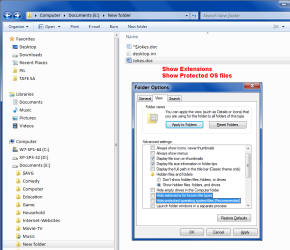
  • Check your "Folder Options" > "View" tab settings (see text and picture below)
  • Opening Windows Explorer
  • Go to "Computer"
  • Paste the first couple of characters into the Windows Explorer Search box (e.g. 灪g)
  • Wait to see if there are any results
You may need to change some "Folder Options" > "View" tab settings.

Create a System Restore Point and/or take a screenshot before you change the settings. :geek:
You can access "Folder Options" by typing "folder" (no quotes) in the Start Menu search box.

Adjust these settings (see picture below):

  • "Show hidden files, folders, and drives" - ON
  • "Hide extensions for known file types" - OFF
  • "Hide protected operating system files (Recommended)" - OFF
233296d1348457213-my-files-save-read-only-also-very-strange-we-ext_on-sys_on-01.png
Remember to reset those settings after your search.

Of course, you can change them to suit yourself.
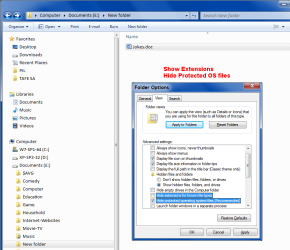
I normally keep the "Show hidden files, folders, and drives" and "Hide protected operating system files (Recommended)" turned on (see picture below).
233294d1348457213-my-files-save-read-only-also-very-strange-we-ext_on-sys_off-01.png
 
Last edited:

My Computer My Computer

Computer type
PC/Desktop
Computer Manufacturer/Model Number
n/a
OS
W7 Ultimate SP1, LM19.2 MATE, W10 Home 1703, W10 Pro 1703 VM, #All 64 bit
CPU
AMD Phenom II x6 1100T, 3.3 GHz
Motherboard
ASUS M4A88T-M/USB3 (AM3)
Memory
12GB DDR3 1333 G-Skill (4GB x 2), G-Skill (2GB x 2)
Graphics Card(s)
NVIDIA GeForce GTX 660
Sound Card
Realtek?
Monitor(s) Displays
Samsung S23B350
Screen Resolution
1920x1080
Hard Drives
WD Green 2TB (SATA), WD Green 3TB (SATA), WD Blue 4TB (SATA), WD Blue 6TB (SATA)
PSU
Cooler Master
Case
Antec GX300 Tower
Cooling
3x Antec TRICOOL 120mm Fans
Mouse
Wired Optical
Internet Speed
DSL
Antivirus
Avast
Browser
Pale Moon (64 bit)
Other Info
2018-12-27 Upgraded HDDs
2015-12-10 Upgraded case, graphics card, storage
2015-08-15 Upgraded motherboard & RAM
2015-07-15 Upgraded LM17.1 to LM17.2
Have you installed anythig from IObit. Systems Tuneup, cleaners,game boosters ect?
 

My Computer My Computer

Computer type
PC/Desktop
Computer Manufacturer/Model Number
Home made Desktop
OS
Windows 10 Pro. 64/ version 1709 Windows 7 Pro/64
CPU
Intel i7-6800K @ 4.3
Motherboard
ASUS X-99 Deluxe II
Memory
Corsair Platinum 16 gig @2400
Graphics Card(s)
EVGA GTX 1070 OC
Monitor(s) Displays
Asus 27" LED LCD/VE278Q
Screen Resolution
1920-1080 or 1280-720 HDMI
Hard Drives
INTEL SSD 730-240 Gb Sata 3.0/
PSU
EVGA Platium 1200W
Case
Phanteks Luxe Tempered Glass 8 fans/ one radiator
Cooling
XSPC/ Water Cooled CPU
Keyboard
Das 4 Professional
Mouse
Logitech M705/MX Anywhere 2-S
Internet Speed
100 mbits
Antivirus
Microsoft Security Essentials/ Malwarebytes Premium 3.0/ SAS
Browser
I.E. 11 default/Firefox/ ISP Time Warner Cable/Spectrum
Other Info
LG BluRay Burner/
Sound system-KLipsch-THX/
Icy Dock ssd Hot Swap bays.
Sorry haven't gotten you sooner. No IObit programs.
 

My Computer My Computer

Computer Manufacturer/Model Number
HP Pavillion
OS
Windows 7 Home Premium x64 SP1
CPU
Intel Core i5-2400CPU@3/10GHz.
Memory
8 Gigs
Graphics Card(s)
NVIDIA GeForce GT 520 on board
Sound Card
NVIDIA High Definition Audio
Monitor(s) Displays
AUSUS

My Computer My Computer

Computer Manufacturer/Model Number
HP Pavillion
OS
Windows 7 Home Premium x64 SP1
CPU
Intel Core i5-2400CPU@3/10GHz.
Memory
8 Gigs
Graphics Card(s)
NVIDIA GeForce GT 520 on board
Sound Card
NVIDIA High Definition Audio
Monitor(s) Displays
AUSUS
just thought I would bring this back up. Problem still there.
 

My Computer My Computer

Computer Manufacturer/Model Number
HP Pavillion
OS
Windows 7 Home Premium x64 SP1
CPU
Intel Core i5-2400CPU@3/10GHz.
Memory
8 Gigs
Graphics Card(s)
NVIDIA GeForce GT 520 on board
Sound Card
NVIDIA High Definition Audio
Monitor(s) Displays
AUSUS
Search

When I search for it. The pages that are returned are all Chinese Unicode related.

Just for kicks search your OS disk for "灪g厍刀旾馕Đ", no quotes. Since you can't type it in cut it from you post and paste it in the search.
 
Last edited:

My Computer My Computer

Computer Manufacturer/Model Number
BGC (Bob's Garage Crew)
OS
win 7 X64 Ultimate SP1
CPU
I3770K
Motherboard
Asus P8Z77-V Deluxe
Memory
G Skill F3-14900CL9-4GBXL x 4
Graphics Card(s)
NVIDIA GeForce GTX670 + Intel 4000
Sound Card
Realtek HD 5.1 (MOB)
Monitor(s) Displays
Asus VW224T (1)
Screen Resolution
1920 x 1080
Hard Drives
SATA Corsair Force GT 2.5" 180GB (System) Sata 3
OCZ Vertex3 120GB
OCZ Vertex 2 120GB 2.5" SATA II
ST31000524AS 1000.2GB
WD15EARS (External)
PSU
CoolerMaster 1000 Watt
Case
CoolerMaster HAF X
Cooling
CPU -- CoolerMaster 520N
Keyboard
MS Wireless 3000 V2
Mouse
MS Wireless 3000 V2
Internet Speed
Cable
Antivirus
Norton Internet Security
Browser
IE9
Other Info
AMI Bios 1805
OC'd 3%
Back
Top