Solved strange "residue" on taskbar

TSS666

New member
Local time
7:34 AM
Messages
5
Location
Warsaw, Poland
I'm using Win7 Ultimate x64 with classic theme and NVidia 450GTS with latest drivers.
I have this strange behaviour with taskbar. For example:

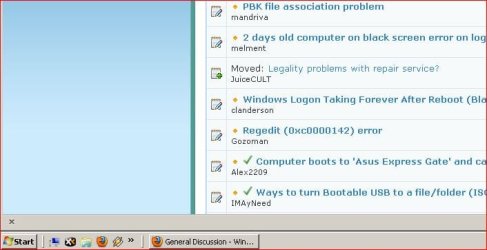
pic.1 - everything looks good
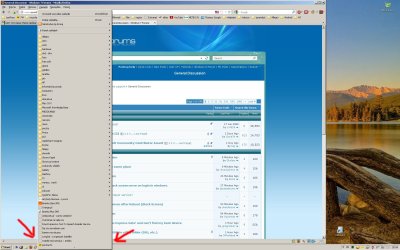
pic.2 - expand firefox bookmarks which cover taskbar area
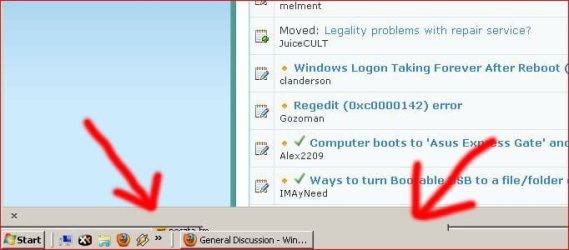
pic.3 - a little remnant remains on taskbar

anybody meets that problem? is this a graphic driver? I have no idea. there is a quite fresh system installation, about two weeks ago.

that happens also in "Win 7 Basic" theme but not i Aero. When Aero is ON everything is good. But I don't want Aero.
 

Attachments

  • 1.JPG
    1.JPG
    39.8 KB · Views: 18
  • 2.jpg
    2.jpg
    246.1 KB · Views: 24
  • 3.JPG
    3.JPG
    45.9 KB · Views: 24

My Computer

OS
Windows 7 Ultimate x64
CPU
Intel Core i7 2600
Motherboard
Asus P8Z68-V Pro
Memory
16GB DDR3
Graphics Card(s)
MSI N450GTS Cyclone 1GD5/OC
Sound Card
Realtek High Definition Audio (default)
Monitor(s) Displays
Samsung SyncMaster 2443BW
Screen Resolution
1920x1200
Hard Drives
SSD Kingston 240GB HyperX 3K (system)
HDD Seagate 1TB (data)
PSU
BeQuiet 550W DarkPower
Case
Xigmatek Midgard II
Cooling
3x120mm fan
Internet Speed
10Mbit
Welcome to the forum.

  1. Click on the firefox tab
  2. Click on Options :ar: Options
  3. Go to the Advanced tab
  4. Unselect Use hardware accelerations when available
  5. Restart firefox. See if the problem goes.
Keep us posted.
 

My Computer

Computer type
PC/Desktop
Computer Manufacturer/Model Number
Self assembled
OS
Windows 10 Home 64Bit
CPU
Intel Core i5 10400 @ 2.90GHz
Motherboard
Intel Corporation DG41WV (PROCESSOR)
Memory
8.00GB Single-Channel Unknown @ 1329MHz (16-20-20-38)
Sound Card
Realtek High Definition Audio
Monitor(s) Displays
DELL E170S
Screen Resolution
1280x1024 pixels
Hard Drives
931GB TOSHIBA DT01ACA100 (SATA)
238GB TEAM TM8PS7256G (SATA SSD)
Case
Nothing Fancy
Cooling
Fans
Keyboard
A4 Tech Co LTD
Mouse
A4 Tech Co Ltd/Logitech
Internet Speed
25 Mbps
  • Like
Reactions: Arc
Big thanks for that clue!
After disabling hardware acceleration in FF everything seems good :)

Thanks again!
 

My Computer

OS
Windows 7 Ultimate x64
CPU
Intel Core i7 2600
Motherboard
Asus P8Z68-V Pro
Memory
16GB DDR3
Graphics Card(s)
MSI N450GTS Cyclone 1GD5/OC
Sound Card
Realtek High Definition Audio (default)
Monitor(s) Displays
Samsung SyncMaster 2443BW
Screen Resolution
1920x1200
Hard Drives
SSD Kingston 240GB HyperX 3K (system)
HDD Seagate 1TB (data)
PSU
BeQuiet 550W DarkPower
Case
Xigmatek Midgard II
Cooling
3x120mm fan
Internet Speed
10Mbit
Good to know!

You can mark the thread as solved :)
 

My Computer

Computer type
PC/Desktop
Computer Manufacturer/Model Number
Self assembled
OS
Windows 10 Home 64Bit
CPU
Intel Core i5 10400 @ 2.90GHz
Motherboard
Intel Corporation DG41WV (PROCESSOR)
Memory
8.00GB Single-Channel Unknown @ 1329MHz (16-20-20-38)
Sound Card
Realtek High Definition Audio
Monitor(s) Displays
DELL E170S
Screen Resolution
1280x1024 pixels
Hard Drives
931GB TOSHIBA DT01ACA100 (SATA)
238GB TEAM TM8PS7256G (SATA SSD)
Case
Nothing Fancy
Cooling
Fans
Keyboard
A4 Tech Co LTD
Mouse
A4 Tech Co Ltd/Logitech
Internet Speed
25 Mbps
Why do you not want Aero?
 

My Computer

Computer type
PC/Desktop
Computer Manufacturer/Model Number
Alienware Aurora ALX R4
OS
Windows 10 Pro (x64)
CPU
Intel Core i7-3930K (3.2GHz - 4.5GHz)
Motherboard
Alienware Aurora-R4 x79
Memory
4x Samsung 4GB PC3-12800 DDR3 (16GB 1600MHz)
Graphics Card(s)
Nvidia Geforce GTX 690
Sound Card
SteelSeries Siberia Elite
Monitor(s) Displays
Dell UltraSharp U3011
Screen Resolution
2560x1600
Hard Drives
Samsung 850 Pro 256 GB, Seagate 1TB Desktop Hybrid HDD, 2x Western Digital 4TB Green HDD
PSU
875W Some Dell PSU <.<
Case
Alienware Aurora ALX
Cooling
Custom Liquid Cooling (EK CPU & GPU blocks) dual EK 480RAD
Keyboard
Logitech G710+ Mechanical
Mouse
Logitech G700s
Internet Speed
Verizon Fios (50 mbps average)
Other Info
Server: Intel NUC D54250WYK: i5-4250U, 16GB, 256 GB mSATA, Windows Server 2012 R2
Because i'm "old school" user ;-) Just an old habit, I also used classic theme on XP at work and at home (before Win7)
 

My Computer

OS
Windows 7 Ultimate x64
CPU
Intel Core i7 2600
Motherboard
Asus P8Z68-V Pro
Memory
16GB DDR3
Graphics Card(s)
MSI N450GTS Cyclone 1GD5/OC
Sound Card
Realtek High Definition Audio (default)
Monitor(s) Displays
Samsung SyncMaster 2443BW
Screen Resolution
1920x1200
Hard Drives
SSD Kingston 240GB HyperX 3K (system)
HDD Seagate 1TB (data)
PSU
BeQuiet 550W DarkPower
Case
Xigmatek Midgard II
Cooling
3x120mm fan
Internet Speed
10Mbit
Seems quite a waste, your graphics card has all this power that Aero takes advantage of...but you rather put the burden of UI on your CPU...rethinking your old habit would be of benefit. With Aero almost the whole UI resides on the GPU and in video memory. Without Aero, the UI is handled by the CPU.
 

My Computer

Computer type
PC/Desktop
Computer Manufacturer/Model Number
Alienware Aurora ALX R4
OS
Windows 10 Pro (x64)
CPU
Intel Core i7-3930K (3.2GHz - 4.5GHz)
Motherboard
Alienware Aurora-R4 x79
Memory
4x Samsung 4GB PC3-12800 DDR3 (16GB 1600MHz)
Graphics Card(s)
Nvidia Geforce GTX 690
Sound Card
SteelSeries Siberia Elite
Monitor(s) Displays
Dell UltraSharp U3011
Screen Resolution
2560x1600
Hard Drives
Samsung 850 Pro 256 GB, Seagate 1TB Desktop Hybrid HDD, 2x Western Digital 4TB Green HDD
PSU
875W Some Dell PSU <.<
Case
Alienware Aurora ALX
Cooling
Custom Liquid Cooling (EK CPU & GPU blocks) dual EK 480RAD
Keyboard
Logitech G710+ Mechanical
Mouse
Logitech G700s
Internet Speed
Verizon Fios (50 mbps average)
Other Info
Server: Intel NUC D54250WYK: i5-4250U, 16GB, 256 GB mSATA, Windows Server 2012 R2
I have had that "residue" with FF and Classic Theme as well. Gonna have to see if online video plays properly with acceleration disabled.
UPDATE: Okay, no, video does not play back properly with FF acceleration switched off. Loss of audio sync. I'll live with the residue until I relaunch FF.
 
Last edited:

My Computer

Computer type
PC/Desktop
Computer Manufacturer/Model Number
Self-Built
OS
Win10 Pro 64-bit
CPU
AMD Ryzen 7 3800X
Motherboard
Gigabyte X570 UD
Memory
32 GB Kingston DDR4-2666
Graphics Card(s)
MSI nVidia GT 710 (2GB)
Sound Card
Creative Audigy FX 5.1
Monitor(s) Displays
ViewSonic VG2439Smh 24"
Screen Resolution
1920x1080
Hard Drives
3xWD1TB; 1xSeagate 1TB... all spinning rust
PSU
EVGA 100-W1-0500-KR (500w)
Case
SilverStone PS10 (modified)
Cooling
CPU:AMD Wraith Prism. Case:3x Noctua 120mm
Keyboard
Compaq Professional PS/2
Mouse
Microsoft Basic Optical Mouse 2.0
Internet Speed
Fiber 1Gbit/sec down/up
Antivirus
Avast Free
Browser
FF, Chrome
Other Info
2x LG GH24NSC0 DVD burners, Mackie CR3 monitor speakers
Just checked YouTube video with and without acceleration in FF. On my system there is no differences. I played 1080p clip and is EXACTLY the same cpu load. But there's a strange thing that cpu load is smaller on full screen than normal play in YouTube window. On full screen 1080p clip is play under 5% cpu load (typically 3-5%) and in window (no matter smaller or bigger window) cpu load is 8-10% - so I leave acceleration off.
 

My Computer

OS
Windows 7 Ultimate x64
CPU
Intel Core i7 2600
Motherboard
Asus P8Z68-V Pro
Memory
16GB DDR3
Graphics Card(s)
MSI N450GTS Cyclone 1GD5/OC
Sound Card
Realtek High Definition Audio (default)
Monitor(s) Displays
Samsung SyncMaster 2443BW
Screen Resolution
1920x1200
Hard Drives
SSD Kingston 240GB HyperX 3K (system)
HDD Seagate 1TB (data)
PSU
BeQuiet 550W DarkPower
Case
Xigmatek Midgard II
Cooling
3x120mm fan
Internet Speed
10Mbit
Honestly I think you are being ridiculous to even sweat this.
Your system specs are very close to mine.
I don't understand why you are jumping through hoops for this. I really don't.
I run full aero and can still play any game title on the market maxed without trouble.
About the only thing I don't use is wallpaper. I think it's useless. I just set the background to black.
 

My Computer

Computer Manufacturer/Model Number
Insane hobo technologies. ;-)
OS
Windows 7 x64
CPU
Intel i7 2600k
Motherboard
Asrock z68 extreme 4 gen 3
Memory
G.skill Ripjaw 16gigs @ 1866
Graphics Card(s)
Nvidia gtx580 (evga)
Sound Card
Integrated HD audio + hdmi
Monitor(s) Displays
24" ASUS widescreen + 42" insignia
Screen Resolution
1080p (1920x1080)
Hard Drives
128 Samsung 830
256 Samsung 840
3 x 1tb storage drive (various)
1 western digital 1tb (eSATA)
1 Seagate 1tb (eSATA)
PSU
1 kilowatt SLI/Crossfire rated Silverstone modular
Case
NZXT Phantom + additional 220 fan
Cooling
Zalmann
Keyboard
Microsoft wireless 3000 (v2)
Mouse
MS - wireless 5000 (bluetrack)
Internet Speed
depends on if you ask me or my provider.
Other Info
The above information is provided as is, and the author assumes no responsibility for issues it may cause with your sanity or fanboyism.
I don't think our personal preferences are ridiculous. I just don't like aero so why should I use it? Classic theme are simply and clean, I'm use it since W2K and 98 and I like it. I don't use aero because my system is not enough for that. It's more than enough. I just don't like... so I don't :)

BTW. This topic concerned something else than our preferences.

 

My Computer

OS
Windows 7 Ultimate x64
CPU
Intel Core i7 2600
Motherboard
Asus P8Z68-V Pro
Memory
16GB DDR3
Graphics Card(s)
MSI N450GTS Cyclone 1GD5/OC
Sound Card
Realtek High Definition Audio (default)
Monitor(s) Displays
Samsung SyncMaster 2443BW
Screen Resolution
1920x1200
Hard Drives
SSD Kingston 240GB HyperX 3K (system)
HDD Seagate 1TB (data)
PSU
BeQuiet 550W DarkPower
Case
Xigmatek Midgard II
Cooling
3x120mm fan
Internet Speed
10Mbit
Back
Top