
Strange sound problem.

wakeboardr116

New member
Member
VIP
Local time
4:18 PM
Messages
138
Location
Edmond, OK
Out of no where I am all of the sudden having a strang problem with my sound. Whenever I'm playing a movie, or music, or anything with audio I get this random short buzz every once in a while. It kinda sounds like feedback or interference or something and the louder I turn up the volume the more it does it. I've tried different speakers and headphones and stuff and no matter what is plugged in it still does it.

The only thing that has really changed lately is that I changed from IDE to AHCI mode for my SSD. I don't know if its a driver problem or a problem with my sound card or what.
 

My Computer

Computer Manufacturer/Model Number
Dell XPS 430
OS
Windows 7 Professional x64 6.1 Build 7600
CPU
Intel Core 2 Quad Q9400 2.66Ghz
Motherboard
Dell Inc. 0G254H
Memory
8GB DDR3 PC3-10700H (1333Mhz)
Graphics Card(s)
Visiontek ATI Radeon HD4850
Sound Card
Intel® 7.1 channel High Definition Audio
Monitor(s) Displays
Asus VH222H 22"
Screen Resolution
1920x1080
Hard Drives
OS: Kingston SSDNow V Series SNV425-S2BD/64GB

Data: Western Digital Caviar Blue 320GB, 7200 RPM
PSU
Dell 425watt PSU
Case
Dell XPS 430
Cooling
Stock
Keyboard
Microsoft Wireless Keyboard 1000
Mouse
Microsoft Wireless Optical Mouse 2000
Internet Speed
20Mb/s Down 5Mb/s Up
Other Info
Logitech X-540 5.1 Channel Surround Sound System
It could be your speaker is going. Try headphones or a different set of speakers and see if the problem persists. Another reason to get a short buzz could be from external interference, such as ham radio. I know the speakers are supposed to be rf shielded, but I've seen powerful ham radios get through anything.

If this is not the problem, you should look at downloading the latest audio driver for your system.
 

My Computer

Computer Manufacturer/Model Number
Dell and Custom
OS
Systems 1 and 2: Windows 7 Enterprise x64, Win 8 Developer
CPU
System 1: i7 [email protected], System 2: AMD FX-4100 Zambezi 3.6G
Motherboard
System 1:Dell 06NWYK System 2: ASUS M5A97 AM3+
Memory
System 1: 8GB System 2: 8GB
Graphics Card(s)
System 1: ATI FirePro V4800 System 2: Radeon HD 6850
Sound Card
System 1: onboard System 2: onboard
Monitor(s) Displays
System1: Viewsonic HDMI 24"
Screen Resolution
System 1: 1920x1080 System 2: 1920x1080
Hard Drives
System 1: Mirrored .5B drives System 2: Seagate Barracuda ST1000DM003 1TB 7200 RPM 64MB Cache SATA 6.0Gb/s
Case
System 1: Dell System 2: Cooler Master
Internet Speed
10 MBPS
I tried my surround speakers, my monitor speakers, and several sets of headphones and it still does it. I don't think it's interference since my tower is inside my desk. I guess I'll look into updating the driver.
 

My Computer

Computer Manufacturer/Model Number
Dell XPS 430
OS
Windows 7 Professional x64 6.1 Build 7600
CPU
Intel Core 2 Quad Q9400 2.66Ghz
Motherboard
Dell Inc. 0G254H
Memory
8GB DDR3 PC3-10700H (1333Mhz)
Graphics Card(s)
Visiontek ATI Radeon HD4850
Sound Card
Intel® 7.1 channel High Definition Audio
Monitor(s) Displays
Asus VH222H 22"
Screen Resolution
1920x1080
Hard Drives
OS: Kingston SSDNow V Series SNV425-S2BD/64GB

Data: Western Digital Caviar Blue 320GB, 7200 RPM
PSU
Dell 425watt PSU
Case
Dell XPS 430
Cooling
Stock
Keyboard
Microsoft Wireless Keyboard 1000
Mouse
Microsoft Wireless Optical Mouse 2000
Internet Speed
20Mb/s Down 5Mb/s Up
Other Info
Logitech X-540 5.1 Channel Surround Sound System
Is it a mobile/indoor wireless phone send/receiving texts?
They also wake up and communicate to the nearest base station every now and then, transmit on full power.

My phone sometimes causes a funny noise like dut-dut-dut through the speakers/headphones whilst communicating.
 

My Computer

Computer type
PC/Desktop
Computer Manufacturer/Model Number
D.I.Y.
OS
WIN7 Ultimate 64bit
CPU
AMD FX8150/Trinity A10-5700
Motherboard
Asus Sabertooth v.1 /Asus F2A85-M Pro
Memory
G-Skill 2400 x2 @ 1866 (both pc's)
Graphics Card(s)
Sapphire (factory OC version) AMD 7770
Sound Card
onboard
Monitor(s) Displays
T260 Samsung
Screen Resolution
1920x1080
Hard Drives
Western Digital Sata 2TB/1TB Caviar Blacks
Buffalo 1TB usb (excellent drive)
PSU
Be-Quiet 700W E-9/Be-Quiet 550W E-9(E-9 = built by FSP)
Case
Antec P183/Antec P180mini
Cooling
x2 Xigmatek SXHH7-U01 + C-Master R4-EXBB-20PK-R0 120mm Fans
Keyboard
Cherry
Mouse
MS Explorer 3.0
Other Info
LG Blu ray combo
Pioneer 207D/208 Blu ray burners
What kind of soundcard do you have? It's very likely you have a conflicting driver, if you could run this util and preferrably add a screen capture of it that would be helpful.
 

My Computer

Computer Manufacturer/Model Number
-
OS
Windows 7 Ultimate x64
CPU
Intel Core i7 960
Motherboard
Gigabyte X58A-UD3R r13
Memory
12GB Mushkin DDR3 Triple Channel
Graphics Card(s)
ZOTAC GeForce GTX 560Ti 1GB PhysX CUDA
Sound Card
M-Audio ProFire 610
Monitor(s) Displays
Samsung SyncMaster 226BW + Benq FP222Wa
Screen Resolution
3360x1024
Hard Drives
RAID 2x OCZ 120GB SSD S-ATA III (System)
RAID 2x Seagate 1TB S-ATA III (Recording)
1x WD Black Edition 7200 2TB
2x WD Black Edition 7200 1TB (Sample archive)
2x WD Caviar 7200 500GB
1x Cavalry Caum 7200 2TB
PSU
Thermaltake Toughpower XT
Case
CoolerMaster Stacker v2.0
Cooling
Antec KÜHLER H2O 620
Keyboard
Logitech diNivo Laser Desktop
Mouse
Logitech MX-900
Internet Speed
VDSL 40/10
Other Info
It is a DAW. Mostly.
Is it a mobile/indoor wireless phone send/receiving texts?
They also wake up and communicate to the nearest base station every now and then, transmit on full power.

My phone sometimes causes a funny noise like dut-dut-dut through the speakers/headphones whilst communicating.

It's not the phone. I checked that too. Plus its much louder and more prominent than when the phone causes interference.

What kind of soundcard do you have? It's very likely you have a conflicting driver, if you could run this util and preferrably add a screen capture of it that would be helpful.

It's just the built in Intel 7.1 Channel High Definition Audio Device.

Whats strange is I tried logging on as another user and don't seem to have the problem.
 

My Computer

Computer Manufacturer/Model Number
Dell XPS 430
OS
Windows 7 Professional x64 6.1 Build 7600
CPU
Intel Core 2 Quad Q9400 2.66Ghz
Motherboard
Dell Inc. 0G254H
Memory
8GB DDR3 PC3-10700H (1333Mhz)
Graphics Card(s)
Visiontek ATI Radeon HD4850
Sound Card
Intel® 7.1 channel High Definition Audio
Monitor(s) Displays
Asus VH222H 22"
Screen Resolution
1920x1080
Hard Drives
OS: Kingston SSDNow V Series SNV425-S2BD/64GB

Data: Western Digital Caviar Blue 320GB, 7200 RPM
PSU
Dell 425watt PSU
Case
Dell XPS 430
Cooling
Stock
Keyboard
Microsoft Wireless Keyboard 1000
Mouse
Microsoft Wireless Optical Mouse 2000
Internet Speed
20Mb/s Down 5Mb/s Up
Other Info
Logitech X-540 5.1 Channel Surround Sound System
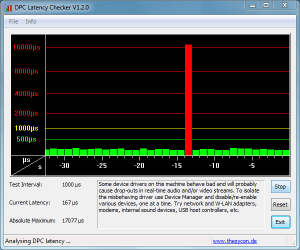
What kind of soundcard do you have? It's very likely you have a conflicting driver, if you could run this util and preferrably add a screen capture of it that would be helpful.

Heres a capture of that running. Looks like something is wrong.

Capture.PNG
 

My Computer

Computer Manufacturer/Model Number
Dell XPS 430
OS
Windows 7 Professional x64 6.1 Build 7600
CPU
Intel Core 2 Quad Q9400 2.66Ghz
Motherboard
Dell Inc. 0G254H
Memory
8GB DDR3 PC3-10700H (1333Mhz)
Graphics Card(s)
Visiontek ATI Radeon HD4850
Sound Card
Intel® 7.1 channel High Definition Audio
Monitor(s) Displays
Asus VH222H 22"
Screen Resolution
1920x1080
Hard Drives
OS: Kingston SSDNow V Series SNV425-S2BD/64GB

Data: Western Digital Caviar Blue 320GB, 7200 RPM
PSU
Dell 425watt PSU
Case
Dell XPS 430
Cooling
Stock
Keyboard
Microsoft Wireless Keyboard 1000
Mouse
Microsoft Wireless Optical Mouse 2000
Internet Speed
20Mb/s Down 5Mb/s Up
Other Info
Logitech X-540 5.1 Channel Surround Sound System
Well, you certainly could look at device manager and see if you have any yellow warnings. And you can check to update your other drivers.

Please let us know how this goes...
 

My Computer

Computer Manufacturer/Model Number
Dell and Custom
OS
Systems 1 and 2: Windows 7 Enterprise x64, Win 8 Developer
CPU
System 1: i7 [email protected], System 2: AMD FX-4100 Zambezi 3.6G
Motherboard
System 1:Dell 06NWYK System 2: ASUS M5A97 AM3+
Memory
System 1: 8GB System 2: 8GB
Graphics Card(s)
System 1: ATI FirePro V4800 System 2: Radeon HD 6850
Sound Card
System 1: onboard System 2: onboard
Monitor(s) Displays
System1: Viewsonic HDMI 24"
Screen Resolution
System 1: 1920x1080 System 2: 1920x1080
Hard Drives
System 1: Mirrored .5B drives System 2: Seagate Barracuda ST1000DM003 1TB 7200 RPM 64MB Cache SATA 6.0Gb/s
Case
System 1: Dell System 2: Cooler Master
Internet Speed
10 MBPS
try disabling your 'network controllers' in 'device manager' if you don't use it/them - loads of them cause spikes/spurious audio problems!

Hopefully you can report back with a new non-spiked pic!
 

My Computer

Computer type
PC/Desktop
Computer Manufacturer/Model Number
D.I.Y.
OS
WIN7 Ultimate 64bit
CPU
AMD FX8150/Trinity A10-5700
Motherboard
Asus Sabertooth v.1 /Asus F2A85-M Pro
Memory
G-Skill 2400 x2 @ 1866 (both pc's)
Graphics Card(s)
Sapphire (factory OC version) AMD 7770
Sound Card
onboard
Monitor(s) Displays
T260 Samsung
Screen Resolution
1920x1080
Hard Drives
Western Digital Sata 2TB/1TB Caviar Blacks
Buffalo 1TB usb (excellent drive)
PSU
Be-Quiet 700W E-9/Be-Quiet 550W E-9(E-9 = built by FSP)
Case
Antec P183/Antec P180mini
Cooling
x2 Xigmatek SXHH7-U01 + C-Master R4-EXBB-20PK-R0 120mm Fans
Keyboard
Cherry
Mouse
MS Explorer 3.0
Other Info
LG Blu ray combo
Pioneer 207D/208 Blu ray burners
I think it might be the receiver/transmitter for my wireless mouse and keyboard. I moved it further away from the computer so I'll see if that makes any difference.
 

My Computer

Computer Manufacturer/Model Number
Dell XPS 430
OS
Windows 7 Professional x64 6.1 Build 7600
CPU
Intel Core 2 Quad Q9400 2.66Ghz
Motherboard
Dell Inc. 0G254H
Memory
8GB DDR3 PC3-10700H (1333Mhz)
Graphics Card(s)
Visiontek ATI Radeon HD4850
Sound Card
Intel® 7.1 channel High Definition Audio
Monitor(s) Displays
Asus VH222H 22"
Screen Resolution
1920x1080
Hard Drives
OS: Kingston SSDNow V Series SNV425-S2BD/64GB

Data: Western Digital Caviar Blue 320GB, 7200 RPM
PSU
Dell 425watt PSU
Case
Dell XPS 430
Cooling
Stock
Keyboard
Microsoft Wireless Keyboard 1000
Mouse
Microsoft Wireless Optical Mouse 2000
Internet Speed
20Mb/s Down 5Mb/s Up
Other Info
Logitech X-540 5.1 Channel Surround Sound System
RF interference. What a crock. Devices are supposed to be RF shielded, but often not well enough. Hope this works for you.
 

My Computer

Computer Manufacturer/Model Number
Dell and Custom
OS
Systems 1 and 2: Windows 7 Enterprise x64, Win 8 Developer
CPU
System 1: i7 [email protected], System 2: AMD FX-4100 Zambezi 3.6G
Motherboard
System 1:Dell 06NWYK System 2: ASUS M5A97 AM3+
Memory
System 1: 8GB System 2: 8GB
Graphics Card(s)
System 1: ATI FirePro V4800 System 2: Radeon HD 6850
Sound Card
System 1: onboard System 2: onboard
Monitor(s) Displays
System1: Viewsonic HDMI 24"
Screen Resolution
System 1: 1920x1080 System 2: 1920x1080
Hard Drives
System 1: Mirrored .5B drives System 2: Seagate Barracuda ST1000DM003 1TB 7200 RPM 64MB Cache SATA 6.0Gb/s
Case
System 1: Dell System 2: Cooler Master
Internet Speed
10 MBPS
Is it a mobile/indoor wireless phone send/receiving texts?
They also wake up and communicate to the nearest base station every now and then, transmit on full power.

My phone sometimes causes a funny noise like dut-dut-dut through the speakers/headphones whilst communicating.
Yep, mine does too :)
 

My Computer

Computer type
PC/Desktop
Computer Manufacturer/Model Number
Bruce ... somewhere in his 40's
OS
Windows 7 Ultimate 32bit SP1
CPU
Intel(R) Core(TM)2 Quad CPU @ 2.40GHz, 2400 MHz
Motherboard
INTEL/D975XBX2
Memory
4 GB
Graphics Card(s)
ATI Radeon HD 2600 Pro
Monitor(s) Displays
Samsung SyncMaster 914v
Screen Resolution
1280 x 1024
Hard Drives
2/500GB each ... ST3500630AS ATA Device.
One is not connected
PSU
Rocketfish 700 W
Case
G.Skill Gigabyte Chassis
Keyboard
Standard PS/2 Keyboard
Mouse
Microsoft PS/2 Mouse
Internet Speed
DSL
Antivirus
Avira Internet Security
Browser
IE 11
Other Info
ATI HDMI Audio
RF interference. What a crock. Devices are supposed to be RF shielded, but often not well enough. Hope this works for you.

Well it appears that was not the problem. I moved the receiver farther away and also cleaned up all the cables and stuff plugged into the pc and it still does it. I noticed though that when running that latency program the spikes don't match up to when the noise happens. They seem to be pretty independent of each other.
 

My Computer

Computer Manufacturer/Model Number
Dell XPS 430
OS
Windows 7 Professional x64 6.1 Build 7600
CPU
Intel Core 2 Quad Q9400 2.66Ghz
Motherboard
Dell Inc. 0G254H
Memory
8GB DDR3 PC3-10700H (1333Mhz)
Graphics Card(s)
Visiontek ATI Radeon HD4850
Sound Card
Intel® 7.1 channel High Definition Audio
Monitor(s) Displays
Asus VH222H 22"
Screen Resolution
1920x1080
Hard Drives
OS: Kingston SSDNow V Series SNV425-S2BD/64GB

Data: Western Digital Caviar Blue 320GB, 7200 RPM
PSU
Dell 425watt PSU
Case
Dell XPS 430
Cooling
Stock
Keyboard
Microsoft Wireless Keyboard 1000
Mouse
Microsoft Wireless Optical Mouse 2000
Internet Speed
20Mb/s Down 5Mb/s Up
Other Info
Logitech X-540 5.1 Channel Surround Sound System
Back
Top