Strange Style Builder problem

gohardsupreme

New member
Local time
7:09 PM
Messages
133
i downloaded and installed vista style builder 1.4, it works perfectly however for some reason after i install it if i shut down my computer the next time i try to log on i cant. i click the picture the screen shows it normal welcome screen but then the screen goes blank and eventually resets back to the screen to log in from. i do not use a password so just the fact that i am seeing the log on screen is strange but not being able to log in is much worse. did i just get a bad download or is it something else?
 

My Computer

Computer Manufacturer/Model Number
Gateway T-1628
OS
windows 7 home premium sp1 x86
CPU
AMD Turion 64 x2 Mobile Technology 2.0 GHz
Motherboard
GATEWAY (Socket M2/S1G1) ATI RS690/RS690M Chipset
Memory
3gb DDR2 RAM
Graphics Card(s)
ATI Radeon x1200 series
Sound Card
SigmaTel High Def audio
Monitor(s) Displays
Generic PnP Monitor
Screen Resolution
1280x800
Hard Drives
250gb Western Digital
In %AppData%/VistaStyleBuilder/Settings.ini, add the following setting

and add this

[Settings]
FirstImageId=508

That will fix the login problem.
 

My Computer

Computer Manufacturer/Model Number
HP Compaq Presario/SR5113WM
OS
Windows 7 Ultimate x64/ Windows Vista Ultimate x64
CPU
AMD Athlon 64 X2 3600+ 1.9Ghz
Motherboard
Asus M2N68-LA
Memory
PNY Optima Memory DDR2 2GB 2x1 kit
Graphics Card(s)
PNY Nvidia 8400 GS 256MB
Sound Card
On board RealTek
Monitor(s) Displays
Acer X163W LCD
Screen Resolution
1366x768
Hard Drives
Western Digital 160 GB SATA 3G (3.0Gb/sec)
7200 rpm
Western Digital 160 GB IDE
PSU
Dynex 400w
Case
Nothin Special
Cooling
Stock
Keyboard
Standard 102 key with volume and sleep buttons
Mouse
Wireless Logitech LX7
Internet Speed
Comcrap 10mb cable
Other Info
Insignia 2.1 speakers, wireless Xbox 360 controller w/plug n play charger, Belkin wireless G + mimo usb network adapter.
In %AppData%/VistaStyleBuilder/Settings.ini, add the following setting

and add this

[Settings]
FirstImageId=508

That will fix the login problem.
ill give it a try. i dont know if it matters but the copy i have may not b legal. is VSB freeware?
 

My Computer

Computer Manufacturer/Model Number
Gateway T-1628
OS
windows 7 home premium sp1 x86
CPU
AMD Turion 64 x2 Mobile Technology 2.0 GHz
Motherboard
GATEWAY (Socket M2/S1G1) ATI RS690/RS690M Chipset
Memory
3gb DDR2 RAM
Graphics Card(s)
ATI Radeon x1200 series
Sound Card
SigmaTel High Def audio
Monitor(s) Displays
Generic PnP Monitor
Screen Resolution
1280x800
Hard Drives
250gb Western Digital
Mansrm81, i appreciate the help but unfortunately it made no difference. my computer just doesnt seem to like VSB. Sergio, do you think the fact that my copy of VSB is illegal plays any role in the fact that i cant log on to my computer when its installed?
 

My Computer

Computer Manufacturer/Model Number
Gateway T-1628
OS
windows 7 home premium sp1 x86
CPU
AMD Turion 64 x2 Mobile Technology 2.0 GHz
Motherboard
GATEWAY (Socket M2/S1G1) ATI RS690/RS690M Chipset
Memory
3gb DDR2 RAM
Graphics Card(s)
ATI Radeon x1200 series
Sound Card
SigmaTel High Def audio
Monitor(s) Displays
Generic PnP Monitor
Screen Resolution
1280x800
Hard Drives
250gb Western Digital
Mansrm81, i appreciate the help but unfortunately it made no difference. my computer just doesnt seem to like VSB. Sergio, do you think the fact that my copy of VSB is illegal plays any role in the fact that i cant log on to my computer when its installed?
No that shouldnt effect it in anyway. As long as you have it activated with a working key/serial.

After applying this fix, you will need to open the theme in WSB/VSB and resave it, so the logon fix will work ;)
 
Mansrm81, i appreciate the help but unfortunately it made no difference. my computer just doesnt seem to like VSB. Sergio, do you think the fact that my copy of VSB is illegal plays any role in the fact that i cant log on to my computer when its installed?
No that shouldnt effect it in anyway. As long as you have it activated with a working key/serial.

After applying this fix, you will need to open the theme in WSB/VSB and resave it, so the logon fix will work ;)
what fix?
 

My Computer

Computer Manufacturer/Model Number
Gateway T-1628
OS
windows 7 home premium sp1 x86
CPU
AMD Turion 64 x2 Mobile Technology 2.0 GHz
Motherboard
GATEWAY (Socket M2/S1G1) ATI RS690/RS690M Chipset
Memory
3gb DDR2 RAM
Graphics Card(s)
ATI Radeon x1200 series
Sound Card
SigmaTel High Def audio
Monitor(s) Displays
Generic PnP Monitor
Screen Resolution
1280x800
Hard Drives
250gb Western Digital
Mansrm81, i appreciate the help but unfortunately it made no difference. my computer just doesnt seem to like VSB. Sergio, do you think the fact that my copy of VSB is illegal plays any role in the fact that i cant log on to my computer when its installed?
No that shouldnt effect it in anyway. As long as you have it activated with a working key/serial.

After applying this fix, you will need to open the theme in WSB/VSB and resave it, so the logon fix will work ;)
what fix?
The fix mansrm81 posted ;)
 
Thanks guys everything seems to be working ok.
 

My Computer

Computer Manufacturer/Model Number
Gateway T-1628
OS
windows 7 home premium sp1 x86
CPU
AMD Turion 64 x2 Mobile Technology 2.0 GHz
Motherboard
GATEWAY (Socket M2/S1G1) ATI RS690/RS690M Chipset
Memory
3gb DDR2 RAM
Graphics Card(s)
ATI Radeon x1200 series
Sound Card
SigmaTel High Def audio
Monitor(s) Displays
Generic PnP Monitor
Screen Resolution
1280x800
Hard Drives
250gb Western Digital
Ave-'s Vista Style Builder very very annoying problem...

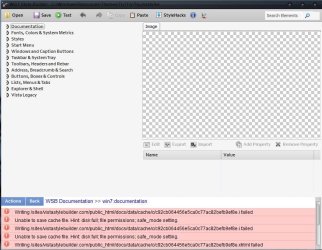
Hello, I'm have this weird problem about Ave-'s Vista Style Builder. I just install it yesterday and the Ave-'s Vista Style Builder is not working at all!!! WHEN I ITY TO IMPORT A IMAGE, NOTHING CAME OUT! THE 'EDIT', ' IMPORT' & 'EXPORT' BUTTON NOT WORKING AT ALL!! ONLY 'ADD PROPERTY ' ARE AVAIBLE......and i'm confuse right know..... is my pc system crash or I'M THE ONE WHO DONNOT KNOW I HOW TO USE IT:sarc:.........Here some of the picture: -

tt1.JPG
This is the first picture.....

tt2.JPG
I dont really understand what this thing said....is this the problem???

Somebosy please help me!!!

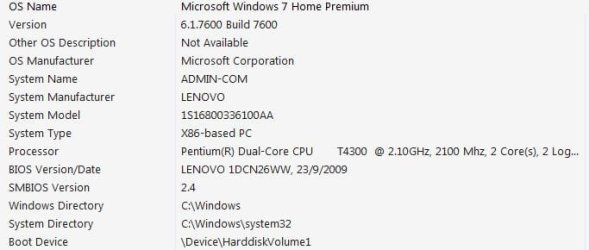
System info: -
system info 1.JPG
 

My Computer

OS
Windows 7 Home Premium 32bit.
Hello, I'm have this weird problem about Ave-'s Vista Style Builder. I just install it yesterday and the Ave-'s Vista Style Builder is not working at all!!! WHEN I ITY TO IMPORT A IMAGE, NOTHING CAME OUT! THE 'EDIT', ' IMPORT' & 'EXPORT' BUTTON NOT WORKING AT ALL!! ONLY 'ADD PROPERTY ' ARE AVAIBLE......and i'm confuse right know..... is my pc system crash or I'M THE ONE WHO DONNOT KNOW I HOW TO USE IT:sarc:.........Here some of the picture: -

View attachment 145991
This is the first picture.....

View attachment 145992
I dont really understand what this thing said....is this the problem???

Somebosy please help me!!!

System info: -
View attachment 145993
Welcome to the Seven Forums
Next time you start a new thread this is an old one.
Then error messages at the bottom are nothing to worry about, that area has never worked well.
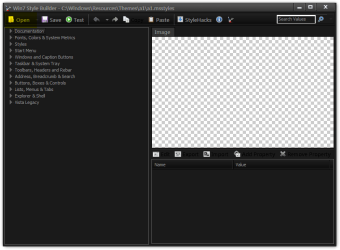
Are you able to load a .msstyle?
Win7 Style Builder - CWindowsResourcesThemesa1a1.msstyles.png
Win7 Style Builder.png
The edit, import, export buttons only work when you have a image loaded in the program.
edit.png
Jerry
 

My Computer

Computer type
Laptop
Computer Manufacturer/Model Number
Sager NP9170
OS
Win 7 Pro x64 / Win 10 Pro
CPU
Intel(R) Core(TM) i7-3630QM CPU @ 2.40GHz
Motherboard
CLEVO P170EM
Memory
12 GB
Graphics Card(s)
(1) Intel(R) HD Graphics 4000 (2) NVIDIA GeForce GTX 675M
Sound Card
(1) Realtek High Definition Audio (2) Intel(R) Display Aud
Monitor(s) Displays
17.3
Screen Resolution
1920x1080
Hard Drives
(1) Samsung 860 EVO 500GB(OS) (1) Samsung 860 EVO 500GB(Data)
Keyboard
Backlite
Antivirus
MSE, Malwarebytes Pro
Browser
Firefox
Other Info
DESKTOP: Custom-built.
OS: Win 10 Pro x64.
CASE: Rosewill R5.
CPU: Intel I5 4670K CPU @ 3.40GHz.
CPU COOLER: Cool Master Hyper 212 EVO.
MOTHERBOARD: Asus Z87-A.
MEMORY: Kingston HyperX 2x4 GB.
GPU: Nvidia Geforce 650 TI.
PSU: Corsair TX750.
DRIVES: (1) Samsung 840 120 GB SSD (2) Western Digital blue 500 GB 7200 RPM.
THANKS ALOT!!!!! Actually there is nor problem with that software lol i'm the one that dunno how to use it.
TAHNK ALOT FOR REPLY MY THREAD!!!:) But did you know where i can find any tutorial about Win7Style Builder? Cuz i'm still confuse about this software... i try to find by google it but most of them is not detail......... and some of it to hard to understand........:confused:
 

My Computer

OS
Windows 7 Home Premium 32bit.
THANKS ALOT!!!!! Actually there is nor problem with that software lol i'm the one that dunno how to use it.
TAHNK ALOT FOR REPLY MY THREAD!!!:) But did you know where i can find any tutorial about Win7Style Builder? Cuz i'm still confuse about this software... i try to find by google it but most of them is not detail......... and some of it to hard to understand........:confused:

There is not a lot on the web. Windows Style Builder have their own forum here VistaStyleBuilder - Index

I can give you a few pointers tell me what you need to know.
Jerry
 

My Computer

Computer type
Laptop
Computer Manufacturer/Model Number
Sager NP9170
OS
Win 7 Pro x64 / Win 10 Pro
CPU
Intel(R) Core(TM) i7-3630QM CPU @ 2.40GHz
Motherboard
CLEVO P170EM
Memory
12 GB
Graphics Card(s)
(1) Intel(R) HD Graphics 4000 (2) NVIDIA GeForce GTX 675M
Sound Card
(1) Realtek High Definition Audio (2) Intel(R) Display Aud
Monitor(s) Displays
17.3
Screen Resolution
1920x1080
Hard Drives
(1) Samsung 860 EVO 500GB(OS) (1) Samsung 860 EVO 500GB(Data)
Keyboard
Backlite
Antivirus
MSE, Malwarebytes Pro
Browser
Firefox
Other Info
DESKTOP: Custom-built.
OS: Win 10 Pro x64.
CASE: Rosewill R5.
CPU: Intel I5 4670K CPU @ 3.40GHz.
CPU COOLER: Cool Master Hyper 212 EVO.
MOTHERBOARD: Asus Z87-A.
MEMORY: Kingston HyperX 2x4 GB.
GPU: Nvidia Geforce 650 TI.
PSU: Corsair TX750.
DRIVES: (1) Samsung 840 120 GB SSD (2) Western Digital blue 500 GB 7200 RPM.
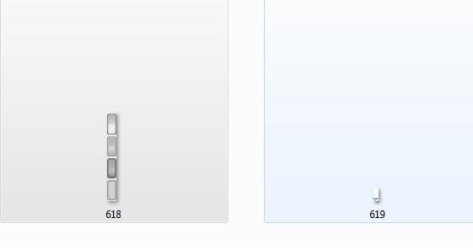
The biggest problem is i dont really know what the image mean! Meaning i dont really know where the image is locate, exple like dis one :

618.JPG
Actually what image is this???!!! It just say " 618 & 619 " but WHERE IS ACTUALLY THE IMAGE IS located ???? IN A STARTMENU?? OR IN THE TASKBAR???!!!

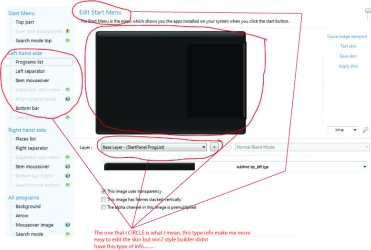
Actually i already try using the " StarDock Skin Studio" and it easy than Win 7 style Builder. " StarDock Skin Studio" is easier to use bcuz it give a detail information on a ' thing' that we want to edit/change,example like dis :-

info.jpg
PLEASE ENLARGE THIS IMAGE BCUZ I WROTE SOMETHING ON THE IMAGE FOR U TO READ.

but what bad about " StarDock Skin Studio" its application is too limited meaning u cant only change a few thing and sometimes it doesnt go like we want to........

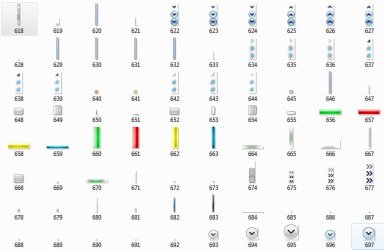
So cant u explain what the image mean [ the IMAGE that u extract form ".msstyle" by using the Restorator 2007 / ResHacker ] and where the image locate?, here some example of the image if u dont really getwant i mean : -

unknow image.JPG

i really really want to make my own theme..........
 

My Computer

OS
Windows 7 Home Premium 32bit.
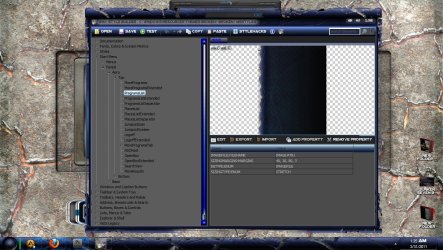
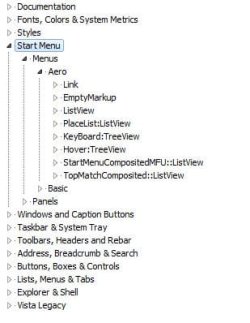
Well welcome to the world of theme building. Quite intimidating at first isn't it? Lets see if i can help you get started a bit. I see you extracted the images out of the msstyle. first you cant always go by the numbers of the images because almost every theme is different. Some add images and some take away images. The only way you can get an accurate number for each image in the theme if you start fresh from a msstyle untouched. Lets concentrate on locations in style builder and not the number it will be alot easier for you to learn locations this way. So let me show you a few images and how you can tell locations

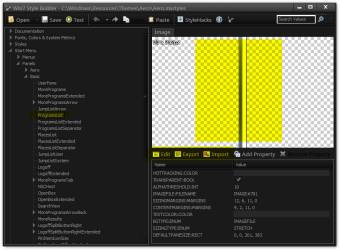
1. Start Menu > Panels > Aero > Top > ProgramsList

1.jpg

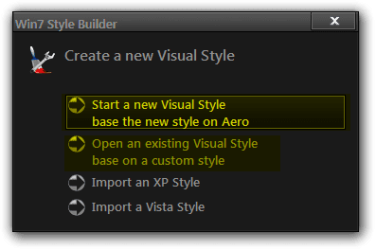
Now for this example you will see here in the image part of the start menu. The program list is the left side of the start menu and the list in number one is how you would get to the image itself. After you find the image you want to change then you would hit edit. This will bring it into your editing program Cs5 or which ever you are using. Then what I do is save it to my desktop and you will save it as a png. Next the easiest way to get your new image into the style builder program is to drag and drop into the box where you see your image this will replace the image with your new one. Now you can either keep building or hit test and see how your new image looks set into place ( I test quite a bit when I am making my themes) after you are happy with the images you have done you will hit save and a box will come up saying use aero and hit ok and after it is all saved it will ask you if you want to use the visual or not some people do and some dont I always use the visual as i am building it because of the testing I do on mine, but I hope this helps you a bit to get started.
 

My Computer

Computer Manufacturer/Model Number
Alienware Aurora
OS
windows 7 rtm
CPU
amd 64 fx51
Motherboard
asus sk8n
Memory
3gb
Monitor(s) Displays
32inch element
Hard Drives
120gb
1tb
1tb
1.5tb
Thank for the tut but i dont have the ' Top' section after the ' Aero'.....

009.JPG

is there something wrong with my win7 style builder????

Ooo, by the way.
TO JERRY : - I ALL ALREADY FOUND WHAT ALL THE IMAGE MEAN:)

146597d1301547394-strange-style-builder-problem-unknow-image.jpg
 

My Computer

OS
Windows 7 Home Premium 32bit.
I'm really sorry!!! I found my 'Top' section juz a few minute ago!!! i'm too careless!!!!
By the way thank alot for the guide!!! I really appreciate it :)
 

My Computer

OS
Windows 7 Home Premium 32bit.
your welcome I know at first just looking at style builder itself it is very overwhelming I was where you are right now at one time and trust me it gets better the more you use it but good luck and cant wait to see what your first one looks like good luck
 

My Computer

Computer Manufacturer/Model Number
Alienware Aurora
OS
windows 7 rtm
CPU
amd 64 fx51
Motherboard
asus sk8n
Memory
3gb
Monitor(s) Displays
32inch element
Hard Drives
120gb
1tb
1tb
1.5tb
Thanks nofx1994 well done
Once you start doing it pretty soon the locations will become natural, and if you get stumped you can always come and ask.
Here is a site that you can join for free with a whole section on Windows Styler Builder Virtual Customs • Home • Customize Your Virtual World!
Jerry
 

My Computer

Computer type
Laptop
Computer Manufacturer/Model Number
Sager NP9170
OS
Win 7 Pro x64 / Win 10 Pro
CPU
Intel(R) Core(TM) i7-3630QM CPU @ 2.40GHz
Motherboard
CLEVO P170EM
Memory
12 GB
Graphics Card(s)
(1) Intel(R) HD Graphics 4000 (2) NVIDIA GeForce GTX 675M
Sound Card
(1) Realtek High Definition Audio (2) Intel(R) Display Aud
Monitor(s) Displays
17.3
Screen Resolution
1920x1080
Hard Drives
(1) Samsung 860 EVO 500GB(OS) (1) Samsung 860 EVO 500GB(Data)
Keyboard
Backlite
Antivirus
MSE, Malwarebytes Pro
Browser
Firefox
Other Info
DESKTOP: Custom-built.
OS: Win 10 Pro x64.
CASE: Rosewill R5.
CPU: Intel I5 4670K CPU @ 3.40GHz.
CPU COOLER: Cool Master Hyper 212 EVO.
MOTHERBOARD: Asus Z87-A.
MEMORY: Kingston HyperX 2x4 GB.
GPU: Nvidia Geforce 650 TI.
PSU: Corsair TX750.
DRIVES: (1) Samsung 840 120 GB SSD (2) Western Digital blue 500 GB 7200 RPM.
Back
Top