Solved Strange USB device issue

swervr1

New member
Local time
2:23 AM
Messages
23
Location
Buckinghamshire, England
Hi,

I have spent quite a while checking through the "safely remove USB device" issues here in the forum but I cannot find an example quite like mine.

If I connect a USB device it will work correctly. It appears correctly under "Computer". The "Safely remove hardware and eject media" icon appears in the taskbar ok. However when you click on this icon to remove the device all that shows is 3 dots (...) instead of the device name. If you open Devices and Printers nothing shows there either.

Any help would be greatly appreciated.

Regards
Mervyn
 

My Computer

Computer Manufacturer/Model Number
Home Build Desktop PC
OS
Windows 7 Ultimate 32 bit
CPU
AMD Athlon 64 FX-60 Dual Core
Motherboard
Asus A8N32-SLi Deluxe
Memory
3Gb Corsair DDR400 DIMM
Graphics Card(s)
2 x XFX nVidia 7900GTX
Sound Card
Creative X-Fi
Monitor(s) Displays
Samsung Syncmaster 226BW 22" Widescreen 2ms
Screen Resolution
1680 x 1050
Hard Drives
2 x Maxtor 6H400F0 Sata 2
1 x Samsung HD103UJ Sata 2
PSU
Jeantech 900w Modular
Case
Coolermaster Wave
Cooling
Gigabyte G-Power Pro
Keyboard
Microsoft Intellipoint
Mouse
Microsoft Laser
Internet Speed
8Mb Broadband
What type of usb device is this? Do you have the latest driver/firmware, software for said usb device?
 

My Computer

Computer Manufacturer/Model Number
Custom built
OS
Windows 7 Ultimate 64 bit
CPU
AMD Phenom II X4 965 Black Edition
Motherboard
Gigabyte GA-MA790X-DS4
Memory
GSkill 4 X 2 GB PC 8500
Graphics Card(s)
XFX Radeon HD 6790 D
Sound Card
On board RealTek HD
Monitor(s) Displays
Dual monitors:Samsung SyncMaster S20B300
Screen Resolution
1600 X 900
Hard Drives
Seagate Barracuda 1TB (primary)
Seagate Barracuda 2 X 320 GB
PSU
Ultra X4 750 watt fully modular
Case
Thermaltake Overseer RX 1 full tower
Cooling
Core-Contact 92 mm CPU Cooler
Keyboard
Logitech G510
Mouse
Razor DeathAdder
Internet Speed
50/5 Mbps UL/DL
Other Info
Optical: Super Muliti DVD burner w/lightscribe, Hauppauge WinTV HVR-1800
You can try entering a name for it in Computer with the device(s) connected.
 

My Computer

Computer type
PC/Desktop
Computer Manufacturer/Model Number
Home Built Desktop By DataTech
OS
Windows 7 Ultimate X64 SP1
CPU
Intel i5-2550K, Differing ~4.4-4.8GHz No built in GPU
Motherboard
ASUS P8Z68-V PRO/GEN3
Memory
16GB G.Skill Sniper 1866MHz @ 2133MHz 2x8GB
Graphics Card(s)
ASUS GTX650TIB-DC2OC-2GD5, (650TI Boost)
Sound Card
Onboard Realtek 5-1
Monitor(s) Displays
Samsung P2570HD
Screen Resolution
1920x1080
Hard Drives
Samsung 840 Pro 256GB SSD for OS, 500GB Seagate Constellation (Enterprise drive) for Data
PSU
Corsair HX650W
Case
Inwin Dragon Rider
Cooling
Hyper 212 EVO w/two Noctua fans, push-pull, @1300 RPM
Keyboard
E-Z Eyes, bright yellow keys with large characters
Mouse
steelseries SENSEI Laser Pro Gaming
Internet Speed
48-51Mbs Mbs down, 11 Mbs up Xfinity Cable
Antivirus
Norton Internet Security 2013
Browser
IE 10, Opera, Pale Moon if needed
Other Info
4 case fans, LG BluRay-RE, ASUS DVD-RW, Mr. Fusion power supply, 1.21 gigawatts.
Thanks for the replies, but this is the weird thing. It is not limited to one device. Anything I plug in now shows as (...) where as all devices worked correctly before.

Looking under "Computer" the device appears correctly, but does not show at all in "Devices and Printers" and so doesn't offer a "safely remove" option. :confused:

Regards
Mervyn
 

My Computer

Computer Manufacturer/Model Number
Home Build Desktop PC
OS
Windows 7 Ultimate 32 bit
CPU
AMD Athlon 64 FX-60 Dual Core
Motherboard
Asus A8N32-SLi Deluxe
Memory
3Gb Corsair DDR400 DIMM
Graphics Card(s)
2 x XFX nVidia 7900GTX
Sound Card
Creative X-Fi
Monitor(s) Displays
Samsung Syncmaster 226BW 22" Widescreen 2ms
Screen Resolution
1680 x 1050
Hard Drives
2 x Maxtor 6H400F0 Sata 2
1 x Samsung HD103UJ Sata 2
PSU
Jeantech 900w Modular
Case
Coolermaster Wave
Cooling
Gigabyte G-Power Pro
Keyboard
Microsoft Intellipoint
Mouse
Microsoft Laser
Internet Speed
8Mb Broadband

My Computer

Computer type
PC/Desktop
Computer Manufacturer/Model Number
Home Built Desktop By DataTech
OS
Windows 7 Ultimate X64 SP1
CPU
Intel i5-2550K, Differing ~4.4-4.8GHz No built in GPU
Motherboard
ASUS P8Z68-V PRO/GEN3
Memory
16GB G.Skill Sniper 1866MHz @ 2133MHz 2x8GB
Graphics Card(s)
ASUS GTX650TIB-DC2OC-2GD5, (650TI Boost)
Sound Card
Onboard Realtek 5-1
Monitor(s) Displays
Samsung P2570HD
Screen Resolution
1920x1080
Hard Drives
Samsung 840 Pro 256GB SSD for OS, 500GB Seagate Constellation (Enterprise drive) for Data
PSU
Corsair HX650W
Case
Inwin Dragon Rider
Cooling
Hyper 212 EVO w/two Noctua fans, push-pull, @1300 RPM
Keyboard
E-Z Eyes, bright yellow keys with large characters
Mouse
steelseries SENSEI Laser Pro Gaming
Internet Speed
48-51Mbs Mbs down, 11 Mbs up Xfinity Cable
Antivirus
Norton Internet Security 2013
Browser
IE 10, Opera, Pale Moon if needed
Other Info
4 case fans, LG BluRay-RE, ASUS DVD-RW, Mr. Fusion power supply, 1.21 gigawatts.
Hi Britton30,

I looked in Device Manager and there are no items with a yellow triangle.

I then ran SFC /Scannow and it found and repaired a number of corrupted files, mainly to do with Internet Explorer it seems. I have uploaded the txt file in case it helps.

I rebooted the PC but the problem remains with any device plugged in showing as (...)

I have not completed any optimizing of C:/ drive, I have a separate drive D:/ solely for Flight Sim and this has been defragmented. I do run Spyware Doctor, Panda Antivirus and Registry Mechanic regularly but have never had an issue previously.

Regards
Mervyn
 
Last edited:

My Computer

Computer Manufacturer/Model Number
Home Build Desktop PC
OS
Windows 7 Ultimate 32 bit
CPU
AMD Athlon 64 FX-60 Dual Core
Motherboard
Asus A8N32-SLi Deluxe
Memory
3Gb Corsair DDR400 DIMM
Graphics Card(s)
2 x XFX nVidia 7900GTX
Sound Card
Creative X-Fi
Monitor(s) Displays
Samsung Syncmaster 226BW 22" Widescreen 2ms
Screen Resolution
1680 x 1050
Hard Drives
2 x Maxtor 6H400F0 Sata 2
1 x Samsung HD103UJ Sata 2
PSU
Jeantech 900w Modular
Case
Coolermaster Wave
Cooling
Gigabyte G-Power Pro
Keyboard
Microsoft Intellipoint
Mouse
Microsoft Laser
Internet Speed
8Mb Broadband
I don't recommend Registry Mechanic for Windows 7 although it was good for XP. In my sig are some links for toher security programs and CCleaner. CCleaner has a Registry cleaner option that seems safe with Win 7, I use it.

Could you post a screenshot of the USB device shown as (...)?
 

My Computer

Computer type
PC/Desktop
Computer Manufacturer/Model Number
Home Built Desktop By DataTech
OS
Windows 7 Ultimate X64 SP1
CPU
Intel i5-2550K, Differing ~4.4-4.8GHz No built in GPU
Motherboard
ASUS P8Z68-V PRO/GEN3
Memory
16GB G.Skill Sniper 1866MHz @ 2133MHz 2x8GB
Graphics Card(s)
ASUS GTX650TIB-DC2OC-2GD5, (650TI Boost)
Sound Card
Onboard Realtek 5-1
Monitor(s) Displays
Samsung P2570HD
Screen Resolution
1920x1080
Hard Drives
Samsung 840 Pro 256GB SSD for OS, 500GB Seagate Constellation (Enterprise drive) for Data
PSU
Corsair HX650W
Case
Inwin Dragon Rider
Cooling
Hyper 212 EVO w/two Noctua fans, push-pull, @1300 RPM
Keyboard
E-Z Eyes, bright yellow keys with large characters
Mouse
steelseries SENSEI Laser Pro Gaming
Internet Speed
48-51Mbs Mbs down, 11 Mbs up Xfinity Cable
Antivirus
Norton Internet Security 2013
Browser
IE 10, Opera, Pale Moon if needed
Other Info
4 case fans, LG BluRay-RE, ASUS DVD-RW, Mr. Fusion power supply, 1.21 gigawatts.
I have downloaded CCleaner and will use that moving forward.

I have also attached the screenshot you asked for. This particular device is a 4Gb memory stick.

Regards
Mervyn

USB issue.jpg
 

My Computer

Computer Manufacturer/Model Number
Home Build Desktop PC
OS
Windows 7 Ultimate 32 bit
CPU
AMD Athlon 64 FX-60 Dual Core
Motherboard
Asus A8N32-SLi Deluxe
Memory
3Gb Corsair DDR400 DIMM
Graphics Card(s)
2 x XFX nVidia 7900GTX
Sound Card
Creative X-Fi
Monitor(s) Displays
Samsung Syncmaster 226BW 22" Widescreen 2ms
Screen Resolution
1680 x 1050
Hard Drives
2 x Maxtor 6H400F0 Sata 2
1 x Samsung HD103UJ Sata 2
PSU
Jeantech 900w Modular
Case
Coolermaster Wave
Cooling
Gigabyte G-Power Pro
Keyboard
Microsoft Intellipoint
Mouse
Microsoft Laser
Internet Speed
8Mb Broadband
Two more ideas and I'm stumped if they don't work.
1. Use system restore to a point before the problem occurred.

2. While rebooting, hit F8 repeatedly and you'll get the Advanced Boot Options screen. Scroll and choose Last Known Good Configuration, enter.

Well one more. If you didn't reboot after the SFC run, run it again and reboot. If you still see it fixed something, run again. A clean one will say No Integrity Violations found.
 

My Computer

Computer type
PC/Desktop
Computer Manufacturer/Model Number
Home Built Desktop By DataTech
OS
Windows 7 Ultimate X64 SP1
CPU
Intel i5-2550K, Differing ~4.4-4.8GHz No built in GPU
Motherboard
ASUS P8Z68-V PRO/GEN3
Memory
16GB G.Skill Sniper 1866MHz @ 2133MHz 2x8GB
Graphics Card(s)
ASUS GTX650TIB-DC2OC-2GD5, (650TI Boost)
Sound Card
Onboard Realtek 5-1
Monitor(s) Displays
Samsung P2570HD
Screen Resolution
1920x1080
Hard Drives
Samsung 840 Pro 256GB SSD for OS, 500GB Seagate Constellation (Enterprise drive) for Data
PSU
Corsair HX650W
Case
Inwin Dragon Rider
Cooling
Hyper 212 EVO w/two Noctua fans, push-pull, @1300 RPM
Keyboard
E-Z Eyes, bright yellow keys with large characters
Mouse
steelseries SENSEI Laser Pro Gaming
Internet Speed
48-51Mbs Mbs down, 11 Mbs up Xfinity Cable
Antivirus
Norton Internet Security 2013
Browser
IE 10, Opera, Pale Moon if needed
Other Info
4 case fans, LG BluRay-RE, ASUS DVD-RW, Mr. Fusion power supply, 1.21 gigawatts.
Hi Britton30,

Thanks for your assistance with this but I have been unable to resolve it.

I did reboot after running SFC, but I did it again and nothing was found this time. I then tried last known good configuration without success and system restore is my last try I guess. I will report how that goes but I dont have the time to run it right at the moment.

If that doesn't help do you think I should do a repair install of W7?

Regards
Mervyn
 

My Computer

Computer Manufacturer/Model Number
Home Build Desktop PC
OS
Windows 7 Ultimate 32 bit
CPU
AMD Athlon 64 FX-60 Dual Core
Motherboard
Asus A8N32-SLi Deluxe
Memory
3Gb Corsair DDR400 DIMM
Graphics Card(s)
2 x XFX nVidia 7900GTX
Sound Card
Creative X-Fi
Monitor(s) Displays
Samsung Syncmaster 226BW 22" Widescreen 2ms
Screen Resolution
1680 x 1050
Hard Drives
2 x Maxtor 6H400F0 Sata 2
1 x Samsung HD103UJ Sata 2
PSU
Jeantech 900w Modular
Case
Coolermaster Wave
Cooling
Gigabyte G-Power Pro
Keyboard
Microsoft Intellipoint
Mouse
Microsoft Laser
Internet Speed
8Mb Broadband
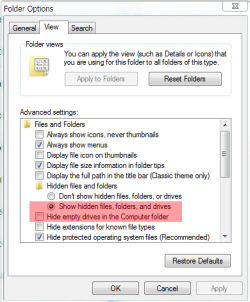
Lets try one more thing. In Control Panel\All Control Panel Items\Folder Options\view tab, make sure you have the items in the red box set as below.
Folder.PNG
 

My Computer

Computer type
PC/Desktop
Computer Manufacturer/Model Number
Home Built Desktop By DataTech
OS
Windows 7 Ultimate X64 SP1
CPU
Intel i5-2550K, Differing ~4.4-4.8GHz No built in GPU
Motherboard
ASUS P8Z68-V PRO/GEN3
Memory
16GB G.Skill Sniper 1866MHz @ 2133MHz 2x8GB
Graphics Card(s)
ASUS GTX650TIB-DC2OC-2GD5, (650TI Boost)
Sound Card
Onboard Realtek 5-1
Monitor(s) Displays
Samsung P2570HD
Screen Resolution
1920x1080
Hard Drives
Samsung 840 Pro 256GB SSD for OS, 500GB Seagate Constellation (Enterprise drive) for Data
PSU
Corsair HX650W
Case
Inwin Dragon Rider
Cooling
Hyper 212 EVO w/two Noctua fans, push-pull, @1300 RPM
Keyboard
E-Z Eyes, bright yellow keys with large characters
Mouse
steelseries SENSEI Laser Pro Gaming
Internet Speed
48-51Mbs Mbs down, 11 Mbs up Xfinity Cable
Antivirus
Norton Internet Security 2013
Browser
IE 10, Opera, Pale Moon if needed
Other Info
4 case fans, LG BluRay-RE, ASUS DVD-RW, Mr. Fusion power supply, 1.21 gigawatts.
I have looked at the folder options and Show Hidden Files, Folders and drives was already selected, but so was Hide empty drives in the Computer Folder so I unselected that. After rebooting still no change.

I have just completed a system restore back to 12th September which was prior to the issue appearing and this has not corrected the problem either. :confused:
 
Last edited:

My Computer

Computer Manufacturer/Model Number
Home Build Desktop PC
OS
Windows 7 Ultimate 32 bit
CPU
AMD Athlon 64 FX-60 Dual Core
Motherboard
Asus A8N32-SLi Deluxe
Memory
3Gb Corsair DDR400 DIMM
Graphics Card(s)
2 x XFX nVidia 7900GTX
Sound Card
Creative X-Fi
Monitor(s) Displays
Samsung Syncmaster 226BW 22" Widescreen 2ms
Screen Resolution
1680 x 1050
Hard Drives
2 x Maxtor 6H400F0 Sata 2
1 x Samsung HD103UJ Sata 2
PSU
Jeantech 900w Modular
Case
Coolermaster Wave
Cooling
Gigabyte G-Power Pro
Keyboard
Microsoft Intellipoint
Mouse
Microsoft Laser
Internet Speed
8Mb Broadband
How long has this been happening for? Can you do a system restore?
 

My Computer

Computer Manufacturer/Model Number
ASUS G60JX Republic of Gamers
OS
Windows 7 Professional 64-bit
CPU
Intel i5 430m
Memory
4 GB DDR3
Graphics Card(s)
nvidia Geforce GTS 360M Cuda 1GB
Sound Card
EAX Advanced HD 4.0
Screen Resolution
1366 x 768
Hard Drives
460 GB 7200 RPM built in
Internet Speed
Too slow :-( 160kbs

My Computer

Computer type
PC/Desktop
Computer Manufacturer/Model Number
Home Built Desktop By DataTech
OS
Windows 7 Ultimate X64 SP1
CPU
Intel i5-2550K, Differing ~4.4-4.8GHz No built in GPU
Motherboard
ASUS P8Z68-V PRO/GEN3
Memory
16GB G.Skill Sniper 1866MHz @ 2133MHz 2x8GB
Graphics Card(s)
ASUS GTX650TIB-DC2OC-2GD5, (650TI Boost)
Sound Card
Onboard Realtek 5-1
Monitor(s) Displays
Samsung P2570HD
Screen Resolution
1920x1080
Hard Drives
Samsung 840 Pro 256GB SSD for OS, 500GB Seagate Constellation (Enterprise drive) for Data
PSU
Corsair HX650W
Case
Inwin Dragon Rider
Cooling
Hyper 212 EVO w/two Noctua fans, push-pull, @1300 RPM
Keyboard
E-Z Eyes, bright yellow keys with large characters
Mouse
steelseries SENSEI Laser Pro Gaming
Internet Speed
48-51Mbs Mbs down, 11 Mbs up Xfinity Cable
Antivirus
Norton Internet Security 2013
Browser
IE 10, Opera, Pale Moon if needed
Other Info
4 case fans, LG BluRay-RE, ASUS DVD-RW, Mr. Fusion power supply, 1.21 gigawatts.

My Computer

Computer Manufacturer/Model Number
Something I threw together
OS
Windows 7 Ultimate x64
CPU
Intel Core i7-2600K
Motherboard
Asus P8P67
Memory
16 GB G Skill F3-10666 CL9D-4GBRL
Graphics Card(s)
ATI Radeon HD 6870
Sound Card
ATI Radeon HDMI / Realtek ALC892
Monitor(s) Displays
2 x 22" standard monitors / LG32LC56v TV to watch films
Screen Resolution
1920 x1080
Hard Drives
2 x OCZ Vertex2 111.79GB
3 x Samsung103SJ
1 x Samsung103UJ
1 x WD3200BEVT
1 x Hitachi5K320-160
PSU
Thermaltake Toughpower Cable Management 750W
Case
Antec 300
Cooling
Noctua NH-U12P SE2 and 5 120mm Case fans
Keyboard
Microsoft Comfort Curve Keyboard 2000
Mouse
Hama M3110 / Logitech M305
Internet Speed
16000
Other Info
I have also used Fedora, Suse, Ubuntu Linux
And all other Windows from 95 to date except ME
If you can, try Enhanced USB Host controller hardware or driver and update it.
 

My Computer

Computer type
PC/Desktop
Computer Manufacturer/Model Number
Home Built Desktop By DataTech
OS
Windows 7 Ultimate X64 SP1
CPU
Intel i5-2550K, Differing ~4.4-4.8GHz No built in GPU
Motherboard
ASUS P8Z68-V PRO/GEN3
Memory
16GB G.Skill Sniper 1866MHz @ 2133MHz 2x8GB
Graphics Card(s)
ASUS GTX650TIB-DC2OC-2GD5, (650TI Boost)
Sound Card
Onboard Realtek 5-1
Monitor(s) Displays
Samsung P2570HD
Screen Resolution
1920x1080
Hard Drives
Samsung 840 Pro 256GB SSD for OS, 500GB Seagate Constellation (Enterprise drive) for Data
PSU
Corsair HX650W
Case
Inwin Dragon Rider
Cooling
Hyper 212 EVO w/two Noctua fans, push-pull, @1300 RPM
Keyboard
E-Z Eyes, bright yellow keys with large characters
Mouse
steelseries SENSEI Laser Pro Gaming
Internet Speed
48-51Mbs Mbs down, 11 Mbs up Xfinity Cable
Antivirus
Norton Internet Security 2013
Browser
IE 10, Opera, Pale Moon if needed
Other Info
4 case fans, LG BluRay-RE, ASUS DVD-RW, Mr. Fusion power supply, 1.21 gigawatts.
I have checked the Enhanced USB Host Controller and tried to update it but it says the most up to date driver is already installed.

I also ran through the tutorial suggested by pooch, but the problem persists.

Thanks again Britton30 for hanging with this, I will wait a while in case you discover something before I reinstall.

Regards
Mervyn
 

My Computer

Computer Manufacturer/Model Number
Home Build Desktop PC
OS
Windows 7 Ultimate 32 bit
CPU
AMD Athlon 64 FX-60 Dual Core
Motherboard
Asus A8N32-SLi Deluxe
Memory
3Gb Corsair DDR400 DIMM
Graphics Card(s)
2 x XFX nVidia 7900GTX
Sound Card
Creative X-Fi
Monitor(s) Displays
Samsung Syncmaster 226BW 22" Widescreen 2ms
Screen Resolution
1680 x 1050
Hard Drives
2 x Maxtor 6H400F0 Sata 2
1 x Samsung HD103UJ Sata 2
PSU
Jeantech 900w Modular
Case
Coolermaster Wave
Cooling
Gigabyte G-Power Pro
Keyboard
Microsoft Intellipoint
Mouse
Microsoft Laser
Internet Speed
8Mb Broadband
I'd try Uwe Sieber's DriveCleanup on your PC. From an elevated command prompt enter drivecleanup -t which will list everything it wants to clear away. To cleanup everything, just drivecleanup.

I've used it a few times, and on one occasion it solved a nasty wierd problem for me. Long shot perhaps; do a System Restore point before trying it. Look about midway down this page:

Drive Tools for Windows
 

My Computer

Computer type
Laptop
Computer Manufacturer/Model Number
Dell Latitude E6540 Laptop
OS
Windows 7 Professional 64bit
CPU
Intel Core i7 4600M @ 2.90GHz
Motherboard
Dell Inc. 0CYT5F (SOCKET 0)
Memory
16.0GB Dual-Channel DDR3 @ 797MHz (11-11-11-28)
Graphics Card(s)
Intel HD Graphics 4600 (Dell) 2048MB ATI AMD Radeon HD 8790M
Sound Card
Realtek High Definition Audio
Monitor(s) Displays
HP ZR30w (2560x1600@60Hz)
Hard Drives
256GB LITEONIT LMT-256M6M-41 mm SATA (SSD)
1TB Samsung SSD 860 EVO mSATA SATA (SSD)
2TB USB 3.0 USB Device
115GB SanDisk Ultra Fit USB
Other Info
Multiple Dell E-Port Plus II Port Replicator/Docking Stations 0Y72NH USB 3.0 + 130W AC Adapters
If you are not happy about doing a repair install/new install I have a workaround that may help, this is a bit long winded, but if it works I will go on to explain how to make a shortcut on your desktop.
When you want to remove hardware open a command prompt (click on :orb: and type command ) and type RunDll32.exe shell32.dll,Control_RunDLL hotplug.dll then press enter.
 
Last edited:

My Computer

Computer Manufacturer/Model Number
Something I threw together
OS
Windows 7 Ultimate x64
CPU
Intel Core i7-2600K
Motherboard
Asus P8P67
Memory
16 GB G Skill F3-10666 CL9D-4GBRL
Graphics Card(s)
ATI Radeon HD 6870
Sound Card
ATI Radeon HDMI / Realtek ALC892
Monitor(s) Displays
2 x 22" standard monitors / LG32LC56v TV to watch films
Screen Resolution
1920 x1080
Hard Drives
2 x OCZ Vertex2 111.79GB
3 x Samsung103SJ
1 x Samsung103UJ
1 x WD3200BEVT
1 x Hitachi5K320-160
PSU
Thermaltake Toughpower Cable Management 750W
Case
Antec 300
Cooling
Noctua NH-U12P SE2 and 5 120mm Case fans
Keyboard
Microsoft Comfort Curve Keyboard 2000
Mouse
Hama M3110 / Logitech M305
Internet Speed
16000
Other Info
I have also used Fedora, Suse, Ubuntu Linux
And all other Windows from 95 to date except ME
Something else to check is in services UPnP Device Host, make sure it's running and startup is Automatic. Go to Start\All Programs\Services to locate it.
 

My Computer

Computer type
PC/Desktop
Computer Manufacturer/Model Number
Home Built Desktop By DataTech
OS
Windows 7 Ultimate X64 SP1
CPU
Intel i5-2550K, Differing ~4.4-4.8GHz No built in GPU
Motherboard
ASUS P8Z68-V PRO/GEN3
Memory
16GB G.Skill Sniper 1866MHz @ 2133MHz 2x8GB
Graphics Card(s)
ASUS GTX650TIB-DC2OC-2GD5, (650TI Boost)
Sound Card
Onboard Realtek 5-1
Monitor(s) Displays
Samsung P2570HD
Screen Resolution
1920x1080
Hard Drives
Samsung 840 Pro 256GB SSD for OS, 500GB Seagate Constellation (Enterprise drive) for Data
PSU
Corsair HX650W
Case
Inwin Dragon Rider
Cooling
Hyper 212 EVO w/two Noctua fans, push-pull, @1300 RPM
Keyboard
E-Z Eyes, bright yellow keys with large characters
Mouse
steelseries SENSEI Laser Pro Gaming
Internet Speed
48-51Mbs Mbs down, 11 Mbs up Xfinity Cable
Antivirus
Norton Internet Security 2013
Browser
IE 10, Opera, Pale Moon if needed
Other Info
4 case fans, LG BluRay-RE, ASUS DVD-RW, Mr. Fusion power supply, 1.21 gigawatts.
Back
Top