
Hey guys,
i checked the forums if someone has a similar problem to mine, but didnt find anything. If i just overlooked it im sorry, my english isnt the best, so i maybe just searched wrong.
But here is my problem. I am using custom themes for my win7 x64. I used universal theme patcher to be able to do so.
Now i have several problems, first of: the back- and forward button and the windows icon in the taskbar doesnt change.
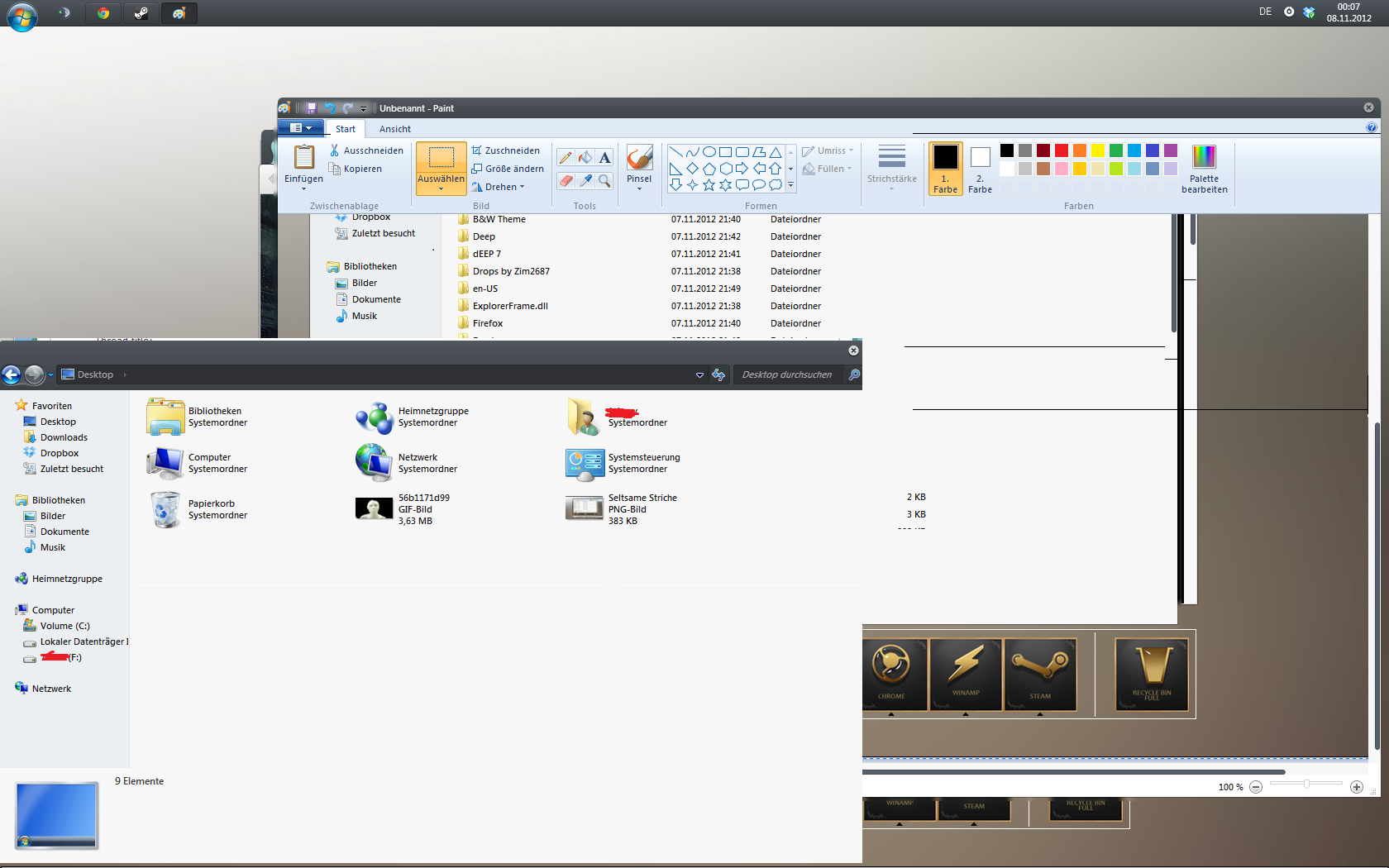
But my biggest problem is that sometimes, not everytime i run the computer, i get this weird horizontal stripes. Most of the time they are black, but sometimes they are white.
The screenshot seems a little bit strange. Thats because i took a screenshot, of me editing a previous screenshot in paint. I did this because while i edited it, more lines appeared.
Im using the spaceblueberries theme from deviantart, but this doesnt matter cause all of the problems occur on any custom theme. The second problem with the bars even appears in the normal win 7 aero theme from windows.
Guess i broken something somewhere :/
My biggest problem is the second one, and i highly assume that it is because of the custom theme. Im also running rocket dock in the background but thats basically it.
Hope someone knows a solution and thanks in advance
Edit: heres the screen:
i checked the forums if someone has a similar problem to mine, but didnt find anything. If i just overlooked it im sorry, my english isnt the best, so i maybe just searched wrong.
But here is my problem. I am using custom themes for my win7 x64. I used universal theme patcher to be able to do so.
Now i have several problems, first of: the back- and forward button and the windows icon in the taskbar doesnt change.
But my biggest problem is that sometimes, not everytime i run the computer, i get this weird horizontal stripes. Most of the time they are black, but sometimes they are white.
The screenshot seems a little bit strange. Thats because i took a screenshot, of me editing a previous screenshot in paint. I did this because while i edited it, more lines appeared.
Im using the spaceblueberries theme from deviantart, but this doesnt matter cause all of the problems occur on any custom theme. The second problem with the bars even appears in the normal win 7 aero theme from windows.
Guess i broken something somewhere :/
My biggest problem is the second one, and i highly assume that it is because of the custom theme. Im also running rocket dock in the background but thats basically it.
Hope someone knows a solution and thanks in advance
Edit: heres the screen:
My Computer
- OS
- DE - Deutschland

