
Strange W7 installation

Stockmoose16

New member
Local time
1:14 AM
Messages
21
I had my computer set up as a dual boot for W7 and XP. My W7 came up with an authentication error after I tried to repartition the drive, so I had to reinstall it. Right before I did the reinstall, I deleted Windows XP pro from the other partition and formatted that partition (using the W7 tool that comes up during the setup process).
I've now reinstalled W7, but I'm confused by what I see in the disk management utility. It says that the primary drive is something called the "system reserved drive." In fact this drive has the following attributes: (System, active, primary partition). Strangely, my W7, which is now the only OS on the computer is listed as (Boot, Page file, crash dump, logical).

What is this "system reserved drive," and why isn't W7 listed as being the primary drive? Do I need to run another clean install?
 

My Computer

OS
Windows 7
CPU
AMD Athlon X2 6000+ 3.0 Ghz
Motherboard
PC Chips AG 13g+ V3
Memory
2.0 gb
Graphics Card(s)
built in
Sound Card
built in
Monitor(s) Displays
LG 32 inch flat screen
Screen Resolution
1080i
Hard Drives
Seagate internal 500 gb
WD "My Passport" external 500gb
Can you please post back a screenshot of your full Disk Management drive map? Use the Snipping Tool in the Start Menu, attaching the file using the paper clip in reply box.

Sounds like you got the 100mb System Reserved partition that is sometimes installed with Win7. It contains the MBR and the repair tools found on the Win7 DVD and Repair Disk, making them available by tapping F8 at bootup. It can be removed if you want, but requires recovery of the MBR into Win7 partition.

But let us see the screenshot to know for sure.
 
Well, I would post a screen shot, but every other time I open up disk management it hangs on "Connecting to virtual disk service" and doesn't bring up any of my drive info. I'll post the screen shot of that.
 

Attachments

  • Capture.PNG
    Capture.PNG
    13.6 KB · Views: 39

My Computer

OS
Windows 7
CPU
AMD Athlon X2 6000+ 3.0 Ghz
Motherboard
PC Chips AG 13g+ V3
Memory
2.0 gb
Graphics Card(s)
built in
Sound Card
built in
Monitor(s) Displays
LG 32 inch flat screen
Screen Resolution
1080i
Hard Drives
Seagate internal 500 gb
WD "My Passport" external 500gb
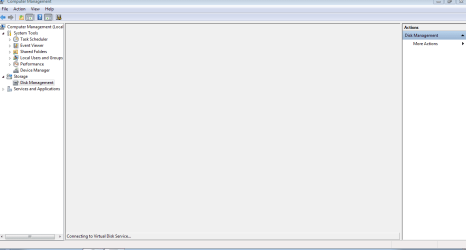
I've now restarted 3 times and the disk management tool just keeps hanging whenever I try to load the information. I don't know what to do. W7 has so many bugs. On my previous install it thought I had a non-genuine version because I changed the partition size. That bug forced me to do this installation, and now i'm having a completely different problem. I don't get it.
 

My Computer

OS
Windows 7
CPU
AMD Athlon X2 6000+ 3.0 Ghz
Motherboard
PC Chips AG 13g+ V3
Memory
2.0 gb
Graphics Card(s)
built in
Sound Card
built in
Monitor(s) Displays
LG 32 inch flat screen
Screen Resolution
1080i
Hard Drives
Seagate internal 500 gb
WD "My Passport" external 500gb
You wouldn't have needed a reinstallation for the activation, you changed the size of the partition and sometimes it happens and is completely normal.

For the disk management, are you waiting long enough for things to appear? Sometimes it can take a bit more time. You could try going directly to it by pressing the start orb and writing "diskmgmt.msc" without the quotes then pressing enter.
 

My Computer

Computer type
PC/Desktop
Computer Manufacturer/Model Number
Custom built Desktop(Myself) Specs below - Also Asus G53SW-A1 laptop
OS
Windows 10 Pro / OpenSUSE
CPU
Intel Core i7 4790K
Motherboard
Asus Z97-A
Memory
32GB DDR3
Graphics Card(s)
EVGA GTX 1070
Sound Card
OnBoard
Monitor(s) Displays
3 X 1080P 24" displays
Screen Resolution
1280x1050 & 1920x1080
Hard Drives
SSD: Crucial M500 128GB
HD 1: WD Caviar Black 1TB
HD 2: WD Caviar Black 2TB
HD 3: WD Caviar Blue 500GB
PSU
Corsair CX650M
Case
Corsair Obisidian 450D
Cooling
Noctua NH-D14
Keyboard
Corsair K70 Vengeance (blue switches)
Mouse
Logitech M500
Internet Speed
65/10
Antivirus
Kaskersky Internet Securty
Browser
Opera
You would not get non-genuine error from just trying to repartition. That was a good time to post here for help.

This is not Win7 bugs but most likely install mistakes or other interference.

Install free Partition Wizard and get screenshot from it using Snipping Tool in start menu, attaching file in reply box using Paper clip. View attachment 41287

We only need to see if you have something about the formatted partition that is interfering with Win7. The system reserved 100mb partition is fine and sounds correct, as does the Win7 partition as you relate it. But we need to see to be sure.

This may only require a http://www.sevenforums.com/tutorials/3413-repair-install.html?ltr=R
 
You would not get non-genuine error from just trying to repartition. That was a good time to post here for help.

This is not Win7 bugs but install mistakes.

I'm sorry, but you are incorrect. It did have something to do with partitioning. After I installed Windows 7, it worked perfectly for a day. Then after using a partition program to move unallocated space to my Win 7 partition, the computer restarted with a blue wallpaper and the words, "Windows 7, build 7600 This is not a genuine version" in small white letters in the bottom righthand corner.

I looked on this very forum, and there were multiple people who had the same problem after playing with partitions. Windows 7 has a bug where the OS changes the letter assignment of your partitions in the registry, which of course messes with the activation.

I followed the directions that I got on this forum, but I couldn't fix the problem. In case you're interested, here's the info from this forum on the error. There is no doubt W7 is buggy.

http://www.sevenforums.com/general-discussion/37113-booting-problem-related-windows-not-genuine-error-2.html#post430194
 

My Computer

OS
Windows 7
CPU
AMD Athlon X2 6000+ 3.0 Ghz
Motherboard
PC Chips AG 13g+ V3
Memory
2.0 gb
Graphics Card(s)
built in
Sound Card
built in
Monitor(s) Displays
LG 32 inch flat screen
Screen Resolution
1080i
Hard Drives
Seagate internal 500 gb
WD "My Passport" external 500gb
You wouldn't have needed a reinstallation for the activation, you changed the size of the partition and sometimes it happens and is completely normal.

For the disk management, are you waiting long enough for things to appear? Sometimes it can take a bit more time. You could try going directly to it by pressing the start orb and writing "diskmgmt.msc" without the quotes then pressing enter.

I've been waiting 45 minutes and it still hasn't come up. Sometimes, after a restart, it opens after about 15 seconds. So I know there is something wrong.
 

My Computer

OS
Windows 7
CPU
AMD Athlon X2 6000+ 3.0 Ghz
Motherboard
PC Chips AG 13g+ V3
Memory
2.0 gb
Graphics Card(s)
built in
Sound Card
built in
Monitor(s) Displays
LG 32 inch flat screen
Screen Resolution
1080i
Hard Drives
Seagate internal 500 gb
WD "My Passport" external 500gb
Where did you get your copy of Win7?

Install free Partition Wizard and get screenshot from it using Snipping Tool in start menu, attaching file in reply box using Paper clip. PartitionWizard.exe

We only need to see if you have something about the partitioning that is interfering with Windows 7. The system reserved 100mb partition is fine and sounds correct, as does the Windows 7 partition as you relate it. But we need to see to be sure.

This may only require a Repair Install
 
Last edited:
Where did you get your copy of Win7?

Install free Partition Wizard and get screenshot from it using Snipping Tool in start menu, attaching file in reply box using Paper clip. PartitionWizard.exe

We only need to see if you have something about the partitioning that is interfering with Windows 7. The system reserved 100mb partition is fine and sounds correct, as does the Windows 7 partition as you relate it. But we need to see to be sure.

This may only require a Repair Install

I got my W7 from the $29.99 student discount site at digitalriver. I'll try to get a screenshot.
 

My Computer

OS
Windows 7
CPU
AMD Athlon X2 6000+ 3.0 Ghz
Motherboard
PC Chips AG 13g+ V3
Memory
2.0 gb
Graphics Card(s)
built in
Sound Card
built in
Monitor(s) Displays
LG 32 inch flat screen
Screen Resolution
1080i
Hard Drives
Seagate internal 500 gb
WD "My Passport" external 500gb
Where did you get your copy of Win7?

Install free Partition Wizard and get screenshot from it using Snipping Tool in start menu, attaching file in reply box using Paper clip. PartitionWizard.exe

We only need to see if you have something about the partitioning that is interfering with Windows 7. The system reserved 100mb partition is fine and sounds correct, as does the Windows 7 partition as you relate it. But we need to see to be sure.

This may only require a Repair Install

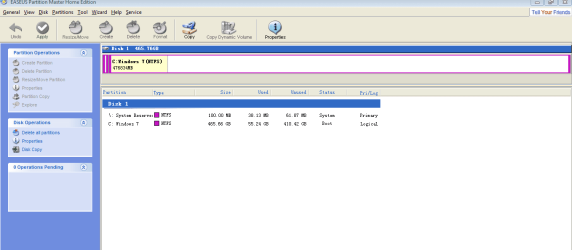
Here's a screenshot of my partitions. Why is everything functioning poorly? I've checked my ram and everything seems fine. But even my xp install was acting weird. I could boot into regular mode, but not safe mode (it would always hang at .mui sys file)...
 

Attachments

  • partition screenshot.PNG
    partition screenshot.PNG
    19.8 KB · Views: 33

My Computer

OS
Windows 7
CPU
AMD Athlon X2 6000+ 3.0 Ghz
Motherboard
PC Chips AG 13g+ V3
Memory
2.0 gb
Graphics Card(s)
built in
Sound Card
built in
Monitor(s) Displays
LG 32 inch flat screen
Screen Resolution
1080i
Hard Drives
Seagate internal 500 gb
WD "My Passport" external 500gb
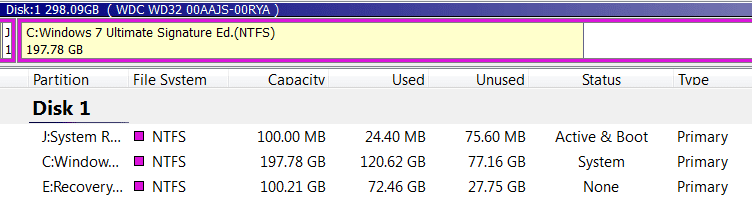
The problem is that the Windows 7 partition was formatted as a logical partition, which cannot be marked Active or become a System partition. This is how it should appear:

Capture2.PNG

Open Partition Wizard and make a bootable CD from the top toolbar. Boot into PW, rightclick on WIndows 7 partition and Modify: Set Partition as Primary.

Now boot into Windows 7 OS* and run Win7 DVD from desktop to http://www.sevenforums.com/tutorials/3413-repair-install.html?ltr=R

(*Should the Win7 OS not start up then boot into the Win7 DVD Repair console and run Startup Repair repeatedly until Win7 starts).

Any performance problems caused by converting from logical to primary will be overcome with the repair install which keeps programs, files and settings in place but reinstalls the OS and reconfigures the boot correctly.
 
The problem is that the Windows 7 partition was formatted as a logical partition, which cannot be marked Active or become a System partition. This is how it should appear:

View attachment 41307

Open Partition Wizard and make a bootable CD from the top toolbar. Boot into PW, rightclick on WIndows 7 partition and Modify: Set Partition as Primary.

Now boot into Windows 7 OS* and run Win7 DVD from desktop to http://www.sevenforums.com/tutorials/3413-repair-install.html?ltr=R

(*Should the Win7 OS not start up then boot into the Win7 DVD Repair console and run Startup Repair repeatedly until Win7 starts).

Any performance problems caused by converting from logical to primary will be overcome with the repair install which keeps programs, files and settings in place but reinstalls the OS and reconfigures the boot correctly.


Since I'm having various problems, and I really just installed W7, I'd rather to a full format clean install. I thought I did this yesterday, which is why I don't understand how W7 ended up as a logical drive. When i installed W7, I deleted and formatted the partition with XP Pro on it. I had also just deletedand formatted my old W7 partition (which was originally on a logical drive). So, with no OS on the computer, why did it install to a logical drive?

If I want to clean install, how can I ensure that I'll get one, fully formatted partition that places W7 as a primary drive? Thanks.
 

My Computer

OS
Windows 7
CPU
AMD Athlon X2 6000+ 3.0 Ghz
Motherboard
PC Chips AG 13g+ V3
Memory
2.0 gb
Graphics Card(s)
built in
Sound Card
built in
Monitor(s) Displays
LG 32 inch flat screen
Screen Resolution
1080i
Hard Drives
Seagate internal 500 gb
WD "My Passport" external 500gb
You can partition and format Primary HD in advance using Partition Wizard CD or Diskpart commands from the Win7 DVD.

Win7 will not install the 100mb System Reserved partition to a HD already partitioned.

You can also undo a 100mb partition as it is being applied during Custom installation: Use Custom>Advanced tools to Delete the partition given where Win7 is to be installed, then extend the 100mb partition to take up the entire HD using New tool, Format and install.
 
Last edited:
No Pro

I'm no pro but I have had a similar situation, right down to windows saying it's not genuine and I paid nearly $200 for the OS. The only way I was able to fully resolve the problem was to go the HD manufacturers website and use their software to to reset the MBR of the HD. Then I did a fresh install and all has been well since.:D

If this helps, tip my scales.

P.S. It may help if you fill in the stats for your computer in your profile.
 

My Computer

Computer Manufacturer/Model Number
IceMicro
OS
6@Win XP 1@Vista (1@Win 7 (Mine))
CPU
AMD Phenom XII 550 Black 3.1Ghz Unlocked to 4cores at 3.1Ghz
Motherboard
Gigabyte GA-M790X-UD4P
Memory
4 (2 X 2) Gig OCZ Reaper DDR2 800
Graphics Card(s)
Gigabyte HD4670 1Gig DDR3
Sound Card
On Board
Monitor(s) Displays
Gateway 22" LCD
Screen Resolution
1650 X 1080
Hard Drives
WD SATA 3Gbs 500Gig
Hitichi SATA 3Gbs 500Gig
PSU
Coolmaster 560W
Case
NZXT
Cooling
Stock plus added case fans
Keyboard
Microsoft Egronomic
Mouse
Microsoft Wireless Laser 5000
Internet Speed
768K DSL
You can partition and format Primary HD in advance using Partition Wizard CD or Diskpart commands from the Win7 DVD.

Win7 will not install the 100mb System Reserved partition to a HD already partitioned.

You can also undo a 100mb partition applied during Custom installation: Use Custom>Advanced tools to Delete the partition given where Win7 is to be installed, then extend the 100mb partition to take up the entire HD using New tool, Format and install.

How do you get into the disk partition commands using the Win7 DVD? And what commands do you use to format and partition? Thanks.
 

My Computer

OS
Windows 7
CPU
AMD Athlon X2 6000+ 3.0 Ghz
Motherboard
PC Chips AG 13g+ V3
Memory
2.0 gb
Graphics Card(s)
built in
Sound Card
built in
Monitor(s) Displays
LG 32 inch flat screen
Screen Resolution
1080i
Hard Drives
Seagate internal 500 gb
WD "My Passport" external 500gb
Boot Win7 DVD>Repair console>Recovery tools, open Command Line, type:

DISKPART
LIST DISK
SELECT DISK # (for Windows 7 disk)
clean
create partition primary
select partition 1
assign letter=c:
active
format
exit
 
Boot Win7 DVD>Repair console>Recovery tools, open Command Line, type:

DISKPART
LIST DISK
SELECT DISK # (for Windows 7 disk)
clean
create partition primary
select partition 1
assign letter=c:
active
format
exit

Great, thanks.
 

My Computer

OS
Windows 7
CPU
AMD Athlon X2 6000+ 3.0 Ghz
Motherboard
PC Chips AG 13g+ V3
Memory
2.0 gb
Graphics Card(s)
built in
Sound Card
built in
Monitor(s) Displays
LG 32 inch flat screen
Screen Resolution
1080i
Hard Drives
Seagate internal 500 gb
WD "My Passport" external 500gb
Back
Top