
Solved Strange Window is appearing on Startup

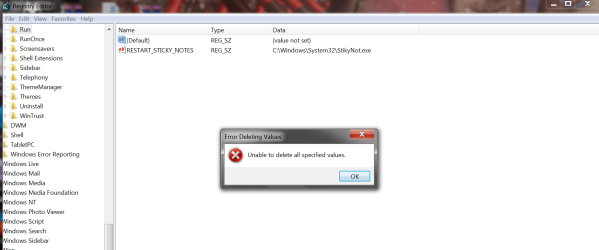
Ok so I think I found the file (Called (Default)) by following the filepath, but when I try to delete it this error pops up (see attached picture). I also restarted my computer and turned off the internet for some reason but the same error still popped up when I tried to delete it.


EDIT: On further inspection I see that all folders contain this "(Default)" file, so this probably isn't the file that I'm looking for haha
 

Attachments
  • regedit1.png
    regedit1.png
    59.4 KB · Views: 33

My Computer My Computer

At a glance

Windows 7 Home Premium 64 bit
OS
Windows 7 Home Premium 64 bit
I do not believe that is the right location. The path that you previously mentioned is "HKCU\SOFTWARE\Microsoft\Windows\CurrentVersion\Run". StikyNot.exe would not be located there, and I expect that the proper location has more than one key in it. And you are correct, the Default key is native to all of the key locations, and shouldn't be deleted.
 

My Computer My Computer

At a glance

W7x64 Pro, SuSe 12.1/** W7 x64 Pro, XP MCEPhenom II 1090T w/Noctua NH-D14 /**4400+ X2 w...2 x 2GB Patriot PGS34g1600LLKA/**4x1GB Corsai...EVGA GTX460 SC/**EVGA 8800GTS
Computer Manufacturer/Model Number
DIY
OS
W7x64 Pro, SuSe 12.1/** W7 x64 Pro, XP MCE
CPU
Phenom II 1090T w/Noctua NH-D14 /**4400+ X2 w/CM Hyper TX 3
Motherboard
ASRock 890FX Deluxe 4/**A8N-SLI
Memory
2 x 2GB Patriot PGS34g1600LLKA/**4x1GB Corsair VS
Graphics Card(s)
EVGA GTX460 SC/**EVGA 8800GTS
Sound Card
Asus Xonar D2X/**Xonar D1
Monitor(s) Displays
Acer X233H, Dell E152FPc /**LG M237-WD
Screen Resolution
1920x1080 & 1024x768/**1980x1080
Hard Drives
WDC 2TB, 1.5TB, 1TB, 500GB,Seagate 500GB , Maxtor 80GB /**500GB Seagate & WDC 1TB Black
PSU
CM RS600 w/ APC BX1000G/**Antec 500 TP w/ APC BX1000
Case
HAF922/**Antec 1040IIB
Cooling
3x200mm, 1x140 and 1x120mm/**5x80mm fans
Keyboard
Logitech Media USB/**Saitek Eclipse
Mouse
Cordless Trackman Wheel/**Ditto
Internet Speed
3.3Mbps
Other Info
SB 560 5.1 w/ Sennheiser RS140/**Creative T20 speakers, Dvico FusionHDTV7 Gold RT, Cisco E3000, HP 5510V AIO, Linksys E3000, Belkin F5U237 hub and **F5D8055 adapter
(** = 2nd rig)

My Computer My Computer

At a glance

W7x64 Pro, SuSe 12.1/** W7 x64 Pro, XP MCEPhenom II 1090T w/Noctua NH-D14 /**4400+ X2 w...2 x 2GB Patriot PGS34g1600LLKA/**4x1GB Corsai...EVGA GTX460 SC/**EVGA 8800GTS
Computer Manufacturer/Model Number
DIY
OS
W7x64 Pro, SuSe 12.1/** W7 x64 Pro, XP MCE
CPU
Phenom II 1090T w/Noctua NH-D14 /**4400+ X2 w/CM Hyper TX 3
Motherboard
ASRock 890FX Deluxe 4/**A8N-SLI
Memory
2 x 2GB Patriot PGS34g1600LLKA/**4x1GB Corsair VS
Graphics Card(s)
EVGA GTX460 SC/**EVGA 8800GTS
Sound Card
Asus Xonar D2X/**Xonar D1
Monitor(s) Displays
Acer X233H, Dell E152FPc /**LG M237-WD
Screen Resolution
1920x1080 & 1024x768/**1980x1080
Hard Drives
WDC 2TB, 1.5TB, 1TB, 500GB,Seagate 500GB , Maxtor 80GB /**500GB Seagate & WDC 1TB Black
PSU
CM RS600 w/ APC BX1000G/**Antec 500 TP w/ APC BX1000
Case
HAF922/**Antec 1040IIB
Cooling
3x200mm, 1x140 and 1x120mm/**5x80mm fans
Keyboard
Logitech Media USB/**Saitek Eclipse
Mouse
Cordless Trackman Wheel/**Ditto
Internet Speed
3.3Mbps
Other Info
SB 560 5.1 w/ Sennheiser RS140/**Creative T20 speakers, Dvico FusionHDTV7 Gold RT, Cisco E3000, HP 5510V AIO, Linksys E3000, Belkin F5U237 hub and **F5D8055 adapter
(** = 2nd rig)
I do not believe that is the right location. The path that you previously mentioned is "HKCU\SOFTWARE\Microsoft\Windows\CurrentVersion\Run". StikyNot.exe would not be located there, and I expect that the proper location has more than one key in it. And you are correct, the Default key is native to all of the key locations, and shouldn't be deleted.
'''


No, I'm 100% positive that the path is correct as stikynot.exe in msconfig also has the same path as what I'm looking for. I think stikynote.exe is there because I use sticky note and when you restart your computer all of the sticky notes are saved instead of going away after every shut down.
 

My Computer My Computer

At a glance

Windows 7 Home Premium 64 bit
OS
Windows 7 Home Premium 64 bit
Then I would have expected to see other keys in the screenshot that you posted above...such as BulletStorm. Since it is not there, I doubt that it is anywhere in the registry, but a general search with Registrar Lite would be a good idea.
 

My Computer My Computer

At a glance

W7x64 Pro, SuSe 12.1/** W7 x64 Pro, XP MCEPhenom II 1090T w/Noctua NH-D14 /**4400+ X2 w...2 x 2GB Patriot PGS34g1600LLKA/**4x1GB Corsai...EVGA GTX460 SC/**EVGA 8800GTS
Computer Manufacturer/Model Number
DIY
OS
W7x64 Pro, SuSe 12.1/** W7 x64 Pro, XP MCE
CPU
Phenom II 1090T w/Noctua NH-D14 /**4400+ X2 w/CM Hyper TX 3
Motherboard
ASRock 890FX Deluxe 4/**A8N-SLI
Memory
2 x 2GB Patriot PGS34g1600LLKA/**4x1GB Corsair VS
Graphics Card(s)
EVGA GTX460 SC/**EVGA 8800GTS
Sound Card
Asus Xonar D2X/**Xonar D1
Monitor(s) Displays
Acer X233H, Dell E152FPc /**LG M237-WD
Screen Resolution
1920x1080 & 1024x768/**1980x1080
Hard Drives
WDC 2TB, 1.5TB, 1TB, 500GB,Seagate 500GB , Maxtor 80GB /**500GB Seagate & WDC 1TB Black
PSU
CM RS600 w/ APC BX1000G/**Antec 500 TP w/ APC BX1000
Case
HAF922/**Antec 1040IIB
Cooling
3x200mm, 1x140 and 1x120mm/**5x80mm fans
Keyboard
Logitech Media USB/**Saitek Eclipse
Mouse
Cordless Trackman Wheel/**Ditto
Internet Speed
3.3Mbps
Other Info
SB 560 5.1 w/ Sennheiser RS140/**Creative T20 speakers, Dvico FusionHDTV7 Gold RT, Cisco E3000, HP 5510V AIO, Linksys E3000, Belkin F5U237 hub and **F5D8055 adapter
(** = 2nd rig)
Those People Can Fly games which write themselves into Startup are an infection. I got rid of one last week by deleting it's Registry key, which can be found linked in msconfig>Startup or CCleaner>Tools>Startup. This was causing major infection which Malwarebytes struggled to delete until I killed the key but now seems clean.

Use the Old Timer temp files cleanup tool Lee posted, uncheck everything in msconfig>Startup except AV and gadgets, then after restarts check msconfig>Services, tick Hide all MS services, see what's running without your knowledge and uncheck it - keep checking back in both places to see if anything writes itself back in. You now have a clean boot.

I'd also uninstall AVG which no one here recommends since it bloated up years ago and never recovered. Use MS Security Essentials or Avast 6 which most recommend here for freeware.
 
Those People Can Fly games which write themselves into Startup are an infection. I got rid of one last week by deleting it's Registry key, which can be found linked in msconfig>Startup or CCleaner>Tools>Startup. This was causing major infection which Malwarebytes struggled to delete until I killed the key but now seems clean.

Use the Old Timer temp files cleanup tool Lee posted, uncheck everything in msconfig>Startup except AV and gadgets, then after restarts check msconfig>Services, tick Hide all MS services, see what's running without your knowledge and uncheck it - keep checking back in both places to see if anything writes itself back in. You now have a clean boot.

I'd also uninstall AVG which no one here recommends since it bloated up years ago and never recovered. Use MS Security Essentials or Avast 6 which most recommend here for freeware.

Alright, I'm doing what you recommended, but since the original malawarebytes scan said I was virus free, does that mean I'm virus free since your similar virus showed up in malawarebytes? Also I did another scan with malawarebytes and everything turned out normal.

EDIT: Also, can you explain the part in red a little bit further.

Also, in a worse case scenario, what could this thing possibly do to my computer? I don't understand viruses at all.
 
Last edited:

My Computer My Computer

At a glance

Windows 7 Home Premium 64 bit
OS
Windows 7 Home Premium 64 bit
A handy program to use for searching for all keys that might be related to a program that is installed, is call Registrar Lite. You might try searching all names that you have found that relate to program in question, like BulletStorm, etc. Its faster and easier than plodding through the registry with Regedit.

Registrar Lite - Free software downloads and software reviews - CNET Download.com

I tried searching for bulletstorm and people can fly and nothing came up.
 

My Computer My Computer

At a glance

Windows 7 Home Premium 64 bit
OS
Windows 7 Home Premium 64 bit
Look under "Location" column in msconfig>Startup for reg key or file location of that program, then delete it.

If it's a file make sure it's uninstalled in Control Panel first, then delete any files by taking ownership if necessary: Take Ownership Shortcut

Did Old Timer's cleaner get rid of the .tmp file popup at startup? If not, unhide Hidden files in Control Panel>Folder Options>View then browse to each User's Appdata folders to find the Temp folders and delete them, taking ownership if necessary.
 
Look under "Location" column in msconfig>Startup for reg key or file location of that program, then delete it.

If it's a file make sure it's uninstalled in Control Panel first, then delete any files by taking ownership if necessary: Take Ownership Shortcut

Did Old Timer's cleaner get rid of the .tmp file popup at startup? If not, unhide Hidden files in Control Panel>Folder Options>View then browse to each User's Appdata folders to find the Temp folders and delete them, taking ownership if necessary.

The .tmp popup no longer occurs. When going to the location path specified in msconfig>Startup by using regedit, the program is not there, but it still says that it is there. Also notice how in the pictures i previously posted on page 2 (post #17), the name of the file in msconfig changed from bullletstorm from people can fly to some numbers by unknown. Does this mean that it is gone permantly, just msconfig is saving the location?
 

My Computer My Computer

At a glance

Windows 7 Home Premium 64 bit
OS
Windows 7 Home Premium 64 bit
Temp files cleanup may have gotten rid of the file and hence it's listing in msconfig.

Manually delete the Temp files under all Users' appdata.

Have you achieved a Clean Boot yet following the steps I gave earlier to uncheck everything in Startup except AV and gadgets? The rest are freeloaders on your RAM, CPU, Startup and can spy on you and cause problems.

When you hide MS services, is anything now showing in msconfig>Services? If so turn it off in Program Prefs. Check back to see nothing sneaks back in either list..
 

My Computer My Computer

At a glance

Windows 7 Ultimate 64 Bit, LINUX MINT 14 NADI...AMD FX 8350 upto 4.00 GHzTranscend DDR3 4 GB x 4, Total 16 GB RAMNVIDIA GAINWARD 2GB DDR3 GT610
Computer type
PC/Desktop
Computer Manufacturer/Model Number
Self-Built
OS
Windows 7 Ultimate 64 Bit, LINUX MINT 14 NADIA 64 BIT CINNAMON EDITION
CPU
AMD FX 8350 upto 4.00 GHz
Motherboard
INTEL DG41CN Motherboard
Memory
Transcend DDR3 4 GB x 4, Total 16 GB RAM
Graphics Card(s)
NVIDIA GAINWARD 2GB DDR3 GT610
Sound Card
CREATIVE SBS 2.1 SPEAKERS
Monitor(s) Displays
DELL S 2240L 21.5 INCH LED MONITOR FULL HD
Screen Resolution
1920 X 1080 HD 1080i
Hard Drives
SAMSUNG 840 SERIES 120 GB SSD+
SEAGATE BARRACUDA 2 TB HDD
PSU
SEASONIC S1211 620 W PSU
Case
ANTEC 1200 FULL TOWER, WITH 2 USB 2.0 PORTS, 6 FANS
Cooling
DEEPCOOL ALTA 7
Keyboard
DELL KM713 WIRELESS KEAYBOARD
Mouse
DELL KM713 WIRELESS MOUSE (COMBO)
Internet Speed
21 Mbps
Antivirus
AVAST INTERNET SECURITY, CLAM AV,
Browser
MOZILLA FIREFOX, SAFARI, CHROMIUM, IE 10.
Other Info
SMART SB 10 HEADSET
The fact that items remains in msconfig after disabling them is normal, what is unusual is that it changed names. However, if it doesn't get re-enabled somehow (re-checked), then it shouldn't be a factor. Still, if it bugs you, I think that you could use StartupCPL, as I mentioned back in post 15 to remove it altogether.
 

My Computer My Computer

At a glance

W7x64 Pro, SuSe 12.1/** W7 x64 Pro, XP MCEPhenom II 1090T w/Noctua NH-D14 /**4400+ X2 w...2 x 2GB Patriot PGS34g1600LLKA/**4x1GB Corsai...EVGA GTX460 SC/**EVGA 8800GTS
Computer Manufacturer/Model Number
DIY
OS
W7x64 Pro, SuSe 12.1/** W7 x64 Pro, XP MCE
CPU
Phenom II 1090T w/Noctua NH-D14 /**4400+ X2 w/CM Hyper TX 3
Motherboard
ASRock 890FX Deluxe 4/**A8N-SLI
Memory
2 x 2GB Patriot PGS34g1600LLKA/**4x1GB Corsair VS
Graphics Card(s)
EVGA GTX460 SC/**EVGA 8800GTS
Sound Card
Asus Xonar D2X/**Xonar D1
Monitor(s) Displays
Acer X233H, Dell E152FPc /**LG M237-WD
Screen Resolution
1920x1080 & 1024x768/**1980x1080
Hard Drives
WDC 2TB, 1.5TB, 1TB, 500GB,Seagate 500GB , Maxtor 80GB /**500GB Seagate & WDC 1TB Black
PSU
CM RS600 w/ APC BX1000G/**Antec 500 TP w/ APC BX1000
Case
HAF922/**Antec 1040IIB
Cooling
3x200mm, 1x140 and 1x120mm/**5x80mm fans
Keyboard
Logitech Media USB/**Saitek Eclipse
Mouse
Cordless Trackman Wheel/**Ditto
Internet Speed
3.3Mbps
Other Info
SB 560 5.1 w/ Sennheiser RS140/**Creative T20 speakers, Dvico FusionHDTV7 Gold RT, Cisco E3000, HP 5510V AIO, Linksys E3000, Belkin F5U237 hub and **F5D8055 adapter
(** = 2nd rig)
Look in 'services', type services.misc in the start search box. If you see anything that might be related, right click ... choose properties, make sure it's disabled, and find the full path to delete it. You will see the full path in that same window.
 

My Computer My Computer

At a glance

Windows 7 Ultimate 32bit SP1Intel(R) Core(TM)2 Quad CPU @ 2.40GHz, 2400 MHz4 GBATI Radeon HD 2600 Pro
Computer type
PC/Desktop
Computer Manufacturer/Model Number
Bruce ... somewhere in his 40's
OS
Windows 7 Ultimate 32bit SP1
CPU
Intel(R) Core(TM)2 Quad CPU @ 2.40GHz, 2400 MHz
Motherboard
INTEL/D975XBX2
Memory
4 GB
Graphics Card(s)
ATI Radeon HD 2600 Pro
Monitor(s) Displays
Samsung SyncMaster 914v
Screen Resolution
1280 x 1024
Hard Drives
2/500GB each ... ST3500630AS ATA Device.
One is not connected
PSU
Rocketfish 700 W
Case
G.Skill Gigabyte Chassis
Keyboard
Standard PS/2 Keyboard
Mouse
Microsoft PS/2 Mouse
Internet Speed
DSL
Antivirus
Avira Internet Security
Browser
IE 11
Other Info
ATI HDMI Audio

My Computer My Computer

At a glance

Windows 7 Ultimate 32bit SP1Intel(R) Core(TM)2 Quad CPU @ 2.40GHz, 2400 MHz4 GBATI Radeon HD 2600 Pro
Computer type
PC/Desktop
Computer Manufacturer/Model Number
Bruce ... somewhere in his 40's
OS
Windows 7 Ultimate 32bit SP1
CPU
Intel(R) Core(TM)2 Quad CPU @ 2.40GHz, 2400 MHz
Motherboard
INTEL/D975XBX2
Memory
4 GB
Graphics Card(s)
ATI Radeon HD 2600 Pro
Monitor(s) Displays
Samsung SyncMaster 914v
Screen Resolution
1280 x 1024
Hard Drives
2/500GB each ... ST3500630AS ATA Device.
One is not connected
PSU
Rocketfish 700 W
Case
G.Skill Gigabyte Chassis
Keyboard
Standard PS/2 Keyboard
Mouse
Microsoft PS/2 Mouse
Internet Speed
DSL
Antivirus
Avira Internet Security
Browser
IE 11
Other Info
ATI HDMI Audio
The fact that items remains in msconfig after disabling them is normal, what is unusual is that it changed names. However, if it doesn't get re-enabled somehow (re-checked), then it shouldn't be a factor. Still, if it bugs you, I think that you could use StartupCPL, as I mentioned back in post 15 to remove it altogether.


StartupCPL doesn't install properly on my computer. The installer gave some error. I don't think it was designed for windows 7 either, as it doesn't mention that it supports it. Any other similar applications?

But i'm starting to think that the problem is resolved, since the popup no longer appears and the thing isn't rechecking itself in msconfig, and the path that it should be at in msconfig doesn't have the registry file in it like msconfig says it should. What do you guys think? Does that sound like evidence of a resolved problem?
 

My Computer My Computer

At a glance

Windows 7 Home Premium 64 bit
OS
Windows 7 Home Premium 64 bit
Startup Control Panel is compatible with all modern versions of Windows, including Windows 95, 98, 98SE, ME, NT 4.0, 2000, and XP
Not for Win7, unless you can run it in XP "compatible" mode. (I haven't tried it)

Hi Pan,

Those HKCU are registry references. Can you browse to "C:Users\Stephen....."as per the second image you attached, and see if those files are in that location?

BulletStorm is a first-person shooter game. Did you download this, or install it from a DVD/CD?

Regards,
Golden
You never answered Golden's question ...... Hard to help when so many questions are asked, and the 'pertinent' one's are ignored :confused:
 

My Computer My Computer

At a glance

Windows 7 Ultimate 32bit SP1Intel(R) Core(TM)2 Quad CPU @ 2.40GHz, 2400 MHz4 GBATI Radeon HD 2600 Pro
Computer type
PC/Desktop
Computer Manufacturer/Model Number
Bruce ... somewhere in his 40's
OS
Windows 7 Ultimate 32bit SP1
CPU
Intel(R) Core(TM)2 Quad CPU @ 2.40GHz, 2400 MHz
Motherboard
INTEL/D975XBX2
Memory
4 GB
Graphics Card(s)
ATI Radeon HD 2600 Pro
Monitor(s) Displays
Samsung SyncMaster 914v
Screen Resolution
1280 x 1024
Hard Drives
2/500GB each ... ST3500630AS ATA Device.
One is not connected
PSU
Rocketfish 700 W
Case
G.Skill Gigabyte Chassis
Keyboard
Standard PS/2 Keyboard
Mouse
Microsoft PS/2 Mouse
Internet Speed
DSL
Antivirus
Avira Internet Security
Browser
IE 11
Other Info
ATI HDMI Audio
Startup Control Panel is compatible with all modern versions of Windows, including Windows 95, 98, 98SE, ME, NT 4.0, 2000, and XP
Not for Win7, unless you can run it in XP "compatible" mode. (I haven't tried it)

Hi Pan,

Those HKCU are registry references. Can you browse to "C:Users\Stephen....."as per the second image you attached, and see if those files are in that location?

BulletStorm is a first-person shooter game. Did you download this, or install it from a DVD/CD?

Regards,
Golden
You never answered Golden's question ...... Hard to help when so many questions are asked, and the 'pertinent' one's are ignored :confused:

See post #20 for my response to all of his questions posed....
 

My Computer My Computer

At a glance

Windows 7 Home Premium 64 bit
OS
Windows 7 Home Premium 64 bit
After running another Full scan with updated Malwarebytes, then an AV scan with MS Security Essentials which has replaced AVG bloatware, I think you can stop worrying.

Is it possible someone else who uses the computer downloaded the game? This is what occurred with another People Can Fly game here last week which had a similar Startup Reg Key and coincided with a major infection which Malwarebytes could only completely delete when when I killed the reg key.

How is overall performance?
 
After running another Full scan with updated Malwarebytes, then an AV scan with MS Security Essentials which has replaced AVG bloatware, I think you can stop worrying.

Is it possible someone else who uses the computer downloaded the game? This is what occurred with another People Can Fly game here last week which had a similar Startup Reg Key and coincided with a major infection which Malwarebytes could only completely delete when when I killed the reg key.

How is overall performance?


I did what you said and yeah still nothing is appearing so I think the issue is fixed. I haven't really experienced anything that unusual since the issue has been "resovled", and I've done a lot to my computer over the last couple days. Regardless, I'll post back if anything serious happens. Thanks for all of the help everybody.
 

My Computer My Computer

At a glance

Windows 7 Home Premium 64 bit
OS
Windows 7 Home Premium 64 bit
Back
Top