Hello,
So I recently had a Win 7 Pro 64bit pc's hard drive die, but I was able to get it cloned successfully, so all of the data and partitions are all intact and all. I've been having problems though, with logging in, and none of my searches seem to find exactly the same issue.
I originally had the black screen/mouse-cursor-only issue upon booting, but was able to get Windows to at least load up the background image by changing the permissions of the system32 directory (a la suggestions in this answers.microsoft.com thread).
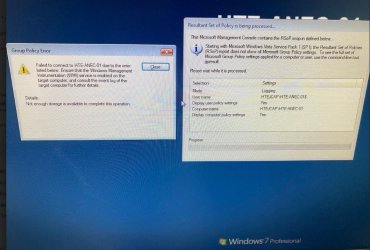
But the "press ctrl-alt-delete to log on" prompt never appears. It looks like it wants to, but every 10 or so seconds the screen flashes and it doesn't. From another answers.microsoft.com thread, by replacing sethc.exe with a copy of cmd.exe I was able to open up a command window and can execute commands in it, including explorer (and get a desktop as System). But again, every 10 seconds, the screen flashes and goes to the bare login background. And anything I try to open from there results in an error message saying there's not enough free memory for explorer to run that. Windows Resource Protection also won't allow me to run sfc /scannow.
So basically, I don't have a good idea of what's going on and could really use someone's insight. I'd really really REALLY appreciate it.
Other possibly relevant info regarding this situation.... this pc runs a lab instrument and is part of a Windows domain, with domain logins and security and such. Also I've tried just about every Windows Repair option I've seen suggested short of a full and clean install and not had any luck.
Nearly at wit's end...
Kevin
So I recently had a Win 7 Pro 64bit pc's hard drive die, but I was able to get it cloned successfully, so all of the data and partitions are all intact and all. I've been having problems though, with logging in, and none of my searches seem to find exactly the same issue.
I originally had the black screen/mouse-cursor-only issue upon booting, but was able to get Windows to at least load up the background image by changing the permissions of the system32 directory (a la suggestions in this answers.microsoft.com thread).
But the "press ctrl-alt-delete to log on" prompt never appears. It looks like it wants to, but every 10 or so seconds the screen flashes and it doesn't. From another answers.microsoft.com thread, by replacing sethc.exe with a copy of cmd.exe I was able to open up a command window and can execute commands in it, including explorer (and get a desktop as System). But again, every 10 seconds, the screen flashes and goes to the bare login background. And anything I try to open from there results in an error message saying there's not enough free memory for explorer to run that. Windows Resource Protection also won't allow me to run sfc /scannow.
So basically, I don't have a good idea of what's going on and could really use someone's insight. I'd really really REALLY appreciate it.
Other possibly relevant info regarding this situation.... this pc runs a lab instrument and is part of a Windows domain, with domain logins and security and such. Also I've tried just about every Windows Repair option I've seen suggested short of a full and clean install and not had any luck.
Nearly at wit's end...
Kevin
My Computers
-
At a glance
Windows 7 professional 64bit- OS
- Windows 7 professional 64bit
-
- Computer type
- PC/Desktop