Streaming Not Working Anymore

wrathloki

New member
Local time
3:02 PM
Messages
55
So streaming to my ps3 worked flawlessly on build 7000 but now with RC1 I seem to be having major problems. I add all my media to my media player library and it all shows up, then when I turn on my ps3 to stream the video it gets rid of anything in the administrator documents folders and just shows the stuff in the public documents folders on both the ps3 and windows media player. I've tried re-adding the files back into WMP and trying again with the same results, it just doesn't want to work. I have my streaming settings to allow access to all devices on the network and to stream my entire library. What is going wrong and how can I fix it?

Edit: The same goes for streaming to the 360, this is so odd...
 

My Computer

OS
Windows 7
I just put anything i want to watch into Libraries/videos folder and my ps3 picks it up fine.
 

My Computer

OS
Win7 7201 x64
CPU
E8400 @ 3.4ghz (don't need it at 3.6 all the time)
Motherboard
Asus P5KC
Memory
Corsair 4GB Kit (2x2GB) DDR2 800MHz/PC2-6400 XMS2
Graphics Card(s)
HD 3870 OC Edition
Sound Card
Soundblaster X-Fi XtremeGamer
Monitor(s) Displays
Samsung 930BF
Screen Resolution
1280 x 1024
Hard Drives
Seagate 250gb 7200RPM SATA
Hitachi 1TB 7200RPM SATA
PSU
Toughpower 750w
Case
Lian Li PC-A17B
Cooling
Arctic Cooling Freezer 7 Pro
Keyboard
Logitech media keyboard elite
Mouse
Logitech MX518
Ya well so do I, don't see how this helps.
 

My Computer

OS
Windows 7
No i don't do anything with media centrer or wmp or its folders, i goto my documents/libraries then put whatever i want to watch in the video folder.

I haven't even set up the media center yet.
 

My Computer

OS
Win7 7201 x64
CPU
E8400 @ 3.4ghz (don't need it at 3.6 all the time)
Motherboard
Asus P5KC
Memory
Corsair 4GB Kit (2x2GB) DDR2 800MHz/PC2-6400 XMS2
Graphics Card(s)
HD 3870 OC Edition
Sound Card
Soundblaster X-Fi XtremeGamer
Monitor(s) Displays
Samsung 930BF
Screen Resolution
1280 x 1024
Hard Drives
Seagate 250gb 7200RPM SATA
Hitachi 1TB 7200RPM SATA
PSU
Toughpower 750w
Case
Lian Li PC-A17B
Cooling
Arctic Cooling Freezer 7 Pro
Keyboard
Logitech media keyboard elite
Mouse
Logitech MX518
Yes and the precise reason why it works for you is because wmp is set to stream anything in the libraries by default. The only thing I did in wmp was make sure everything was showing up there too. It doesn't matter if wmp is closed or whatever if that's what you're getting at, it just defaults to the stuff in the public libraries whenever I turn on my ps3 or 360.
 

My Computer

OS
Windows 7
So no one knows anything? I just don't get why it would work perfectly fine in build 7000 but not in RC1, why the hell does windows have to be so finnicky with everything? Seriously starting to see why people love macs so much.
 

My Computer

OS
Windows 7
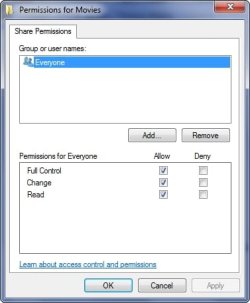
Did you go into the advanced sharing settings on your folder you want to share and change the permissions to everyone?

That should work, it always works for me.

2009-05-13_120440.jpg2009-05-13_120509.jpg
 

My Computer

Computer Manufacturer/Model Number
Home Brew
OS
Windows 7 Ultimate Vista Ultimate x64
CPU
Core 2 Duo E8500 3.16Ghz @ 3.8Ghz
Motherboard
eVGA 750i FTW
Memory
2x2Gigs Patriot PC2-6400 LL
Graphics Card(s)
Inno3D GeForce GTX260 216 SP
Monitor(s) Displays
ASUS VW222U 22" 2ms Response time
Screen Resolution
1680x1050
Hard Drives
SATA 150GB
SATA II 250GB
USB IDE 750GB Ext.
PSU
HYTEC 600W & Thermaltake 650W Toughpower Power Exp
Case
Thermaltake Armor LCS (Liquid Cooling System)
Cooling
Liquid Cooling System
Keyboard
Logitech G15 Gaming Keyboard
Mouse
Logitech G9 Gaming Mouse
Hmm, well damn, I did this and all it seemed to accomplish is that nothing shows up on my ps3 or 360 now.
 

My Computer

OS
Windows 7
So I've noticed that when I'm in a media folder, the "Share With" dropdown menu just under the file bar is locked at "Nobody", I can't seem to switch it to homegroup. I'm guessing this has something to do with my problems, does anyone know how to remedy this situation?
 

My Computer

OS
Windows 7
The same here

Well I have the same problem here. I add my video's folder to my library (include a folder from your computer in a library) by right clicking on it and it worked. It shows the folder and its content in WMP and that used to be enough in Vista. But now when I go to my PS3 that folder/folders isn't there, only my Public/Shared Videos and thats it. And this is the same with my pictures and musec as well.The thing is that my system files are on C: and the folders that I'm trying to add are on D: , but this shouldn't be a problem. BTW I've done all the steps and everything in sharing settings, everything is set. And now it gets even odder I included a folder from an external hard drive into my library and it worked the same way it used to work.It showed up in my PS3 and I can stream my videos and all media. I just can't figure it out why it doesn't wanna show the folders from my local drive D:
Thanks a lot if someone can come up with something
 

My Computer

OS
Windows 7

My Computer

OS
Windows 7 PRO x64
CPU
Phenom II 1090T @ 4.00GHz
Motherboard
Crosshair IV Formula
Memory
8gb DDR3
Graphics Card(s)
1x ATI Diamond 5850
Monitor(s) Displays
50in HDTV (HDMI)
Screen Resolution
1080P
Hard Drives
2x 1TB barracuda
1x 1TB WD Black
1x 2TB WD
1x OCZ Vertex 2 40GB
PSU
1000w Xion
Case
Armor+ VH6000BWS
Cooling
W/C
Internet Speed
60Mbps down, 7 up
Back
Top