Solved Stretched Screen! HELP!

Emma96

New member
Local time
10:46 AM
Messages
8
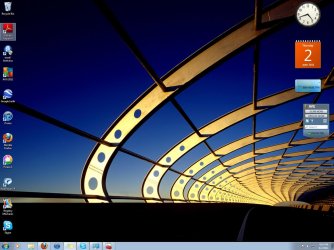
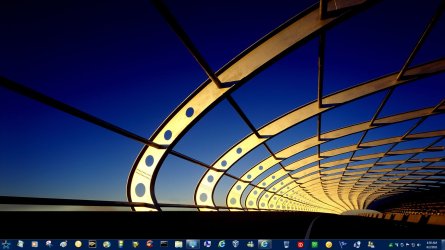
Hey. I have a windows 7 ultimate OS. I just turned on my computer and the entire screen is stretched out! I tried to search on google and stuff but nothing helped. So, I went to Device Manager and under the display adapters it says Intel(R) G33/G31 Express chipset family. I'm guessing thats the video card or something (Sorry I'm not much of a tech girl) :o Anyways, it's disabled and i was wondering if it would help if i enabled it. If not then what should I do?! Help? :(
 

Attachments

  • Capture.jpg
    Capture.jpg
    162 KB · Views: 269

My Computer

OS
Windows 7

Attachments

  • streched.jpg
    streched.jpg
    173 KB · Views: 96

My Computer

Computer type
PC/Desktop
Computer Manufacturer/Model Number
Self Built
OS
Win 10 Pro x64
CPU
Intel I5-2500K @3.3GHz
Motherboard
Asrock P67 Extreme4
Memory
16GB G.Skill Ripjaws X (4x4GB)
Graphics Card(s)
EVGA GeForce 750 Ti SC 2GB
Sound Card
ASUS Xonar DG 5.1 Channels 24-bit 96KHz PCI Interface Sound
Monitor(s) Displays
auria eq2367
Screen Resolution
1920 x 1080
Hard Drives
250GB Samsung 850 EVO SSD
1TB WD Blue
1TB Hitachi
PSU
SeaSonic X 650W 80 Plus Gold
Case
Corsair Obsidian 750D
Cooling
Corsair H60, Three 140mm case fans
Keyboard
Logitech Wireless Keyboard K520
Mouse
Logitech Wireless Mouse M310
Internet Speed
Wave Broadband ~ 100 dn 5 up
Antivirus
Windows Defender, Malwarebytes Premium
Browser
Edge, IE11, Chrome
Other Info
Laptop specs: HP g7-1365dx /
CPU: AMD A6-3420M APU with Radeon(tm) HD Graphics /
RAM: Crucial 8Gb (2x4Gb) /
SSD: Crucial M4-CT128M4SSD2 ATA Device/ FW 000F /
GFX: AMD Radeon HD 6520G /
OS: Windows 10 Pro x64
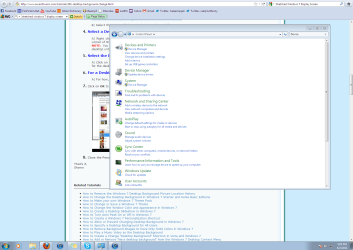
Is your problem just on your desktop or on every screen you go to? Check your recommended screen resolution; rick click on open desktop, click screen resolution, under resolution make sure it's set to the recommended setting for that monitor.
 

My Computer

Computer Manufacturer/Model Number
Custom built
OS
Windows 7 Ultimate 64 bit
CPU
AMD Phenom II X4 965 Black Edition
Motherboard
Gigabyte GA-MA790X-DS4
Memory
GSkill 4 X 2 GB PC 8500
Graphics Card(s)
XFX Radeon HD 6790 D
Sound Card
On board RealTek HD
Monitor(s) Displays
Dual monitors:Samsung SyncMaster S20B300
Screen Resolution
1600 X 900
Hard Drives
Seagate Barracuda 1TB (primary)
Seagate Barracuda 2 X 320 GB
PSU
Ultra X4 750 watt fully modular
Case
Thermaltake Overseer RX 1 full tower
Cooling
Core-Contact 92 mm CPU Cooler
Keyboard
Logitech G510
Mouse
Razor DeathAdder
Internet Speed
50/5 Mbps UL/DL
Other Info
Optical: Super Muliti DVD burner w/lightscribe, Hauppauge WinTV HVR-1800

Attachments

  • Capture2.PNG
    Capture2.PNG
    71.9 KB · Views: 219

My Computer

OS
Windows 7
Is your problem just on your desktop or on every screen you go to? Check your recommended screen resolution; rick click on open desktop, click screen resolution, under resolution make sure it's set to the recommended setting for that monitor.

Its on every window. And yeah I messed with the screen resolution but that didn't help either.
 

My Computer

OS
Windows 7
Help?

What happens if I enable the Intel(R) G33/ G31 Express Chipset Family?
 

My Computer

OS
Windows 7
Do you have the monitor hooked up to your motherboards graphics card (the display adapter port will be vertical | on the tower) or an aftermarket card? (display adapter will be horizontal _ and located in the bank of expansion slots)
 

My Computer

Computer Manufacturer/Model Number
Pugh Technologies
OS
W7 Professional x64
CPU
AMD Athlon II X3 445 Rana 3.10 GHz
Motherboard
MSI 870A-G54
Memory
PNY XLR DDR3 1600 4x2GB
Graphics Card(s)
NVIDIA GeForce GTS 450 (fermi) 1GB GDDR5
Sound Card
Realtek ALC892 onboard
Monitor(s) Displays
ASUS VE205t, Viewsonic VX2035WM
Screen Resolution
1600x900, 1600x1050
Hard Drives
977GB Hitachi Hitachi HDS721010CLA332
244GB Western Digital WDC WD2500AAJS-65B4A0
488GB Western Digital WDC WD5000AAJS-00A8B0
488GB Western Digital WDC WD5000AAKS-00UU3A0
PSU
Antec EarthWatts EA650 650W
Case
ThermalTake Armor A90 Mid Tower
Cooling
3x 120mm in, 1x 120mm & 200mm out, self built hydro-cooler
Keyboard
Logitec 55
Mouse
Razer Deathadder
Internet Speed
20 Mbps D/L, 9 Mbps U/L
Do you have the monitor hooked up to your motherboards graphics card (the display adapter port will be vertical | on the tower) or an aftermarket card? (display adapter will be horizontal _ and located in the bank of expansion slots)

Hooked up to the motherboard.
 

My Computer

OS
Windows 7
Enable it, that's the graphics card, it's using uPnP drivers at the moment, Once enabled, the screen will go blank, then the correct display resolution will show, why was it disabled in the first place?
 

My Computer

Computer type
PC/Desktop
Computer Manufacturer/Model Number
Custom Build
OS
Windows 7 Ultimate x64 SP1
CPU
Intel Q6600 @ 2.6Ghz
Motherboard
Evga NF78-CK-132-A 3-Way SLI
Memory
4Gb DDR2 Corsair Dominator @ 800Mhz 5-5-5-15
Graphics Card(s)
EVGA 560 GTX SC FTW 1GB
Sound Card
Realtek HD 7.1 Audio, Plantronics GameCom780 7.1 Headset
Monitor(s) Displays
Dell S2409W
Screen Resolution
1920 x 1080
Hard Drives
SanDisk SDSSDHII-120G-G25 120GB SSD
Samsung 7200RPM 750Gb SATA
Samsung 850 EVO 120GB SSD
Western Digital Green 1TB 7200RPM
PSU
Xigmatek 750W Quad sli quad core 80% eff
Case
Antec 900 Gaming Case
Cooling
Zalman CNPS9700-NT NVIDIA Tritium
Keyboard
Logitech generic keyboard, MS wireless keyboard
Mouse
Razor Lachesis Banshee V2 Blue, 4000DPI, MS wireless mouse
Internet Speed
152Mb Virgin Media Fibre Optic
Antivirus
Microsoft Security Essentials
Browser
Google Chrome
Other Info
Wireless Gaming Receiver for Windows, Wireless Xbox 360 Pad
Enable it, that's the graphics card, it's using uPnP drivers at the moment, Once enabled, the screen will go blank, then the correct display resolution will show, why was it disabled in the first place?

I have no idea. There was a virus in the computer and I sent it to the shop to get it fixed. When it came back the screen was stretched and the graphics card was disabled. :huh:
 

My Computer

OS
Windows 7
they must have wiped it, and didn't install the graphics driver, unless the driver was the virus, just enable it and reboot, it will install your graphics card for you and then it will be sorted
 

My Computer

Computer type
PC/Desktop
Computer Manufacturer/Model Number
Custom Build
OS
Windows 7 Ultimate x64 SP1
CPU
Intel Q6600 @ 2.6Ghz
Motherboard
Evga NF78-CK-132-A 3-Way SLI
Memory
4Gb DDR2 Corsair Dominator @ 800Mhz 5-5-5-15
Graphics Card(s)
EVGA 560 GTX SC FTW 1GB
Sound Card
Realtek HD 7.1 Audio, Plantronics GameCom780 7.1 Headset
Monitor(s) Displays
Dell S2409W
Screen Resolution
1920 x 1080
Hard Drives
SanDisk SDSSDHII-120G-G25 120GB SSD
Samsung 7200RPM 750Gb SATA
Samsung 850 EVO 120GB SSD
Western Digital Green 1TB 7200RPM
PSU
Xigmatek 750W Quad sli quad core 80% eff
Case
Antec 900 Gaming Case
Cooling
Zalman CNPS9700-NT NVIDIA Tritium
Keyboard
Logitech generic keyboard, MS wireless keyboard
Mouse
Razor Lachesis Banshee V2 Blue, 4000DPI, MS wireless mouse
Internet Speed
152Mb Virgin Media Fibre Optic
Antivirus
Microsoft Security Essentials
Browser
Google Chrome
Other Info
Wireless Gaming Receiver for Windows, Wireless Xbox 360 Pad
they must have wiped it, and didn't install the graphics driver, unless the driver was the virus, just enable it and reboot, it will install your graphics card for you and then it will be sorted

Thanks! Its all fixed now. I'm gonna go show the guy at the shop a piece of my mind ;)
 

My Computer

OS
Windows 7
they must have wiped it, and didn't install the graphics driver, unless the driver was the virus, just enable it and reboot, it will install your graphics card for you and then it will be sorted

Thanks! Its all fixed now. I'm gonna go show the guy at the shop a piece of my mind ;)
:D glad it's sorted though, i've also marked the thread as solved
 
Last edited:

My Computer

Computer type
PC/Desktop
Computer Manufacturer/Model Number
Custom Build
OS
Windows 7 Ultimate x64 SP1
CPU
Intel Q6600 @ 2.6Ghz
Motherboard
Evga NF78-CK-132-A 3-Way SLI
Memory
4Gb DDR2 Corsair Dominator @ 800Mhz 5-5-5-15
Graphics Card(s)
EVGA 560 GTX SC FTW 1GB
Sound Card
Realtek HD 7.1 Audio, Plantronics GameCom780 7.1 Headset
Monitor(s) Displays
Dell S2409W
Screen Resolution
1920 x 1080
Hard Drives
SanDisk SDSSDHII-120G-G25 120GB SSD
Samsung 7200RPM 750Gb SATA
Samsung 850 EVO 120GB SSD
Western Digital Green 1TB 7200RPM
PSU
Xigmatek 750W Quad sli quad core 80% eff
Case
Antec 900 Gaming Case
Cooling
Zalman CNPS9700-NT NVIDIA Tritium
Keyboard
Logitech generic keyboard, MS wireless keyboard
Mouse
Razor Lachesis Banshee V2 Blue, 4000DPI, MS wireless mouse
Internet Speed
152Mb Virgin Media Fibre Optic
Antivirus
Microsoft Security Essentials
Browser
Google Chrome
Other Info
Wireless Gaming Receiver for Windows, Wireless Xbox 360 Pad
Enable it, that's the graphics card, it's using uPnP drivers at the moment, Once enabled, the screen will go blank, then the correct display resolution will show, why was it disabled in the first place?

Hi! This sounds a LOT like me. Im glad you know the solution! How do I enable my graphics card? Please and Thanks!
 

My Computer

OS
Windows Home Vista 32 bit
Enable it, that's the graphics card, it's using uPnP drivers at the moment, Once enabled, the screen will go blank, then the correct display resolution will show, why was it disabled in the first place?

Hi! This sounds a LOT like me. Im glad you know the solution! How do I enable my graphics card? Please and Thanks!

Just go to Device Manager in the control panel. Then check your display adapters for the graphic card and enable it. Hope this helps! :)
 

My Computer

OS
Windows 7
Thanks Emma! :)

Enable it, that's the graphics card, it's using uPnP drivers at the moment, Once enabled, the screen will go blank, then the correct display resolution will show, why was it disabled in the first place?

Hi! This sounds a LOT like me. Im glad you know the solution! How do I enable my graphics card? Please and Thanks!

Just go to Device Manager in the control panel. Then check your display adapters for the graphic card and enable it. Hope this helps! :)

Thanks Emma!
 

My Computer

OS
Windows Home Vista 32 bit
Hi, I have the above mentioned problem, but my graphic card works just fine. Ideas, anyone?
Please use simple explanation because I'm a tech dumb, plus English is not my native language.
Thank you ;)

edit: nevermind, just realized I changed resolution through some keyboard shortcut by accident. The reason I did not notice what is the problem is that I tried to fix it by changing between the higher two, because my programmer friend told me those are recommended (I know it should say which one is, but it doesn't), however I needed the third one.
tech dumb, as I said. anyway it's all ok now.
 
Last edited:

My Computer

Computer type
PC/Desktop
OS
windows 7 starter 32bit
Back
Top