Stuck at "Setup is loading System Devices"

LightningLdr180

New member
Local time
10:32 PM
Messages
7
Stuck at "Setup is starting services"

Hello everybody. Installing Win7 Home Premium x64 on a new 1TB from the offical DVD, and the computer hangs at "Setup is starting services" Only running with 2GB of ram in. My video card is a nvidia 9800 GT 1GB, and i've tried it with an older nvidia 8800, with the same issue. I don't have any USB devices hooked up besides my keyboard and mouse. I've tried reinstalling twice with the same issue. I've also tried using the "VGA 640 x 480" option in the F8 boot menu. Safe mode just says I need to complete setup first, and restarts.

Any suggestions?
 
Last edited:

My Computer

Computer Manufacturer/Model Number
Custom Built
OS
Windows 7
CPU
Intel i7 Quad-core 2.66 Ghz
Memory
6GB DDR3 Triple-Channel
Graphics Card(s)
Nvidia 9800GT 1GB
Hard Drives
1TB WD
Welcome to Seven Forums.

You have done some good trouble shooting already.

By 'offical DVD' do you mean MS DVD or MS ISO file burned to DVD?

Are you using the Clean install or Upgrade method?

What mother board are you using?
Try with one of the other RAM modules. Have you done a memtest?

Do you have on board graphics? Try installing with that if possible.
Try with VGA cable if possible.

Have you checked for updated BIOS version?

Any Over Clocking of the RAM, CPU or GPU?

You might try running Windows 7 Upgrade Advisor, this might find any hardware, settings and device issues.
 

My Computer

Computer type
PC/Desktop
Computer Manufacturer/Model Number
76~2.0
OS
Windows 7 Ult x64 - SP1/ Windows 8 Pro x64
CPU
Intel Core i5-3570K 4.6GHz
Motherboard
Gigabyte GA-Z77X UD3H, f18
Memory
8GB (2X4GB) DDR3 1600 Corsair Vengeance CL8 1.5v
Graphics Card(s)
Sapphire HD 7770 Vapor-X OC 1GB DDR5
Sound Card
Onboard VIA VT2021
Monitor(s) Displays
22" LCD Dell
Screen Resolution
1680x1050
Hard Drives
Samsung 840Pro 128GB SSD,
Seagate Barracuda 500GB SATA2 7200rpm 32MB cache, Seagate Barracuda 1TB SATA2 7200rpm 32MB cache,
PSU
Corsair HX650W
Case
Cooler Master Storm Scout
Cooling
Corsair H80 2x12cm Noctua NF P12 , 2x14cm case fans
Keyboard
Logitech Wave
Mouse
CM Sentinel
Internet Speed
Dismal
Antivirus
Avast
Browser
Opera Next
Other Info
Haswell laptop: HP Envy 17t-j, i7-4700MQ, GeForce 740M 2GB DDR3, 17.3" Full HD 1920x1080, 16GB RAM, Samsung 840 Pro 128GB, 1TB Hitachi 7200 HDD,
Desktop: eSATA ports,
External eSATA Seagate 500GB SATA2 7200rpm,
External WD USB 500GB
Thanks for the welcome, and thanks for the reply!

By 'offical DVD' do you mean MS DVD or MS ISO file burned to DVD?
It is an actual Windows 7 Home Premium x64 Upgrade MS DVD.

Are you using the Clean install or Upgrade method?
Clean Install on a new HD, which is the only one in the system.

What mother board are you using?
Asus P6T Deluxe

Try with one of the other RAM modules. Have you done a memtest?
All the RAM modules are identical, and trying a different one had no effect.

Do you have on board graphics? Try installing with that if possible.
Try with VGA cable if possible.
Unfortunately my card only has DVI and S-Video outputs. Tried both with no success. I have no onboard graphics card, but I've tried an older Nvidia 8800GT with same problem. (DVI / S-Video only also)

Have you checked for updated BIOS version?
Not yet, I will look into that after trying accessing the device manager via safemode as posted in this other thread: http://www.sevenforums.com/tutorials/15856-device-manager-access-during-windows-7-installation.html

Any Over Clocking of the RAM, CPU or GPU?
No.
 

My Computer

Computer Manufacturer/Model Number
Custom Built
OS
Windows 7
CPU
Intel i7 Quad-core 2.66 Ghz
Memory
6GB DDR3 Triple-Channel
Graphics Card(s)
Nvidia 9800GT 1GB
Hard Drives
1TB WD
Updates on my situation.

I have tried swapping memory modules, and running memory diagnostics. Memory is fine, swapping does nothing.

I have upgraded my BIOS to the latest version, no luck.

I have also accessed the device manager via the safe mode command prompt, tried disabling my video card and other devices, still no luck.

Running out of things to try... Anybody with any suggestions please let me know. Thanks!
 

My Computer

Computer Manufacturer/Model Number
Custom Built
OS
Windows 7
CPU
Intel i7 Quad-core 2.66 Ghz
Memory
6GB DDR3 Triple-Channel
Graphics Card(s)
Nvidia 9800GT 1GB
Hard Drives
1TB WD
No second monitor or TV hooked Up ?

Bios settings, acpi, max memory, legacy, do you have a floppy in your hardware ?

" Doc "
 

My Computer

Computer type
PC/Desktop
Computer Manufacturer/Model Number
Built them myself, Science Experiments !
OS
Win7 Enterprise, Win7 x86 (Ult 7600), Win7 x64 Ult 7600, TechNet RTM on AMD x64 (2.8Ghz)
CPU
AMD fx8350 4ghz, AMD-32 2400mhz, AMD-64 3200mhz, AMDx64 2.8G
Motherboard
SIS 755, ECS-K8M890M-M (Ult 7600), GigaByte & others
Memory
2gb, 4gb on the Ult 7600, 4gb on Technet RTM, 32gb on FX8350
Graphics Card(s)
Draw my own Graphics, several nVidia cards
Sound Card
on motherboard
Monitor(s) Displays
19" flat scr, 28" I-Inc widescr,22" Emprex Widescr, 23" Acer
Screen Resolution
1280 x 1024, 1440 x 900, 1920 x 1080
Hard Drives
6 pata Ide HD's & 2 Sata HD's
added 80gb external on Ult 7600 computer,
numerous extra 1tb, 2TB, 3Tb SATA HD's
A collection of ext HD Docks w/ HDs
PSU
430w, 550w, 600w, 700, 800, etc
Case
All Generic Full Towers
Cooling
Open Air & a few fans, some w/ colored LEDs
Keyboard
Compaq & Dell recycled from GoodWill
Mouse
Made in China Optical Wired Mouse
Internet Speed
Fast Cable InterNet
Antivirus
AVG Free on 24 different Desktops, NO Problems!
Browser
IE 8 is preferred, but use FireFox sometimes
Other Info
Linksys Routers, switches, & Hubs
Too Many USB Flash Drives to count, Biggest is 64GB !
Eight computers in my home network.
Sixteen computers at my business network.
Linked via TeamViewer !
Lots of old used spare computer parts everywhere!
No second monitor or TV hooked up. Tried it with a second monitor hooked up just to see if it made a difference, it did not.

I've been running through BIOS settings a lot, with little else to try... Nothing is overclocked, disabled all unnessecary onboard hardware, and BIOS is most recent version.

No floppy drive in this system, used a USB stick when I flashed the BIOS. Have 6GB (3 x 2GB) of Memory , but i'm only running with 1 x 2GB in.
 

My Computer

Computer Manufacturer/Model Number
Custom Built
OS
Windows 7
CPU
Intel i7 Quad-core 2.66 Ghz
Memory
6GB DDR3 Triple-Channel
Graphics Card(s)
Nvidia 9800GT 1GB
Hard Drives
1TB WD
Since you do not have a floppy is it disabled in the bios Bootup order ?

Also how long did you wait ? when "Setup up is starting services"

Some have had to wait over 2 hours for some strange reason on initial setup while Win7 checks hardware & drivers. Then after it completes install everything is okay for a fairly fast boot up ! :confused:

" Doc "
 

My Computer

Computer type
PC/Desktop
Computer Manufacturer/Model Number
Built them myself, Science Experiments !
OS
Win7 Enterprise, Win7 x86 (Ult 7600), Win7 x64 Ult 7600, TechNet RTM on AMD x64 (2.8Ghz)
CPU
AMD fx8350 4ghz, AMD-32 2400mhz, AMD-64 3200mhz, AMDx64 2.8G
Motherboard
SIS 755, ECS-K8M890M-M (Ult 7600), GigaByte & others
Memory
2gb, 4gb on the Ult 7600, 4gb on Technet RTM, 32gb on FX8350
Graphics Card(s)
Draw my own Graphics, several nVidia cards
Sound Card
on motherboard
Monitor(s) Displays
19" flat scr, 28" I-Inc widescr,22" Emprex Widescr, 23" Acer
Screen Resolution
1280 x 1024, 1440 x 900, 1920 x 1080
Hard Drives
6 pata Ide HD's & 2 Sata HD's
added 80gb external on Ult 7600 computer,
numerous extra 1tb, 2TB, 3Tb SATA HD's
A collection of ext HD Docks w/ HDs
PSU
430w, 550w, 600w, 700, 800, etc
Case
All Generic Full Towers
Cooling
Open Air & a few fans, some w/ colored LEDs
Keyboard
Compaq & Dell recycled from GoodWill
Mouse
Made in China Optical Wired Mouse
Internet Speed
Fast Cable InterNet
Antivirus
AVG Free on 24 different Desktops, NO Problems!
Browser
IE 8 is preferred, but use FireFox sometimes
Other Info
Linksys Routers, switches, & Hubs
Too Many USB Flash Drives to count, Biggest is 64GB !
Eight computers in my home network.
Sixteen computers at my business network.
Linked via TeamViewer !
Lots of old used spare computer parts everywhere!
Ah, overlooked the Floppy drive settings in the BIOS. Disabled it and took it out of the boot order. Reinstalled but still hanging on same spot, I'm out of ideas so I'll just let it sit, maybe like you said, it'll be okay after a few hours.
 

My Computer

Computer Manufacturer/Model Number
Custom Built
OS
Windows 7
CPU
Intel i7 Quad-core 2.66 Ghz
Memory
6GB DDR3 Triple-Channel
Graphics Card(s)
Nvidia 9800GT 1GB
Hard Drives
1TB WD
After about 10 minutes it says setup will continue after restarting. This is an endless loop.
 

My Computer

Computer Manufacturer/Model Number
Custom Built
OS
Windows 7
CPU
Intel i7 Quad-core 2.66 Ghz
Memory
6GB DDR3 Triple-Channel
Graphics Card(s)
Nvidia 9800GT 1GB
Hard Drives
1TB WD
After about 10 minutes it says setup will continue after restarting. This is an endless loop.

I empathise - that sounds like a complex issue and you've done some great troubleshooting already. Have rep.

Personally, I'd try to get to the setup log files in order to check whether there's anything useful being logged. Here's a list of logfiles and the specific phase of installation where each one is recorded:

Windows Vista setup log file locations

The article references Vista but that doesn't matter in this instance - the info should be identical or very similar for Win7. It's probably best to start off by checking setupact.log and setuperr.log. There may be clues in there as to why the installation is looping.
 

My Computer

Computer Manufacturer/Model Number
Multiple machines in various stages of decomposition.
OS
Win7x64
MOBO

Good morning,
Lightning, for some reason, I'm getting a flag here! (I'm quoting you here)
"Do you have on board graphics? Try installing with that if possible.
Try with VGA cable if possible.
Unfortunately my card only has DVI and S-Video outputs. Tried both with no success. I have no onboard graphics card, but I've tried an older Nvidia 8800GT with same problem. (DVI / S-Video only also)"


In an earlier post some one had the same issue woth the DVI set up.
Have you gone to the ASUS web site and updated your chipset for windows 7?
Report back and let us know and we will continue on.

Regards,
Adrian
 

My Computer

Computer Manufacturer/Model Number
Custom Build
OS
Windows 7 7600 1 X64
CPU
AMD PHENOM II X 550 PROCESSOR 3.1 ghz
Motherboard
ASUS M4A78-TE
Memory
Corsair 4 gig ddr 3
Graphics Card(s)
ati radeon 3300
Sound Card
ati hd
Monitor(s) Displays
syncmaster 2033sw
Screen Resolution
1600X900 60 hz refresh
Hard Drives
twin_seagates SATA's 1 TB & 500 Gig, hitachi_slimline 160 gig
PSU
antec_550 watt
Case
cooler master GLite
Cooling
stock_heat sink
Internet Speed
20mbs up/ 1.5mbs down
Other Info
favorite child "stewie"
favorite dog "brian"
Motherboard

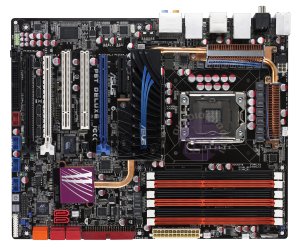
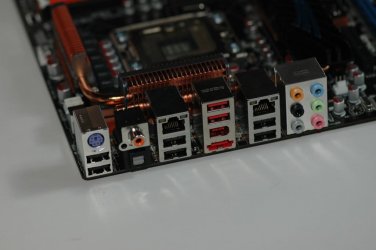
Lightning, I looked up your MOBO and I don't see any vga connection?
 

Attachments

  • P6T-Deluxe_supper.jpg
    P6T-Deluxe_supper.jpg
    1.2 MB · Views: 4
  • PCGH_Asus_P6T_Deluxe_X58_08.jpg
    PCGH_Asus_P6T_Deluxe_X58_08.jpg
    60.7 KB · Views: 4

My Computer

Computer Manufacturer/Model Number
Custom Build
OS
Windows 7 7600 1 X64
CPU
AMD PHENOM II X 550 PROCESSOR 3.1 ghz
Motherboard
ASUS M4A78-TE
Memory
Corsair 4 gig ddr 3
Graphics Card(s)
ati radeon 3300
Sound Card
ati hd
Monitor(s) Displays
syncmaster 2033sw
Screen Resolution
1600X900 60 hz refresh
Hard Drives
twin_seagates SATA's 1 TB & 500 Gig, hitachi_slimline 160 gig
PSU
antec_550 watt
Case
cooler master GLite
Cooling
stock_heat sink
Internet Speed
20mbs up/ 1.5mbs down
Other Info
favorite child "stewie"
favorite dog "brian"
Back
Top