JavaScript is disabled. For a better experience, please enable JavaScript in your browser before proceeding.
You are using an out of date browser. It may not display this or other websites correctly.
You should upgrade or use an
alternative browser .
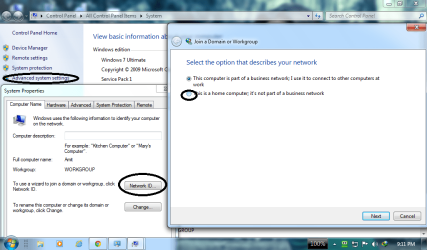
stuck on business network
Hi,
Computer type PC/Desktop Computer Manufacturer/Model Number Costum Build OS Romania CPU Intel Core 2 Duo E8400 Motherboard ASUS P5KPL-AM SE Memory Kingstone 4 GB DDR2 Graphics Card(s) NVIDIA GeForce GT 630 1GB GDDR5 Sound Card Realtek Monitor(s) Displays LG Flatron W1934S Screen Resolution 1440 x 900 Hard Drives Seagate Barracuda 1TB PSU Sirtec High Power Element PLUS 500 W Case Segotep C1 Black Cooling Arctic Cooling Alpine 11 Pro Keyboard Delux K800 Mouse 3D Optical Mouse Internet Speed 100 Mb/s Antivirus None Browser Google Chrome
Computer type PC/Desktop Computer Manufacturer/Model Number Home built OS Windows 7 Ult, Windows 8.1 Pro, CPU Q9650-4.275GHz, E8600 4.5GHz, E6750-3.8GHz Motherboard Evga 780i FTW Memory G.Skill PC2 9600 1200Mhz 5 5 5 15 2T Graphics Card(s) GTX480 Sound Card Asus Xonar D2 Monitor(s) Displays HannsG Screen Resolution 1680X1050 Hard Drives GSkill Phoenix Pro 120GB SSD PSU ThermalTake Toughpower 1000Watt modular Case ThermalTake XaserV Cooling Xigmatek S1283 Keyboard Logitech G15 Mouse Logitech G9 Internet Speed T1
New member
Thread Starter
I restored the default settings in Windows Firewall but still remains on Business Network after restart.
Computer type PC/Desktop Computer Manufacturer/Model Number Costum Build OS Romania CPU Intel Core 2 Duo E8400 Motherboard ASUS P5KPL-AM SE Memory Kingstone 4 GB DDR2 Graphics Card(s) NVIDIA GeForce GT 630 1GB GDDR5 Sound Card Realtek Monitor(s) Displays LG Flatron W1934S Screen Resolution 1440 x 900 Hard Drives Seagate Barracuda 1TB PSU Sirtec High Power Element PLUS 500 W Case Segotep C1 Black Cooling Arctic Cooling Alpine 11 Pro Keyboard Delux K800 Mouse 3D Optical Mouse Internet Speed 100 Mb/s Antivirus None Browser Google Chrome
Hi
Untitled.png
65.8 KB
· Views: 3
Computer type PC/Desktop OS Windows 7 Ultimate x32 Motherboard Gigabyte Z68XP UD3R rev 1 Memory 4 gb Graphics Card(s) Gigabyte AMD Radeon 7770 1 GB Antivirus ESET Smart Security 6 Browser Chrome
New member
Thread Starter
I have one network in Merge or Delete Network Locations; Status: In Use;Type: Unmanaged.I tried to rename the network and I folowed the screenshot and Restart the PC and its still on Business Network...
Computer type PC/Desktop Computer Manufacturer/Model Number Costum Build OS Romania CPU Intel Core 2 Duo E8400 Motherboard ASUS P5KPL-AM SE Memory Kingstone 4 GB DDR2 Graphics Card(s) NVIDIA GeForce GT 630 1GB GDDR5 Sound Card Realtek Monitor(s) Displays LG Flatron W1934S Screen Resolution 1440 x 900 Hard Drives Seagate Barracuda 1TB PSU Sirtec High Power Element PLUS 500 W Case Segotep C1 Black Cooling Arctic Cooling Alpine 11 Pro Keyboard Delux K800 Mouse 3D Optical Mouse Internet Speed 100 Mb/s Antivirus None Browser Google Chrome
I already figured that the obvious solutions wouldn't work but it's a bit too crowded in here for me.
Computer type PC/Desktop Computer Manufacturer/Model Number Home built OS Windows 7 Ult, Windows 8.1 Pro, CPU Q9650-4.275GHz, E8600 4.5GHz, E6750-3.8GHz Motherboard Evga 780i FTW Memory G.Skill PC2 9600 1200Mhz 5 5 5 15 2T Graphics Card(s) GTX480 Sound Card Asus Xonar D2 Monitor(s) Displays HannsG Screen Resolution 1680X1050 Hard Drives GSkill Phoenix Pro 120GB SSD PSU ThermalTake Toughpower 1000Watt modular Case ThermalTake XaserV Cooling Xigmatek S1283 Keyboard Logitech G15 Mouse Logitech G9 Internet Speed T1
chev65 over to you for this thread. go ahead please
Computer type PC/Desktop OS Windows 7 Ultimate x32 Motherboard Gigabyte Z68XP UD3R rev 1 Memory 4 gb Graphics Card(s) Gigabyte AMD Radeon 7770 1 GB Antivirus ESET Smart Security 6 Browser Chrome