stuck on choose an option test memory

jcbbrooks

New member
Local time
2:01 AM
Messages
5
my son brings me his laptop this afternoon not sure exactly what was done but anyway its stuck on test memory, test system and exit. i thought i could go back to factory image but i cant fugure out where its at. any help is really appreciated.
 

My Computer My Computer

Computer Manufacturer/Model Number
inspiron 1545
OS
64
what is the model of your laptop??
 

My Computer My Computer

OS
windows 7 home premium 64 bit
its a dell inspiron 1545
 

My Computer My Computer

Computer Manufacturer/Model Number
inspiron 1545
OS
64
how long are you using your laptop?
 

My Computer My Computer

OS
windows 7 home premium 64 bit
did you already boot the hdd on you laptop? fix the bios setup
 

My Computer My Computer

OS
windows 7 home premium 64 bit
I don't know how.
 

My Computer My Computer

Computer Manufacturer/Model Number
inspiron 1545
OS
64
turn on the power of your laptop and press f2 or del then find the boot sequence then set the hdd on the 1st boot try it
 

My Computer My Computer

OS
windows 7 home premium 64 bit
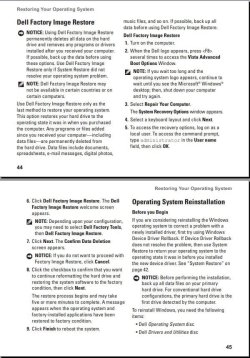
This is what the Setup Guide for your computer says:

Capture.JPG

That sort of indicates Vista was the original OS for this computer. Is that true? If so restoring to factory state will give you Vista instead of Windows 7.
 

My Computer My Computer

Computer type
PC/Desktop
Computer Manufacturer/Model Number
Lenovo IdeaCenter 450
OS
Windows 10 Pro X64
CPU
Intel Quad Core i7-4770 @ 3.4Ghz
Memory
16.0GB PC3-12800 DDR3 SDRAM 1600 MHz
Graphics Card(s)
Intel Integrated HD Graphics
Sound Card
Realtek HD Audio
Monitor(s) Displays
HP 22" LCD
Screen Resolution
1680 x 1050
Hard Drives
250GB Samsung EVO SATA-3 SSD
2TB Seagate ST2000DM001 SATA-2
1.5TB Seagate ST3150041AS SATA
Keyboard
Dell USB
Mouse
Lenovo USB
Internet Speed
Cable via Road Runner 3MB Upload, 30MB Download
Antivirus
Windows Defender, MBAM Pro, MBAE
Browser
Seamonkey
Other Info
UEFI/GPT
PLDS DVD-RW DH16AERSH
same thing happens
 

My Computer My Computer

Computer Manufacturer/Model Number
inspiron 1545
OS
64
ive actually tried to do that already to restore factory image. When i press f8 it still loads to choose an option.
 

My Computer My Computer

Computer Manufacturer/Model Number
inspiron 1545
OS
64
when did you buy your laptop? give me an answer, year is important
 

My Computer My Computer

OS
windows 7 home premium 64 bit
what year did you bought your laptop
 

My Computer My Computer

OS
windows 7 home premium 64 bit
Run chkdsk first, then try F8 again. There is a pretty small window where F8 is recognized.

How to run chkdsk from the Recovery Console
  • Boot your Vista or Windows 7 installation DVD
  • When you see "Press any key to boot from CD or DVD", press Enter
  • At the "Language" screen hold the "Shift" key and press the F10 key to open a Command Window
  • For chkdsk, type chkdsk /r and press Enter.
Let this run to completion undisturbed..

Windows 7 only:
If you don't have a install DVD, you can download a legal copy here: Official Windows 7 SP1 ISO from Digital River

Make sure you get the same version you have installed: 32 or 64 bit; Home Premium, Pro or Ultimate.
 

My Computer My Computer

Computer type
PC/Desktop
Computer Manufacturer/Model Number
Lenovo IdeaCenter 450
OS
Windows 10 Pro X64
CPU
Intel Quad Core i7-4770 @ 3.4Ghz
Memory
16.0GB PC3-12800 DDR3 SDRAM 1600 MHz
Graphics Card(s)
Intel Integrated HD Graphics
Sound Card
Realtek HD Audio
Monitor(s) Displays
HP 22" LCD
Screen Resolution
1680 x 1050
Hard Drives
250GB Samsung EVO SATA-3 SSD
2TB Seagate ST2000DM001 SATA-2
1.5TB Seagate ST3150041AS SATA
Keyboard
Dell USB
Mouse
Lenovo USB
Internet Speed
Cable via Road Runner 3MB Upload, 30MB Download
Antivirus
Windows Defender, MBAM Pro, MBAE
Browser
Seamonkey
Other Info
UEFI/GPT
PLDS DVD-RW DH16AERSH
Back
Top