
Stuck On Install

gutrenchladd

New member
Local time
7:53 PM
Messages
18
ok i installed windows 7 ultimate x64. and it worked just fine up until the first real startup where it would go into the actual os and it just stalled at the windows 7 logo. i have tried installing 3 times and no go each time. fresh installs with a reformat of the drive. still nothing.. i am at a loss here. i have never had this happen before. i could use any help at all.
 

My Computer

OS
Windows 7 Ultimate x64
CPU
AMD Athlon 64 X2 4400+
Motherboard
Acer F690GVM
Memory
2G DDR2 PC2 6400 PN: OCZ2N800SR4GK x2
Graphics Card(s)
NVIDIA GeForce 9500 GT
Monitor(s) Displays
Main: Gateway EVF720 Secondary: IBM E74
Screen Resolution
Main: 1600 x 1280 Secondary: 1024 x 768
Please fill in your System Specs at bottom left of your post.

Where did you get Windows 7? Did you burn DVD yourself?

Are you booting from the installer or running it from previous OS?
 
will fill in specs soon... 7 is from microsoft website.. untouched. burned to dvd myself.. booting from installer. formatted disc before i did anything.
 

My Computer

OS
Windows 7 Ultimate x64
CPU
AMD Athlon 64 X2 4400+
Motherboard
Acer F690GVM
Memory
2G DDR2 PC2 6400 PN: OCZ2N800SR4GK x2
Graphics Card(s)
NVIDIA GeForce 9500 GT
Monitor(s) Displays
Main: Gateway EVF720 Secondary: IBM E74
Screen Resolution
Main: 1600 x 1280 Secondary: 1024 x 768
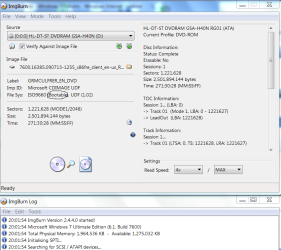
Let's make sure both the ISO and the DVD are bootable. THere is a simple test for this.

Install ImgBurn, select "Verify Disk" and load the ISO using the file folder icon. It should say bootable as in this screenshot:
Capture.PNG

Now insert the DVD and click the button at the bottom to Verify DVD.

Did you format using Advanced drive tools on Win7 DVD or pre-format some other way?

If you have more than 2gb of memory take out the excess and try again.

Download the diagnostics for your HD from Support Downloads page for your model HD.

Check also the latest BIOS update on Support Downloads page for your computer or mobo model, compare to BIOS version given on first bootup screen or page after Entering BIOS setup.
 
i used ultra iso to burn and it said both the iso and dvd are bootable.. and the dvd HAS to be bootable since i have already technically installed the information from the disc its just not setting up.

ill try the memory trick but i need you to be specific... try again as in boot it with only 2 gigs or re install it with only 2 gigs?
 

My Computer

OS
Windows 7 Ultimate x64
CPU
AMD Athlon 64 X2 4400+
Motherboard
Acer F690GVM
Memory
2G DDR2 PC2 6400 PN: OCZ2N800SR4GK x2
Graphics Card(s)
NVIDIA GeForce 9500 GT
Monitor(s) Displays
Main: Gateway EVF720 Secondary: IBM E74
Screen Resolution
Main: 1600 x 1280 Secondary: 1024 x 768
If you think you might already have a valid installation, then boot into the Win7 DVD Repair console and see if it discovers an installation to repair.

If it offers you to repair it, accept and reboot to see if it starts.

More likely, you will need to boot back into Repair and run Startup Repair repeated times to get it started up.

If it hasn't completed installation then try an alternative method of installation like USB flash:

Plug in USB flash, format primary in Disk Management, copy DVD files into root as they appear on DVD, boot from flash by tapping F-key given for Boot Menu on first bootscreen

Or... if you have an ISO, write it to flash stick using UltraISO Bootable tab.

If this doesn't work any better, then remove all but one ram stick and try again to install.
 
ok... what finally worked was taking out 1 of my 2 gig ram sticks... but do i have to keep it out now or can i put it back in?
 

My Computer

OS
Windows 7 Ultimate x64
CPU
AMD Athlon 64 X2 4400+
Motherboard
Acer F690GVM
Memory
2G DDR2 PC2 6400 PN: OCZ2N800SR4GK x2
Graphics Card(s)
NVIDIA GeForce 9500 GT
Monitor(s) Displays
Main: Gateway EVF720 Secondary: IBM E74
Screen Resolution
Main: 1600 x 1280 Secondary: 1024 x 768
Welcome to SevenForums,
Put it back in. Should be good to go now that you have a successful install
 

My Computer

Computer Manufacturer/Model Number
Gateway GT5692
OS
Windows 7 Ulti. x64
CPU
AMD Phenom 8450 triple-core 2.10 ghz
Memory
4GB
Graphics Card(s)
ATI Radion HD 3200
Monitor(s) Displays
Gateway FPD1775W
Screen Resolution
1280x720
Hard Drives
465.6613 Gibibytes
ok... ummm. i just tried putting it back in and it doesnt work.... now what?
 

My Computer

OS
Windows 7 Ultimate x64
CPU
AMD Athlon 64 X2 4400+
Motherboard
Acer F690GVM
Memory
2G DDR2 PC2 6400 PN: OCZ2N800SR4GK x2
Graphics Card(s)
NVIDIA GeForce 9500 GT
Monitor(s) Displays
Main: Gateway EVF720 Secondary: IBM E74
Screen Resolution
Main: 1600 x 1280 Secondary: 1024 x 768
Try swapping them around, be very gentle, never force it, just coax it in by rocking in with even pressure on both ends.

If it will work as sole stick only, then run Windows Memory Diagnostic test on it, switch and try it on the other.
 
i did both things you suggested.. i swapped using the other one only worked fine... everything turnout out fine with the diagnostics on both sticks... but i still cant run with both sticks.
 

My Computer

OS
Windows 7 Ultimate x64
CPU
AMD Athlon 64 X2 4400+
Motherboard
Acer F690GVM
Memory
2G DDR2 PC2 6400 PN: OCZ2N800SR4GK x2
Graphics Card(s)
NVIDIA GeForce 9500 GT
Monitor(s) Displays
Main: Gateway EVF720 Secondary: IBM E74
Screen Resolution
Main: 1600 x 1280 Secondary: 1024 x 768
I look in your System Specs to see memory but there are no specs. This will cause most of the smarter guys to move on.

But since I'm not one of the smarter guys here, I'll suggest you contact your memory vendor and have them troubleshoot it. If you have Kingston, they will back their memory for life. Others, not so sure.
 
But since I'm not one of the smarter guys here, I'll suggest you contact your memory vendor and have them troubleshoot it. If you have Kingston, they will back their memory for life. Others, not so sure.

Dont believe what gregrocker says, he's one of our main goto members in situations like this... ;)
 

My Computer

Computer type
PC/Desktop
Computer Manufacturer/Model Number
LENOVO K450 @3.0GHZ
OS
64-bit Windows 8.1 Pro
CPU
Core(TM) i5 CPU 4330 Haswell @ 3.20GHz
Motherboard
LENOVO
Memory
12.00 GB
Graphics Card(s)
Intel(R) HD Graphics
Sound Card
Intel HD integtrated
Monitor(s) Displays
HP 25' ISP Monitor
Screen Resolution
1900/1020
Hard Drives
(1) ST1000DM003-1CH162 (2) Generic STORAGE DEVICE USB Device (3) Generic STORAGE DEVICE USB Device
Internet Speed
100mb down/10mb up
ok i just completed the system specs... or most of them... it was a basic ACER tower that i got from best-buy but have since started upgrading things... i have done so far the ram and vid card... soon will be the mobo cpu and psu. oh and everything i buy for my computers i buy through TigerDirect.com if that matters lol
 

My Computer

OS
Windows 7 Ultimate x64
CPU
AMD Athlon 64 X2 4400+
Motherboard
Acer F690GVM
Memory
2G DDR2 PC2 6400 PN: OCZ2N800SR4GK x2
Graphics Card(s)
NVIDIA GeForce 9500 GT
Monitor(s) Displays
Main: Gateway EVF720 Secondary: IBM E74
Screen Resolution
Main: 1600 x 1280 Secondary: 1024 x 768
Excellent, the RAM is newer and still under warranty. Contact the maker tech support, open a case and have them troubleshoot the problem to replace if necessary.

Do some homework first:

Doublecheck the mobo specs to make sure that RAM is exactly correct and within mobo limits.

Download and burn to CD definitive memtest86, run overnight to stress test each RAM stick.
 
guttrenchladd, pls double check the computer specs. I couldn't find your Mobo specs to be sure, but I found some reference that it only handles 2G. That would explain it.
What is your computer model?
 

My Computer

Computer Manufacturer/Model Number
Wally, Innc.
OS
Windows 7 x64 finally!
CPU
AMD Athlon II X2 240
Motherboard
Biostar TA790GX XE
Memory
OCZ Platinum 4GB DDR2 1066 (will not work past 800MHz)
Graphics Card(s)
MSI R4670-MD1G Radeon HD 4670 1GB 128-bit GDDR3
Sound Card
ATI High Definition Audio Device Realtek ALC888
Monitor(s) Displays
HP w19e
Screen Resolution
1440x900
Hard Drives
Western Digital Caviar Green WD5000AADS 500GB SATA
Western Digital Caviar Blue WD5000AAKS 500GB SATA
PSU
Athena Power Micro ATX 400W
Case
HEC 6T 6T10BB Black MicroATX Mini Tower
Cooling
stock
Keyboard
wired, many keys
Mouse
HP wireless, 2 buttons, 1 wheel
Internet Speed
DSL 2Mb (recently getting 1.65M!)
i was running vista x64 with 4gigs and a 512 meg video card just fine before. and i would be surprised if you DID find my mobo. I ran into that problem before. it is like my mobo doesnt exist drivers take forever to find sometimes... i am wondering if flashing my bios will make it work.. the ram company said that since it is a pre setup machine that is more than 2 years old that they cannot guarantee that it will work correctly... and Acer wont even talk to me because the warranty is up so i am once again stuck... i have tried every slot and combination of ram and both had perfect 100% error free on all tests in EVERY slot. i am truly at a loss and i would love very much to make this computer get 4 gigs in it so it runs smoother when i play games... i just wanna play wow... :cry: oh and checking teh exact specs via acers website it says that it does in fact support more than 2 gigs of ram here is the link http://support.acer.com/acerpanam/desktop/0000/Acer/AspireM5100/AspireM5100sp2.shtml
 

My Computer

OS
Windows 7 Ultimate x64
CPU
AMD Athlon 64 X2 4400+
Motherboard
Acer F690GVM
Memory
2G DDR2 PC2 6400 PN: OCZ2N800SR4GK x2
Graphics Card(s)
NVIDIA GeForce 9500 GT
Monitor(s) Displays
Main: Gateway EVF720 Secondary: IBM E74
Screen Resolution
Main: 1600 x 1280 Secondary: 1024 x 768
guttrenchladd, thanks for the update
I think updating the BIOS is a good way to go.
 

My Computer

Computer Manufacturer/Model Number
Wally, Innc.
OS
Windows 7 x64 finally!
CPU
AMD Athlon II X2 240
Motherboard
Biostar TA790GX XE
Memory
OCZ Platinum 4GB DDR2 1066 (will not work past 800MHz)
Graphics Card(s)
MSI R4670-MD1G Radeon HD 4670 1GB 128-bit GDDR3
Sound Card
ATI High Definition Audio Device Realtek ALC888
Monitor(s) Displays
HP w19e
Screen Resolution
1440x900
Hard Drives
Western Digital Caviar Green WD5000AADS 500GB SATA
Western Digital Caviar Blue WD5000AAKS 500GB SATA
PSU
Athena Power Micro ATX 400W
Case
HEC 6T 6T10BB Black MicroATX Mini Tower
Cooling
stock
Keyboard
wired, many keys
Mouse
HP wireless, 2 buttons, 1 wheel
Internet Speed
DSL 2Mb (recently getting 1.65M!)
my problem is that the motherboard is so old that they list no updates for the bios on the website and i have no way of knowing what will work and what wont. help please?
 

My Computer

OS
Windows 7 Ultimate x64
CPU
AMD Athlon 64 X2 4400+
Motherboard
Acer F690GVM
Memory
2G DDR2 PC2 6400 PN: OCZ2N800SR4GK x2
Graphics Card(s)
NVIDIA GeForce 9500 GT
Monitor(s) Displays
Main: Gateway EVF720 Secondary: IBM E74
Screen Resolution
Main: 1600 x 1280 Secondary: 1024 x 768
Indeed, not so helpful site. they mostly only have updates to their bloatware, and nothign for BIOS. Even the user manual they list is for another model...

I can only think of a few things:
1 - check in your BIOS if there is a memory limitation set up. That would be a cause. There is also a maximum memory setting in Windows 7, I just can't remember now where it is and I am at my XP machine. I will see later if I can find that.
2 - they list TV tuner as one of the available devices. Do you have one? if so, try removing it and see if it works. I have seen many cases where tuners are problematic
3 - same thing for the Video card.
2 and 3 are not solutions, but might help narrow down where the problem is.

Regarding the BIOS, you can try running SIW, it should give you the motherboard model. You would then have to find another Acer model with the same MoBo and be lucky enough to have a BIOS update there. Very long shot though.....
 

My Computer

Computer Manufacturer/Model Number
Wally, Innc.
OS
Windows 7 x64 finally!
CPU
AMD Athlon II X2 240
Motherboard
Biostar TA790GX XE
Memory
OCZ Platinum 4GB DDR2 1066 (will not work past 800MHz)
Graphics Card(s)
MSI R4670-MD1G Radeon HD 4670 1GB 128-bit GDDR3
Sound Card
ATI High Definition Audio Device Realtek ALC888
Monitor(s) Displays
HP w19e
Screen Resolution
1440x900
Hard Drives
Western Digital Caviar Green WD5000AADS 500GB SATA
Western Digital Caviar Blue WD5000AAKS 500GB SATA
PSU
Athena Power Micro ATX 400W
Case
HEC 6T 6T10BB Black MicroATX Mini Tower
Cooling
stock
Keyboard
wired, many keys
Mouse
HP wireless, 2 buttons, 1 wheel
Internet Speed
DSL 2Mb (recently getting 1.65M!)
Back
Top