Stuck on startup repair after bsod

harty10

New member
Local time
7:25 AM
Messages
13
Right guys I don't know what's happened but I've tried turning my laptop on today and when it's on the windows logo loading at the start after 2 minutes I get a bsod saying process operization failed then it takes me to start up repair which says : windows cannot repair this computer automatically
Problem details: problem signature 07: bad disk
I've tried command prompt rebuildbcd
So now I'm stuck on how to fix this?

All your help will be much appreciated!✌️
 

My Computer My Computer

At a glance

ultimate 64
OS
ultimate 64

My Computer My Computer

At a glance

Windows 7 Ultimate x64 SP1AMD Phenom 2 1090T2x8GB Kingston HyperX Fury Black 1600Mhz Unga...MSI GTX 970 Gaming 4G
Computer type
PC/Desktop
Computer Manufacturer/Model Number
Custom Build
OS
Windows 7 Ultimate x64 SP1
CPU
AMD Phenom 2 1090T
Motherboard
Gigabyte GA-890FXA-UD5
Memory
2x8GB Kingston HyperX Fury Black 1600Mhz Unganged
Graphics Card(s)
MSI GTX 970 Gaming 4G
Sound Card
Realtek On-Board HD 7.1 Audio / Logitech G35
Monitor(s) Displays
3xAcer GD245HQ
Screen Resolution
1920x1080
Hard Drives
Samsung 850 Pro 512GB SSD - OS /
WD Caviar Black SATA 3 - 1 TBx2 - Dynamic RAID 0 /
WD Caviar Green SATA 2 - 640GBx2 - Dynamic RAID 0 /
WD Caviar Green SATA 2 - 640GB - Internal Backup /
Seagate Barracude SATA 3 - 3TB - External Backup/ Sync
PSU
HighPower 1000W
Case
Cooler Master HAF 932
Cooling
Noctua NH-D14
Keyboard
Logitech G19
Mouse
Logitech G500
Internet Speed
100/4 Mbit Cable (100GB quota)
Antivirus
ZoneAlarm Extreme Security / MBAM Pro / MBAE Free / SAS Free
Browser
IE 11 - Firefox - Chrome
Other Info
Logitech F710/ G27/ G940/ Z5500 // TrackIR 5 // Nvidia 3D Surround Vision
I've started my laptop running from the Usb then I get a black screen saying
Could not find kernel image: linux
Boot:
Then repeats the above?
 

My Computer My Computer

At a glance

ultimate 64
OS
ultimate 64
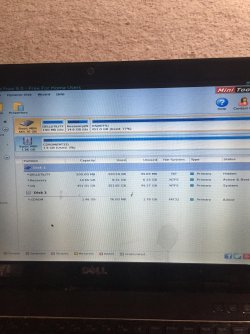
Ive managed to get it working and this is the outcome, it makes no sense to me guys?
IMG_1122.jpg
 

My Computer My Computer

At a glance

ultimate 64
OS
ultimate 64
What is working? Is Win7 starting?

First let's deal with the bad disk by highlighting Disk1 again as you have done in picture, then run Partition surface test with Partition Wizard to learn the condition of the hard drive. If there are bad blocks then you can confirm this using the HD maker's HD Diagnostic extended CD scan. If it fails both tests then replace the HD. The best replacement you can get and the best upgrade you can give Win7 is to buy an SSD, lightning fast, even faster than buying a new high-end PC without one.

If HD passes with still no start and you have tried every other step in Troubleshooting Windows 7 Failure to Start then follow Step 10 to try moving the boot files to OS partition by Marking Partition Active then running Startup Repair - Run 3 Separate Times.

If this fails you can try to construct a System Reserved partition using PW CD to shrink OS partition from the left by 200mb, create a Primary Partition, Set it Active then run Startup Repair - Run 3 Separate Times .
 
I'm running the test now, it's got 1 hour and 4 minutes left remaining and so far I can see 1 red square?
 

My Computer My Computer

At a glance

ultimate 64
OS
ultimate 64
In that case once it completes I'd let the manufacturer's HD Diagnostic extended CD scan decide for sure if it's failing. PW is not as definitive but just an indicator like SMART.

What is your HD brand? If it has no maker's diagnostics then use Seatools ISO burned to CD with Windows Image Burner.
 
im running the test again! just out of curiosity would it be possible to download a windows 7 iso then i can install a new copy but keep all my files, music and itunes! is that possible?
 

My Computer My Computer

At a glance

ultimate 64
OS
ultimate 64
Finding safe reinstallation media is discussed fully in Step 1 of Clean Reinstall Windows 7.

Those steps will also result in a perfect install which will stay that way as long as you use only the tools and methods given, compiled based on what's worked best in tens of thousands of installs we've directly helped with here. Over 1.5 million consumers have used the tutorial without a single complaint.

Unplug other hard drive, delete all partitions during the booted install.

What OS and version shipped with your laptop? Why do you have Ultimate in your specs?
 
i dont know why it says ultimate?:S
so basically i can follow them steps above to do a fresh install but it will keep all my files, music. itunes etc.?
il also have to boot the iso from usb by making it 1st priority right?
 

My Computer My Computer

At a glance

ultimate 64
OS
ultimate 64
If you'll read the tutorial it explains how your files must be backed up first and answers most other questions.

I asked you what OS version shipped with your laptop.
 
windows 7 was shipped with!
this is all possible when my laptop wont boot up right, just change the 1st priority to usb then follow the instructions given to copy my data then it will be complete
 

My Computer My Computer

At a glance

ultimate 64
OS
ultimate 64
What version of Windows 7?

I have no idea what you are asking about setting USB first priority to boot. You must back up your data first as shown in tutorial. Then if you want to reinstall using USB flash stick it tells how to format it to boot in Step 1, so you can boot it to delete all partitions and then install.

I would leave the hard drive as first boot device in BIOS. Use the one-time BIOS Boot menu key to boot the installation media. BIOS Boot menu keys
 
Standard version on my dell laptop
1st thing underneath my laptop the product key has faded and theres no access to my laptop as it wont boot up
 

My Computer My Computer

At a glance

ultimate 64
OS
ultimate 64
There is no Standard version. Is this the OS that shipped with your laptop from factory? What is the exact Dell model and Service Tag? These will be on a sticker on the bottom of PC to read carefully.

Dell will ship reinstallation media for handling charges only. I'd call or chat their Tech Support. You'll need your Service tag.

What were the results of Hard Drive test which you didn't report?
 
the results shown 17 errors:/
windows startup recovery used to launch after 5 minutes of hanging on the windows logo now it doesnt launch at all i just get the same loop
i have a dell inspiron
windows 7 home premium
service tag - 3nx4gr1
 

My Computer My Computer

At a glance

ultimate 64
OS
ultimate 64
17 errors running which test exactly?

I would run Dell Hardware Diagnostics from F12 Menu.

Then if it proves the hard drive defective you can confirm that with the hard drive maker's HD Diagnostic extended CD scan.

If likely you need to replace the hard drive then the best upgrade you can give Win7 is to buy an SSD, lightning fast, faster even than buying a new expensive PC without one.

If you can't read the Product Key then you'll need to order Reinstallation Media from Dell. You're lucky that Dell is the one brand that will supply a clean copy of only the OS without the bloatware, but which includes Activation and a Dell logo. Contact Dell tech support and browse the Dell Support pages for your Service tag
 
my uncle is a technician whos has been over to do everything ive done, he told me the hard drive has gone so thats it:( hopefully he can retain my data

just 1 question with that new hard drive installed, how do i install windows on to it now its a new one?
 

My Computer My Computer

At a glance

ultimate 64
OS
ultimate 64
Follow Clean Reinstall Windows 7 to get and keep a perfect install. It discusses how to obtain reinstallation media in Step 1. Dell is the only brand that will ship you clean reinstallation disks without the crapware for free. Contact their tech support. Or you can find your own and verify using tutorial.

If you made your Recovery Disks you can also run those and then Clean Up Factory Bloatware

You can boot in with the Win7 disk or System Repair Disk to browse the failing hard drive and rescue your files to a flash stick or USB external drive following Copy & Paste - in Windows Recovery Console.
You or your Uncle might also have a Linux disk to do this with.
http://www.sevenforums.com/tutorials/93347-copy-paste-windows-recovery-console.html
 
Back
Top