Stuck on Windows Welcome Screen

MahLiiSah

New member
Local time
6:03 AM
Messages
19
When I turn on my computer, a loud beeping noise occurs until I turn the sound off. The computer boots through the starting windows screen and goes to the welcome screen. It stays on the welcome screen with the loading sign. Occasionally the login screen will flash but then it'll go right back to the welcome loading screen.
 

My Computer

Computer type
Laptop
Computer Manufacturer/Model Number
Dell Inspiron 1440
OS
Window 7 64 bit
Hello M mate try a memtest as the prolonged beep sounds like either a memory problem or a heat problem on the CPU.

Check the temps with Speccy Speccy - Download post the results back.

Before running the memtest try reseating the RAM sticks too.
Two more things some system specs would be handy and what make of BIOS do you have? it should show up on the boot up screen.

http://www.sevenforums.com/tutorials/180324-system-info-see-your-system-specs.html


MEMTEST

http://www.sevenforums.com/tutorials/105647-ram-test-memtest86.html for this one you will need to make a bootable disk set the BIOS to optical (or USB if preferred) boot the machine and let it run for at LEAST 8 passes unless the errors come up straight away. Takes fair time to complete and some leave it running overnight.
 

My Computer

Computer type
PC/Desktop
Computer Manufacturer/Model Number
Own build (new) Desk1 / Asus ROG Win 7 / Desk2 1st build
OS
Desk1 7 Home Prem / Desk2 10 Pro / Main lap Asus ROG 10 Pro 2 laptop Toshiba 7 Pro Asus P2520 7 & 10
CPU
Desk1 i5 3750K / Laptop i7 GTX 860M / Desk2 i5 2500
Motherboard
Desk1 Asus P877-V / Desk2 Gigabyte H67 UD3H / Laptop ?
Memory
Desk1 8GB (1866) / Desk2 16GB (1333) / Laptop 8Gb DDR3
Graphics Card(s)
Desk 1& 2NVidia GTX 650 & Laptops on board Intel
Sound Card
Desk 1 & 2 -XONAR DG Realtek High Def audio Laptop
Monitor(s) Displays
Desk 1 Benq HD 2450 / Desk2 Philips 24" / Laptop 17.5"
Screen Resolution
1920x1080 D1 & D2 & Laptop 1
Hard Drives
Desk1 Samsung 120GB 830 SSD
Asus ROG 256GB 850 Pro SSD
Desk2 Samsung 840 256 SSD
Toshiba 120GB EVO
PSU
Desk 1 Corsair HX 1050/ Laptop ? / Desk 2 Corsair HX 650
Case
Desk 1 Cooler HAF XM ? Toshiba laptop / Desk2 Coolermaster
Cooling
Fans on all Desk1 -2 Desk2 - all Coolermasters 5 Laptop ?
Keyboard
Desk 1 MS Sidewinder X6 Desk 2 MS Sidewinder X 4
Mouse
Desk 1&2 - Gigabyte MS 900 gamer - laptop - Logitec wireless
Internet Speed
ADSL2+
Other Info
One other Desktop (tester) and spare Toshba laptop both with SSD's
Running Kaspersky 2016 ISS on all machines config'd identically
Logitec audio stereo systems on each machine (x3)
Canon MG5250MFC
Router/modem TP-Link running WPA2SK
How do I reseat the RAM sticks? The BIOS make I have is A07.
 

My Computer

Computer type
Laptop
Computer Manufacturer/Model Number
Dell Inspiron 1440
OS
Window 7 64 bit
See thi M ftp://ftp.dell.com/Manuals/all-prod...on_laptop/inspiron-1440_Setup Guide_en-us.pdf there is usually a small "door" on the underside of the machine which is held down by a very small screw. When opened just flick the side retain clips back and the stick should flip up slightly then just gently pull out and reverse the procedure.

Remember to unplug the power supply and remove the battery first

You can use tinker of mine if you like see this

SLOTCLEANING

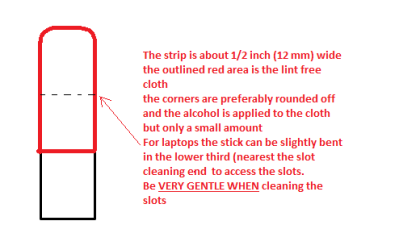
Now as for the slots to clean them use astrip of old credit card about 1/2 inch wide nip the corners off one end - preferably round them off hold apiece of thin lint free cloth over the end dab on some form of alcohol - isopropyl alcohol (what we swab the skin with before an injection) is good and GENTLY swipe along the slots.

This can also be done for the GPU slot/s.
See this pic and info also
 

Attachments

  • STICK CLEANER.PNG
    STICK CLEANER.PNG
    4.9 KB · Views: 25

My Computer

Computer type
PC/Desktop
Computer Manufacturer/Model Number
Own build (new) Desk1 / Asus ROG Win 7 / Desk2 1st build
OS
Desk1 7 Home Prem / Desk2 10 Pro / Main lap Asus ROG 10 Pro 2 laptop Toshiba 7 Pro Asus P2520 7 & 10
CPU
Desk1 i5 3750K / Laptop i7 GTX 860M / Desk2 i5 2500
Motherboard
Desk1 Asus P877-V / Desk2 Gigabyte H67 UD3H / Laptop ?
Memory
Desk1 8GB (1866) / Desk2 16GB (1333) / Laptop 8Gb DDR3
Graphics Card(s)
Desk 1& 2NVidia GTX 650 & Laptops on board Intel
Sound Card
Desk 1 & 2 -XONAR DG Realtek High Def audio Laptop
Monitor(s) Displays
Desk 1 Benq HD 2450 / Desk2 Philips 24" / Laptop 17.5"
Screen Resolution
1920x1080 D1 & D2 & Laptop 1
Hard Drives
Desk1 Samsung 120GB 830 SSD
Asus ROG 256GB 850 Pro SSD
Desk2 Samsung 840 256 SSD
Toshiba 120GB EVO
PSU
Desk 1 Corsair HX 1050/ Laptop ? / Desk 2 Corsair HX 650
Case
Desk 1 Cooler HAF XM ? Toshiba laptop / Desk2 Coolermaster
Cooling
Fans on all Desk1 -2 Desk2 - all Coolermasters 5 Laptop ?
Keyboard
Desk 1 MS Sidewinder X6 Desk 2 MS Sidewinder X 4
Mouse
Desk 1&2 - Gigabyte MS 900 gamer - laptop - Logitec wireless
Internet Speed
ADSL2+
Other Info
One other Desktop (tester) and spare Toshba laptop both with SSD's
Running Kaspersky 2016 ISS on all machines config'd identically
Logitec audio stereo systems on each machine (x3)
Canon MG5250MFC
Router/modem TP-Link running WPA2SK
Okay. I ran the Memtest overnight and so far it ran for 13 passes with 0 errors. Should I keep it running?
 

My Computer

Computer type
Laptop
Computer Manufacturer/Model Number
Dell Inspiron 1440
OS
Window 7 64 bit

My Computer

Computer type
PC/Desktop
Computer Manufacturer/Model Number
Own build (new) Desk1 / Asus ROG Win 7 / Desk2 1st build
OS
Desk1 7 Home Prem / Desk2 10 Pro / Main lap Asus ROG 10 Pro 2 laptop Toshiba 7 Pro Asus P2520 7 & 10
CPU
Desk1 i5 3750K / Laptop i7 GTX 860M / Desk2 i5 2500
Motherboard
Desk1 Asus P877-V / Desk2 Gigabyte H67 UD3H / Laptop ?
Memory
Desk1 8GB (1866) / Desk2 16GB (1333) / Laptop 8Gb DDR3
Graphics Card(s)
Desk 1& 2NVidia GTX 650 & Laptops on board Intel
Sound Card
Desk 1 & 2 -XONAR DG Realtek High Def audio Laptop
Monitor(s) Displays
Desk 1 Benq HD 2450 / Desk2 Philips 24" / Laptop 17.5"
Screen Resolution
1920x1080 D1 & D2 & Laptop 1
Hard Drives
Desk1 Samsung 120GB 830 SSD
Asus ROG 256GB 850 Pro SSD
Desk2 Samsung 840 256 SSD
Toshiba 120GB EVO
PSU
Desk 1 Corsair HX 1050/ Laptop ? / Desk 2 Corsair HX 650
Case
Desk 1 Cooler HAF XM ? Toshiba laptop / Desk2 Coolermaster
Cooling
Fans on all Desk1 -2 Desk2 - all Coolermasters 5 Laptop ?
Keyboard
Desk 1 MS Sidewinder X6 Desk 2 MS Sidewinder X 4
Mouse
Desk 1&2 - Gigabyte MS 900 gamer - laptop - Logitec wireless
Internet Speed
ADSL2+
Other Info
One other Desktop (tester) and spare Toshba laptop both with SSD's
Running Kaspersky 2016 ISS on all machines config'd identically
Logitec audio stereo systems on each machine (x3)
Canon MG5250MFC
Router/modem TP-Link running WPA2SK
How do I run speccy from a flash drive?
 

My Computer

Computer type
Laptop
Computer Manufacturer/Model Number
Dell Inspiron 1440
OS
Window 7 64 bit
How do I run speccy from a flash drive?
Can you download it onto a drive on say another machine? If so can you then get into safe mode on the faulty machine? if so then insert the stick and run or install from there while in safe mode and run it.
 

My Computer

Computer type
PC/Desktop
Computer Manufacturer/Model Number
Own build (new) Desk1 / Asus ROG Win 7 / Desk2 1st build
OS
Desk1 7 Home Prem / Desk2 10 Pro / Main lap Asus ROG 10 Pro 2 laptop Toshiba 7 Pro Asus P2520 7 & 10
CPU
Desk1 i5 3750K / Laptop i7 GTX 860M / Desk2 i5 2500
Motherboard
Desk1 Asus P877-V / Desk2 Gigabyte H67 UD3H / Laptop ?
Memory
Desk1 8GB (1866) / Desk2 16GB (1333) / Laptop 8Gb DDR3
Graphics Card(s)
Desk 1& 2NVidia GTX 650 & Laptops on board Intel
Sound Card
Desk 1 & 2 -XONAR DG Realtek High Def audio Laptop
Monitor(s) Displays
Desk 1 Benq HD 2450 / Desk2 Philips 24" / Laptop 17.5"
Screen Resolution
1920x1080 D1 & D2 & Laptop 1
Hard Drives
Desk1 Samsung 120GB 830 SSD
Asus ROG 256GB 850 Pro SSD
Desk2 Samsung 840 256 SSD
Toshiba 120GB EVO
PSU
Desk 1 Corsair HX 1050/ Laptop ? / Desk 2 Corsair HX 650
Case
Desk 1 Cooler HAF XM ? Toshiba laptop / Desk2 Coolermaster
Cooling
Fans on all Desk1 -2 Desk2 - all Coolermasters 5 Laptop ?
Keyboard
Desk 1 MS Sidewinder X6 Desk 2 MS Sidewinder X 4
Mouse
Desk 1&2 - Gigabyte MS 900 gamer - laptop - Logitec wireless
Internet Speed
ADSL2+
Other Info
One other Desktop (tester) and spare Toshba laptop both with SSD's
Running Kaspersky 2016 ISS on all machines config'd identically
Logitec audio stereo systems on each machine (x3)
Canon MG5250MFC
Router/modem TP-Link running WPA2SK
When I turn on my computer, a loud beeping noise occurs until I turn the sound off. The computer boots through the starting windows screen and goes to the welcome screen. It stays on the welcome screen with the loading sign. Occasionally the login screen will flash but then it'll go right back to the welcome loading screen.

Hi MahLiiSah.

Please perform the steps suggested by ICit2lol. Also, you can perform the diagnostics to confirm no hardware failure on the system:

http://dell.to/18xQpRy

Also, check this link which would be useful in resolving this issue:

Failure to Boot


Keep us posted with the results so we can advise you further.
 

My Computer

Computer type
PC/Desktop
OS
Winndows 7 32 bit
How do I run speccy from a flash drive?
Can you download it onto a drive on say another machine? If so can you then get into safe mode on the faulty machine? if so then insert the stick and run or install from there while in safe mode and run it.

I can't run my computer on safe mode and I'm not sure if I downloaded it right on the flash drive because it doesn't boot up automatically like how the memtest did.
 

My Computer

Computer type
Laptop
Computer Manufacturer/Model Number
Dell Inspiron 1440
OS
Window 7 64 bit
I performed the diagnostics and it prompted me to restart the computer and do a system repair. Other times the repair didn't work but this time it did and my computer came back on and I was able to log in. However, the beeping noise still occurs. Is there anyway to fix that?
 

My Computer

Computer type
Laptop
Computer Manufacturer/Model Number
Dell Inspiron 1440
OS
Window 7 64 bit
I performed the diagnostics and it prompted me to restart the computer and do a system repair. Other times the repair didn't work but this time it did and my computer came back on and I was able to log in. However, the beeping noise still occurs. Is there anyway to fix that?

Hi MahLiiSah,

Please let us know how many beeps you get before the system starts. Also, have you tried disconnecting all the peripherals attached to the system and then booting it to isolate the issue.

Also, make sure that BIOS is updated on the system:

BIOS

Keep us posted with the results so we can advise you further.
 

My Computer

Computer type
PC/Desktop
OS
Winndows 7 32 bit
Back
Top