Stupid boot situation

Northorne

New member
Local time
7:08 PM
Messages
9
When booting my computer I am asked if I want to boot 7 or linux.
This is a problem for two reasons; first both OSs are on the same partition (HardDisk 0). Second I want to simply boot 7 by default and not be asked to choose on startup.

I created this problem when I was playing around with making a Linux "live" usb flash drive. I think unetbootin (the software for making the flashdrive into a bootable linux os) perhaps screwed up and put a couple of Linux boot files on my 7 partition. So now when my laptop goes looking for boot files it finds both 7, and Linux boot instructions on partition one.

Can anyone tell me how to fix this? I tried looking for the Linux boot files but I dont know what they look like. The less invasive/time intensive the advice is the better!

1st post, nice to meet ya'll
Thanks alot!

PS. I wasnt sure which forum to put this is in. I hope no one is offended.
 

My Computer

Computer Manufacturer/Model Number
Asus K70AC
OS
Windows 7 Home 64 Bit
CPU
AMD Turion x2 Mobile RM-75 2.2ghz
Memory
4gigs
Graphics Card(s)
ATI Radeon HD 4570 512MB
Hard Drives
ST932032 SATA Disk
Hello Northorne, welcome to Seven Forums!


Will you please post a snip/screen-shot of the entire disk management drive map so we can see what you have going on, before any suggestions are made?


How to Post a Screenshot in Seven Forums
 

My Computer

Computer Manufacturer/Model Number
* BFK Customs *
OS
W 7 64-bit Ultimate
CPU
Intel Q9550 Yorkfield
Motherboard
ASUS P5Q Pro
Memory
8GB Dominator 8500C5D
Graphics Card(s)
ATI : XFX 5870
Sound Card
Realtek HD Audio 7-1
Monitor(s) Displays
1x 47" LCD HDMI & 3x 26" LCD HDMI
Screen Resolution
1920x1080P & 1920x1200
Hard Drives
1x 80GB Intel X25-M G2 SSD : 1x 500GB & 1x 640GB WD Caviar Black(s)
PSU
Corsair 620HX
Case
Cooler Master RC-690
Cooling
Tuniq Tower 120, 2x 140mm and 3x 120mm case fans
Keyboard
Microsoft 500
Mouse
Razer Diamondback 3G
Internet Speed
14 Mb/s
Other Info
1x Koutech 3Gb/s SATA HDD Hot Swap Rack
I would love to! Although I'm not sure exactly what your asking for. Could you point me in the direction of the disk managment drive map?
 

My Computer

Computer Manufacturer/Model Number
Asus K70AC
OS
Windows 7 Home 64 Bit
CPU
AMD Turion x2 Mobile RM-75 2.2ghz
Memory
4gigs
Graphics Card(s)
ATI Radeon HD 4570 512MB
Hard Drives
ST932032 SATA Disk
I would love to! Although I'm not sure exactly what your asking for. Could you point me in the direction of the disk managment drive map?


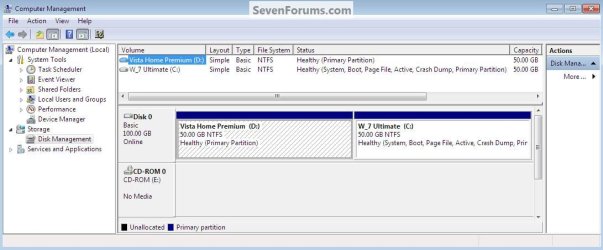
In the Windows start menu right click computer and click manage, in the left pane of the "Computer Management" window that opens click disk management and post a snip of that, it should look similar to this.


click to enlarge
Dual Vista_W_7.jpg
 

My Computer

Computer Manufacturer/Model Number
* BFK Customs *
OS
W 7 64-bit Ultimate
CPU
Intel Q9550 Yorkfield
Motherboard
ASUS P5Q Pro
Memory
8GB Dominator 8500C5D
Graphics Card(s)
ATI : XFX 5870
Sound Card
Realtek HD Audio 7-1
Monitor(s) Displays
1x 47" LCD HDMI & 3x 26" LCD HDMI
Screen Resolution
1920x1080P & 1920x1200
Hard Drives
1x 80GB Intel X25-M G2 SSD : 1x 500GB & 1x 640GB WD Caviar Black(s)
PSU
Corsair 620HX
Case
Cooler Master RC-690
Cooling
Tuniq Tower 120, 2x 140mm and 3x 120mm case fans
Keyboard
Microsoft 500
Mouse
Razer Diamondback 3G
Internet Speed
14 Mb/s
Other Info
1x Koutech 3Gb/s SATA HDD Hot Swap Rack
Start :ar: Computer Management :ar: Disk Management
 

My Computer

Computer type
PC/Desktop
Computer Manufacturer/Model Number
Built them myself, Science Experiments !
OS
Win7 Enterprise, Win7 x86 (Ult 7600), Win7 x64 Ult 7600, TechNet RTM on AMD x64 (2.8Ghz)
CPU
AMD fx8350 4ghz, AMD-32 2400mhz, AMD-64 3200mhz, AMDx64 2.8G
Motherboard
SIS 755, ECS-K8M890M-M (Ult 7600), GigaByte & others
Memory
2gb, 4gb on the Ult 7600, 4gb on Technet RTM, 32gb on FX8350
Graphics Card(s)
Draw my own Graphics, several nVidia cards
Sound Card
on motherboard
Monitor(s) Displays
19" flat scr, 28" I-Inc widescr,22" Emprex Widescr, 23" Acer
Screen Resolution
1280 x 1024, 1440 x 900, 1920 x 1080
Hard Drives
6 pata Ide HD's & 2 Sata HD's
added 80gb external on Ult 7600 computer,
numerous extra 1tb, 2TB, 3Tb SATA HD's
A collection of ext HD Docks w/ HDs
PSU
430w, 550w, 600w, 700, 800, etc
Case
All Generic Full Towers
Cooling
Open Air & a few fans, some w/ colored LEDs
Keyboard
Compaq & Dell recycled from GoodWill
Mouse
Made in China Optical Wired Mouse
Internet Speed
Fast Cable InterNet
Antivirus
AVG Free on 24 different Desktops, NO Problems!
Browser
IE 8 is preferred, but use FireFox sometimes
Other Info
Linksys Routers, switches, & Hubs
Too Many USB Flash Drives to count, Biggest is 64GB !
Eight computers in my home network.
Sixteen computers at my business network.
Linked via TeamViewer !
Lots of old used spare computer parts everywhere!
Capture.PNG
 

My Computer

Computer Manufacturer/Model Number
Asus K70AC
OS
Windows 7 Home 64 Bit
CPU
AMD Turion x2 Mobile RM-75 2.2ghz
Memory
4gigs
Graphics Card(s)
ATI Radeon HD 4570 512MB
Hard Drives
ST932032 SATA Disk
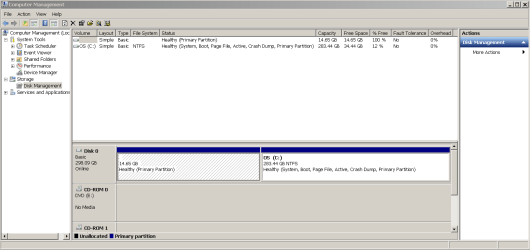
There we go, sorry it took a minute
 

My Computer

Computer Manufacturer/Model Number
Asus K70AC
OS
Windows 7 Home 64 Bit
CPU
AMD Turion x2 Mobile RM-75 2.2ghz
Memory
4gigs
Graphics Card(s)
ATI Radeon HD 4570 512MB
Hard Drives
ST932032 SATA Disk

My Computer

Computer Manufacturer/Model Number
* BFK Customs *
OS
W 7 64-bit Ultimate
CPU
Intel Q9550 Yorkfield
Motherboard
ASUS P5Q Pro
Memory
8GB Dominator 8500C5D
Graphics Card(s)
ATI : XFX 5870
Sound Card
Realtek HD Audio 7-1
Monitor(s) Displays
1x 47" LCD HDMI & 3x 26" LCD HDMI
Screen Resolution
1920x1080P & 1920x1200
Hard Drives
1x 80GB Intel X25-M G2 SSD : 1x 500GB & 1x 640GB WD Caviar Black(s)
PSU
Corsair 620HX
Case
Cooler Master RC-690
Cooling
Tuniq Tower 120, 2x 140mm and 3x 120mm case fans
Keyboard
Microsoft 500
Mouse
Razer Diamondback 3G
Internet Speed
14 Mb/s
Other Info
1x Koutech 3Gb/s SATA HDD Hot Swap Rack
The 14 gig partition is the Asus recovery partition, its been there since I baught the machine. I've been meaning to replace it with a paragon backup capsule but havent gotten around to it.
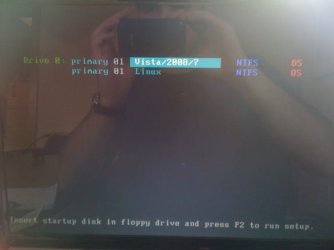
Here is a screenshot of the boot event itself. It might help.

photo.JPG
 

My Computer

Computer Manufacturer/Model Number
Asus K70AC
OS
Windows 7 Home 64 Bit
CPU
AMD Turion x2 Mobile RM-75 2.2ghz
Memory
4gigs
Graphics Card(s)
ATI Radeon HD 4570 512MB
Hard Drives
ST932032 SATA Disk
OK, I don't have enough experience with Grub to give advice about it so I'll let someone else help you from here on in; keep checking back as it shouldn't take too long.


Just so we'll know going forward, you don't want to have to reinstall at all, do you?
 

My Computer

Computer Manufacturer/Model Number
* BFK Customs *
OS
W 7 64-bit Ultimate
CPU
Intel Q9550 Yorkfield
Motherboard
ASUS P5Q Pro
Memory
8GB Dominator 8500C5D
Graphics Card(s)
ATI : XFX 5870
Sound Card
Realtek HD Audio 7-1
Monitor(s) Displays
1x 47" LCD HDMI & 3x 26" LCD HDMI
Screen Resolution
1920x1080P & 1920x1200
Hard Drives
1x 80GB Intel X25-M G2 SSD : 1x 500GB & 1x 640GB WD Caviar Black(s)
PSU
Corsair 620HX
Case
Cooler Master RC-690
Cooling
Tuniq Tower 120, 2x 140mm and 3x 120mm case fans
Keyboard
Microsoft 500
Mouse
Razer Diamondback 3G
Internet Speed
14 Mb/s
Other Info
1x Koutech 3Gb/s SATA HDD Hot Swap Rack
No I'd really rather not, I just dont have that kind of time.

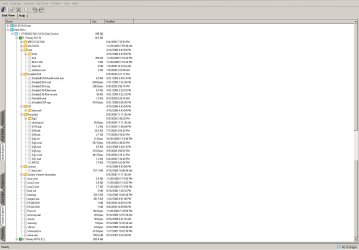
Based on the fact that the backup partition (14gig) is partition 1 on the only HD. And that the image of the boot selection above says both OSs are on "Primary 01". I think that may be where the linux boot files are hiding. I've attached an image of the contents of the 14gig backup partition (partition 1). Can anyone spot things that arent supposed to be there?

Capture1.jpg
 

My Computer

Computer Manufacturer/Model Number
Asus K70AC
OS
Windows 7 Home 64 Bit
CPU
AMD Turion x2 Mobile RM-75 2.2ghz
Memory
4gigs
Graphics Card(s)
ATI Radeon HD 4570 512MB
Hard Drives
ST932032 SATA Disk
I don't see the GRUB or Linux files in the Recovery Partition but am not a Linux expert so maybe you should ask in a Linux forum and provide complete screenshots of both partitions. Win7 partition is the System Active partition from which it is booting.

Try making your factory Recovery Disks, then running the Recovery Partition to see if it will even run (just cue it up). If it won't work at all, then you can wipe that partitiion with free http://www.sevenforums.com/tutorials/93322-partition-wizard-use-bootable-cd.html. Wipe with at least one set of zeroes to overcome GRUB corruption on HD.

You may need to repair the Win7 MBR using the Win7 DVD Repair console or Repair CD to run Startup Repair up to 3 separate times with reboots.
http://www.sevenforums.com/tutorials/2083-system-repair-disc-create.html
http://www.sevenforums.com/tutorials/105541-startup-repair-run-3-separate-times.html

If it turns out the Linux or GRUB files were placed on Win7 partition, then you may be able to resolve this by running a http://www.sevenforums.com/tutorials/3413-repair-install.html?ltr=R from the Win7 desktop, which will reinstall Win7 while keeping all files, programs and settings in place. Hopefully the reinstall will overwrite the Linux files.
 
Last edited:
gregrocker,
Awesome, thank you. But one question.
Are you saying that the boot files for my main 200+gig 7 partition are actaully in that backup partition?

At this point I just want to wipe that 14gig backup partition and see what happens. That wont get me into immediate trouble will it?

Thanks again
 

My Computer

Computer Manufacturer/Model Number
Asus K70AC
OS
Windows 7 Home 64 Bit
CPU
AMD Turion x2 Mobile RM-75 2.2ghz
Memory
4gigs
Graphics Card(s)
ATI Radeon HD 4570 512MB
Hard Drives
ST932032 SATA Disk


We have to go by your screenshot which shows that everything is contained in the Win7 partition: System, Active, Boot, etc. However the screenshot could be in error as it shows Recov partition is 100% free space.

Because the Recovery partition sits on the boot sector, it might be necessary to repair the MBR once you wipe that partition.

Here are the steps I would follow:

Back up a Win7 System image externally.

Boot PW CD, select 1 for screen res, rightclick Recovery Partition, select Wipe, apply zeroes to overcome possible GRUB corruption, OK, Apply.

Next rightclick Win7 partition to Resize and take up the unallocated space to the left by dragging the left grey border over it, OK, Apply.

Now take one last look at Win7 partition to make sure it is still marked Active. If Win7 will not now start, then boot into the Win7 DVD Repair console or Repair CD to run Startup Repair up to 3 separate times to repair the MBR to the Active partition. http://www.sevenforums.com/tutorials/105541-startup-repair-run-3-separate-times.html

If you still get the GRUB menu, then run the http://www.sevenforums.com/tutorials/3413-repair-install.html?ltr=R.
 

My Computer

Computer Manufacturer/Model Number
* BFK Customs *
OS
W 7 64-bit Ultimate
CPU
Intel Q9550 Yorkfield
Motherboard
ASUS P5Q Pro
Memory
8GB Dominator 8500C5D
Graphics Card(s)
ATI : XFX 5870
Sound Card
Realtek HD Audio 7-1
Monitor(s) Displays
1x 47" LCD HDMI & 3x 26" LCD HDMI
Screen Resolution
1920x1080P & 1920x1200
Hard Drives
1x 80GB Intel X25-M G2 SSD : 1x 500GB & 1x 640GB WD Caviar Black(s)
PSU
Corsair 620HX
Case
Cooler Master RC-690
Cooling
Tuniq Tower 120, 2x 140mm and 3x 120mm case fans
Keyboard
Microsoft 500
Mouse
Razer Diamondback 3G
Internet Speed
14 Mb/s
Other Info
1x Koutech 3Gb/s SATA HDD Hot Swap Rack
Thanks fellas, I think your suggestions should solve the problem. I'll take a crack at it after work and let ya'll know what happens!!
 

My Computer

Computer Manufacturer/Model Number
Asus K70AC
OS
Windows 7 Home 64 Bit
CPU
AMD Turion x2 Mobile RM-75 2.2ghz
Memory
4gigs
Graphics Card(s)
ATI Radeon HD 4570 512MB
Hard Drives
ST932032 SATA Disk
Do post back with an update.
 

My Computer

Computer Manufacturer/Model Number
* BFK Customs *
OS
W 7 64-bit Ultimate
CPU
Intel Q9550 Yorkfield
Motherboard
ASUS P5Q Pro
Memory
8GB Dominator 8500C5D
Graphics Card(s)
ATI : XFX 5870
Sound Card
Realtek HD Audio 7-1
Monitor(s) Displays
1x 47" LCD HDMI & 3x 26" LCD HDMI
Screen Resolution
1920x1080P & 1920x1200
Hard Drives
1x 80GB Intel X25-M G2 SSD : 1x 500GB & 1x 640GB WD Caviar Black(s)
PSU
Corsair 620HX
Case
Cooler Master RC-690
Cooling
Tuniq Tower 120, 2x 140mm and 3x 120mm case fans
Keyboard
Microsoft 500
Mouse
Razer Diamondback 3G
Internet Speed
14 Mb/s
Other Info
1x Koutech 3Gb/s SATA HDD Hot Swap Rack
If you don't what to have a Linux choice in the boot loader. Boot with your 7 dvd or build a 7 repair disc and run bootrec.exe /fixmbr from the Command Prompt.
Say Yes (press Y )and restart.
Let us all know.
You can redo the partitions with windows manager.
 

My Computer

Computer Manufacturer/Model Number
self built
OS
windows 7
CPU
AMD
Motherboard
Gagabyte
Memory
8 gigs Kinkston hyper x
Graphics Card(s)
9800 GTX
Hard Drives
80 gig ssd
PSU
corsar
If you don't what to have a Linux choice in the boot loader. Boot with your 7 dvd or build a 7 repair disc and run bootrec.exe /fixmbr from the Command Prompt.
Say Yes (press Y )and restart.
Let us all know.
You can redo the partitions with windows manager.

The bootsect and bootrec commands are automated in Win7 Startup Repair, but this is certainly worth a shot as it might rid you of GRUB on its own.

However be aware that GRUB can play havoc with the Win7 bootloader until it is wiped from the HD, or overwritten with a Repair Install or Reinstall.
 
Back
Top