Solved sub-folders not appearing using folder "icon"...

edwoodt

New member
Local time
9:17 AM
Messages
4
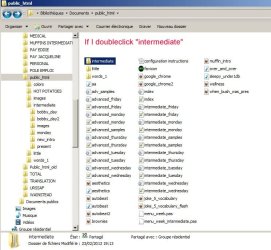
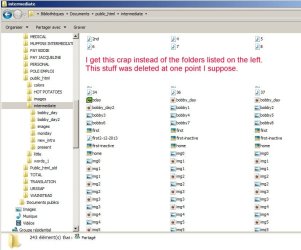
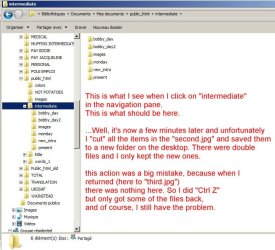
...most of the time, but they will show up everytime i use the navigation pane on the left. see attached image(s)
I explain the problem on the images. But i think the only solution is to delete all of it and rebuild :mad:
 

Attachments

  • first.jpg
    first.jpg
    73.5 KB · Views: 13
  • second.jpg
    second.jpg
    64.9 KB · Views: 13
  • third.jpg
    third.jpg
    76.9 KB · Views: 13

My Computer

Computer Manufacturer/Model Number
asus
OS
Windows 7 Home Premium 64bit
CPU
intel prem B960 @ 2.2ghz
Memory
6g
In "intermediate" are only folder, so no files? The files are actually in jis subfolders?
The strange contents you see are the files form his subfolders?
 

My Computer

Computer type
Laptop
Computer Manufacturer/Model Number
ACER ASPIRE 5742G
OS
Microsoft Windows 7 Home Premium 64-bits 7601 Multiprocessor Free Service Pack 1
CPU
Intel(R) Core(TM) i3 CPU M 370 @ 2.40GHz
Motherboard
Acer Aspire 5742G
Memory
4,00 GB
Graphics Card(s)
ATI Mobility Radeon HD 5400 Series
Sound Card
(1) AMD High Definition Audio Device (2) Realtek High Defi
Screen Resolution
1366 x 768 x 32 bits (4294967296 colors) @ 60 Hz
Hard Drives
WDC WD5000BEVT-22ZAT0
no the folders have files, which have nothing to do with these files. it's like now you see them and now you don't. that's what's weird. the 2 screenshots of "intermediate" folder should be the same. when you click on a folder on your computer, you see the contents of that folder, whether this be subfolders and files or just files. but the contents don't change. here the results change! and as i said originally, sometimes the folder file "icon" will give the correct result, but most of the time it won't. whereas, the nav pane always gives the correct result. and as far i know this is the only folder on the computer where i have this problem.
 

My Computer

Computer Manufacturer/Model Number
asus
OS
Windows 7 Home Premium 64bit
CPU
intel prem B960 @ 2.2ghz
Memory
6g
Hello Edwood, and welcome to Seven Forums.

It looks like this is being viewed in your Documents library location instead of the actual folder location.

While in your Documents library, set the View settings to be "Arrange by -> Folders", "Sort by -> Name", and "Group by -> (None)" with a "Details" view to see if that may help.

http://www.sevenforums.com/tutorials/3952-file-folder-arrangement-group-sort-arrange.html

Hope this helps, :)
Shawn
 

My Computer

Computer type
PC/Desktop
Computer Manufacturer/Model Number
Self built custom
OS
64-bit Windows 11 Pro for Workstations
CPU
Intel i7-8700K OC'd to 5 GHz
Motherboard
ASUS ROG Maximus XI Formula Z390
Memory
64 GB (4x16GB) G.SKILL TridentZ RGB DDR4 3600 MHz
Graphics Card(s)
ASUS ROG-STRIX-GTX1080TI-O11G-GAMING
Sound Card
Integrated
Monitor(s) Displays
2 x Samsung Odyssey G7 27"
Screen Resolution
2560x1440
Hard Drives
1TB Samsung 990 PRO M.2,
4TB Samsung 990 PRO PRO M.2,
TerraMaster F8 SSD Plus NAS
PSU
Seasonic Prime Titanium 850W
Case
Thermaltake Core P3
Cooling
Corsair Hydro H115i
Keyboard
Logitech wireless K800
Mouse
Logitech MX Master 4
Internet Speed
2 Gb/s Download and 100 Mb/s Upload
Antivirus
Malwarebyte Anti-Malware Premium
Browser
Google Chrome
Other Info
Logitech Z625 speaker system,
Logitech BRIO 4K Pro webcam,
HP Color LaserJet Pro MFP M477fdn,
APC SMART-UPS RT 1000 XL - SURT1000XLI,
Galaxy S23 Plus phone
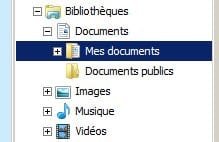
hey thanx, i should have noticed the 2 paths are not the same. effectively, when clicking on intermediate folder, it adds "mes (my) documents" onto the path at the top of the page.
btw, i had already performed the task you suggested...to no avail
my last computer had xp, and with Win 7, I noticed the 4 libraries all have 2 sub folders of "my" and "public". seems to me that the "my" folders are superfluous. and as I stated before, none of files on my puter show "my documents" except for the one which is causing me problems. Could someone out there tell me if their Win 7 is set up with the addition of "my & public" in the libraries? and if so do your paths add "my documents" at the top of the page? It would seem logical to me to eliminate the subfolders "my" if they serve no purpose.

And my brother in law just bought a new computer with win 8, what a nightmare! I didn't like the change from xp to vista or 7, but 8 is ridiculous. It's like designing a new car with door handles to steer, ashtrays to listen to music, and a hood latch to open the trunk.

 

Attachments

  • ScreenHunter_019.jpg
    ScreenHunter_019.jpg
    6.1 KB · Views: 14

My Computer

Computer Manufacturer/Model Number
asus
OS
Windows 7 Home Premium 64bit
CPU
intel prem B960 @ 2.2ghz
Memory
6g
OK so now I've learned interesting things about windows libraries:

1.They are made up of files, and folders from anywhere on your computer, and even external drives.
2.You can create your own.
3.by including the Library pane, which of course I had hidden, you see where the files come from.

Get to Know Windows 7 Libraries Inside and Out


And it seems you can restore individual folders to an earlier state. I haven't tried this yet, but that may change this afternoon.
 

My Computer

Computer Manufacturer/Model Number
asus
OS
Windows 7 Home Premium 64bit
CPU
intel prem B960 @ 2.2ghz
Memory
6g

My Computer

Computer type
PC/Desktop
Computer Manufacturer/Model Number
Self built custom
OS
64-bit Windows 11 Pro for Workstations
CPU
Intel i7-8700K OC'd to 5 GHz
Motherboard
ASUS ROG Maximus XI Formula Z390
Memory
64 GB (4x16GB) G.SKILL TridentZ RGB DDR4 3600 MHz
Graphics Card(s)
ASUS ROG-STRIX-GTX1080TI-O11G-GAMING
Sound Card
Integrated
Monitor(s) Displays
2 x Samsung Odyssey G7 27"
Screen Resolution
2560x1440
Hard Drives
1TB Samsung 990 PRO M.2,
4TB Samsung 990 PRO PRO M.2,
TerraMaster F8 SSD Plus NAS
PSU
Seasonic Prime Titanium 850W
Case
Thermaltake Core P3
Cooling
Corsair Hydro H115i
Keyboard
Logitech wireless K800
Mouse
Logitech MX Master 4
Internet Speed
2 Gb/s Download and 100 Mb/s Upload
Antivirus
Malwarebyte Anti-Malware Premium
Browser
Google Chrome
Other Info
Logitech Z625 speaker system,
Logitech BRIO 4K Pro webcam,
HP Color LaserJet Pro MFP M477fdn,
APC SMART-UPS RT 1000 XL - SURT1000XLI,
Galaxy S23 Plus phone
Back
Top