
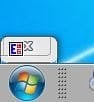
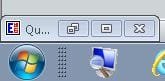
Before delving into trial and error of uninstalling recent Windows Updates I wanted to ask if anyone has encountered a recent appearance change in windows minimized to the desktop (not taskbar). In the past few weeks any sub window of an application that normally minimizes to the desktop with a partial caption visible in addition to restore and close buttons has become just the close button in a frame just big enough to display the close button. The application icon overlaps the button. I cannot drag the frame to make it larger and the only way I can restore the window now is to right-click and choose restore because hovering pretty much makes the event for the entire frame equal to close. The vendor for the primary app of concern has no remedy and no recent app-specific updates have been applied so I'm guessing it's a Windows Update issue. Anyone else have this issue? Dell PC w Win 7 Pro. Reboot, explorer.exe task kill/restart, dwm task kill/restart, and graphics card update have not resolved. Attached images of current appearance (blue background) and expected appearance (gray background).
Attachments
My Computer
At a glance
Windows 7 Professional 64-bit
- Computer type
- PC/Desktop
- Computer Manufacturer/Model Number
- Dell
- OS
- Windows 7 Professional 64-bit