Subwoofer plays when configuring sound, but not when playing music.

ruste84

New member
Member
VIP
Local time
12:30 PM
Messages
73
Location
Indiana
So, here's my issue. I have Creative Inspire 5.1 Digital 5500 speakers. I originally had them connected to my computer via a single line. So, I took the inputs from the speakers' console and directly connected everything to my computer. Now, I have surround sound (Wahoo!). But, the subwoofer only works when I'm configuring through the Control Panel. But, when I play music, I get zero sound from it.

Also, I have to set the properties in Sound to 7.1 to get all 5 speakers working. And the sub still works when running the test in 7.1 too. I've gone through every program that I can find on my computer that relates to sound and have set everything to 5.1 for now. I don't understand why I don't have sound from my subwoofer.
 
Last edited:

My Computer My Computer

At a glance

Windows 7 Home Premium 64bitAMD Phenom II X3 740Mushkin Enhanced SilverlineASUS CuCore Series EAH5770 CuCore/2DI/1GD5
Computer type
PC/Desktop
Computer Manufacturer/Model Number
Self Built
OS
Windows 7 Home Premium 64bit
CPU
AMD Phenom II X3 740
Motherboard
ASUS Crosshair IV Formula
Memory
Mushkin Enhanced Silverline
Graphics Card(s)
ASUS CuCore Series EAH5770 CuCore/2DI/1GD5
Sound Card
SupremeFX X-Fi 8-Ch audio with EAX Advanced HD 4.0 support
Hard Drives
Western Digital WD Black WD6402AAEX 640GB 7200 RPM SATA 6.0Gb/s 3.5"
PSU
Antec EarthWatts EA750 750W
Case
Antec Nine Hundred Two Black Steel ATX Mid Tower
Cooling
Scythe YASYA SCYS-1000 120mm
Mouse
Old as dirt Logitech, but its still kickin'
Antivirus
Microsoft Security Essentials and Malware Bytes
Browser
Google Chrome, IE10, and Firefox
Hi ruste84,

Since the speakers are producing 'surround sound' while configuration, it appears that the 'audio track' that you are trying to listen to is a standard '2 channel audio file'. You may try a digitally encoded 'surround sound audio' (a retail DVD with known 5.1 audio) to check if the 'speakers' work as desired.

If the issue persists, please confirm that the physical connections of the 'speakers' are setup properly. For reference, you may want to have a look at the recommended 'setup' for the motherboard installed 'ASUS Crosshair IV Formula'.
95838530.jpg


Also use the 'X-Fi CMSS-3D Panel' to configure 3D virtual surround effects. (Reference image below)
76161519.jpg


Hope this helps. Do reply with the findings.

 
Last edited:

My Computer My Computer

At a glance

Windows 7 64bit
OS
Windows 7 64bit
Hello Saurabh A,

The first image is how I have it setup now, but I'll check the X-FI 3D panel settings when I get home. Here's a little more background. All of my speakers connected to the subwoofer, then the 3 speaker connections ran from the subwoofer to the speaker "console", which was connected to my computer through another single connection. This worked, but it was only 2 speakers and the sub.

So, what I did was disconnected the single connection to the computer and instead of running the speaker cables from the sub to the console, I ran them from the outputs on my computer to the sub. This relegates the console as merely a power supply for my speakers, but it brings to life all of my speakers when I’m playing music. This is where I noticed the sub not playing, but as you stated, I'm not sure about the audio track itself.

Another issue I noticed after awhile is I don’t have sound when watching YouTube videos. But, I’ll double check after I configure the X-Fi 3D panel.
 

My Computer My Computer

At a glance

Windows 7 Home Premium 64bitAMD Phenom II X3 740Mushkin Enhanced SilverlineASUS CuCore Series EAH5770 CuCore/2DI/1GD5
Computer type
PC/Desktop
Computer Manufacturer/Model Number
Self Built
OS
Windows 7 Home Premium 64bit
CPU
AMD Phenom II X3 740
Motherboard
ASUS Crosshair IV Formula
Memory
Mushkin Enhanced Silverline
Graphics Card(s)
ASUS CuCore Series EAH5770 CuCore/2DI/1GD5
Sound Card
SupremeFX X-Fi 8-Ch audio with EAX Advanced HD 4.0 support
Hard Drives
Western Digital WD Black WD6402AAEX 640GB 7200 RPM SATA 6.0Gb/s 3.5"
PSU
Antec EarthWatts EA750 750W
Case
Antec Nine Hundred Two Black Steel ATX Mid Tower
Cooling
Scythe YASYA SCYS-1000 120mm
Mouse
Old as dirt Logitech, but its still kickin'
Antivirus
Microsoft Security Essentials and Malware Bytes
Browser
Google Chrome, IE10, and Firefox
So, I've checked my connections and set the X-Fi CMSS-3D Panel. Still no sub or sound when watching YouTube.
 

My Computer My Computer

At a glance

Windows 7 Home Premium 64bitAMD Phenom II X3 740Mushkin Enhanced SilverlineASUS CuCore Series EAH5770 CuCore/2DI/1GD5
Computer type
PC/Desktop
Computer Manufacturer/Model Number
Self Built
OS
Windows 7 Home Premium 64bit
CPU
AMD Phenom II X3 740
Motherboard
ASUS Crosshair IV Formula
Memory
Mushkin Enhanced Silverline
Graphics Card(s)
ASUS CuCore Series EAH5770 CuCore/2DI/1GD5
Sound Card
SupremeFX X-Fi 8-Ch audio with EAX Advanced HD 4.0 support
Hard Drives
Western Digital WD Black WD6402AAEX 640GB 7200 RPM SATA 6.0Gb/s 3.5"
PSU
Antec EarthWatts EA750 750W
Case
Antec Nine Hundred Two Black Steel ATX Mid Tower
Cooling
Scythe YASYA SCYS-1000 120mm
Mouse
Old as dirt Logitech, but its still kickin'
Antivirus
Microsoft Security Essentials and Malware Bytes
Browser
Google Chrome, IE10, and Firefox
Something magical has happened in the 5 minutes since my last post. I can now hear YouTube videos. Still no subwoofer though.
 

My Computer My Computer

At a glance

Windows 7 Home Premium 64bitAMD Phenom II X3 740Mushkin Enhanced SilverlineASUS CuCore Series EAH5770 CuCore/2DI/1GD5
Computer type
PC/Desktop
Computer Manufacturer/Model Number
Self Built
OS
Windows 7 Home Premium 64bit
CPU
AMD Phenom II X3 740
Motherboard
ASUS Crosshair IV Formula
Memory
Mushkin Enhanced Silverline
Graphics Card(s)
ASUS CuCore Series EAH5770 CuCore/2DI/1GD5
Sound Card
SupremeFX X-Fi 8-Ch audio with EAX Advanced HD 4.0 support
Hard Drives
Western Digital WD Black WD6402AAEX 640GB 7200 RPM SATA 6.0Gb/s 3.5"
PSU
Antec EarthWatts EA750 750W
Case
Antec Nine Hundred Two Black Steel ATX Mid Tower
Cooling
Scythe YASYA SCYS-1000 120mm
Mouse
Old as dirt Logitech, but its still kickin'
Antivirus
Microsoft Security Essentials and Malware Bytes
Browser
Google Chrome, IE10, and Firefox
Hi ruste84,

Thank you for the response.

Wierd that the 'sub woofer' works while testing stage; and don't work later.
Would recommend you to try removing the current 'audio drivers' and allow 'Windows' to pick the apt drivers by itself.

Do reply with the results.


My Computer My Computer

At a glance

Windows 7 64bit
OS
Windows 7 64bit
Equalizer APO

This solution worked for me using a piece of free software called Equalizer APO https://sourceforge.net/projects/equalizerapo/

I originally started using this software to swap left and right channels, since my new Micca PB42X Powered Bookshelf Speakers had the powered speaker as the right channel and my PC was to the left of my desk and the cables wouldn't reach. I configured it to swap channels, following this guide, Swap left/right audio channels and have not seen it or used it again until today.

I decided to add back in my old powered sub which originally connected to the front speaker connection of the sound card, has a built in crossover, and powers the old Left and Right passive speakers. I wanted to connect the sub to the Center/Sub port to use with my new powered Left and Right speakers. While this seemed to work in the Winblows Sound Control Panel setting up the system as 5.1 and deselecting the center and rear speakers, I could hear the thump of the sub, but when playing 2 channel music through foobar or anything else, no sound from the sub. Equalizer APO to the rescue.

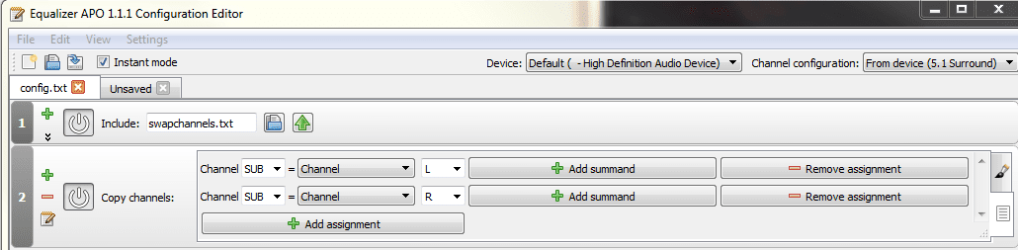
I added one filter "Copy Channels:" and selected Channel SUB = Channel L, added another assignment: Channel SUB = Channel R. Instantly my sub started working. Effectively the filter tells winblows to send the left and right channel to the sub port on the sound card. I tried changing winblows config back to 2 channel setup vs 5.1 and the sub quit working. So it's important to setup winblows for 5.1 and deselect the speakers you don't have keeping the sub channel in order to keep the sub port on the sound card active. ** Note that after applying the filter and testing the sub in Control pannel it made no sound.

The only draw back is if you play a true 5.1 channel sound this filter will probably mess with that. But it as simple as running Editor.exe and clicking the power button for the filter to toggle it off and on. No reboot required.
 

Attachments

  • copy to sub.PNG
    copy to sub.PNG
    17 KB · Views: 2

My Computer My Computer

At a glance

Windows 7 Professional 64 bitAMD Phenom II X4 B504GBNvidia GeForce GTX 660
Computer type
PC/Desktop
Computer Manufacturer/Model Number
custom build
OS
Windows 7 Professional 64 bit
CPU
AMD Phenom II X4 B50
Motherboard
Asus M4A79XTD EVO
Memory
4GB
Graphics Card(s)
Nvidia GeForce GTX 660
Hard Drives
many
Antivirus
none
Browser
Epic
This solution worked for me using a piece of free software called Equalizer APO Equalizer APO download | SourceForge.net

Hi!

First post here and I know it's a bit of a necropost. I just wanted to say thanks for your post! It was the only solution I found for the same problem that I have been having for a long time now. Really appreciate it :) Finally getting some real bass with music playing from my home theater system. It's great :-)
 

My Computer My Computer

At a glance

Windows 10 Pro x64AMD Ryzen 7 2700XG.Skill 16GB DDR4 3200 mHz Trident Z RGBAsus ROG RTX2080 SUPER STRIX
Computer type
PC/Desktop
OS
Windows 10 Pro x64
CPU
AMD Ryzen 7 2700X
Motherboard
Asus ROG STRIX X470-F GAMING
Memory
G.Skill 16GB DDR4 3200 mHz Trident Z RGB
Graphics Card(s)
Asus ROG RTX2080 SUPER STRIX
Hard Drives
Samsung 970 EVO 500GB M.2
Antivirus
Malwarebytes Premium
Browser
Waterfox Classic
This solution worked for me using a piece of free software called Equalizer APO Equalizer APO download | SourceForge.net

I originally started using this software to swap left and right channels, since my new Micca PB42X Powered Bookshelf Speakers had the powered speaker as the right channel and my PC was to the left of my desk and the cables wouldn't reach. I configured it to swap channels, following this guide, Swap left/right audio channels and have not seen it or used it again until today.

I decided to add back in my old powered sub which originally connected to the front speaker connection of the sound card, has a built in crossover, and powers the old Left and Right passive speakers. I wanted to connect the sub to the Center/Sub port to use with my new powered Left and Right speakers. While this seemed to work in the Winblows Sound Control Panel setting up the system as 5.1 and deselecting the center and rear speakers, I could hear the thump of the sub, but when playing 2 channel music through foobar or anything else, no sound from the sub. Equalizer APO to the rescue.

I added one filter "Copy Channels:" and selected Channel SUB = Channel L, added another assignment: Channel SUB = Channel R. Instantly my sub started working. Effectively the filter tells winblows to send the left and right channel to the sub port on the sound card. I tried changing winblows config back to 2 channel setup vs 5.1 and the sub quit working. So it's important to setup winblows for 5.1 and deselect the speakers you don't have keeping the sub channel in order to keep the sub port on the sound card active. ** Note that after applying the filter and testing the sub in Control pannel it made no sound.

The only draw back is if you play a true 5.1 channel sound this filter will probably mess with that. But it as simple as running Editor.exe and clicking the power button for the filter to toggle it off and on. No reboot required.

I registered just for saying thank you for this solution, it worked perfectly for me. I didn't know exactly which channel is subwoofer on, but I went through them in the program and found it. Thanks a lot!
 

My Computer My Computer

At a glance

Windows 10 64 bit
Computer type
PC/Desktop
OS
Windows 10 64 bit
Back
Top