Successfully Installed Korean Language Doesn't Work

fxoz

New member
Local time
3:23 AM
Messages
5
Windows 7 Ultimate x64

I've read dozens of sources on how to (re)install/fix Korean on Win7 and I successfully installed Korean language pack - the installation says it was successful. However under "Korean" there's no "Microsoft IME" as there should be, and picking only the "Korean" sub-option doesn't do anything. I can even set my default language to Korean and I still would type with Latin characters. Korean never shows on the language bar, other languages show. Reboot doesn't help.

Tried uninstalling / installing the Korean language pack; tried different sources for the pack, re-downloading. It never seems to work; it installs and then nothing happens. I'm at a loss how to solve this further, please help!
 

My Computer

OS
Windows 7 Ultimate x64
Hi Fxoz, welcome to the Seven Forums.

After installing Korean language pack you need to change display language as described in this tutorial: http://www.sevenforums.com/tutorials/87317-display-language-change.html

When that's done, set the keyboard layout as told here: http://www.sevenforums.com/tutorials/86239-keyboard-layout-change.html

Then the tricky part, using Korean Ms IME; read this post to fix that: http://www.sevenforums.com/general-discussion/71465-cannot-input-foreign-language.html#post629434

Should work now as you wanted.

Kari
 

My Computer

Computer type
Laptop
Computer Manufacturer/Model Number
HP ENVY 17-1150eg
OS
Windows 10 Pro x64 EN-GB
CPU
1.6 GHz Intel Core i7-720QM Processor
Memory
6 GB
Graphics Card(s)
ATI Mobility Radeon HD 5850 Graphics
Sound Card
Beats sound system with integrated subwoofer
Monitor(s) Displays
17" laptop display, 22" LED and 32" Full HD TV through HDMI
Screen Resolution
1600*900 (1), 1920*1080 (2&3)
Hard Drives
Internal: 2 x 500 GB SATA Hard Disk Drive 7200 rpm
External: 2TB for backups, 3TB USB3 network drive for media
Cooling
As Envy runs a bit warm, I have it on a Cooler Master pad
Keyboard
Logitech diNovo Media Desktop Laser (bluetooth)
Mouse
Logitech Performance Mouse MX
Internet Speed
50/10 Mbps VDSL
Antivirus
Windows Defender 4.3.9431.0
Browser
Maxthon 3.5.2., IE11
Thank you for taking the time to help me!

1. I want to keep my display language as English. I tried setting it to Korean once, for the test, but:
- it still didn't fix the issue with lack of Korean IME
- most menus were in squares (unrecognized symbol); some were in Korean though, surprisingly

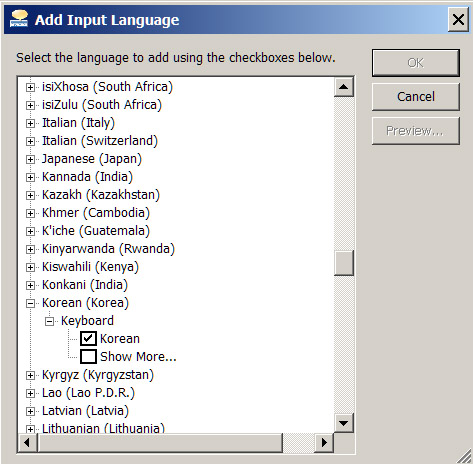
2. I can only add Korean language - not the "Microsoft IME". The "Microsoft IME" option doesn't appear for me in this menu:
61272d1268780391t-cannot-input-foreign-language-korean_ime.png

There is only "Korean" for me there, no sign of "Microsoft IME" even in the "Show More..." sub-section of Korean / Keyboard.
 

My Computer

OS
Windows 7 Ultimate x64
Did you check that on a user account with Korean as display language? It should be there if you have installed Windows 7 correctly with default options, I just checked and I can find it on my personal laptop as well as on two laptops and a desktop at my office. All are showing Korean IME.

Kari
 

My Computer

Computer type
Laptop
Computer Manufacturer/Model Number
HP ENVY 17-1150eg
OS
Windows 10 Pro x64 EN-GB
CPU
1.6 GHz Intel Core i7-720QM Processor
Memory
6 GB
Graphics Card(s)
ATI Mobility Radeon HD 5850 Graphics
Sound Card
Beats sound system with integrated subwoofer
Monitor(s) Displays
17" laptop display, 22" LED and 32" Full HD TV through HDMI
Screen Resolution
1600*900 (1), 1920*1080 (2&3)
Hard Drives
Internal: 2 x 500 GB SATA Hard Disk Drive 7200 rpm
External: 2TB for backups, 3TB USB3 network drive for media
Cooling
As Envy runs a bit warm, I have it on a Cooler Master pad
Keyboard
Logitech diNovo Media Desktop Laser (bluetooth)
Mouse
Logitech Performance Mouse MX
Internet Speed
50/10 Mbps VDSL
Antivirus
Windows Defender 4.3.9431.0
Browser
Maxthon 3.5.2., IE11
Thank you for taking the time to help me!

1. I want to keep my display language as English. I tried setting it to Korean once, for the test, but:
- it still didn't fix the issue with lack of Korean IME
- most menus were in squares (unrecognized symbol); some were in Korean though, surprisingly

2. I can only add Korean language - not the "Microsoft IME". The "Microsoft IME" option doesn't appear for me in this menu:
61272d1268780391t-cannot-input-foreign-language-korean_ime.png

There is only "Korean" for me there, no sign of "Microsoft IME" even in the "Show More..." sub-section of Korean / Keyboard.


Hi there
if you install the Korean Character set (can be done in any version of Windows) the Squares will disappear

I'm trying to learn a bit of Cantonese and I had the same problem with Chinese symbols -- works fine after installing the character set.

Note this is DIFFERENT to the display Language.

To see if it works just logon to a korean / chinese web site --Google for instance and see if the display is OK.

In general you don't need the whole Language interface just to DISPLAY the characters - just add SUPPORT for the language ( I think it's the EAST ASIAN Language support option you need).

That way you can keep English as the display language but still show documents etc in Korean correctly. (If you have a Korean keyboard you can input in Korean too).


Note however FULL Multi languge Interface support is only available in versions of Windows Higher than HOME PREMIUM - you'll need Professional, Ultimate or Enterprise.

DISPLAYING foreign character sets is possible in ANY version of Windows however.

For example

Hangul - Wikipedia, the free encyclopedia

Works fine on my machine

Cheers
jimbo
 

My Computer

Computer type
PC/Desktop
Computer Manufacturer/Model Number
Custom built, several laptops HP/ASUS
OS
Linux CENTOS 7 / various Windows OS'es and servers
CPU
Intel i7 Intel i5
Memory
8GB, 16GB
Graphics Card(s)
On Motherboard
Sound Card
Realtek HD audio
Monitor(s) Displays
Apple Cinema display, Samsung LCD
Screen Resolution
1920 X 1080
Hard Drives
4 X 1TB SATA
Mouse
Toshiba wireless laser
Internet Speed
> 20MB up
Did you check that on a user account with Korean as display language?
Yes, here's the result:
z39iT.jpg


and in English:

Y5avU.jpg


if you install the Korean Character set (can be done in any version of Windows) the Squares will disappear

For example

Hangul - Wikipedia, the free encyclopedia
How do I install Korean Character set?

Here's how the wiki looks - the Hangul shows, but it seems some other (Chinese?) characters don't:
ZP901.jpg


P.S. I have Windows 7 Ultimate x64, I can install Korean language pack through Windows Update successfully. But I still get squares and can't add Korean to my language bar.
 

My Computer

OS
Windows 7 Ultimate x64
Did you remember to change system locale to Korean? If not, do it now. Remember to reboot to activate new locale.

korean_locale.png

Kari
 

My Computer

Computer type
Laptop
Computer Manufacturer/Model Number
HP ENVY 17-1150eg
OS
Windows 10 Pro x64 EN-GB
CPU
1.6 GHz Intel Core i7-720QM Processor
Memory
6 GB
Graphics Card(s)
ATI Mobility Radeon HD 5850 Graphics
Sound Card
Beats sound system with integrated subwoofer
Monitor(s) Displays
17" laptop display, 22" LED and 32" Full HD TV through HDMI
Screen Resolution
1600*900 (1), 1920*1080 (2&3)
Hard Drives
Internal: 2 x 500 GB SATA Hard Disk Drive 7200 rpm
External: 2TB for backups, 3TB USB3 network drive for media
Cooling
As Envy runs a bit warm, I have it on a Cooler Master pad
Keyboard
Logitech diNovo Media Desktop Laser (bluetooth)
Mouse
Logitech Performance Mouse MX
Internet Speed
50/10 Mbps VDSL
Antivirus
Windows Defender 4.3.9431.0
Browser
Maxthon 3.5.2., IE11
Changing Locale only seems to resize the squares :D (I rebooted - it prompts you):

5pebP.jpg
 

My Computer

OS
Windows 7 Ultimate x64
Do I have other option except reinstalling? And if I reinstall (never done it on Windows 7), is there a clever method to do it? Perhaps keep the current installation and only "fix" it, for example?

In general, what should be done during installation of Windows 7 to ensure that it supports Asian languages / fonts?
Thank you for the help so far.

Side question - could there be a tool that provides me with IME for typing in Korean? I've seen such non-Windows native programs for other languages, but can't find one for Korean.

Basically, I only need to be able to type Korean, without having to use this online tool:
http://www.sayjack.com/type/korean/
which I'm using for now, but just to type / switch English<->Korean anywhere in Windows.
 

My Computer

OS
Windows 7 Ultimate x64
Back
Top