Sudden and extreme slowdown Shutdown, boot and hibernate

alternatorone

New member
Local time
4:26 PM
Messages
6
I was regularly using Windows 7 Home Premium 64bit with no problems what so ever from the OS until 2 days back. Since then, suddenly my laptop is taking a lot of time to boot, shutdown or hibernate- surprisingly no noticeable slow down while turning on from hibernation. Entering and exiting sleep mode is also non-issue. Another strange thing was that on hitting shutdown/hibernate my HDD activity indicator would blink a little and then show no activity for a long time. Then it will come back on, blink randomly, sometimes extended and then shuts down/hibernate.

While powering on from shut down, it also takes a longer than usual time.

My usual hibernate takes around 25secs with the HDD activity remaining on through out. Now it's almost 2mins! I always hibernate my laptop- shut downs are only when required.

I had updated windows that day earlier, but I did hibernate/turn on without any issues after that restart once without problems. To be sure i did a sytem restore- no solution. So i ran windows update again.

I am almost certain my hardware is not a problem- I've made no recent changes, including drivers. It is an ASUS K43-SV notebook with following specs-
Intel Core i5 2410M 2.3Ghz
4GB RAM
Nvidia GeForce GT 540M 1GB

I use ESET Smart Security 5.0. I keep only my essential applications like DAP, Audio Manager etc. running in the back ground with minimal startup applications.

While using, the notebook is zippy as it has been since day 1. Only the said problems arose out of the blue.

Could anyone please tell me what's going on or where i need to be looking? Please do help and if any more info is required please do ask.

Thanks in Advance :)
 

My Computer My Computer

At a glance

Windows 7 Home Premium 64bitIntel Core i5-2410M 2.3Ghz4GB DDR3Nvidia GeForce GT 540M
Computer Manufacturer/Model Number
ASUS K43-SV Notebook
OS
Windows 7 Home Premium 64bit
CPU
Intel Core i5-2410M 2.3Ghz
Memory
4GB DDR3
Graphics Card(s)
Nvidia GeForce GT 540M
Have you checked Event viewer?
Type eventvwr in search and go to the windows log>application tab & system tabs.

Look for red errors that say app hang, or app crash, or anything related to the current activity / problem.
When you find them either take a screenshot of them and upload them to us, or note the event ID and source codes and look them up in Google.
 

My Computer My Computer

At a glance

Win 7 Ultimate 64-bit. SP1.Intel i7 -720QM.[1.6GHz Turbo Boost 2.8GHz. 6...8 DDR 3 RAM. 1066MHZATI 1024 MB. DDR3. Radeon HD5650
Computer Manufacturer/Model Number
LAPTOP. HP Pavilion dv7-4010TX .
OS
Win 7 Ultimate 64-bit. SP1.
CPU
Intel i7 -720QM.[1.6GHz Turbo Boost 2.8GHz. 6MB Cache.]
Memory
8 DDR 3 RAM. 1066MHZ
Graphics Card(s)
ATI 1024 MB. DDR3. Radeon HD5650
Monitor(s) Displays
17.3" High Definition Brightview LCD. LED Backlit.
Screen Resolution
1600 x 900.
Hard Drives
640GB
Case
Laptop / notebook.
Mouse
Logitech Anywhere mouse. MX.
Internet Speed
ADSL [ but too slow ]
Have you checked Event viewer?
Type eventvwr in search and go to the windows log>application tab & system tabs.

Look for red errors that say app hang, or app crash, or anything related to the current activity / problem.
When you find them either take a screenshot of them and upload them to us, or note the event ID and source codes and look them up in Google.

Okay thanks for the advice. Here's the info you asked -

1. Applications- filtered for errors, warnings, verbose and critical. Upto 13j Jan is visible.

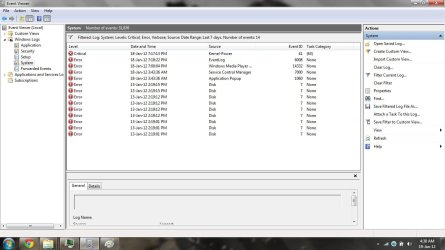
2.System - filtered for errors, verbose and critical to a week.

And oh my problems began from 18th night... i think :/ certainly not before 18 morning. I connected to a wifi network that i had not used for a long time again last night, just thought you should know.

Hope the attached images are visible. Well what do i need to do next?
 

Attachments

  • event app.png
    event app.png
    56.9 KB · Views: 60
  • system event viewer.jpg
    system event viewer.jpg
    96.3 KB · Views: 28

My Computer My Computer

At a glance

Windows 7 Home Premium 64bitIntel Core i5-2410M 2.3Ghz4GB DDR3Nvidia GeForce GT 540M
Computer Manufacturer/Model Number
ASUS K43-SV Notebook
OS
Windows 7 Home Premium 64bit
CPU
Intel Core i5-2410M 2.3Ghz
Memory
4GB DDR3
Graphics Card(s)
Nvidia GeForce GT 540M
* First & foremost make sure you have a back up of anything you consider important on your computer..

http://www.sevenforums.com/tutorials/663-backup-complete-computer-create-image-backup.html

* What changes have you made in the two days that you have had this " glitch"?
Any new programs installed?

* Have you a System Restore point created PRIOR to the current problems that you can return to?

* Please list your Security programs including any Anti Virus program that came preinstalled on your computer.

* Initially I suggest you run Disk Check & then SFC.{ Option 2}

http://www.sevenforums.com/tutorials/433-disk-check.html

http://www.sevenforums.com/tutorials/1538-sfc-scannow-command-system-file-checker.html

*FYI.
http://www.sevenforums.com/tutorials/11728-optimize-windows-7-a.html?filter[2]=Performance%20Maintenance


My Computer My Computer

At a glance

Win 7 Ultimate 64-bit. SP1.Intel i7 -720QM.[1.6GHz Turbo Boost 2.8GHz. 6...8 DDR 3 RAM. 1066MHZATI 1024 MB. DDR3. Radeon HD5650
Computer Manufacturer/Model Number
LAPTOP. HP Pavilion dv7-4010TX .
OS
Win 7 Ultimate 64-bit. SP1.
CPU
Intel i7 -720QM.[1.6GHz Turbo Boost 2.8GHz. 6MB Cache.]
Memory
8 DDR 3 RAM. 1066MHZ
Graphics Card(s)
ATI 1024 MB. DDR3. Radeon HD5650
Monitor(s) Displays
17.3" High Definition Brightview LCD. LED Backlit.
Screen Resolution
1600 x 900.
Hard Drives
640GB
Case
Laptop / notebook.
Mouse
Logitech Anywhere mouse. MX.
Internet Speed
ADSL [ but too slow ]
* First & foremost make sure you have a back up of anything you consider important on your computer..

http://www.sevenforums.com/tutorials/663-backup-complete-computer-create-image-backup.html

* What changes have you made in the two days that you have had this " glitch"?
Any new programs installed?

* Have you a System Restore point created PRIOR to the current problems that you can return to?

* Please list your Security programs including any Anti Virus program that came preinstalled on your computer.

* Initially I suggest you run Disk Check & then SFC.{ Option 2}

http://www.sevenforums.com/tutorials/433-disk-check.html

http://www.sevenforums.com/tutorials/1538-sfc-scannow-command-system-file-checker.html

*FYI.
http://www.sevenforums.com/tutorials/11728-optimize-windows-7-a.html?filter[2]=Performance%20Maintenance


*Okay back ups are fine. But I would like to use reformat/deleting files as a last resort.

*Changes i made in my computer? Hardly anything. After along time i connected to a wifi network again, that i used previously. And I installed an application, an mp3 bitrate changer but the last system restore i mentioned removed it and i havent reinstalled it- problems continue. I can't remeber doing anything else.

*System restore to a point made by windows update before any issues was what i did. Issues continue. Strangely when i did that restore i had many restore points but now that i check only 3, since the update, are left. does a system restore remove earlier points?

*I've got ESET Smart Security 5 as my Security software ( fully updated ). There is also Windows Defender, Firewall which I've disabled from action center. My laptop shipped with Trial Trend MIcro something Antivirus but i used Revo Uninstaller and removed it to oblivion (or so i believe) the same day i got my machine. Had no problems.

*I ran Disk check, without fixing bad sectors or attemting recovery, just the scanning- no errors reported. Screenshot attached.

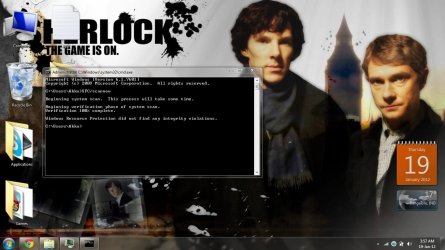
SFC also ran- no errors screenshot attached.

*Nice read. But I've customized everything already to my liking months back and it's all been going fine.

OKAY Thanks so much for taking time. What next??
 

Attachments

  • check disc.jpg
    check disc.jpg
    49.2 KB · Views: 21
  • scan now.jpg
    scan now.jpg
    110.8 KB · Views: 13

My Computer My Computer

At a glance

Windows 7 Home Premium 64bitIntel Core i5-2410M 2.3Ghz4GB DDR3Nvidia GeForce GT 540M
Computer Manufacturer/Model Number
ASUS K43-SV Notebook
OS
Windows 7 Home Premium 64bit
CPU
Intel Core i5-2410M 2.3Ghz
Memory
4GB DDR3
Graphics Card(s)
Nvidia GeForce GT 540M
*I ran Disk check, without fixing bad sectors or attemting recovery, just the scanning- no errors reported.

OKAY
Thanks so much for taking time. What next??

Run the second part of Disk Check "Scan for & attempt recovery of bad sectors."
 

My Computer My Computer

At a glance

Win 7 Ultimate 64-bit. SP1.Intel i7 -720QM.[1.6GHz Turbo Boost 2.8GHz. 6...8 DDR 3 RAM. 1066MHZATI 1024 MB. DDR3. Radeon HD5650
Computer Manufacturer/Model Number
LAPTOP. HP Pavilion dv7-4010TX .
OS
Win 7 Ultimate 64-bit. SP1.
CPU
Intel i7 -720QM.[1.6GHz Turbo Boost 2.8GHz. 6MB Cache.]
Memory
8 DDR 3 RAM. 1066MHZ
Graphics Card(s)
ATI 1024 MB. DDR3. Radeon HD5650
Monitor(s) Displays
17.3" High Definition Brightview LCD. LED Backlit.
Screen Resolution
1600 x 900.
Hard Drives
640GB
Case
Laptop / notebook.
Mouse
Logitech Anywhere mouse. MX.
Internet Speed
ADSL [ but too slow ]

My Computer My Computer

At a glance

Windows 10 Pro x64Intel Core i7 4790K @ 4.5GHz32GB DDR3Nvidia GeForce GTX970
Computer type
PC/Desktop
Computer Manufacturer/Model Number
Custom
OS
Windows 10 Pro x64
CPU
Intel Core i7 4790K @ 4.5GHz
Motherboard
Asus Maximus Hero VII
Memory
32GB DDR3
Graphics Card(s)
Nvidia GeForce GTX970
Sound Card
Realtek HD Audio
Screen Resolution
1920x1200
Hard Drives
1x Samsung 250GB SSD
4x WD RE 2TB (RAIDZ)
PSU
Corsair AX760i
Case
Fractal Design Define R4
Cooling
Noctua NH-D15
  • Like
Reactions: JMH
*I ran Disk check, without fixing bad sectors or attemting recovery, just the scanning- no errors reported.

OKAY
Thanks so much for taking time. What next??

Run the second part of Disk Check "Scan for & attempt recovery of bad sectors."

Yup did the same and finished it. Well the system rebooted and didnt show any report or anything. I had done the same a month back and it came through clean.
 

My Computer My Computer

At a glance

Windows 7 Home Premium 64bitIntel Core i5-2410M 2.3Ghz4GB DDR3Nvidia GeForce GT 540M
Computer Manufacturer/Model Number
ASUS K43-SV Notebook
OS
Windows 7 Home Premium 64bit
CPU
Intel Core i5-2410M 2.3Ghz
Memory
4GB DDR3
Graphics Card(s)
Nvidia GeForce GT 540M

My Computer My Computer

At a glance

Windows 7 Home Premium 64bitIntel Core i5-2410M 2.3Ghz4GB DDR3Nvidia GeForce GT 540M
Computer Manufacturer/Model Number
ASUS K43-SV Notebook
OS
Windows 7 Home Premium 64bit
CPU
Intel Core i5-2410M 2.3Ghz
Memory
4GB DDR3
Graphics Card(s)
Nvidia GeForce GT 540M
Thanks to both of you for looking into my case. You should know that sometimes the laptop shutsdown/hibernates/boots without issue. And when i hibernate and the delay is there i can hear the same sound as you would when you do a double click ona folder in my computer long after the harddrive activity light turns off- and then soon the indicator starts blinking and laptop hibernates. I can't seee what's on the screen though because the display turns off the moment i hit hibernate (usual).
 

My Computer My Computer

At a glance

Windows 7 Home Premium 64bitIntel Core i5-2410M 2.3Ghz4GB DDR3Nvidia GeForce GT 540M
Computer Manufacturer/Model Number
ASUS K43-SV Notebook
OS
Windows 7 Home Premium 64bit
CPU
Intel Core i5-2410M 2.3Ghz
Memory
4GB DDR3
Graphics Card(s)
Nvidia GeForce GT 540M
Back
Top