
Solved Sudden loss of functionality with youtube

450125

New member
Power User
Local time
5:50 PM
Messages
281
My daughter's Windows 7 laptop just started having problems this week with youtube.

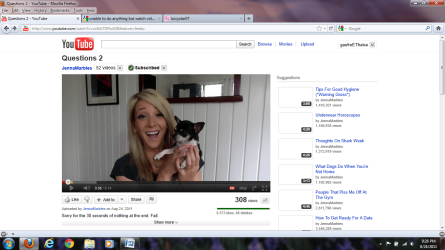
The "spotlight" or "suggestion" videos on the right of the page show up just as white rectangles (that is there is no image in the thumbnail).

Even when logged in, she can't comment on a video or "like" it.

Here are several things that it's not:
  • javascript (it's enabled)
  • flash player (I uninstalled, then reinstalled it from scratch)
  • cookies (I cleared the youtube cookies)
  • cache (I cleared the browser cache)
  • browser (same problem happens in latest version of firefox, ie, chrome)
  • user account (problem replicates whether from my admin account, or her non-admin account, on the machine)

So what's going on? I can usually troubleshoot this stuff great, and this one has me stumped.
 

My Computer My Computer

At a glance

Win7 Professional 64Intel I3 550 (3.2 GHz)8 gig (2x4gig Kingston DDR 3)Intel HD graphics (from CPU)
Computer Manufacturer/Model Number
custom-built
OS
Win7 Professional 64
CPU
Intel I3 550 (3.2 GHz)
Motherboard
GIGABYTE|GA-H55M-S2V H55 1156 R
Memory
8 gig (2x4gig Kingston DDR 3)
Graphics Card(s)
Intel HD graphics (from CPU)
Sound Card
Realtek ALC888B
Monitor(s) Displays
ViewSonic
Screen Resolution
1280x1024
Hard Drives
Seagate ST3250310CS (250 gig C drive for OS and programs)
WDC WD5000AAKS-00V1A0 (2x500 gig drives, software mirrored in a RAID 1 configuration, as a D drive, for documents and data)
Internet Speed
download > 15 mbps; upload approx 1 mbps
Maybe the following will be helpful.

If you right-click on the "spotlight" or "suggestion" thumbnails in youtube when it's working, you can view the associated image, which will be something like http://i1.ytimg.com/vi/lJnEp7u19oM/default.jpg (standard thumbnail for a video).

However, if you do the same thing on my daughter's computer, the associated image is always http://s.ytimg.com/yt/img/pixel-vfl3z5WfW.gif regardless of the video. This is a 1x1 pixel blank or white image.

If I google that http://s.ytimg.com/yt/img/pixel-vfl3z5WfW.gif url, I get suggestions of malware at work. Troubling. Remember, this behavior is the same on the computer regardless of the account used to log into Windows, or regardless of the browser being used, or whether logged into youtube or not.

Another concerning thing - see http://www.sevenforums.com/backup-restore/182232-how-could-system-restore-get-turned-off.html - is that the computer's system restore got mysteriously turned off, which is another SOP for malware.

However, I did scans of the computer in safe mode using AVG and SuperAntiSpyware, and it came up clean, and the daily AVG scans come up clean as well.
 

My Computer My Computer

At a glance

Win7 Professional 64Intel I3 550 (3.2 GHz)8 gig (2x4gig Kingston DDR 3)Intel HD graphics (from CPU)
Computer Manufacturer/Model Number
custom-built
OS
Win7 Professional 64
CPU
Intel I3 550 (3.2 GHz)
Motherboard
GIGABYTE|GA-H55M-S2V H55 1156 R
Memory
8 gig (2x4gig Kingston DDR 3)
Graphics Card(s)
Intel HD graphics (from CPU)
Sound Card
Realtek ALC888B
Monitor(s) Displays
ViewSonic
Screen Resolution
1280x1024
Hard Drives
Seagate ST3250310CS (250 gig C drive for OS and programs)
WDC WD5000AAKS-00V1A0 (2x500 gig drives, software mirrored in a RAID 1 configuration, as a D drive, for documents and data)
Internet Speed
download > 15 mbps; upload approx 1 mbps
Download and scan with MalwareBytes, it is just the best antimalware program available today. You might also want to start a new thread in the Security forum, and mention this thread, as it seems likely this is now a security issue. A Guy
 

My Computer My Computer

At a glance

Windows 10 Home x64INTEL Core i5-750 Quad-Core 3.37GHzHyperX Fury Black Series 8GB (2 x 4GB) 1866MhzEVGA GeForce GTX 750 Superclocked 1GB 128-Bit...
Computer type
PC/Desktop
OS
Windows 10 Home x64
CPU
INTEL Core i5-750 Quad-Core 3.37GHz
Motherboard
ASUS P7P55D
Memory
HyperX Fury Black Series 8GB (2 x 4GB) 1866Mhz
Graphics Card(s)
EVGA GeForce GTX 750 Superclocked 1GB 128-Bit GDDR5
Monitor(s) Displays
LG 32MA68HY 32" IPS
Screen Resolution
1920 x 1080
Hard Drives
Samsung 840 Evo 120GB, SEAGATE 500GB Barracuda® 7200.12, SATA 3 Gb/s, 7200 RPM, 16MB cache
PSU
ANTEC TruePower New TP-550, 80 PLUS, 550W
Case
ANTEC Three Hundred Illusion
Cooling
COOLER MASTER Hyper 212 Plus, 4 x 120mm 1 x 140mm Noctua's
Internet Speed
85 + Mbps
Antivirus
Avast
Browser
Vivaldi

My Computer My Computer

At a glance

Windows 7 Ultimate x64 SP1Core2 Duo4 GBGM965 on-board
Computer Manufacturer/Model Number
Toshiba L355D
OS
Windows 7 Ultimate x64 SP1
CPU
Core2 Duo
Motherboard
Intel
Memory
4 GB
Graphics Card(s)
GM965 on-board
Sound Card
RealTek on-board
Monitor(s) Displays
19"+17"(laptop)
Screen Resolution
1440x900 (x 2)
Hard Drives
500GB Ext. 200GB Internal
PSU
N/A
Case
N/A
Cooling
N/A
Download and scan with MalwareBytes, it is just the best antimalware program available today. You might also want to start a new thread in the Security forum, and mention this thread, as it seems likely this is now a security issue. A Guy
I guess this is good news, but in this context, bad news would be better news.

First, the SFC /SCANNOW command found nothing wrong. A good thing, but again, something is wrong.

I have also run Stinger and MalwareBytes, both the latest copies, MalwareBytes totally updates, and both were run in safe mode. Neither found anything wrong.

Right now I'm running SuperAntiSpyware (again in safe mode) and it's only found some "not to worry" tracking cookies. I had run this program twice yesterday in normal Windows 7 mode and it found nothing (except the cookies).

YouTube not loading/fucntioning properly; Incld.: the buttons: username dropdown, "Add Too", Search & majority of thumbnails | Firefox Support Forum | Firefox Help describes EXACTLY what is going on with the laptop, and googling the symptoms brings up others who've had this problem (including, curiously, on a Mac). One of the suggestions on there, involving adding a line to the hosts file, I've read about. I tried that, but it did not work.

Remember, this is a computer-wide problem for me - not something that goes away with a different browser.

Other than the system restore being turned off (and there's a slight chance I'd done it or the computer came that way), I have seen no other sign of malware on the computer. Yet anyway.

Keep the ideas coming, please.
 

My Computer My Computer

At a glance

Win7 Professional 64Intel I3 550 (3.2 GHz)8 gig (2x4gig Kingston DDR 3)Intel HD graphics (from CPU)
Computer Manufacturer/Model Number
custom-built
OS
Win7 Professional 64
CPU
Intel I3 550 (3.2 GHz)
Motherboard
GIGABYTE|GA-H55M-S2V H55 1156 R
Memory
8 gig (2x4gig Kingston DDR 3)
Graphics Card(s)
Intel HD graphics (from CPU)
Sound Card
Realtek ALC888B
Monitor(s) Displays
ViewSonic
Screen Resolution
1280x1024
Hard Drives
Seagate ST3250310CS (250 gig C drive for OS and programs)
WDC WD5000AAKS-00V1A0 (2x500 gig drives, software mirrored in a RAID 1 configuration, as a D drive, for documents and data)
Internet Speed
download > 15 mbps; upload approx 1 mbps

have to do some work right now, but as a test, try youtube through a web proxy, and see if the problem remains. A long shot, but easy to try. A Guy
 

My Computer My Computer

At a glance

Windows 10 Home x64INTEL Core i5-750 Quad-Core 3.37GHzHyperX Fury Black Series 8GB (2 x 4GB) 1866MhzEVGA GeForce GTX 750 Superclocked 1GB 128-Bit...
Computer type
PC/Desktop
OS
Windows 10 Home x64
CPU
INTEL Core i5-750 Quad-Core 3.37GHz
Motherboard
ASUS P7P55D
Memory
HyperX Fury Black Series 8GB (2 x 4GB) 1866Mhz
Graphics Card(s)
EVGA GeForce GTX 750 Superclocked 1GB 128-Bit GDDR5
Monitor(s) Displays
LG 32MA68HY 32" IPS
Screen Resolution
1920 x 1080
Hard Drives
Samsung 840 Evo 120GB, SEAGATE 500GB Barracuda® 7200.12, SATA 3 Gb/s, 7200 RPM, 16MB cache
PSU
ANTEC TruePower New TP-550, 80 PLUS, 550W
Case
ANTEC Three Hundred Illusion
Cooling
COOLER MASTER Hyper 212 Plus, 4 x 120mm 1 x 140mm Noctua's
Internet Speed
85 + Mbps
Antivirus
Avast
Browser
Vivaldi
have to do some work right now, but as a test, try youtube through a web proxy, and see if the problem remains. A long shot, but easy to try. A Guy
No go, no improvement.

I tried turning off the Windows firewall too, and that changed nothing (as far as how youtube appears).
 

My Computer My Computer

At a glance

Win7 Professional 64Intel I3 550 (3.2 GHz)8 gig (2x4gig Kingston DDR 3)Intel HD graphics (from CPU)
Computer Manufacturer/Model Number
custom-built
OS
Win7 Professional 64
CPU
Intel I3 550 (3.2 GHz)
Motherboard
GIGABYTE|GA-H55M-S2V H55 1156 R
Memory
8 gig (2x4gig Kingston DDR 3)
Graphics Card(s)
Intel HD graphics (from CPU)
Sound Card
Realtek ALC888B
Monitor(s) Displays
ViewSonic
Screen Resolution
1280x1024
Hard Drives
Seagate ST3250310CS (250 gig C drive for OS and programs)
WDC WD5000AAKS-00V1A0 (2x500 gig drives, software mirrored in a RAID 1 configuration, as a D drive, for documents and data)
Internet Speed
download > 15 mbps; upload approx 1 mbps
The most disconcerting thing, to me, is that your system restore was turned off. Have you checked that, lately?

A Guy was correct in wanting you to scan, but, sometimes, a simple error in system files can make one think they have malware and you already presented you've done various scans.

What version of Flash? Have you uninstalled Flash and then re-installed it? It's not clear (at least, to me) so far (maybe I missed something). Also, what version of Flash?

Toss out anything about the HOSTS file unless you're attempting to subvert registration of licensed software or something - really, otherwise the Win7 HOSTS file is fine ... unless you have malware that altered it.

Also, what version of FX? I have yet to see that posted. The only thing I really know at this point is you are running Win 7 Professional x64.
 
Last edited:

My Computer My Computer

At a glance

Windows 7 Ultimate x64 SP1Core2 Duo4 GBGM965 on-board
Computer Manufacturer/Model Number
Toshiba L355D
OS
Windows 7 Ultimate x64 SP1
CPU
Core2 Duo
Motherboard
Intel
Memory
4 GB
Graphics Card(s)
GM965 on-board
Sound Card
RealTek on-board
Monitor(s) Displays
19"+17"(laptop)
Screen Resolution
1440x900 (x 2)
Hard Drives
500GB Ext. 200GB Internal
PSU
N/A
Case
N/A
Cooling
N/A
The most disconcerting thing, to me, is that your system restore was turned off. Have you checked that, lately?

A Guy was correct in wanting you to scan, but, sometimes, a simple error in system files can make one think they have malware and you already presented you've done various scans.

What version of Flash? Have you uninstalled Flash and then re-installed it? It's not clear (at least, to me) so far (maybe I missed something). Also, what version of Flash?

Toss out anything about the HOSTS file unless you're attempting to subvert registration of licensed software or something - really, otherwise the Win7 HOSTS file is fine ... unless you have malware that altered it.

Also, what version of FX? I have yet to see that posted. The only thing I really know at this point is you are running Win 7 Professional x64.

Let me individually tackle these good points:

  • System restore remains turned on. My educated guess is that it defacto shut off because the originally-configured computer (by the way, see bullet down below - this is not the "system specs" computer shown in my profile; it is an ASUS laptop) had a C and D partition; I used a freeware partition program to first merge everything into one big C, then I changed my mind and used the same tool to create a C/D partition. When I was configuring the system restore I saw that it referred to a "C (old)" (or something like that) and a "C" and would not let me set up a true system restore for "C" until I deleted from the system restore list the "C (old)" - I think my repartitionings confused system restore into turning itself off. And as I said, 48 hours later, system restore is turned on.
  • I have several times uninstalled Flash, then reinstalled. This has been done mostly from the Adobe site, but in one instance I used the Flash player from Download Flash Player 10 (Complete Standalone Installer) - free download of the full Flash Player installer which is something that several posters in other forums had said solved youtube problems. In each case, Flash worked (for example, if I go to Adobe or other Flash test pages, I can see the animation). In each case, videos played correctly on youtube. But in each case, the original problem - described upthread, but it's that the "suggested" videos on the right side show up with blank (white) thumbnails, and the javascripted functions like "liking" or "commenting" on a video don't work.
  • Flash player is the most current one - 10.3.183.5
  • I did revert the hosts file to what I'd previously had. I actually use the hosts file to block access to Facebook and other timewasters from my daughter's laptop. But I took out the single line I'd added in an attempt to solve this problem.
  • What is FX and how do I find the version?
  • Finally, I don't know how to get around this, but I ask Windows 7 questions on this forum in support of three computers - my own Windows 7 desktop (pretty stable, but that's the one spec-ed out in my displayed system specifications), a Sony VAIO laptop that one child uses, and the newest one, the ASUS laptop having this problem. Other than creating three user profiles, one for each computer, and logging in as a different user for each one, what am I to do to accurately reflect the specs of the machine I'm discussing?
Thanks!
 

My Computer My Computer

At a glance

Win7 Professional 64Intel I3 550 (3.2 GHz)8 gig (2x4gig Kingston DDR 3)Intel HD graphics (from CPU)
Computer Manufacturer/Model Number
custom-built
OS
Win7 Professional 64
CPU
Intel I3 550 (3.2 GHz)
Motherboard
GIGABYTE|GA-H55M-S2V H55 1156 R
Memory
8 gig (2x4gig Kingston DDR 3)
Graphics Card(s)
Intel HD graphics (from CPU)
Sound Card
Realtek ALC888B
Monitor(s) Displays
ViewSonic
Screen Resolution
1280x1024
Hard Drives
Seagate ST3250310CS (250 gig C drive for OS and programs)
WDC WD5000AAKS-00V1A0 (2x500 gig drives, software mirrored in a RAID 1 configuration, as a D drive, for documents and data)
Internet Speed
download > 15 mbps; upload approx 1 mbps
A couple quick but not-insignificant updates.

First, a friend of mine, pretty adept in IT matters, suggested to me that this could all be a Youtube problem, caused by, he speculated, "load balancing." I didn't ask for a detailed explanation, nor would I have understood it.

I didn't give much credence to this because I'd never seen this issue on anyone's computer but my daughter's ASUS.

But then, tonight, lo and behold, the functionality had come back from the dead!

home page.png

Those thumbnails down the right side of the youtube home page were all white for the past week. And now they've returned!

Not a complete victory though:

Jenna Marbles.png

As you can see, while watching a video, they're whited out again.

However, some functionality that she'd lost - like commenting on videos or liking them - has returned.

I realize that if this "youtube's fault" or "load balancing" thing is true, that's not a Windows 7 issue, so I'm going off topic. But any comments on the new developments?

If you're new to the thread, reading from the top should clarify more.

Thanks!
 

My Computer My Computer

At a glance

Win7 Professional 64Intel I3 550 (3.2 GHz)8 gig (2x4gig Kingston DDR 3)Intel HD graphics (from CPU)
Computer Manufacturer/Model Number
custom-built
OS
Win7 Professional 64
CPU
Intel I3 550 (3.2 GHz)
Motherboard
GIGABYTE|GA-H55M-S2V H55 1156 R
Memory
8 gig (2x4gig Kingston DDR 3)
Graphics Card(s)
Intel HD graphics (from CPU)
Sound Card
Realtek ALC888B
Monitor(s) Displays
ViewSonic
Screen Resolution
1280x1024
Hard Drives
Seagate ST3250310CS (250 gig C drive for OS and programs)
WDC WD5000AAKS-00V1A0 (2x500 gig drives, software mirrored in a RAID 1 configuration, as a D drive, for documents and data)
Internet Speed
download > 15 mbps; upload approx 1 mbps
In reading this, I had thought you were refering to the browser thumbnail that the mouse curser hovers over when IE (or other browser) is minimized. Your IT friend is right when he says that it is likely a Youtube problem, but I would also say it could be a slow(ish) internet speed. If not, I would bet it has something to do with addons in the browser(s). You can have a program on the computer that separately installs its own addon into each browser, As far fetched as it might sound. Or you could just have installed a problem causing addon in each browser. All possibillities, but minimal at that. is internet speed slow? let me know if full functionality comes back to the youtube site. If full functionality doesn't come back, list what browser you are using (do make sure it is current), make sure the addons in the browser are current, and then list what those addons are.

PS I think this is funny considering this entire thread is about youtube. How is FB a timewaster and Youtube is fine?
I actually use the hosts file to block access to Facebook and other timewasters from my daughter's laptop.

Also, I've had your problem happen to me before. It didn't last.
 

My Computer My Computer

At a glance

Microsoft Windows 8.1 Pro 64-bitIntel(R) Core(TM) i3-4130 CPU @ 3.40GHz8.00 GBNone
Computer type
PC/Desktop
Computer Manufacturer/Model Number
Custom Asus Build
OS
Microsoft Windows 8.1 Pro 64-bit
CPU
Intel(R) Core(TM) i3-4130 CPU @ 3.40GHz
Motherboard
B85M-E
Memory
8.00 GB
Graphics Card(s)
None
Sound Card
Realtek High Definition Audio
Monitor(s) Displays
Asus 23.6" Monitor
Screen Resolution
1920 x 1080 x 32 bits (4294967296 colors) @ 60 Hz
Hard Drives
INTEL SSDSC2BW180A4
Samsung SSD 840 PRO Series
PSU
Seasonic S12II-380Bronze
Case
Lian Li
Cooling
Fan, Passive
Keyboard
Logitech K120
Mouse
Microsoft Touch Mouse
Internet Speed
4ms Ping, 19.0 Mbps Download, 19.0 Mbps Upload
Antivirus
Eset Endpoint
Browser
Internet Explorer, Chrome
Dusty,

I think it's moving toward being okay. My IT friend mentioned someone he knows who is having similar problems with youtube.

Running down some of the things you mention:

  • Slowish internet speed - doubtful. I've not tested lately but my desktop, hardwired to the internet, gets 10-15 mbps, often higher, from Road Runner. I've been working with my daughter's laptop (802.11g wireless) a lot lately and I have minimal patience for slowness and it "felt right" in browsing.
  • Browser add-ons - not it either. Problem would repeat consistently across FF, IE, Chrome (most current versions of each, per upthread). In FF I disabled Adblock and that didn't help.
Actually after I posted this yesterday, my daughter said that she had more - possibly even full - youtube functionality.

Lastly, regarding FB and Youtube - and thanks for asking - I have FB blocked as a combination punishment/incentive for her to get her not bad but not good grades up. Yes, people can put in a lot of wasted time watching videos, but the interactive and "me-centric" nature of Facebook can make that a bigger timewaste.
 

My Computer My Computer

At a glance

Win7 Professional 64Intel I3 550 (3.2 GHz)8 gig (2x4gig Kingston DDR 3)Intel HD graphics (from CPU)
Computer Manufacturer/Model Number
custom-built
OS
Win7 Professional 64
CPU
Intel I3 550 (3.2 GHz)
Motherboard
GIGABYTE|GA-H55M-S2V H55 1156 R
Memory
8 gig (2x4gig Kingston DDR 3)
Graphics Card(s)
Intel HD graphics (from CPU)
Sound Card
Realtek ALC888B
Monitor(s) Displays
ViewSonic
Screen Resolution
1280x1024
Hard Drives
Seagate ST3250310CS (250 gig C drive for OS and programs)
WDC WD5000AAKS-00V1A0 (2x500 gig drives, software mirrored in a RAID 1 configuration, as a D drive, for documents and data)
Internet Speed
download > 15 mbps; upload approx 1 mbps
Following on with the Off topic discussion ....

have a look at windows 7's own parental controls for controlling the youngsters access to the computers, You would have to run them as standard users and keep an admin account for yourself but this is good practice anyway.

Also to control the access to Facebook, Youtube, and also the far worse sites that the young should be protected from have a look at OpenDNS which with the use of a free account can block access to all sorts of undesirable sites as well as time-wasters.

OpenDNS | DNS-Based Web Security
 

My Computers My Computers

  • At a glance

    Windows 11 Pro x64 [Latest Release and Releas...Ryzen 9 5950X, 3.8 - 5.2 MHz64GB [2 x 32GB] DDR4 3200MHz4GB NVIDIA GEFORCE GTX 1650 Ti
    Computer type
    PC/Desktop
    Computer Manufacturer/Model Number
    ChillBlast - Custom to my design
    OS
    Windows 11 Pro x64 [Latest Release and Release Preview]
    CPU
    Ryzen 9 5950X, 3.8 - 5.2 MHz
    Motherboard
    Asus Prime X570-Pro
    Memory
    64GB [2 x 32GB] DDR4 3200MHz
    Graphics Card(s)
    4GB NVIDIA GEFORCE GTX 1650 Ti
    Sound Card
    On-board SPDIF to 5.1 System + HDMI [5.1 system]
    Monitor(s) Displays
    32" UHD 32 Bit HDR Monitor + 43" UHD 4K 32Bit HDR TV
    Screen Resolution
    2 x 3840 x 2160 @60Hz
    Hard Drives
    1TB M2 SSD OS, 500GB Fast Access SSD, 2 x 8TB Data + Various Externals from 1TB to 4TB, 10TB NAS
    PSU
    NZXT C750 80 PLUS Gold 750W Modular PSU
    Case
    Workstation Case [Matt Black]
    Cooling
    NZXT Kraken X63 280mm CPU Cooler +2x Quiet Case fans
    Keyboard
    Logitech Wireless MX Keys & K400 + others
    Mouse
    Logitech Wireless MX Master 3S
    Internet Speed
    920 MB Down 50 MB Up
    Antivirus
    BitDefender Total Security Pro
    Browser
    Chrome (always run latest Non-Beta)
    Other Info
    Also run ...
    Laptop - Quad 8GB - Windows 10 Pro x64
    Nexus 7 Android tablet x2
    Samsung 10.2" tablet
    Blackview TAB 8 4G Android Tablet c/w Keyboard
    Wacom Intuos Pro Medium Pen Pad
    Wacom Intuos Pro Small Pen Pad
    Wacom Expresskeys Remote
    Loopdeck+ Graphics Controller
    Shuttle Pro v2 Control
  • At a glance

    Windows 11 Pro x64 Latest RPIntel I7 10750H 5.0GHz32GB [2x16GB] DDR4 2933 MHznVidia GTX1650Ti 4 GB GDDR6
    Computer type
    Laptop
    System Manufacturer/Model Number
    Dell XPS 17 10750H
    OS
    Windows 11 Pro x64 Latest RP
    CPU
    Intel I7 10750H 5.0GHz
    Motherboard
    Dell XPS
    Memory
    32GB [2x16GB] DDR4 2933 MHz
    Graphics Card(s)
    nVidia GTX1650Ti 4 GB GDDR6
    Sound Card
    Stock [Realtek] 4 Speaker
    Monitor(s) Displays
    17" IPS UHD+ Infinity Edge Touchscreen
    Screen Resolution
    3840 x 2400
    Hard Drives
    2TB M2 NVMe, 4TB External + various 500GB & 1TB External NVMe (also have access to spinner HDD from
    PSU
    Stock
    Case
    Stock XPS Aluminium & Carbon Fibre
    Cooling
    Stock - Active Fan Control
    Keyboard
    Backlit + Various Logitech
    Mouse
    Stock Track Pad + Logitech MX Trackball
    Internet Speed
    72 MB Down 18MB Up
    Browser
    Chrome
    Other Info
    Also run ...
    Laptop - Quad 8GB - Windows 10 Pro x64
    Nexus 7 Android tablet x2
    10.2" tablet
    Sony Z3 Android Smartphone
    Wacom Intuos Pro Medium Pen Pad
    Wacom Intuos Pro Small Pen Pad
    Wacom Expresskeys Remote
    Loopdeck+ Graphics Controller
    Shuttle Pro v2 Control Pad
    10TB NAS
Because the youtube functionality returned last week and has been constant since, I guess this is solved. Problem must have been with youtube, as nothing I did on the laptop in question changed anything. Weird.
 

My Computer My Computer

At a glance

Win7 Professional 64Intel I3 550 (3.2 GHz)8 gig (2x4gig Kingston DDR 3)Intel HD graphics (from CPU)
Computer Manufacturer/Model Number
custom-built
OS
Win7 Professional 64
CPU
Intel I3 550 (3.2 GHz)
Motherboard
GIGABYTE|GA-H55M-S2V H55 1156 R
Memory
8 gig (2x4gig Kingston DDR 3)
Graphics Card(s)
Intel HD graphics (from CPU)
Sound Card
Realtek ALC888B
Monitor(s) Displays
ViewSonic
Screen Resolution
1280x1024
Hard Drives
Seagate ST3250310CS (250 gig C drive for OS and programs)
WDC WD5000AAKS-00V1A0 (2x500 gig drives, software mirrored in a RAID 1 configuration, as a D drive, for documents and data)
Internet Speed
download > 15 mbps; upload approx 1 mbps
As long as it stays fixed ;)

A Guy
 

My Computer My Computer

At a glance

Windows 10 Home x64INTEL Core i5-750 Quad-Core 3.37GHzHyperX Fury Black Series 8GB (2 x 4GB) 1866MhzEVGA GeForce GTX 750 Superclocked 1GB 128-Bit...
Computer type
PC/Desktop
OS
Windows 10 Home x64
CPU
INTEL Core i5-750 Quad-Core 3.37GHz
Motherboard
ASUS P7P55D
Memory
HyperX Fury Black Series 8GB (2 x 4GB) 1866Mhz
Graphics Card(s)
EVGA GeForce GTX 750 Superclocked 1GB 128-Bit GDDR5
Monitor(s) Displays
LG 32MA68HY 32" IPS
Screen Resolution
1920 x 1080
Hard Drives
Samsung 840 Evo 120GB, SEAGATE 500GB Barracuda® 7200.12, SATA 3 Gb/s, 7200 RPM, 16MB cache
PSU
ANTEC TruePower New TP-550, 80 PLUS, 550W
Case
ANTEC Three Hundred Illusion
Cooling
COOLER MASTER Hyper 212 Plus, 4 x 120mm 1 x 140mm Noctua's
Internet Speed
85 + Mbps
Antivirus
Avast
Browser
Vivaldi
Back
Top