
Hi all,
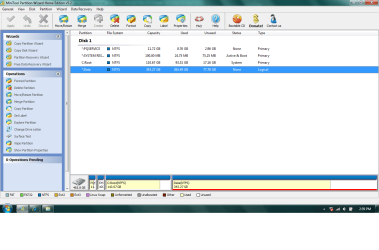
Today, when I restarted my computer, the D: partition disappeared. I had just finished installing a new game, and played it for a bit. Other than that, I wasn't doing anything strange. I have a single drive with a logical partition (C for programs, D for data). I downloaded the free Partition Wizard and ran the Partition Recovery Wizard. It found the missing drive along with the data and it apparently did it's thing. Now, in Partition Wizard, I can see all the drives, but I still don't have access to them in explorer. As I'm showing in the uploaded pic, there is a star beside 3 drives - 2 of them are supposed to be invisible (system reserved and restore disk). Does this mean that my lost partition is just invisible now?
Also, I am able to see the correct drive in the Disk Management window (after the issue, it said "unallocated" but now it has the correct drive letter and free space numbers).
What gives?
Thanks all,
buggaby
Today, when I restarted my computer, the D: partition disappeared. I had just finished installing a new game, and played it for a bit. Other than that, I wasn't doing anything strange. I have a single drive with a logical partition (C for programs, D for data). I downloaded the free Partition Wizard and ran the Partition Recovery Wizard. It found the missing drive along with the data and it apparently did it's thing. Now, in Partition Wizard, I can see all the drives, but I still don't have access to them in explorer. As I'm showing in the uploaded pic, there is a star beside 3 drives - 2 of them are supposed to be invisible (system reserved and restore disk). Does this mean that my lost partition is just invisible now?
Also, I am able to see the correct drive in the Disk Management window (after the issue, it said "unallocated" but now it has the correct drive letter and free space numbers).
What gives?
Thanks all,
buggaby
Attachments
My Computer
- OS
- Windows 7

