Hi Kaide,
wish i had an old comp like yours.
Thats a really good rig.
Thanks it's an oldy but a goody, served me well

MS has been throwing out some unusual driver updates lately, which have been causing graphics/Bios issues, have you downloaded any in the last couple of weeks?
Yes, I've had a couple of issues with updates actually.
First was after an auto update around a month ago, when I started my PC it couldn't find the operating system and I had to manually go into the Bios and choose the boot device every time to get windows to load, but then it mysteriously fixed it's self and started working normally again.
Second issue is this current problem, I believe there was an auto update just before my current issue.
I just noticed that when I restart the PC the Asus bios logo doesn't always show now like it normally does and I couldn't even enter the Bios with the usual hot key, it seemed to skip right past that and load windows.
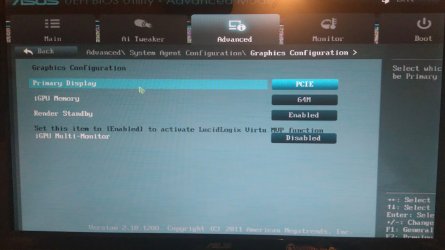
Just at the point when normally the Bios logo would show up on the screen after start up, there is a message, but it flashes up for a split second so I can't read it, I think it mentioned "PCI" but can't be 100%, it then proceeds to load windows with the current problem.
This morning I've had to restart many times to try and get into the Bios to check the information you requested such as the Bios version, eventually it showed up and let me in with the hotkey, but 9 times our of 10 it doesn't show and just skips to loading windows.
ASUS Exclusive Features :
- MemOK!
- AI Suite II
- Ai Charger+
- Anti-Surge
- ASUS UEFI BIOS EZ Mode featuring friendly graphics user interface <<<<---------------
- USB 3.0 Boost
- Disk Unlocker
The above is from the spec sheet for that motherboard,
can you check the settings for arrowed please.
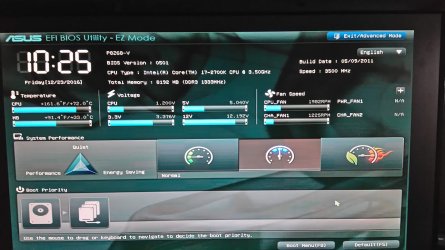
I've included a screen shot of the Bios (once it finally let me in) and it seems to be "EFI Bios EZ mode"
It seems to be an older version than you mention below though.
Did you run the other 2 identifiers/updaters from the links i provided earlier.
And we do need to update the USB3
The Asustek link doesn't seem to work, it just took me to their website.
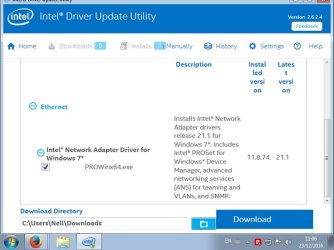
But I did download and run Intel Driver Update Utility you linked and it just showed this one driver as seen in the screen shot here, I didn't download it or anything as I was sure if I should so wanted to check with you first?
Bios version should be 1110 and graphic 353.62
As seen in the image above the Bios version is 0501, not sure about the "graphic" as I couldn't see that information there.
And lastly the latest utilites,
Description GPUTweak2 Ver1.4.0.8
1. Improve: Multiple card stability.
2. Fix: Monitor error when FanConnect enabled. File Size 34.85 MBytesupdate
according to Asus
note if you have fanconnect enabled change to dissabled, any change
If the problem still persists after the above, enter Bios hit the Reset to default option.
Roy
I don't have anything like GPUTweak installed or any other utilities, as I installed a new hard drive some time ago and reinstalled windows 7. The name does ring a bell though so I think I may have had it on the original hard drive at some stage.
I also noticed some other strange behavior such as not being able to sleep the PC (the option is greyed out) and similar small things like this.
Should I try and enter the Bios again and reset to default as you mentioned above?
I have the feeling that those recent windows updates totally screwed something, as mentioned in my first post windows start up repair and the command prompt sfc /scannow both separately said some windows files were corrupt but couldn't fix them.
Sorry for all my questions and speculation but unfortunately my knowledge is very limited on these matters.
Thanks again for your help!
Kaide
My Computer
At a glance
Windows 7 Home premium 64-bitIntel Core i7 2700K CPU @ 3.50GHz8GB - DDR3Nvidia Geforce GTX 660 Ti
- Computer type
- PC/Desktop
- Computer Manufacturer/Model Number
- Custom build
- OS
- Windows 7 Home premium 64-bit
- CPU
- Intel Core i7 2700K CPU @ 3.50GHz
- Motherboard
- ASUS P8Z68-V
- Memory
- 8GB - DDR3
- Graphics Card(s)
- Nvidia Geforce GTX 660 Ti
- Monitor(s) Displays
- Asus 24inch Wide Screen
- Hard Drives
- Toshiba DT01ACA200 (200 GB)
WDC WD10EARX-00N0YB0 (100 GB)
- Cooling
- Fan cooled
- Keyboard
- Cosair Raptor K30
- Mouse
- Razer Naga
- Internet Speed
- 50MB DSL
- Antivirus
- Bitdefender Total Secruity 2016
- Browser
- Firefox (latest version)



 Is it possible to replace the Bios if that's the issue?