Stupid question but...do you have enough space on your mail server?
Hey' Tex not stupid at all, but well thought out and relevant to the problem.
You don't say which OP system you are using, but I have found a few things which you can try, they are written with XP in mind though.
Red
X Appears instead of an image
Its possible that “Show Pictures” has been turned off in Internet Explorer
Solution....
Open Internet Explorer > Tools > Internet Options > click Advanced Tab > scroll down to Multimedia > put a tick in Show Pictures box > Ok.
Check firewall privacy settings, > Untick > Disable Web Bugs > Ok.
Internet Explorer settings maybe to high, preventing accessing the web page hosting the image.
Solution....
Reset Internet Explorer default settings > Tools > Internet Options > click Security Tab > Set to Default > Ok.
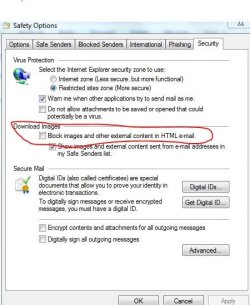
After installing XP the “ Block images an other content in HTML is automatically turned on in Outlook Express
Solution....
Open Outlook Express > Tools > Security Tab > untick “ Block images & other external content in HTML > Ok.
Internet Explorer 8 can also stop images being shown
Red X
Close IE > Open regedit > Find and click on HKEY_CLASS_ROOT\ scroll down and click on > .gif
Double click the > content type value, in the R/h pane of the reg editor
In the > Edit String, box type > image.gif > in the value data box > Ok
Next
Locate and click on > reg key > HKEY_CLASS_ROOT\ > scroll down and click on > .jpg
Double click on the Content Type Value, in the R/h pane of the regeditor
In the > Edit String dialog box type > image\jpg in the value data box
> Ok > Close regedit.
Hope one of them works for you